
关于 Browser Scraper
Browser Scraper 是面向网页提取与交互的 Node.js 库、命令行工具和 MCP 服务,使用 Chrome 处理网页内容。它可生成 Markdown、元数据和无障碍快照,并读取封闭 Shadow DOM 及跨域 iframe,适用于 AI Agent 和网页抓取工作流。
主要功能
- 01通过 DevTools Protocol 操作 Chrome
- 02提取 Markdown、元数据和链接
- 03生成带可点击引用的无障碍快照
- 04遍历封闭 Shadow DOM 和 iframe
- 05按需从 HTTP 升级到浏览器抓取
- 06提供 MCP 服务、命令行和可选 LLM 提取
适用场景
- 01为 Agent 工作流提取网页内容
- 02浏览并操作有反爬保护的页面
- 03通过快照检查页面交互元素
- 04从变化的网站收集结构化字段
MCP 相关
它以 MCP 服务运行,将浏览器导航、快照、点击、输入、Markdown 与元数据提取、抓取、截图和 Turnstile 交互作为工具提供。域名允许列表和秘密占位符可用于配置安全限制。
配置
本地服务的配置在各客户端中通用,复制后粘贴到客户端的 MCP 配置文件即可。
工具
13收录的工具列表 · 更新于 今天
| 参数 | 类型 | 必填 | 说明 |
|---|---|---|---|
| url | string | 是 | 绝对 http(s) URL。 |
| waitUntil | enum | 否 | load | domcontentloaded | networkidle0 | networkidle2 |
详细介绍
Browser Scraper:用于网页抓取和 AI Agent 的隐身浏览器
适用于 Node.js 的未检测到的 Chrome,可读取和操作会拦截机器人的网站。可将其用作库、命令行工具或 MCP 服务,供 Claude、Cursor 和 Codex 使用。它能将任何页面(包括封闭的 Shadow DOM 和跨源 iframe)转换为整洁的 Markdown、结构化数据或可供 Agent 浏览并点击的无障碍快照。本地运行、免费、采用 MIT 许可证,LLM 由你自备。




CreepJS:无头检测率 0%,隐身检测率 0% · bot.sannysoft.com:0 项失败 · 不泄露 Runtime.enable (这意味着什么,以及它的局限)
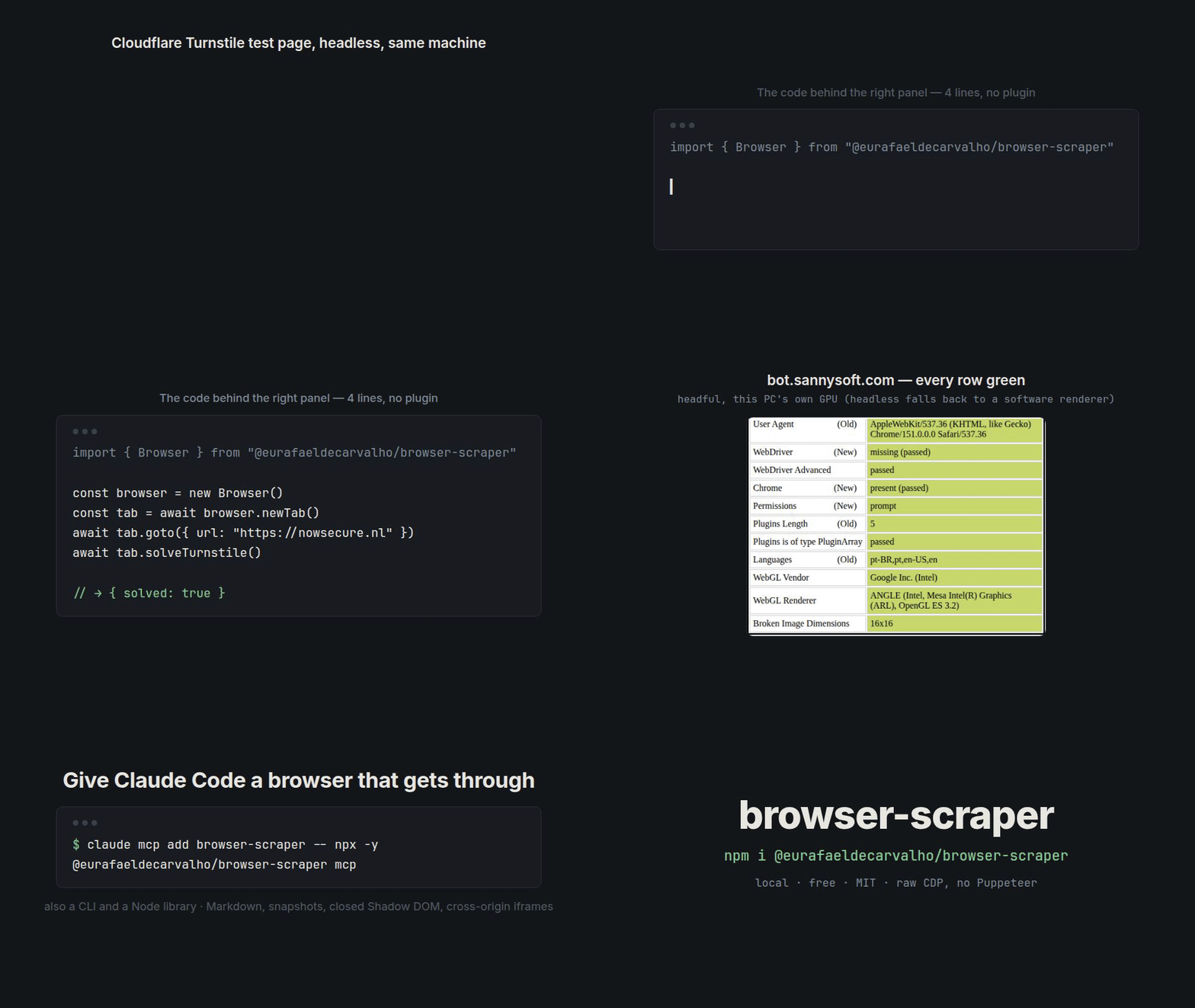
在一台桌面 PC 上录制:无头模式下的 nowsecure.nl Turnstile 测试页面,以及使用该 PC 自带 GPU 的有头模式下的 bot.sannysoft.com。
import { scrape } from "@eurafaeldecarvalho/browser-scraper";

const page = await scrape({ url: "https://example.com", formats: ["markdown", "metadata"] });
console.log(page.tier);     // "http" | "browser" | "stealth": the cheapest tier that worked
console.log(page.markdown); // clean, LLM-ready Markdown of the main content
# Give Claude Code a browser that gets through Cloudflare:
claude mcp add browser-scraper -- npx -y @eurafaeldecarvalho/browser-scraper mcp
@eurafaeldecarvalho/browser-scraper 通过原始 DevTools 协议(CDP)驱动真正的 Chrome。它从不发送 Runtime.enable(这是最常见的自动化指纹信号之一),并且浏览器各层的身份信息都保持一致。在此隐身核心之上,它还提供 AI 工作负载所需的功能:Markdown 和元数据提取、带可点击引用的无障碍快照、仅在必要时才从普通 HTTP 升级到隐身浏览器的一站式 scrape()、MCP 服务,以及可使用任意模型的可选 LLM 提取。
为什么选择它:
- 能访问无头浏览器会被拦截的网站。 不会泄露
Runtime.enable,浏览器身份(UA、Client Hints、WebGL、时区、地区设置)保持一致,鼠标和键盘输入也很像真人。solveTurnstile()可处理 Cloudflare 的复选框。 - 看得全面。
find()、markdown()和snapshot()都能深入封闭的 Shadow DOM 和跨源 iframe,而 Playwright 的快照和 Readability 风格的提取器无法做到这一点。 - 专为 Agent 打造。 MCP 服务和命令行工具无需额外安装即可使用。凭据通过
{{SECRET}}占位符输入,模型永远看不到它们;允许列表可限制域名;页面内容则会被标记为不可信数据。 - 只在确有价值时使用 LLM。
generateExtractor()让模型只需一次生成 CSS 选择器。之后,run()无需 LLM 即可提取数据;网站发生变化时,runOrHeal()会重新生成选择器。 - 本地运行,免费使用。 无云服务、无 API 密钥、无按页面计费。你自备代理;模型则可选用(通过 Vercel AI SDK 使用 OpenAI、Anthropic、Google、Ollama……,或使用你自己的函数)。
通过实际使用的机器人检测器
配置得当时——使用干净的住宅/移动 IP,以及用于渲染哈希检测目标的真实 GPU(EC2 g4dn/g5)——browser-scraper 能够通过拦截无头自动化的指纹检测套件和反机器人防护:
| 检测/指纹套件 | 反机器人/WAF 厂商 | ||
|---|---|---|---|
bot.sannysoft.com — 0 项失败 | ✅ | Cloudflare(Turnstile) | ✅ |
| CreepJS — 无头检测率 0%,隐身检测率 0% | ✅ | DataDome | ✅ |
bot-detector.rebrowser.net | ✅ | Kasada | ✅ |
| Pixelscan | ✅ | Akamai Bot Manager | ✅ |
| IPHey | ✅ | PerimeterX / HUMAN | ✅ |
| Browserscan | ✅ | Imperva(Incapsula) | ✅ |
| Incolumitas | ✅ | Shape / F5 | ✅ |
| Fingerprint.com | ✅ | AWS WAF Bot Control | ✅ |
✅ 表示指纹和行为层检测通过——并不保证一定能绕过防护。 面对高强度检测目标时,IP 信誉是上限:数据中心 ASN 会在 JavaScript 运行前就被拦截,因此请通过住宅/移动代理转发流量(参见生产环境技术栈)。
browser-scraper不是 CAPTCHA 求解器——对于 reCAPTCHA v2 / hCaptcha / Arkose(FunCaptcha)图像挑战,请搭配求解服务使用。它确实能通过类人输入和预热的配置文件,让 reCAPTCHA v3 评分保持较高。
数据是在桌面版 Chrome 上采集的。在没有 GPU 的 Lambda 上运行 chrome-headless-shell(
@sparticuz/chromium)时,各项检测表现会有所不同——请使用实际生产环境中的二进制文件重新运行这些套件,并以此作为判断依据(参见云端部署)。
这是一款精密工具,不是万能的绕过方案——它坦诚说明了自身的局限(参见注意事项与限制),而正是这份坦诚,让上面的绿色勾选真正有意义。
目录
- 安装
- 快速开始
- 面向 AI Agent 和大模型 — Markdown、
scrape()、快照 + refs、MCP 服务、命令行、大模型提取 - 功能一览 — 它能做什么,示例说明
- API 参考
- 深入了解隐身功能
- 云主机上的 WebGL / GPU
- 生产环境技术栈 — 代理 · VPS · 求解器
- 云端部署(Lambda 与 EC2-GPU)
- 身份与持久化
- WebRTC
- 替代方案 — 对比分析
- 常见问题
- 注意事项与限制
- 支持
安装
npm install @eurafaeldecarvalho/browser-scraper
或:
pnpm add @eurafaeldecarvalho/browser-scraper
需要 Node.js ≥ 20 和本地 Chrome/Chromium(会自动查找,也可以通过 chromePath 指定)。对于 AWS Lambda,还需安装可选的 @sparticuz/chromium——参见云端部署。配置文件历史记录的种子数据使用 Node 内置的 node:sqlite(Node ≥ 22.5)或可选的 better-sqlite3;若两者均不可用,则会直接跳过。LLM 辅助工具需要 ai(使用 Zod 架构时还需要 zod),且仅在导入 /ai 时才需要。
快速开始
import { Browser } from "@eurafaeldecarvalho/browser-scraper";

const browser = new Browser();

try {
  const tab = await browser.newTab();
  await tab.goto({ url: "https://example.com" });

  const heading = await tab.find({ selector: "h1" });
  console.log(await heading?.text());

  await tab.screenshot({ path: "example.png" });
} finally {
  await browser.close();
}
这就是这个库的整体结构:一个 Browser、一个 Tab,以及供你查找并操作的 Element。下面的内容都是围绕这三者展开的详细说明。
面向 AI Agent 和大模型
清晰的 Markdown、元数据和链接
const tab = await browser.newTab();
await tab.goto({ url: "https://shop.example.com/product/42" });

const { markdown, title, links, wordCount } = await tab.markdown({
  mainContent: true,      // drop nav/header/footer/cookie banners (default)
  query: "price shipping", // optional: keep only the relevant blocks (BM25), saves tokens
  links: "inline",        // "inline" | "reference" | "none"
  includeIframes: false,  // true = also inline iframe documents, cross-origin included
});

const meta = await tab.metadata();
// { title, description, canonical, lang, image, openGraph, twitter, jsonLd: [...] }
// JSON-LD often already has the price, rating and availability: check it before you prompt.
markdown() 通过 CDP(DOM.getDocument 和 pierce)读取 Chrome 自身的 DOM 树。不会向页面注入任何脚本,并且会按阅读顺序包含封闭 Shadow Root 的内容,同时组合插槽。对于已有的 HTML,htmlToMarkdown(html) 和 extractMetadata(html) 无需浏览器即可完成相同的工作。
scrape():一次调用,优先尝试成本最低的层级
import { Browser, scrape } from "@eurafaeldecarvalho/browser-scraper";

const browser = new Browser({ proxy: process.env.PROXY });   // reuse it across URLs
const page = await scrape({
  url,
  browser,
  formats: ["markdown", "metadata", "links", "html", "screenshot"],
  strategy: "auto",   // http → browser → stealth (or pin one tier)
  http: { curlImpersonate: "curl_chrome131" }, // optional: real Chrome TLS for the http tier
});

page.tier;      // which tier produced the result
page.attempts;  // [{ tier: "http", ok: false, reason: "needs JavaScript (empty app shell)", ms: 4 }, …]
| 层级 | 执行内容 | 使用场景 |
|---|---|---|
http | 一次请求,不启动 Chrome(Node fetch,或用于获取真实 Chrome JA3/JA4 的 curl-impersonate) | 静态页面、API |
browser | 隐身 Chrome | HTTP 响应被拦截(403/429/503)、遇到验证页面或返回空的 JS 应用外壳 |
stealth | 同一标签页,加上行为预热和交互式 Turnstile 验证 | 浏览器仍然看到验证页面 |
验证页面绝不会作为内容返回:如果所有层级都被拦截,scrape() 会抛出包含 attempts 的 ScrapeError。
无障碍快照 + refs(Agent 点击的内容)
console.log(await tab.snapshot());
// - main
//   - heading "Sign in" [level=1]
//   - textbox "Email" [ref=e3]
//   - button "Continue" [ref=e4]
//   - Iframe [ref=e5]
//     - checkbox "Verify you are human" [ref=e6]   ← cross-origin iframe, still addressable

await (await tab.byRef({ ref: "e3" })).type({ text: "[email protected]" }); // human-like typing
await (await tab.byRef({ ref: "e4" })).click();                          // human-like mouse
无障碍树在组合树上计算,因此封闭 Shadow Root 内的元素也会显示,并且可以点击。传入 { interactive: true } 可仅获取可点击或可输入元素的扁平列表。
MCP 服务(Claude Code、Claude Desktop、Cursor、Codex……)
claude mcp add browser-scraper -- npx -y @eurafaeldecarvalho/browser-scraper mcp
也可以在任何 MCP 客户端配置中使用(claude_desktop_config.json、.cursor/mcp.json……):
{
  "mcpServers": {
    "browser-scraper": {
      "command": "npx",
      "args": ["-y", "@eurafaeldecarvalho/browser-scraper", "mcp", "--allowed-domains", "example.com", "--secrets", "/path/to/.env"]
    }
  }
}
工具:
| 工具 | 功能 |
|---|---|
navigate | 打开 URL 并返回快照 |
snapshot | 带有 [ref=…] 的无障碍大纲 |
click | 通过 ref 点击元素,使用类人的输入方式 |
type | 通过 ref 在元素中输入文字,使用类人的输入方式 |
press_key | 按下按键 |
go_back | 返回上一页 |
wait | 等待指定秒数 |
markdown | 将主要内容转换为 Markdown,可选传入 query |
metadata | JSON-LD、OpenGraph 及其他页面元数据 |
screenshot | PNG 截图 |
solve_turnstile | 完成交互式 Cloudflare Turnstile 验证 |
scrape | 一次性抓取,并逐级提升尝试层级 |
check_egress | 检查出口 IP 是否看起来属于数据中心 |
防护措施:
--allowed-domains a.com,b.com会拒绝导航到其他域名,并回滚离开列表范围的点击操作。--secrets .env允许 Agent 输入{{PASSWORD}}。值会在按键时填入,并从所有返回内容中删除。- 页面内容始终会包含在
<untrusted-page-content>标记中。 - 其他选项:
--proxy、--headful、--user-data-dir、--geo BR。该服务也已列入 MCP Registry(server.json),并附带一项 Agent 技能。
命令行工具
npx @eurafaeldecarvalho/browser-scraper markdown https://example.com --query pricing
npx @eurafaeldecarvalho/browser-scraper scrape https://example.com --format markdown,metadata,links --json
npx @eurafaeldecarvalho/browser-scraper snapshot https://example.com --interactive
npx @eurafaeldecarvalho/browser-scraper scrape https://example.com --format screenshot --out page.png
大模型提取:@eurafaeldecarvalho/browser-scraper/ai
可选功能,只有在使用时才会安装额外依赖。传入 Vercel AI SDK 模型(npm i ai @ai-sdk/anthropic,也可使用 openai、google、ollama……)或自定义的 llm 函数。Schema 可以使用 Zod 或普通 JSON Schema。
import { extract, generateExtractor, Extractor, observe } from "@eurafaeldecarvalho/browser-scraper/ai";
import { anthropic } from "@ai-sdk/anthropic";
import { z } from "zod";

const Product = z.object({ name: z.string(), price: z.number(), inStock: z.boolean() });
const model = anthropic("claude-sonnet-5-5");

// 1) One LLM call per page.
const product = await extract({ tab, schema: Product, model });
//    input: "markdown" (default) | "snapshot" | "image" (screenshot for vision models)

// 2) The LLM writes the selectors ONCE; later pages cost nothing.
const extractor = await generateExtractor({ tab, schema: z.array(Product), model });
await extractor.save({ path: ".extractors/products.json" });

const again = await Extractor.load({ path: ".extractors/products.json", schema: z.array(Product), model });
const items = await again.run({ tab });                 // no LLM, runs in the isolated world
const { data, via } = await again.runOrHeal({ tab });   // via: "selectors" | "healed" | "llm"

// 3) Find elements by description: the model only LOCATES, your code acts.
const [login] = await observe({ tab, model, instruction: "the login button" });
await login.element.click();
手边没有模型?llm: async ({ system, prompt, schema, images }) => myClient.json(...) 可与任何提供商或本地模型配合使用。
功能导览
逐一介绍最常用的功能,并展示实际用法。
用一次 find() 穿透封闭 Shadow DOM 和跨源 iframe
find() 是核心功能。传入 CSS 选择器后,它会在主文档、封闭 Shadow Root 和跨源 iframe 中搜索,一次调用即可完成。即使验证码复选框位于沙盒 iframe 内部、深达三层,查找方式也与查找顶层 <h1> 完全相同。
// Reaches into a closed shadow root or an OOP iframe automatically — no frame plumbing.
const checkbox = await tab.find({ selector: "input[type='checkbox']", timeout: 12_000 });
await checkbox?.click();

// Returns null on timeout instead of throwing, so branching is clean:
const banner = await tab.find({ selector: ".cookie-banner", timeout: 2_000 });
if (banner) await banner.click();

// Collect every match (also shadow- and iframe-aware):
const links = await tab.findAll({ selector: "a[href]" });
for (const link of links) console.log(await link.getAttribute({ name: "href" }));
等待合适的时机
真实页面会分阶段稳定下来。请选择与你实际等待条件相匹配的条件,而不是只靠休眠碰运气。
// Navigation: same waitUntil names as Puppeteer — load | domcontentloaded | networkidle0 | networkidle2
await tab.goto({ url, waitUntil: "networkidle2", timeout: 45_000 });

// "ready" = visible AND interactable (enabled, not busy) — the state you want before a click
await tab.waitForSelector({ selector: "button.submit", state: "ready", timeout: 30_000 });

// Arbitrary page predicate
await tab.waitForFunction({ expression: "window.__APP_READY__ === true" });

// Whichever finishes first — selector appears, or a JS condition flips. Great for success-or-challenge forks:
const winner = await tab.race({
  selectors: [".dashboard"],
  jsFunctions: ["document.querySelector('.captcha') !== null"],
  timeout: 30_000,
});
像真人一样交互
输入默认经过拟人化处理——真实感来自库,而不是你的代码。
const button = await tab.find({ selector: "#cta" });
await button?.click();                      // cursor travels a Bézier path, then presses

await button?.click({ humanLike: false });  // opt out: dispatch straight at the target
await button?.click({ removeNewTabTarget: true }); // strip target/formtarget, stay in this tab

const input = await tab.find({ selector: "#email" });
await input?.type({ text: "[email protected]", clear: true });          // real keyDown/keyUp, lognormal timing
await input?.type({ text: "[email protected]", typos: true });          // opt-in: occasional misstroke + self-correct

// Ambient motion before a token-minting call (grecaptcha.execute) or a high-value submit:
// a "blind execute" with no prior pointer/scroll activity tanks a reCAPTCHA v3 score.
await tab.ambientActivity({ durationMs: 1200 });
type() 和 pressKey() 会发送真实的 keyDown/keyUp 事件,并使用正确的 keyCode/code,因此命名按键(Enter、Tab、ArrowDown)的行为就像真实键盘,而不是通过合成的 value 进行设置。
控制网络
降低按流量计费的代理带宽、屏蔽跟踪器或重写请求——同时避免以看起来像机器人的方式破坏页面。
// Block by HOST so the page still renders normally — safest near anti-bot/captcha,
// which read a broken page as a bot signal:
await tab.blockResources({ urls: ["*googletagmanager.com*", "*adobeaemcloud.com*"] });

// Or block whole resource types to trim bandwidth:
await tab.blockResources({ types: ["Image", "Media", "Font"] });

// Full control: inspect each request and decide:
tab.network.intercept({
  pattern: "*",
  resourceType: "Image",
  handler: async (req) => {
    if (req.url.includes("keep-me")) return req.continueRequest();
    await req.abort({ reason: "BlockedByClient" });
  },
});

// Just watch the traffic go by:
tab.network.on({ event: "response", handler: (res) => console.log(res.status, res.url) });
请求拦截可与经过身份验证的代理无缝配合:单个 Fetch.enable 同时携带代理凭据和拦截规则,二者互不冲突。
连贯的浏览器指纹(User-Agent、Client Hints、WebGL、时区)
最有效的指纹防护并非依赖某一种伪装,而是确保所有信息彼此一致。只需设置一次身份配置,各层就会随之匹配。
const browser = new Browser({
  geoCountry: "BR",       // sets timezone + locale + Accept-Language together, in sync
  spoofWebGL: true,       // OS-coherent WebGL string derived from the UA (soft targets)
  proxy: "http://user:pass@residential-proxy:8000",
});

// Or adjust a live tab — one call keeps language, navigator.languages,
// Accept-Language, and timezone consistent. Match it to your proxy's region:
await tab.emulateLocale({ locale: "pt-BR", timezone: "America/Sao_Paulo" });
不知道代理的出口国家?设置 autoGeo: true,首次调用 newTab() 时会通过代理查询并为你配置地理信息。
持久化配置文件与养号
reCAPTCHA v3 会评估信誉度,而一次性配置文件毫无信誉可言。使用同一身份和固定 IP,并对其进行养号,让服务器生成真实的 Cookie。
import { Browser, ProfileStore, warmProfile } from "@eurafaeldecarvalho/browser-scraper";

const store = new ProfileStore({ baseDir: "/mnt/efs/profiles" }); // EFS, or sync to S3 between runs
const browser = new Browser({
  userDataDir: store.dirFor("identity-42"),
  proxy: "http://user:pass@sticky-residential:8000",
  geoCountry: "BR",
});

const tab = await browser.newTab();
await warmProfile(tab); // genuine navigations + ambient motion so cookies/history accrue
一个身份、一个固定 IP、一个指纹——在轮换的数据中心 IP 后方养号,毫无作用。
API 参考
浏览器
new Browser({
  chromePath: null,
  headless: false,
  userDataDir: null,
  proxy: null,            // http(s):// or socks5:// (auth only on http(s) — Chrome can't auth SOCKS)
  extraArgs: [],
  autoSeed: true,

  // --- stealth / persona (all derived coherently from the resolved UA) ---
  userAgent: null,        // override the UA for the WHOLE persona (WebGL OS default,
                          // Client-Hints, platform) and apply it via --user-agent at launch.
                          // Keep the Chrome major matching the host build.
  spoofWebGL: false,      // OS-coherent WebGL identity (soft targets only; off on real GPU)
  webglVendor: null,      // explicit override (must match the UA's OS)
  webglRenderer: null,
  geoCountry: null,       // ISO-2, e.g. "BR" => timezone + locale + Accept-Language together
  autoGeo: false,         // detect the proxy exit country at first newTab() and set geoCountry
  timezone: null,         // explicit overrides for the above
  locale: null,
  acceptLanguage: null,
  hardwareConcurrency: null, // re-applied per worker session to stay coherent main↔worker
  screen: null,           // { width, height } => device-metrics + window.screen/outerWidth
  windowSize: null,       // { width, height } => --window-size (defaults to screen or 1920x1080)
  evasions: true,         // webdriver / Notification / screen init scripts
  lambda: false,          // adds --no-sandbox --disable-dev-shm-usage for containers
  warnOnDirectEgress: true,  // warn once when launching with no proxy

  // --- Lambda / chrome-headless-shell (@sparticuz/chromium) ---
  channel: null,          // "headless-shell" => binary is chrome-headless-shell:
                          // never add --headless=new, own the software-WebGL flags,
                          // ensure HOME/XDG/user-data dirs, DBUS=/dev/null, and
                          // auto-apply the shell shims (window.chrome, connection).
  chromium: null,         // pre-resolved { executablePath, args, shellMode } from
                          // `await resolveSparticuz()`; implies channel:"headless-shell".
  onStderr: null,         // (chunk) => void : receive Chrome's stderr live. Even
                          // without it, stderr is captured and attached to the
                          // BrowserError on a launch timeout (real crash cause).
  screenCoordOffset: null,// OPT-IN { x, y }: MouseEvent.screenX/screenY = clientX+x /
                          // clientY+y to counter the CDP screenX==clientX artifact.
                          // VERIFY on your exact binary first (a ~Sep-2025 Chromium
                          // fix may already report correct coords).
});

await browser.newTab({ url: "about:blank" });
await browser.checkEgress();  // optional: report exit IP ASN + hosting flag
await browser.close();
**已知的加固缺口(未处理):**该库通过绑定到
127.0.0.1的 TCP--remote-debugging-port暴露 CDP。由于随机端口的存在,无法完全阻止同源页面探测localhost。要关闭这一入口,需要将整个传输方式切换为--remote-debugging-pipe(fd 3/4),这会移除 HTTP/json/*端点,并将每个标签页各自使用 WebSocket 的模式改为通过单个连接复用会话——这是一项深入且独立的传输层重写。我们有意将其留作单独的变更,而不是只完成一半就发布;这是一个低严重性风险(随机端口和绑定到 localhost 已能缓解远程扫描)。
标签页
await tab.goto({ url, waitUntil: "load", timeout: 30_000 });
await tab.waitForNavigation({ waitUntil: "networkidle2", timeout: 30_000 });
await tab.find({ selector, timeout: 5_000 });
await tab.findAll({ selector });
await tab.waitForSelector({ selector, state: "attached", timeout: 30_000 });
await tab.waitForSelector({ selector, state: "ready", timeout: 30_000 });
await tab.waitForFunction({ expression, timeout: 30_000 });
await tab.race({ selectors: [".success"], jsFunctions: ["window.done === true"], visible: false, timeout: 30_000 });
await tab.evaluate({ expression: "document.title" });
// Read page-owned globals the isolated world can't see (the page's own window state,
// the live grecaptcha/turnstile objects). Opt-in; the isolated world is the default.
await tab.evaluate({ expression: "window.__APP_STATE__", world: "main" });
await tab.screenshot({ path: "shot.png" });
await tab.content();
await tab.sleep({ milliseconds: 2_000 });
// AI-ready content (no page JS; closed shadow DOM included)
await tab.markdown({ mainContent: true, query: "pricing", links: "inline", includeIframes: false });
await tab.metadata();            // OpenGraph, Twitter, canonical, JSON-LD
await tab.snapshot({ interactive: false }); // accessibility outline with [ref=eN]
await tab.byRef({ ref: "e4" });  // → Element (human-like click/type)
await tab.url();
await tab.title();
await browser.closeTab(tab);     // closes the page target (tab.close() only disconnects)

// History navigation
await tab.back();
await tab.forward();
await tab.reload();

// Input helpers
await tab.pressKey({ key: "Enter" });
await tab.mouse.moveTo({ x: 200, y: 300 });

// Emulation / stealth
await tab.addInitScript({ source: "/* runs before page scripts */" });
await tab.setUserAgent({ userAgent: "..." });
await tab.setExtraHeaders({ headers: { "Accept-Language": "en-US" } });
await tab.setViewport({ width: 1280, height: 800 });
await tab.setGeolocation({ latitude: -23.55, longitude: -46.63 });
await tab.setTimezone({ timezoneId: "America/Sao_Paulo" });
await tab.setLocale({ locale: "pt-BR" });
// One call that keeps language + navigator.languages + Accept-Language + timezone
// consistent — match this to your proxy's region to avoid a geo mismatch.
await tab.emulateLocale({ locale: "pt-BR", timezone: "America/Sao_Paulo" });
await tab.bringToFront();
await tab.pdf({ path: "page.pdf" });

// Native dialogs (alert/confirm/prompt/beforeunload)
tab.onDialog(async (dialog) => {
  await dialog.accept();
});

// Human-like ambient motion BEFORE a token-minting call (grecaptcha.execute) or a
// high-value submit — a "blind execute" with zero prior pointer/scroll activity
// tanks a reCAPTCHA v3 score.
await tab.ambientActivity({ durationMs: 1200 });

// Cloudflare Turnstile (INTERACTIVE checkbox): wait for the widget, human-click it,
// poll for the token. Built on the lib's own primitives (no third-party solver).
// For an INVISIBLE widget, read the token directly with turnstileToken(). Best
// behind a residential IP — the click can't rescue a datacenter-IP session.
const { solved, token } = await tab.solveTurnstile({ timeoutMs: 30_000 });
const t = await tab.turnstileToken();        // live cf-turnstile-response, or null

// Inject a warmed cookie bundle via CDP (encrypted with the live profile key —
// unlike the inert SQLite seeding). Each cookie needs a `domain` or `url`.
await tab.setCookies({ cookies: [{ name: "NID", value: "...", domain: ".google.com", secure: true }] });

// Surface a mid-run Chrome death as a typed, recoverable error for THIS run
// (in-flight CDP commands reject immediately instead of hanging to a 30s timeout).
tab.onDisconnect((error) => { /* abort this run gracefully */ });
waitUntil 使用与 Puppeteer 相同的公开名称:load、domcontentloaded、networkidle0 和 networkidle2。
所有超时和休眠时长均以毫秒为单位。
waitForSelector({ state: "visible" }) 只等待元素可见。
waitForSelector({ state: "ready" }) 会等待元素可见且可交互,包括检查常见按钮状态是否启用且非忙碌。
网络 / 请求拦截
// Drop bandwidth-heavy resources (handy to cut metered-proxy traffic).
// Block by HOST to keep the page rendering normally — safest around anti-bot /
// captcha, which read a broken page as a bot signal:
await tab.blockResources({ urls: ["*adobeaemcloud.com*", "*googletagmanager.com*"] });

// Or block whole resource types (Image, Media, Font, Stylesheet). With no proxy
// auth, only the listed types pause at the CDP level — scripts/XHR/documents are
// never intercepted:
await tab.blockResources({ types: ["Image", "Media"] });

// Lower-level equivalents:
await tab.network.block({ patterns: ["*.jpg", "*ads*"], resourceTypes: ["Font"] });
tab.network.intercept({
  pattern: "*",
  resourceType: "Image",
  handler: async (req) => {
    if (req.url.includes("keep-me")) return req.continueRequest();
    await req.abort({ reason: "BlockedByClient" });
  },
});

// Observe traffic:
const onResponse = tab.network.on({ event: "response", handler: (res) => console.log(res.status, res.url) });

// Detach handlers. Drain them before teardown so none fires (and issues a CDP
// command the closing socket would reject) while the connection is going down:
tab.network.off({ event: "response", handler: onResponse });
tab.network.removeAllListeners();
请求拦截可与经过身份验证的代理无缝配合:单个 Fetch.enable
同时处理代理凭据和拦截规则,因此二者
互不冲突。
HTTP 快速通道(无需浏览器)
对于廉价 / 无防护的端点(JSON API、静态 HTML),不一定需要标签页——browser.createHttpClient() 会使用浏览器的身份配置(解析后的 User-Agent + Accept-Language)和代理发送单个请求,无需启动 Chrome:
const http = browser.createHttpClient({
  // Optional: a curl-impersonate binary gives a REAL Chrome TLS/JA3/JA4 + HTTP/2
  // fingerprint through the proxy. WITHOUT it, the Node `fetch` fallback is used
  // (coherent headers, but Node's TLS — fine for unprotected targets, a tell for
  // hard ones) and a proxy is REFUSED rather than leaking the host TLS/IP.
  curlImpersonate: "curl_chrome131",
});

// Reuse a warmed session by passing cookies pulled from a tab:
const cookies = Object.fromEntries((await tab.getCookies()).map((c) => [c.name, c.value]));
const res = await http.get("https://api.example.com/data", { cookies });
console.log(res.status, res.impersonated, res.body);
它是补充方案,而非隐身替代方案:对于任何真正有反机器人防护的目标,请使用标签页。
元素
await element.click();
await element.click({ humanLike: false });
await element.click({ removeNewTabTarget: true });
await element.hover();
await element.type({ text: "hello", clear: true });
await element.pressKey({ key: "Enter" });
await element.text();
await element.innerHtml();
await element.getAttribute({ name: "href" });
await element.setAttribute({ name: "data-test", value: "1" });
await element.getProperty({ name: "value" });
await element.boundingBox();
await element.isVisible();
await element.isChecked();
await element.selectOption({ value: "b" });
await element.setInputFiles({ files: ["/path/to/file.png"] });
await element.screenshot({ path: "element.png" });
click() 默认采用拟人化操作:按下之前,光标会沿贝塞尔曲线路径移至元素。
click({ humanLike: false }) 会直接在解析出的目标位置触发按下和释放。
click({ removeNewTabTarget: true }) 会在点击前移除 target 和 formtarget,以便在可行时让操作留在当前标签页。
type() 和 pressKey() 会触发真实的 keyDown/keyUp 事件(使用正确的 keyCode/code),因此 Enter、Tab 和 ArrowDown 等命名按键都能正常工作。
type({ typos: true })(需主动启用,默认关闭)会偶尔输入相邻按键的错误字符并自行更正(Backspace),行为评分器会将其视为真人操作。对于需要在输入过程中断言值或会在每次按键时进行验证的字段,请保持此选项关闭。
深入了解隐身功能
**背景研究:**关于 reCAPTCHA v3/Enterprise 和反机器人供应商(Cloudflare、DataDome/Picasso、PerimeterX/HUMAN、Kasada、Akamai、Imperva、securiti.ai、Arkose、hCaptcha)实际如何检测机器人,以及下文每项选择背后的信号层分类和设计依据,详见
docs/antibot-and-captcha-research.md。
该库旨在尽量减少反机器人供应商(Cloudflare、DataDome、Kasada)会检测的信号:
- 不使用
Runtime.enable。 所有 JavaScript 都通过Page.createIsolatedWorld+Runtime.evaluate运行,这些普通命令不会启用 Runtime 域。通过Page.frameNavigated和过期上下文重试来处理上下文失效。(校准说明:已知效果最好的探测方式——在检查器序列化期间触发Error.stackgetter——已基本被 V8 在 2025 年 5 月的补丁化解,因此它不再像过去那样是唯一的主要识别信号;但避免使用Runtime.enable仍能规避其他依赖 Runtime 域的信号,例如Runtime.consoleAPICalled,所以这仍是正确的不变规则。) - 干净的 User-Agent 和客户端提示。 在
--headless=new模式下,Chrome 会将HeadlessChrome注入 UA 和sec-ch-ua。该库会将其移除,并应用匹配的userAgentMetadata,以保持navigator.userAgentData一致。 - 随机化的、按标签页隔离的世界名称(随机的
u…令牌,而不是固定标记,如常量util或 Playwright 的__playwright_utility_world__),这样即使世界名称泄露(例如出现在Error堆栈帧中),也无法将其作为跨会话的静态特征。 - 启动标志避免使用仅凭存在本身就会形成指纹的选项(
--disable-popup-blocking、--disable-component-update、--disable-extensions、--enable-automation)。 - 类人输入。 鼠标移动采用最小加加速度速度曲线,时间随距离缩放,并加入飞行中的颤动和弹道式过冲及修正;打字使用对数正态的按键停留和飞行时间,并偶尔加入按键重叠。
tab.mouse.idle()会添加非周期性的环境光标漂移(在调用grecaptcha.execute()前很有用)。 - 一致的人设。 UA 字符串、Client-Hints(
platform、platformVersion、真实的fullVersionList、architecture)、WebGL 标识和地理信息(时区/区域设置/Accept-Language)都源自同一个解析后的 User-Agent,因此各层不会相互矛盾——跨层不匹配是信号最强的识别特征。
默认会注入少量有条件的防御性 JS 补丁(可通过 evasions: false 切换):仅当启动标志未处理时,才将 navigator.webdriver 强制设为存在且值为 false 的 getter;让 Notification.permission 与 navigator.permissions.query 保持一致(返回真实的 PermissionStatus,只映射其 state,因此 default → 有效值 prompt);设置 screen/windowSize 时,将 window.screen/outerWidth 规范化为一致的最大化窗口几何参数。每个补丁都会保留原生的 toString(),且当值已经正确时不会执行任何操作(对正确值进行过度修补本身就是一种识别信号)。navigator.hardwareConcurrency 通过 Emulation.setHardwareConcurrencyOverride 固定;该页面会话级覆盖不会作用于 worker 目标,因此该库会在每个 worker 自己的 CDP 会话中重新应用此设置(并恢复 worker 运行,否则它会在自动附加时暂停挂起),从而保持主线程与 Web/Shared/Service Workers 中的 navigator.hardwareConcurrency 一致,因为主线程与 worker 之间不匹配,比该值本身更容易被识别。刻意不伪装 deviceMemory(它没有按目标覆盖的方式,因此仅对主世界进行修补会导致与 worker 不一致)。使用 tab.addInitScript({ source }) 添加自定义脚本。
已通过 bot-detector.rebrowser.net 审计(无 runtimeEnableLeak、无 navigatorWebdriver、使用隔离世界执行)、bot.sannysoft.com(0 项失败)和 CreepJS(0% headless、0% stealth)。
请在生产环境的二进制文件上重新测量。 这些结果是在桌面版 Chrome 上得出的。在没有 GPU 的 Lambda 上运行 chrome-headless-shell(
@sparticuz/chromium)时,各项特征会有所不同——缺少window.chrome/navigator.plugins、使用 SwiftShader WebGL、编解码器等;这正是channel:'headless-shell'要模拟的内容。请使用 实际的 sparticuz 二进制文件重新运行测试套件,并以此作为事实依据。
云主机上的 WebGL / GPU
在你的机器上,WebGL 会报告真实 GPU。在没有 GPU 的云服务器上,Chrome 会回退到 SwiftShader/llvmpipe,而渲染器中出现 SwiftShader / llvmpipe 是已知的无头浏览器信号。但伪装有两个必须注意的关键问题:
- 绝不要声称使用了渲染器不可能对应的操作系统。
Direct3D11/D3D11渲染器字符串只存在于 Windows 上。在 Linux UA 下输出此字符串是不可能的组合,DataDome/Picasso 会直接拦截——比如实报告软件渲染器字符串更糟。现在,spoofWebGL: true会根据解析后的 UA 生成与操作系统一致的默认值(Linux→Mesa/ANGLE OpenGL、Windows→D3D11、macOS→Metal);绝不会在 Linux UA 下报告 Windows GPU。如果你传入显式的webglRenderer,当其后端与 UA 的操作系统不符时,库会发出警告(在 Linux/macOS 下使用 D3D11 字符串、在 Windows/macOS 下使用 Mesa/SwiftShader 字符串,或在 Windows/Linux 下使用 Metal 字符串)。 - 仅伪装
getParameter无法骗过强制渲染检测。 该覆盖会更改厂商/渲染器字符串,但扩展列表、参数限制以及实际渲染像素的哈希仍来自 SwiftShader。顶级反机器人系统(DataDome Picasso、Cloudflare、Kasada)会强制执行渲染并交叉校验,因此,在软件渲染下使用独立 GPU 字符串是可检测的。此伪装仅适用于宽松的目标。
// Soft targets: an OS-coherent default derived from the UA (Linux => Mesa string)
const browser = new Browser({ headless: true, spoofWebGL: true });

// Or pick exact strings (must match your UA's OS)
const browser = new Browser({
  webglVendor: "Google Inc. (Intel)",
  webglRenderer: "ANGLE (Intel, Mesa Intel(R) UHD Graphics (TGL GT1) (0x00009A60), OpenGL 4.6 (Core Profile) Mesa 23.2.1)",
});
Lambda / Linux + --headless=new 目标的决策指南:
- 严格目标(DataDome/Cloudflare/Kasada): 字符串伪装无法通过渲染哈希检测。请运行真实 GPU(EC2
g4dn/g5+ NVIDIA 驱动程序),并关闭伪装——让 WebGL 报告真实且内部一致的硬件信息。这是通过 Picasso 检测的唯一配置。 - 宽松目标: 使用
spoofWebGL: true(一致的 Linux 字符串)即可。
在 --headless=new 模式下,库始终会添加 --enable-unsafe-swiftshader:Chrome 137+ 移除了自动软件 WebGL 回退,因此没有 GPU 的主机若不添加此选项,getContext('webgl') 会返回 null——这本身就是一个明显信号,也会使任何伪装失效。有真实 GPU 时,仍会使用该 GPU。
此覆盖在页面的主世界中运行,并使 getParameter.toString() 看起来像原生实现。已知限制:它针对主线程,不针对 Web Workers/OffscreenCanvas。
生产环境技术栈
代理 · VPS · 求解器——决定爬取能否成功的三大要素。这个库负责浏览器;这些则负责其他一切,而库本身的建议也直指它们。能申请到的读者折扣,我都放在这里了。
| 你需要 | 原因——直接引自这个库自身的建议 | 推荐(附折扣) |
|---|---|---|
| 住宅 / 移动代理 | 你的 IP 信誉度决定上限——在你的 JavaScript 运行之前,数据中心 ASN 就已经落败。这是影响最大的单一因素。 | IPRoyal——能成功通过的最便宜代理池 · Bright Data——高端方案,适用于最难应对的目标 |
| 用于 7×24 小时运行的 VPS | 定时爬取需要一台始终在线的 Linux 主机,而不是你的笔记本电脑。无 GPU 的软件 WebGL 路径在这里运行良好,适用于软 / 中等难度的目标。 | Hostinger VPS——通过此链接可享 8 折优惠 |
| CAPTCHA 求解器(仅在不得不使用时) | 这个库本身并非求解器——将图像 / 复选框挑战交给求解器处理,并先解决你的 IP 问题。 | 2Captcha · Anti-Captcha |
对于高难度、依赖渲染哈希的目标(DataDome Picasso、Kasada),请从廉价 VPS 升级到配备真实 GPU 的 EC2 g4dn/g5,并关闭 spoofWebGL——详情见下文的 云端部署。
代理、VPS 和 captcha 链接是联盟 / 付费链接——我可能会从中获得佣金,你无需额外付费,还能享受折扣。这些都是我自己用来转发流量的工具。
云端部署(Lambda 与 EC2-GPU)
主要影响因素是你的 IP,而不是指纹。 即使在 AWS 出口 IP 上运行完美的无头 Chrome,reCAPTCHA v3 的评分仍然会很低,也会触发 Cloudflare/DataDome 的质询,因为数据中心 ASN 会在 JavaScript 运行之前就受到惩罚。访问受保护的目标时,请通过住宅或移动代理路由 — IPRoyal 是我找到的价格最低、且仍然能通过验证的住宅代理池(付费链接);Bright Data 则是应对最难目标的高端选择。该库会在直接出口时发出警告(
warnOnDirectEgress),而browser.checkEgress()会报告你的出口 IP 是否被标记为托管服务。
Lambda — ZIP 运行时 + @sparticuz/chromium(受支持的方案)。 真正的 google-chrome-stable 无法在 Lambda ZIP 运行时中运行:即使使用单进程模式,也会在 Firecracker 的命名空间/seccomp 沙箱下退出(credentials.cc Operation not permitted,“Zygote could not fork”),而且完整的 Chrome 无法装入约 250 MB 的 ZIP 解压后大小限制。请使用 @sparticuz/chromium(可选依赖 — 安装并固定其版本,同时确保在打包器中将它设为 external,这样它就能通过相对路径解析其二进制文件)。它提供 chrome-headless-shell,该程序本身已是无头模式(--headless='shell');该库会通过 channel:'headless-shell' 检测到这一点,并且:不会添加 --headless=new,负责管理软件 WebGL 标志,确保 /tmp 下存在 HOME/XDG_*/用户数据目录,将 DBUS_SESSION_BUS_ADDRESS 指向 /dev/null,并自动应用 shell 兼容补丁(window.chrome、navigator.connection),以模拟真正有头 Chrome 原生具备的属性。
import { Browser, resolveSparticuz } from "@eurafaeldecarvalho/browser-scraper";

const browser = new Browser({
  chromium: await resolveSparticuz(), // executablePath + Lambda args; implies channel:'headless-shell'
  proxy: "http://user:pass@residential-proxy:8000",
  geoCountry: "BR",                   // timezone + locale + Accept-Language, matched to the proxy exit
  onStderr: (chunk) => console.error(chunk), // optional: live Chrome stderr (OOM/seccomp cause)
});
这是一种折中方案,反机器人能力略有取舍(chrome-headless-shell + SwiftShader,不含专有编解码器),之所以接受,是因为对于 reCAPTCHA v3,IP 声誉的影响更大。打包完整 Chromium 的
--headless=new构建版本不值得:它无法装入 ZIP,会在 Firecracker 下退出,而且最明显的特征(SwiftShader WebGL、没有 GPU)源于宿主机没有 GPU,而不是无头模式 — 因此它们与 shell 完全相同。请将函数的/tmp(临时存储)容量设为高于默认的 512 MB:二进制文件会在其中解压出约 130 MB,此外还需要用户数据配置文件的空间。
geoCountry 必须与代理的出口国家/地区相匹配(在德国 IP 上使用 UTC 时钟或 pt-BR 区域设置会是一个明显破绽)。如果你事先不知道出口国家/地区,请设置 autoGeo: true,而不是设置 geoCountry;首次调用 newTab() 时会通过代理查询出口国家/地区并为你设置(启动时会多发出一次请求;显式设置的 geoCountry/timezone/locale 始终优先;如果国家/地区无法映射,则会发出警告,而不会猜测)。
EC2 g4dn/g5(真正的 NVIDIA GPU): 应对高难度目标的方案。请在 chrome://gpu 验证 GPU,保持 关闭 spoofWebGL,并且仍然使用住宅/移动代理。
没有 AWS?普通 VPS 也可以。 对于难度较低/中等的目标和定时任务,价格低廉、始终在线的 VPS 是最省力的托管选择 — Hostinger VPS(通过该链接可享受 20% 折扣)能够顺利运行无 GPU 的软件 WebGL 方案。同样的规则仍然适用:搭配住宅/移动代理;只有面对渲染哈希级别的高难度目标时,才升级到配备真正 GPU 的 EC2 实例。
身份与持久化
每次运行都使用全新的临时配置文件,不会积累信誉;而且伪造 Google/_GRECAPTCHA Cookie 毫无用处(Google 在服务器端生成并验证这些 Cookie——播种器已不再伪造它们)。对于设有 reCAPTCHA-v3 验证的目标站点,请为每个身份保留一个持久化配置文件,固定使用一个粘性代理 IP,并对其进行预热,让服务器生成真实 Cookie:
import { Browser, ProfileStore, warmProfile } from "@eurafaeldecarvalho/browser-scraper";

const store = new ProfileStore({ baseDir: "/mnt/efs/profiles" }); // EFS, or sync to S3 between runs
const browser = new Browser({
  userDataDir: store.dirFor("identity-42"),
  proxy: "http://user:pass@sticky-residential:8000",
  geoCountry: "BR",
});
const tab = await browser.newTab();
await warmProfile(tab); // genuine navigations + ambient motion so cookies/history accrue
使用轮换数据中心 IP 的预热配置文件无法积累信誉——一个身份、一个粘性 IP、一个指纹。
通过 CDP 注入预热后的 Cookie,而不是写入 SQLite 文件。
ProfileManager.seedCookies()(启动前写入 SQLite)在 Chrome ≥ 80 中不起作用:Chrome 会读取由 OSCrypt 加密的encrypted_value,并忽略明文value,因此从文件播种的 Cookie 会在加载时被丢弃(自动播种现在只播种历史记录,SQLite 路径可以正常处理)。若要注入能够生效的预热 Cookie 包,请通过 Chrome 自己的(加密)存储在运行时设置:await tab.setCookies({ cookies })——使用当前配置文件密钥加密。ProfileManager.cookieSeeds()会返回默认的低调 Cookie 包。每个 Cookie 包都应固定到对其进行预热时所用的同一个粘性住宅代理 IP。
WebRTC
WebRTC 保持启用(完全禁用本身就会成为异常特征),但会受到限制以防止 IP 泄漏:使用代理时,会强制所有 UDP 流量通过代理(disable_non_proxied_udp);否则只公开公共网络接口并隐藏本地 IP(default_public_interface_only)。
替代方案——对比
如果你正在寻找不易被检测的 Puppeteer / Playwright 替代方案,以下是这个库的定位。它针对的用途与原版 Puppeteer + puppeteer-extra-plugin-stealth 或 puppeteer-real-browser 相同,但它从原始 CDP 入手,而不是事后修补高级驱动程序。
| 能力 | Puppeteer / Playwright | + puppeteer-extra-plugin-stealth | puppeteer-real-browser | browser-scraper |
|---|---|---|---|---|
| 传输方式 | 高级 API(会启用 Runtime) | 相同 + JS 补丁 | 真实 Chrome + 补丁 | 原始 CDP |
Runtime.enable 泄漏 | 存在 | 已修补 | 已缓解 | 从不发送(隔离世界执行) |
| 一次调用穿透封闭式 Shadow DOM | ✗ | ✗ | ✗ | ✓ find() |
同一个 find() 中跨源 iframe | ✗(需手动处理 frame) | ✗ | ✗ | ✓ |
| 一致的人设(来自同一 UA 的 UA + Client-Hints + WebGL + 时区) | ✗ | 部分支持 | 部分支持 | ✓ |
| 仿人输入(最小加加速度鼠标、对数正态打字) | ✗ | ✗(添加 ghost-cursor) | 部分支持 | ✓ 内置 |
| AWS Lambda / chrome-headless-shell 路径 | 手动处理 | 手动处理 | ✗ | ✓ resolveSparticuz() |
这是一个精密工具,不是神奇的验证码绕过方案:面对难以处理的目标(Cloudflare、DataDome、Kasada),IP 信誉仍然起主导作用——请搭配住宅/移动代理使用(参见云端部署)。
面向 AI Agent
@playwright/mcp | Stagehand | Firecrawl / 托管式爬虫 | browser-scraper | |
|---|---|---|---|---|
| 本地运行,无需 API 密钥 | ✓ | ✓(自带模型) | ✗(付费 API)/ 可自托管 | ✓ |
隐身能力(无 Runtime.enable、一致的人设、仿人输入) | ✗ | 通过 Browserbase 云端实现 | 服务器端 | ✓ 内置 |
| Cloudflare Turnstile 验证 | ✗ | 仅限云端 | ✓(付费) | ✓ solveTurnstile() |
| 快照包含封闭式 Shadow DOM 根节点 | ✗ | ✗ | 不适用 | ✓ |
| HTML → Markdown、元数据 | ✗ | 部分支持 | ✓ | ✓ |
| 选择器只生成一次,之后无需大模型 | ✗ | 操作缓存 | ✗ | ✓ generateExtractor() |
| 每页成本 | 免费 | 每次操作调用大模型 | 按积分计费 | 免费(大模型可选) |
如果你需要自主 Agent 工作循环,请使用 Stagehand 或 browser-use。若要在 Agent(Claude、Cursor 或你自己的 Agent)之下使用浏览器层,或者主要需求是低成本地从受保护页面提取内容,请使用 browser-scraper。
常见问题
如何在 Node.js 中让 Puppeteer 避免被检测/通过机器人检测?
可检测的信号包括 Runtime.enable CDP 泄漏、HeadlessChrome User-Agent/客户端提示,以及跨层指纹不匹配。此库完全避免使用 Runtime.enable(所有 JS 都通过 Page.createIsolatedWorld + Runtime.evaluate 运行),移除无头模式 UA,并生成一套一致的身份特征——详见隐身机制详解。已通过 bot.sannysoft.com(0 项失败)、CreepJS(无头检测率为 0%)和 bot-detector.rebrowser.net 的验证。
如何在 Node.js 中绕过 Cloudflare Turnstile?
Turnstile 复选框通常位于沙盒化的跨源 iframe 中。一次 find() 就能找到它(以及任何封闭的 Shadow DOM 根),因此你可以像真实用户一样对它调用 click()——也可以调用 tab.solveTurnstile(),使用一步完成的方式(它会等待组件加载,以模拟真人的方式点击复选框,并轮询令牌)。详见穿透封闭的 Shadow DOM 和跨源 iframe以及 examples/cloudflare-turnstile.ts 示例。使用干净的住宅 IP 时,这样可以通过 Cloudflare 的拦截页面;起主导作用的是 IP,而非点击操作。
如何访问或查询封闭的 Shadow DOM?
Puppeteer 和 Playwright 无法穿透封闭的 Shadow DOM 根。find() / findAll() 一次调用即可搜索主文档、封闭的 Shadow DOM 根和跨源(OOP)iframe——无需遍历 shadowRoot,也无需处理 frame。
什么是 Runtime.enable CDP 检测泄漏?如何避免?
调用 Runtime.enable(大多数自动化技术栈都会在启动时调用)会触发 Runtime.consoleAPICalled 等 Runtime 域信号,反机器人厂商会利用这些信号进行指纹识别。此库从不启用 Runtime 域——代码在命名的隔离世界中通过 Runtime.evaluate 执行,不会触发这些信号。
如何在 AWS Lambda 上运行无头 Chrome 进行抓取?
使用可选的 @sparticuz/chromium 构建版本和 resolveSparticuz();此库会自动检测 chrome-headless-shell,并应用正确的标志、目录和兼容层——详见云端部署(Lambda 与 EC2-GPU)。
用于隐身抓取时,Puppeteer 和 Playwright 哪个更适合?
二者都是高级驱动程序,都会启用 Runtime 域,也都无法穿透封闭的 Shadow DOM 根,因此用于对检测敏感的抓取时,你最终都得加装隐身插件。此库是从一开始就为这种场景打造的 CDP 优先替代方案——详见替代方案与对比。
如何为 Claude/Cursor 提供不会被拦截的浏览器?
运行捆绑的 MCP 服务:claude mcp add browser-scraper -- npx -y @eurafaeldecarvalho/browser-scraper mcp。Agent 可在隐身 Chrome 上使用 navigate / snapshot / click / type / markdown / solve_turnstile。详见 MCP 服务。
如何将网站抓取为适用于大模型/RAG 工作流的 Markdown?
scrape({ url, formats: ["markdown"] }) 会返回干净的正文 Markdown,仅在需要时才从普通 HTTP 升级为隐身浏览器。对于结构化字段,请使用带有 Zod 架构的 extract(),或使用 generateExtractor(),这样每种网站布局只需调用一次大模型,而非每个页面调用一次。
它能解决 CAPTCHA 或 reCAPTCHA v3 吗?
它不能解决图片/令牌 CAPTCHA。它能做的是保持较高的 reCAPTCHA v3 评分——通过模拟真人的鼠标和键盘操作、在生成令牌的调用前进行自然活动,以及在固定的住宅 IP 上使用预热的持久化配置文件——详见身份特征与持久化。对于 v2 图片挑战,请搭配验证码求解服务使用。
注意事项与限制
markdown()的主要内容检测采用启发式方法(语义标签、角色、类名提示、链接密度),并非 Readability。如果裁剪内容过多,请使用mainContent: false。snapshot()使用 CDP Accessibility 域,与 Playwright 的 snapshot 使用相同来源。generateExtractor()生成的选择器会在隔离世界中通过querySelectorAll运行,因此无法访问封闭的 shadow root;对于这类内容,请使用extract()(Markdown/snapshot 输入)或observe()。- 在普通桌面版 Chrome 上,默认不会注入 JavaScript 指纹伪装代码:原生行为比经过修补的 API 更难检测。隐身效果来自避免使用
Runtime.enable、清理无头模式的 UA/client-hints、使用通用世界名称、谨慎设置启动参数,以及模拟真人输入。如果目标需要修补,请通过tab.addInitScript自行添加。 - 使用
channel:'headless-shell'时,该库会应用一小组有条件的垫片,弥补仅存在于 shell 的两项特定特征——它并未声称能让 shell 二进制与真实的有头 Chrome 无法区分。每个垫片在对应值已是真实值时均为空操作,并按照 Chrome 原生描述符的形态编写(window.chrome是可枚举的自有数据属性;navigator.connection是原型访问器,且toString看起来像原生实现):仅在缺失时添加最简window.chrome/chrome.runtime,仅在navigator.connection.rtt读数为0时将其设为非零值。刻意保留其他 shell 差异(伪造navigator.plugins/WebGPU 适配器本身就是一种特征——参见研究文档),这些仍是软目标的限制;最主要的杠杆仍然是 IP。该库还会将真实且实时的 GREASE 品牌(从navigator.userAgentData读取)传入 Client-Hints,而非使用会过时的硬编码轮换值;并且会在安装 WebGL 字符串伪装前验证 WebGL 上下文是否存在(没有上下文时,仅伪装getParameter不会生效——而且前后不一致;面对 DataDome Picasso 这类基于渲染哈希的反机器人机制,这比保持真实更糟,因此spoofWebGL仅用于软目标)。 - WebGL 字符串伪装仅适用于软目标——无法对抗强制渲染哈希检测。对于难以应对的目标,请使用真实 GPU。
- 最主要的信号是你的 IP 信誉,而非指纹。数据中心 ASN 在 JavaScript 运行前就会被拦截;访问受保护目标时,请使用住宅/移动代理(预算有限可选 IPRoyal,难以应对的目标可选 Bright Data——付费链接)。
- **本库不解决验证码——这是有意为之。**它采用的策略是提升 IP 信誉并模拟真人行为,而非伪造令牌(伪造
_GRECAPTCHA令牌毫无用处)。如果目标出现你确实必须完成的交互式图片/复选框挑战,请交由验证码服务处理——2Captcha 或 Anti-Captcha(付费链接)。先解决 IP 问题:如果 IP 被标记为数据中心 IP,即使使用验证码服务也仍然无法通过。
支持
本库以开源方式构建和维护。如果它帮你省去了自行处理 Runtime.enable 泄漏、shadow DOM 遍历和指纹一致性问题的工作,小额支持就能助力持续开发:
- 在 GitHub 上赞助 — 一次性赞助或按月赞助
- 在 Ko-fi 请我喝杯咖啡 — 快速的一次性打赏
给仓库点星也有帮助——其他开发者正是通过这种方式发现这个项目的。
本 README 中的一些代理和验证码链接是付费链接——我可能会因此获得佣金,你无需额外付费。这些都是我自己也会用来转发流量的工具。
许可证
MIT。0.7.0 及之前版本采用 PolyForm Noncommercial 1.0.0 许可证发布;从 0.8.0 开始,该库采用 MIT 许可证。
评论
一个开放协议,规定了 AI 应用如何以统一方式连接外部工具与数据源。客户端负责与模型对话,MCP 服务负责提供工具、资源和提示模板,两者通过标准消息通信,同一个服务可以被不同客户端复用。