
关于 google-maps-directions
google-maps-directions 通过 Apify Directions API 提供结构化的 Google Maps 路线结果,面向 Python 用户和需要路线选项、行程时间及逐步导航的 MCP 客户端,支持多种出行方式。
主要功能
- 01驾车、公交、步行等路线
- 02距离、预计时间和交通时长范围
- 03逐步导航及公交详情
- 04地址、坐标和地点 ID 输入
- 05路线规避、时间与本地化选项
- 06含 Google Maps 链接的结构化 JSON
适用场景
- 01比较行程的路线选项
- 02按偏好方式或到达时间规划公交
- 03通过坐标或地点 ID 查询路线
- 04获取本地化指引和距离单位
MCP 相关
Apify 托管的 MCP 服务将此 Actor 作为路线工具提供给 MCP 客户端。服务 URL 可预载此 Actor,以及 Apify 的 actors 和 docs 工具。
配置
远程服务无需本地安装。选择你使用的客户端,复制配置或使用一键安装。
https://mcp.apify.com/?tools=johnvc/google-maps-directions-apiclaude mcp add --transport http johnisanerd-google-maps-directions https://mcp.apify.com/?tools=johnvc/google-maps-directions-api{"mcpServers":{"johnisanerd-google-maps-directions":{"type":"http","url":"https://mcp.apify.com/?tools=johnvc/google-maps-directions-api"}}}在 Cursor 中打开{"servers":{"johnisanerd-google-maps-directions":{"type":"http","url":"https://mcp.apify.com/?tools=johnvc/google-maps-directions-api"}}}在 VS Code 中打开{"mcpServers":{"johnisanerd-google-maps-directions":{"type":"http","url":"https://mcp.apify.com/?tools=johnvc/google-maps-directions-api"}}}{"mcpServers":{"johnisanerd-google-maps-directions":{"serverUrl":"https://mcp.apify.com/?tools=johnvc/google-maps-directions-api"}}}命令在终端中运行;JSON 粘贴到对应客户端的 MCP 配置后重启。需要授权的服务会在首次连接时提示登录。
工具
详细介绍
🗺️ Google Maps Directions API:路线、预计到达时间和逐向导航步骤(JSON 格式)
使用 Google Maps Directions API 的高效、可靠且对开发者友好的方式。
Actor 页面: apify.com/johnvc/google-maps-directions-api 输入架构: apify.com/johnvc/google-maps-directions-api/input-schema
通过 Python 或任何 MCP 客户端调用 Google Maps Directions API,即可获取起点到终点的路线信息,并以清晰、结构化的 JSON 格式返回:包括驾车、公共交通、步行、骑行和飞行路线选项,以及距离、预计到达时间、考虑交通状况的时长范围、解析后的地点坐标、逐向导航步骤和 Google Maps 直达链接。可提供地址、GPS 坐标或地点 ID。
视频演示

快速开始
前提条件
- Python 3.11 或更高版本
- Apify 帐户和 API 密钥(在此获取免费密钥)
-
克隆代码库
git clone https://github.com/johnisanerd/Apify-Google-Maps-Directions-API.git cd Apify-Google-Maps-Directions-API -
使用 UV 安装依赖项
# Install UV if you do not have it: curl -LsSf https://astral.sh/uv/install.sh | sh # Install project dependencies: uv sync -
配置 API 密钥
cp .env.example .env # Edit .env and add your Apify API key # Get your free API key at: https://apify.com?fpr=9n7kx3 -
运行示例
uv run python google-maps-directions-api-example.py
另一种方式:直接设置 API 密钥
export APIFY_API_TOKEN="your_api_key_here"
uv run python google-maps-directions-api-example.py
探索所有输入
基本运行成功后,google-maps-directions-api-cookbook.py 是一个可运行的功能目录,涵盖所有功能(所有出行方式、坐标和地点 ID 输入、避开选项、单位、本地化,以及公共交通时间和路线设置)。请参阅下方“使用示例”中的食谱表。
为什么使用此 Google Maps Directions API?
一次调用支持所有出行方式。 获取不同出行方式下的最佳选项,或指定单一方式:驾车、公共交通、步行、骑行、飞行或两轮车。一次请求即可返回 Google 为起点和终点提供的所有路线选项。
结构化的逐向导航详情。 每个路线选项都包含距离、时长、考虑交通状况的典型时长范围、路线摘要、路线备注(收费路段、路况),以及分解为逐向导航步骤的行程。公共交通选项包含站点、线路、运营方和时间。
灵活的输入。 起点和终点可以是地址或地点名称、精确 GPS 坐标,或 Google Maps 地点 ID。可选择单位、避开收费路段、高速公路或轮渡、调整公共交通路线设置,并设置出发或到达时间。
价格可预测。 单次路线查询按固定费用计费,不会按步骤或字节额外收费。
专为 Agent 打造。 此 Actor 已支持 MCP,因此可以将其作为工具加载到 Claude 或 Cursor 中,并用自然语言询问路线(见下方安装章节)。
功能
核心功能
- 驾车、公共交通、步行、骑行、飞行和两轮车路线规划
- 距离、预计到达时间和考虑交通状况的时长范围
- 每段路线的逐向导航步骤,以及每一步的距离和时长
- 公共交通站点、线路、运营方和出发/到达时间
- 解析后的起点/终点地址、地点 ID 和 GPS 坐标
- 每条路线对应的 Google Maps 直达链接
数据质量
- 清晰一致的 JSON,每次查询对应一行
- 实际单位,同时提供格式化值和原始值(米/秒及易读字符串)
- 支持按国家和语言定位,以提供本地化地点名称和导航说明
使用示例
基本示例
{
  "start_addr": "New York, NY",
  "end_addr": "Boston, MA"
}
高级示例
{
  "start_addr": "Brooklyn, NY",
  "end_addr": "Times Square, New York, NY",
  "travel_mode": "transit",
  "transit_routing": "less_walking",
  "time_type": "arrive_by",
  "time_value": "2026-06-01T09:00:00",
  "distance_unit": "miles",
  "hl": "en",
  "gl": "us"
}
从 Python 运行每种输入(操作指南)
google-maps-directions-api-cookbook.py 是一个可运行的示例目录,涵盖 API 支持的每种输入,并为每条路线打印简洁的摘要。按名称运行一个示例,或运行 all:
uv run python google-maps-directions-api-cookbook.py            # runs 'basic'
uv run python google-maps-directions-api-cookbook.py walking
uv run python google-maps-directions-api-cookbook.py all        # runs every example (each is billed)
| 示例 | 展示内容 |
|---|---|
basic | 所有出行方式中的最佳路线(默认) |
driving | 仅驾车,距离以英里为单位 |
walking | 步行路线 |
cycling | 骑行路线 |
two_wheeler | 两轮车(摩托车/踏板车;选择印度等地区) |
transit | 公共交通路线 |
transit_advanced | 公共交通路线,支持设定到达时间、首选方式和减少步行 |
flight | 长途路线的航班选项 |
coordinates | 将起点和终点设为纬度、经度 |
place_ids | 将起点和终点设为 Google Maps 地点 ID |
avoid | 避开收费道路、高速公路和渡轮 |
depart_at | 未来出发时间(根据交通状况估算到达时间) |
localized | 使用公里和法语路线说明 |
输入参数
提供起点(地址、坐标或地点 ID)和终点。
| 参数 | 类型 | 必需 | 默认值 | 说明 |
|---|---|---|---|---|
start_addr | str | 二选一,作为起点 | - | 起点地址或地点名称。 |
end_addr | str | 二选一,作为终点 | - | 终点地址或地点名称。 |
start_coords | str | 否 | - | 起点坐标,格式为 latitude,longitude。优先于 start_addr。 |
end_coords | str | 否 | - | 终点坐标,格式为 latitude,longitude。优先于 end_addr。 |
start_data_id | str | 否 | - | 起点 Google Maps 地点 ID。优先于 start_addr。 |
end_data_id | str | 否 | - | 终点 Google Maps 地点 ID。优先于 end_addr。 |
travel_mode | str | 否 | best | best、driving、cycling、walking、transit、flight、two-wheeler。 |
distance_unit | str | 否 | auto | auto、km 或 miles。 |
avoid_tolls | bool | 否 | false | 优先选择不经过收费道路的路线。 |
avoid_highways | bool | 否 | false | 优先选择避开高速公路的路线。 |
avoid_ferries | bool | 否 | false | 优先选择避开渡轮的路线。 |
transit_prefer | str | 否 | none | bus、subway、train、tram 或 light_rail(仅适用于公共交通)。 |
transit_routing | str | 否 | none | fewer_transfers、less_walking 或 wheelchair(仅适用于公共交通)。 |
time_type | str | 否 | leave_now | leave_now、depart_at 或 arrive_by。 |
time_value | str | 否 | - | ISO 8601 日期时间或 Unix 时间戳,与 depart_at/arrive_by 搭配使用。 |
hl | str | 否 | en | 界面语言代码(ISO 639-1)。 |
gl | str | 否 | us | 国家/地区代码(ISO 3166-1)。 |
输出格式
每次运行输出一行。以下是从 New York, NY 到 Boston, MA 的精简示例:
{
  "result_type": "directions",
  "start": "New York, NY",
  "end": "Boston, MA",
  "travel_mode": "best",
  "directions_found": true,
  "directions_count": 3,
  "best_duration": "3 hr 38 min",
  "best_distance": "215 miles",
  "places_info": [
    { "address": "New York", "data_id": "0x89c24fa5d33f083b:0xc80b8f06e177fe62", "gps_coordinates": { "latitude": 40.7127753, "longitude": -74.0059728 } },
    { "address": "Boston, Massachusetts", "data_id": "0x89e3652d0d3d311b:0x787cbf240162e8a0", "gps_coordinates": { "latitude": 42.3555076, "longitude": -71.0565364 } }
  ],
  "directions": [
    {
      "travel_mode": "Driving",
      "via": "CT-15 N and I-90 E",
      "distance": 346243,
      "duration": 13082,
      "formatted_distance": "215 miles",
      "formatted_duration": "3 hr 38 min",
      "typical_duration_range": "3 hr 21 min to 4 hr 10 min",
      "extensions": ["Fastest route now due to traffic conditions", "This route has tolls."],
      "trips": [
        {
          "travel_mode": "Driving",
          "title": "Get on FDR Dr",
          "formatted_distance": "0.9 mi",
          "formatted_duration": "5 min",
          "details": [
            { "title": "Head toward Park Row", "action": "straight", "formatted_distance": "200 ft", "formatted_duration": "21 sec" }
          ]
        }
      ]
    }
  ],
  "durations": [
    { "travel_mode": "Driving", "formatted_duration": "3 hr 38 min" },
    { "travel_mode": "Transit", "formatted_duration": "4 hr 25 min" },
    { "travel_mode": "Flight", "formatted_duration": "1 hr 15 min" }
  ],
  "google_maps_directions_url": "https://www.google.com/maps/dir/...",
  "gl": "us",
  "hl": "en",
  "fetched_at": "2026-05-29T12:00:00+00:00"
}
此 Actor 兼容 MCP 服务,因此 AI 助手可以通过 Apify 托管的 MCP 服务调用 Google Maps Directions API 工具。
此 Actor 的 MCP 服务 URL 始终由 actors 和 docs 辅助工具以及此 Actor 构建:
https://mcp.apify.com/?tools=actors,docs,johnvc/google-maps-directions-api
actors 和 docs 工具可让助手发现并阅读 Apify 文档,而仅预加载此 Actor 可保持工具列表精简。身份验证方式为:如有提供,则在浏览器中使用 OAuth;或使用 Apify API 令牌(与 Python 示例使用的 APIFY_API_TOKEN 密钥相同)。请在 https://console.apify.com/settings/integrations 获取令牌,并在 https://apify.com?fpr=9n7kx3 免费注册 Apify 账户。
在 Claude Cowork 桌面应用中安装
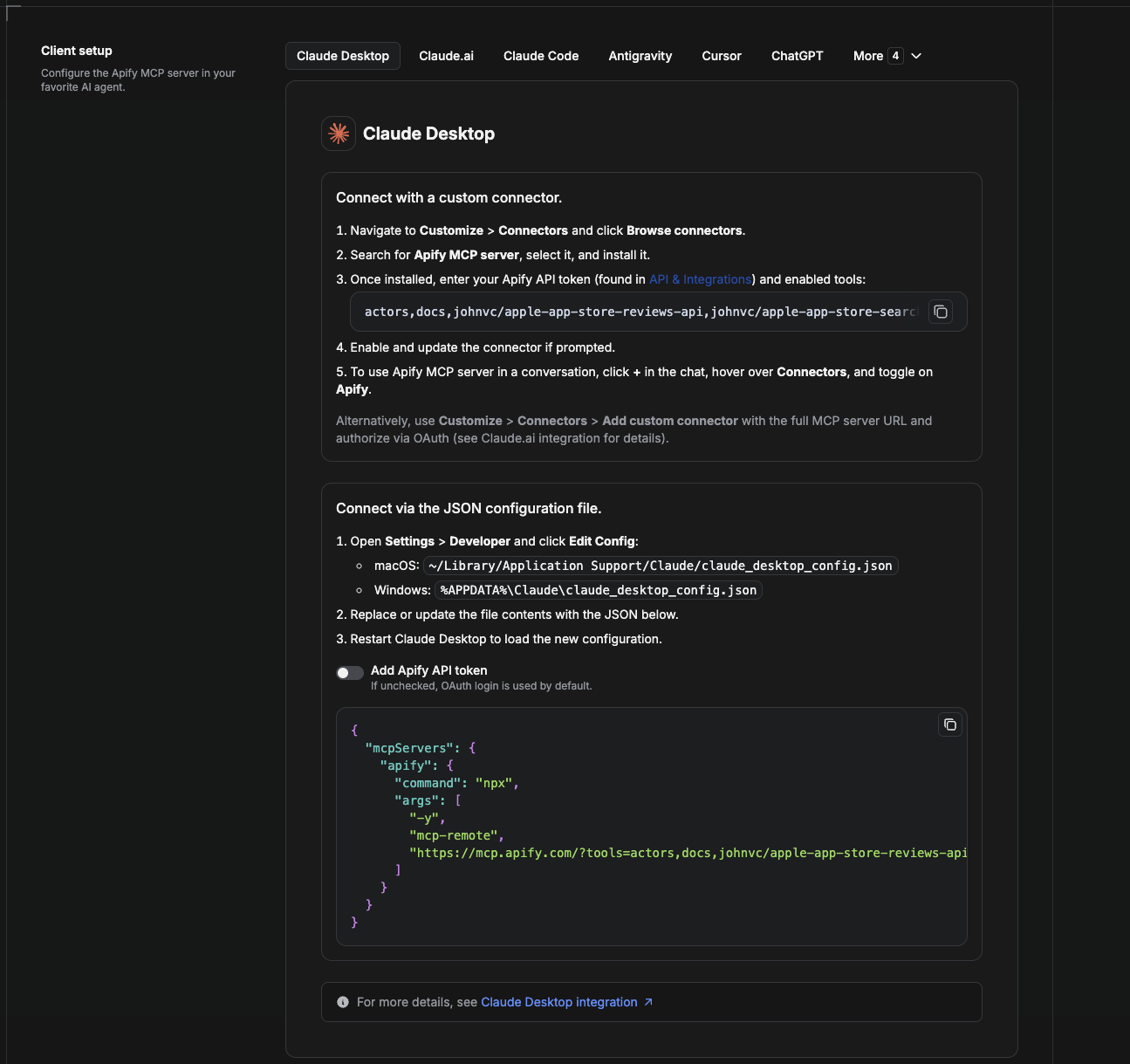
Cowork 是桌面应用的自动化模式。若要将 Google Maps Directions API 作为工具提供给它,请将 Apify MCP 服务添加为连接器。
- 打开 Claude 桌面应用,并前往 Settings → Connectors(或前往 Settings → Developer → Edit Config,直接编辑
claude_desktop_config.json)。- macOS:
~/Library/Application Support/Claude/claude_desktop_config.json - Windows:
%APPDATA%\Claude\claude_desktop_config.json
- macOS:
- 添加 Apify MCP 服务,并仅预加载此 Actor:
{
  "mcpServers": {
    "apify": {
      "command": "npx",
      "args": [
        "-y",
        "mcp-remote",
        "https://mcp.apify.com/?tools=actors,docs,johnvc/google-maps-directions-api"
      ]
    }
  }
}
- 重启应用。Cowork 首次调用工具时,请在浏览器中完成 OAuth 提示,或在连接器设置中添加 Apify API token 以跳过 OAuth。
- 在 Cowork 聊天中,确认工具可用,然后让它运行 Google Maps Directions API。
下载桌面应用并开始免费试用:https://claude.ai/referral/uIlpa7nPLg 更多帮助:https://docs.apify.com/platform/integrations/claude-desktop
在 Claude Code 中安装
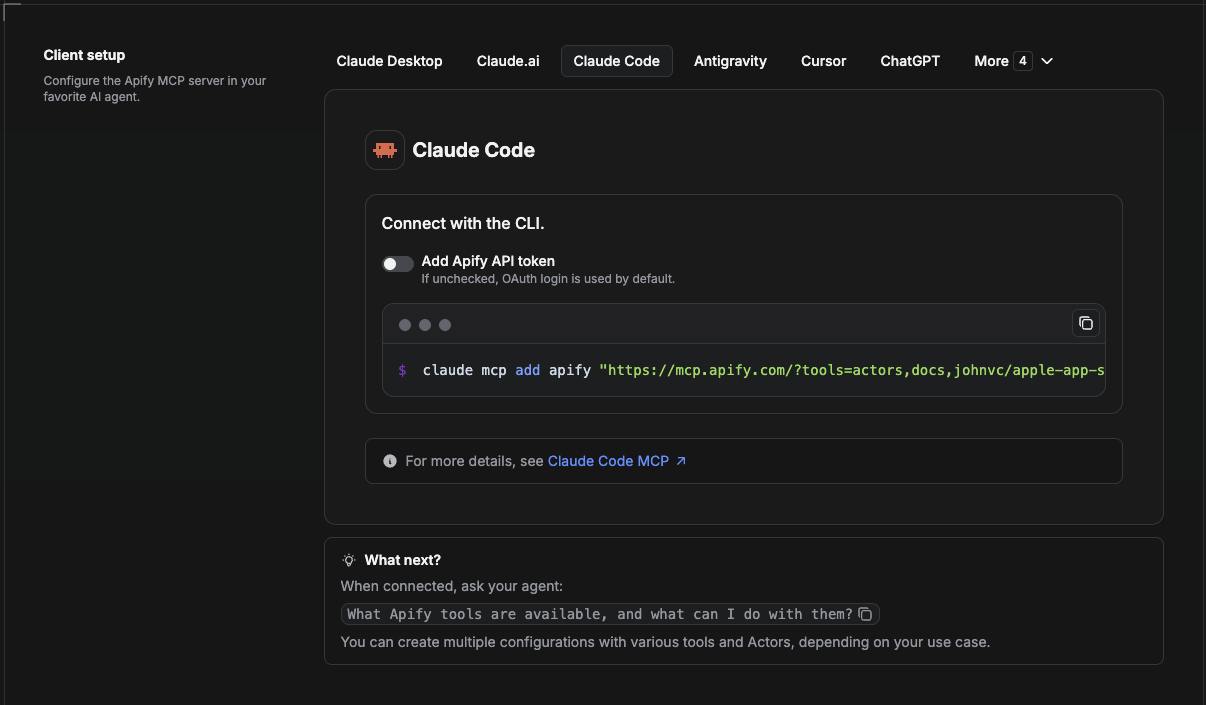
Claude Code 是命令行工具。使用一条命令添加 Actor 的 MCP 服务:
claude mcp add --transport http apify \
  "https://mcp.apify.com/?tools=actors,docs,johnvc/google-maps-directions-api"
若要使用 token 而非浏览器 OAuth:
claude mcp add --transport http apify \
  "https://mcp.apify.com/?tools=actors,docs,johnvc/google-maps-directions-api" \
  --header "Authorization: Bearer YOUR_APIFY_TOKEN"
然后使用 claude mcp list 验证,或在会话中运行 /mcp。让 Claude Code 调用 Google Maps Directions API。
免费试用 Claude Code:https://claude.ai/referral/uIlpa7nPLg Claude Code MCP 文档:https://code.claude.com/docs/en/mcp
在 Claude(网站)中安装
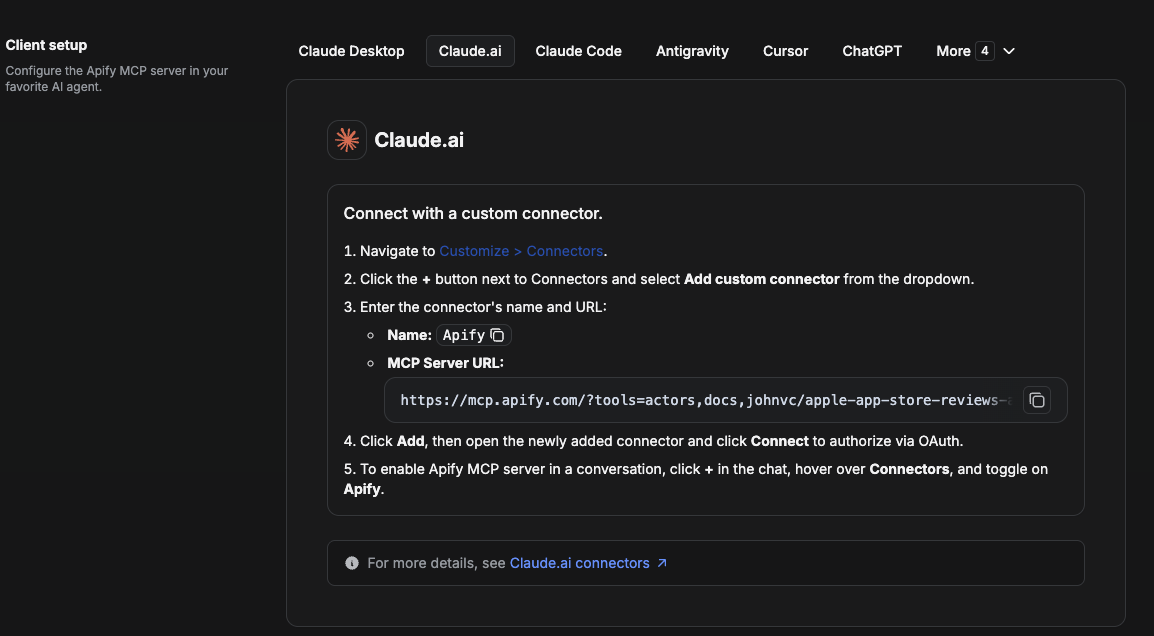
在 claude.ai 上添加 Apify 作为连接器,然后仅启用此 Actor 的工具。
- 前往 Settings → Connectors → Browse connectors,并搜索 Apify MCP server。安装它(如果出现提示,请启用或更新)。
- 连接时,使用 Apify API token 进行身份验证,并启用工具
johnvc/google-maps-directions-api。 - 在任意聊天中,打开 + → Connectors 并启用 Apify。
- 或者,选择 Add custom connector 并粘贴完整的 MCP URL
https://mcp.apify.com/?tools=actors,docs,johnvc/google-maps-directions-api,并在出现提示时使用 OAuth。 - 让 Claude 运行 Google Maps Directions API。
在网页上打开 Claude:https://claude.ai/referral/uIlpa7nPLg
在 Cursor 中安装
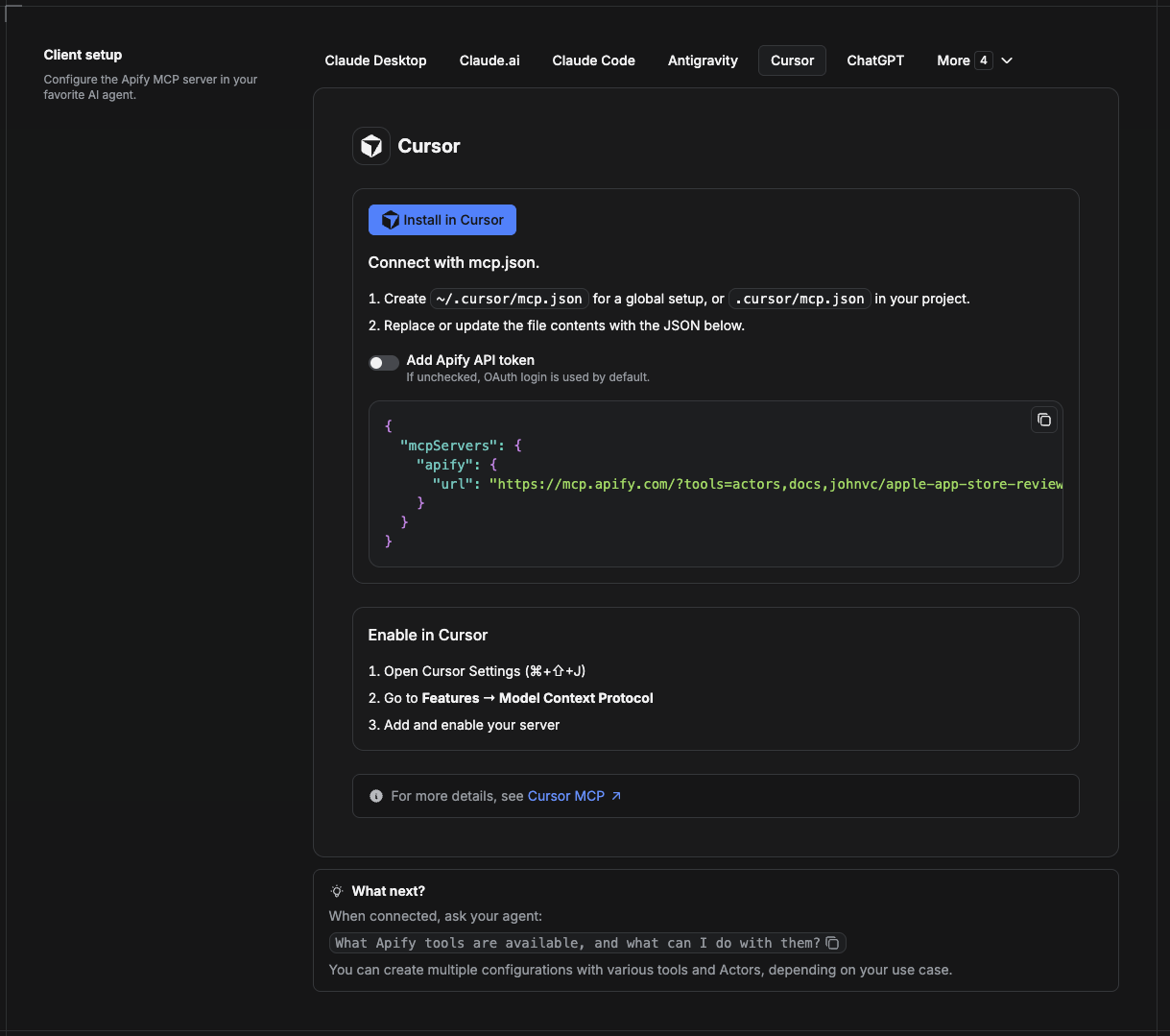
Cursor 从项目文件 .cursor/mcp.json 中读取 MCP 服务。
- 在项目中创建
.cursor/mcp.json:
{
  "mcpServers": {
    "apify": {
      "url": "https://mcp.apify.com/?tools=actors,docs,johnvc/google-maps-directions-api"
    }
  }
}
- 如果希望使用 token 身份验证而非浏览器 OAuth,请添加一个请求头:
{
  "mcpServers": {
    "apify": {
      "url": "https://mcp.apify.com/?tools=actors,docs,johnvc/google-maps-directions-api",
      "headers": { "Authorization": "Bearer YOUR_APIFY_TOKEN" }
    }
  }
}
- 打开 Cursor → Settings → MCP,确认 apify 服务已连接(显示绿点)。
- 在 Composer 或 Chat 中,让 Cursor 调用 Google Maps Directions API。
刚开始使用 Cursor?在此获取:https://cursor.com/referral?code=XQP4VBLI3NNX
在 ChatGPT 中安装
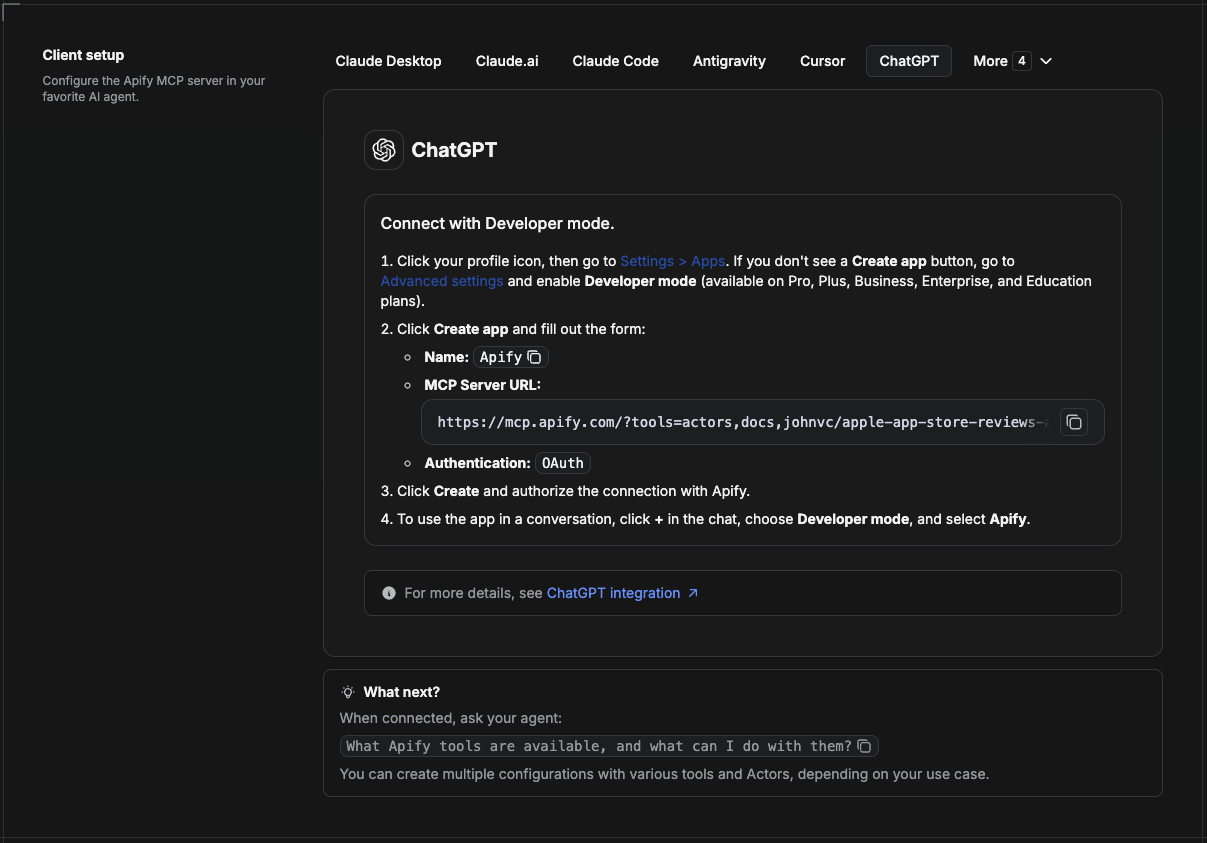
ChatGPT 通过开发者模式连接到 Apify MCP 服务(适用于 ChatGPT Pro、Plus、Business、Enterprise 和 Education 套餐)。
- 点击个人资料图标,然后前往 Settings > Apps。如果看不到 Create app 按钮,请打开 Advanced settings 并启用 Developer mode。
- 点击 Create app 并填写表单:
- Name: Apify
- MCP Server URL:
https://mcp.apify.com/?tools=actors,docs,johnvc/google-maps-directions-api - Authentication: OAuth
- 点击 Create,并通过 Apify 授权连接。
- 若要在对话中使用该应用,请点击聊天中的 +,选择 Developer mode,然后选择 Apify。
更多帮助:https://docs.apify.com/platform/integrations/mcp
使用 Google Maps Directions API,通过可靠、结构化的结果为你的路线规划、物流和旅行工作流提供支持。
🤖 向 AI 助手咨询此 Actor
在你选择的 AI 中打开一条关于 Google Maps Directions API 的即用提示词:
- 💬 ChatGPT
- 🧠 Claude
- 🔍 Perplexity
- 🅒 Copilot
最后更新:2026.10.27
评论
一个开放协议,规定了 AI 应用如何以统一方式连接外部工具与数据源。客户端负责与模型对话,MCP 服务负责提供工具、资源和提示模板,两者通过标准消息通信,同一个服务可以被不同客户端复用。