
关于 Dev error explainers
dev-error-explainers 是一组离线、确定性的 JavaScript 错误诊断模块,面向处理 Node.js、npm、Next.js、CORS 和 PostgreSQL 问题的开发者。它只对识别出的错误给出原因和修复建议,不会猜测未知错误。
主要功能
- 01诊断七类常见错误
- 02提供原因、修复建议和来源
- 03支持库、CLI 与 GitHub Action
- 04统一 JSON 输出并脱敏输入
- 05未知错误不做猜测
适用场景
- 01分析 npm 依赖冲突日志
- 02排查 Node.js 模块格式错误
- 03检查 PostgreSQL 连接 URL
- 04解读 Next.js 构建输出
MCP 相关
项目提供一个 MCP 服务和 `explain_error` 工具,供助手将错误文本与已记录的原因进行核对。该服务离线运行,并以确定性方式报告无法识别的输入。
配置
本地服务的配置在各客户端中通用,复制后粘贴到客户端的 MCP 配置文件即可。
工具
1收录的工具列表 · 更新于 3 周前
| 参数 | 类型 | 必填 | 说明 |
|---|---|---|---|
| error | string | 是 | 原始错误消息或日志片段,逐字传入(最多约 200 KB)。请包含错误附近的行:堆栈跟踪、npm 日志块、“Node.js vX”页脚或完整连接字符串。 |
| client | enum | 否 | 用于连接字符串建议的可选数据库客户端(默认值为 prisma)。prisma | drizzle | pg | psql |
| node_version | string | 否 | 正在使用的可选 Node.js 版本(例如 “20.10.0”),用于调整 ESM/CommonJS 建议。通常可从错误文本本身检测到。 |
详细介绍
dev-error-explainers



粘贴错误。获取确定性的解释。
无需大模型 · 无需 API · 无需网络 · 无遥测
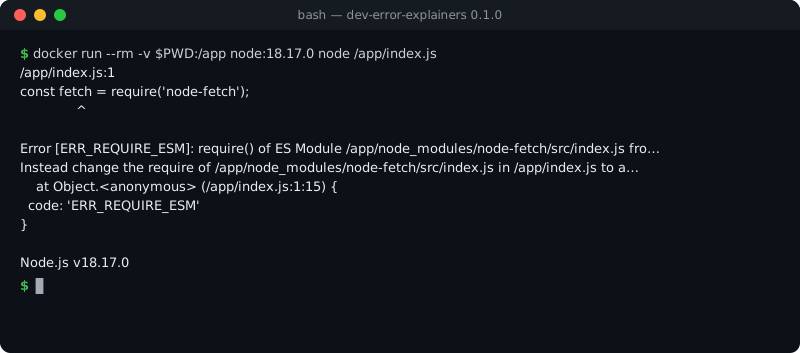
npm run build 2>&1 | npx dev-error-explainers
npm install dev-error-explainers
import { detect, explainEsmCjs } from 'dev-error-explainers';
const error = 'Error [ERR_REQUIRE_ESM]: require() of ES Module /app/node_modules/node-fetch/src/index.js from /app/index.js not supported.';
console.log(detect(error));
const { findings } = explainEsmCjs({ error, nodeVersion: '20.10.0' });
console.log(findings[0].title, findings[0].fixes.map((f) => f.title));
输出:
[ 'esm-cjs-explainer' ]
ERR_REQUIRE_ESM — require() of an ES module [
  'Upgrade Node.js (you are on 20.10.0)',
  'Use dynamic import() from CommonJS',
  'Convert the calling file to ESM'
]
七个小巧、纯粹的 JavaScript 模块,零依赖。每个模块都会识别开发者粘贴的确切错误文本(来自浏览器控制台、npm、next build、curl -I、Node.js 堆栈跟踪等),解释错误为何发生,并提供具体的修复方案,以及适用时的主要来源链接(MDN、Node.js 文档、npm 文档、PostgreSQL 文档、Supabase 文档等)。同一引擎可作为库、CLI、GitHub Action 和 MCP 服务运行。
机密信息:CLI、Action 和 MCP 服务会在分析输入前将其传入 redact(),但有一个例外:DATABASE_URL doctor 会读取原始的 postgres:// 行(密码的确切字符决定诊断结果),且绝不会打印该密码。直接作为库使用时,七个模块中有六个会在回显内容前屏蔽看起来像机密信息的内容;build-error decoder 不会——它会原样引用构建输出中匹配的行。脱敏并非万无一失:请参阅无法捕获的内容。
其中六个模块为 iloveblogs.blog/tools 上的免费工具提供支持,你可以在浏览器中试用每个工具。
| 模块 | 主要导出项(dev-error-explainers) | 说明内容 | 在线试用 |
|---|---|---|---|
cors-error-explainer | diagnoseCors | Chrome / Firefox / Safari 中的“被 CORS 策略拦截”错误:缺少或错误的 Access-Control-Allow-* 标头、预检失败、凭据、混合内容——并针对你的技术栈提供修复方案 | CORS 错误说明器 |
esm-cjs-explainer | explainEsmCjs | ERR_REQUIRE_ESM、“Cannot use import statement outside a module”、“exports is not defined in ES module scope”、ERR_UNKNOWN_FILE_EXTENSION ".ts"、ERR_MODULE_NOT_FOUND、ERR_PACKAGE_PATH_NOT_EXPORTED——会根据你的 Node.js 版本进行判断 | ESM/CJS 错误说明器 |
npm-eresolve-explainer | analyseEresolveLog | npm ERR! ERESOLVE 对等依赖冲突:谁要求什么版本范围、安装了什么,以及它们为何不兼容 | npm ERESOLVE 说明器 |
chunk-cache-explainer | diagnoseChunkCache | 部署后出现 ChunkLoadError /“Loading chunk failed”:读取响应标头并查找过期的 HTML、CDN 缓存命中或 SPA 回退 | ChunkLoadError 缓存检查器 |
database-url-doctor | diagnoseDatabaseUrl | Postgres / Supabase 连接字符串:连接池器与直连、端口 5432 与 6543、pgbouncer、SSL、未编码的密码字符——并为 Prisma、Drizzle、pg 或 psql 提供修正后的 URL | DATABASE_URL 诊断工具 |
build-error-decoder | decodeBuildError | next build / next dev 的失败输出:Suspense 提前退出、动态服务器用法、window is not defined、水合不匹配、模块解析、堆内存溢出、EADDRINUSE…… | Next.js 构建错误解码器 |
database-connection-explainer | explainDatabaseConnection | PostgreSQL 上 Node.js 应用的“无法连接数据库”错误:ECONNREFUSED(包括 ::1 localhost)、ETIMEDOUT、ENOTFOUND、Prisma P1000 / P1001 / P1017、password authentication failed、no pg_hba.conf entry、too many clients、自签名证书。只有在同时检测到 Postgres 特征时,才会诊断通用网络错误代码 | 暂无浏览器工具——规则和来源 |
依据:大多数诊断结果都会引用作为核对依据的一手来源。 构建错误解码器没有一手来源 URL;其链接指向作者网站 iloveblogs.blog 上的文章。
Node.js 20 或更高版本。仅支持 ES 模块。
用法
所有内容都可从包根目录导入,也可以单独导入每个模块:
import { diagnose } from 'dev-error-explainers/cors-error-explainer';

const r = diagnose({
  error: "Access to fetch at 'https://api.example.com/data' from origin 'http://localhost:3000' has been blocked by CORS policy: No 'Access-Control-Allow-Origin' header is present on the requested resource.",
});
r.isCorsProblem; // true
r.findings;      // what is wrong, why, and the source
r.fix;           // a fix for the detected (or guessed) stack
import {
  analyseEresolveLog, diagnoseDatabaseUrl, diagnoseChunkCache, decodeBuildError, explainDatabaseConnection,
} from 'dev-error-explainers';

analyseEresolveLog(npmOutput);                                        // { detected, code, conflicts: [...] }
diagnoseDatabaseUrl(process.env.DATABASE_URL, { client: 'prisma' }); // { ok, kind, findings, corrected }
diagnoseChunkCache({ htmlHeaders, chunkHeaders });                    // headers from `curl -I`
decodeBuildError(nextBuildOutput);                                    // matched rules, most severe first
explainDatabaseConnection({ error: stackTrace });                     // { recognised, findings, related }
detect(text)
按固定顺序返回能够识别 text 的模块名称;如果没有,则返回 []。
每个模块都会通过自身的识别器进行判断——detect 本身不会添加任何启发式规则。
请注意,chunk-cache-explainer 会读取 HTTP 响应标头(curl -I 的输出),
而不是读取 ChunkLoadError 消息本身;只有 build-error-decoder 能识别该消息。
JSON 契约
每个模块都有自己的结果结构。diagnose(text) 会在对输入进行脱敏后,将所有结果映射到同一种结构,并使用稳定的规则 ID。这也是 CLI 使用 --json 时输出、GitHub Action 渲染以及 MCP 服务返回的结构:
import { diagnose } from 'dev-error-explainers'; // or 'dev-error-explainers/contract'

diagnose('FATAL:  password authentication failed for user "andym"');
// { version: '0.1', matched: true, redactions: 0,
//   results: [{ rule: 'database-connection.password-auth-failed', family: 'database-connection',
//               severity: 'critical', confidence: 'high', title, cause, fixes, evidence, module }] }
对于未知输入,返回 { matched: false, results: [] }——绝不会给出最接近的猜测。结构、完整规则表、置信度语义和脱敏限制详见
docs/CONTRACT.md。
fixtures/ 中提供了真实粘贴错误及其预期结果的公开语料,每个案例都附有来源。
redact(text) 也会导出(dev-error-explainers/redact)。
CLI
将失败命令的输出通过管道传入,或传入日志文件。不会向任何地方发送数据。
npm run build 2>&1 | npx dev-error-explainers
npx dev-error-explainers < error.log
npx dev-error-explainers --text "Error [ERR_REQUIRE_ESM]: require() of ES Module …" --node 18.17.0
npx dev-error-explainers --json < error.log     # the contract result (docs/CONTRACT.md)
标志:--only cors|esm|eresolve|build|database-url|database-connection|chunk-cache、--json、
--node <version>、--client prisma|drizzle|pg|psql、--html-headers <file> --chunk-headers <file>、
--help、--version。运行 npx dev-error-explainers mcp 可启动 MCP 服务。
退出码:0 表示已识别错误,2 表示未识别任何内容(不会猜测),64 表示用法错误。
连接字符串始终会屏蔽其中的密码。
在 CI 中使用(GitHub Action)
某个步骤失败时,Action 会读取你保存的该步骤日志,并将原因和修复方法写入作业摘要;如果日志中提到了检出目录里的文件,还会在对应文件和行添加注释。无网络、无大模型、无令牌。
      - name: Build
        id: build
        continue-on-error: true      # let the explain step run…
        shell: bash
        run: |
          set -o pipefail
          npm run build 2>&1 | tee build.log

      - name: Explain the failure
        if: steps.build.outcome == 'failure'
        uses: mahdibrr/dev-error-explainers@v0
        with:
          log-file: build.log

      - name: Fail the job if the build failed
        if: steps.build.outcome == 'failure'
        run: exit 1                  # …then keep the job red
输入、输出,以及 pipefail 和 steps.build.outcome 的重要性:
docs/ACTION.md。
在 AI 助手中使用(MCP)
MCP 服务提供一个工具 explain_error,让助手在猜测之前,先根据有文档记录的原因检查粘贴的错误。离线且结果确定;无法识别的输入会如实报告。Claude Code:
claude mcp add dev-error-explainers -- npx -y -p dev-error-explainers dev-error-explainers-mcp
Claude Desktop、Cursor、VS Code 和协议详情: docs/MCP.md。
在 Claude Code 中使用(插件:skill + MCP)
该仓库也是 Claude Code 插件市场。该插件打包了 MCP 服务和一个 skill,用于告知 Claude 何时调用它:
/plugin marketplace add mahdibrr/dev-error-explainers
/plugin install dev-error-explainers@dev-error-explainers
原则
- 结果确定。 相同输入始终得到相同答案;规则经过真实错误文本测试(Stack Overflow 问题、GitHub issue、框架输出)。
- 离线运行。 不会向任何地方发送数据:输入不会离开当前进程。
- 尽可能引用来源。 如果有说明规则的文档,诊断结果会链接到该文档——并非每条规则都有来源引用。
- 如实说明未知情况。 模块无法识别的错误会报告为无法识别,绝不猜测。
测试
npm install
npm test
CI 会在 Node.js 20、22 和 24 上运行测试套件。
贡献
遇到无法识别的错误?请提交 issue,并附上准确文本。 粘贴原样输出的错误、生成该错误的命令以及工具版本。新增规则必须基于真实错误编写测试。诊断结果错误同样属于 bug——另有专门的模板。
许可证
维护者与项目背景
由 Mahdi Ben Rhouma 维护。
- 项目说明与浏览器工具 - 了解离线库如何连接浏览器工具、CLI 和公开示例。
评论
一个开放协议,规定了 AI 应用如何以统一方式连接外部工具与数据源。客户端负责与模型对话,MCP 服务负责提供工具、资源和提示模板,两者通过标准消息通信,同一个服务可以被不同客户端复用。