
关于 Gemini Terminal Agent
Gemini Terminal Agent 的 README 实际介绍的是 mcp-agent:一个用于构建 MCP Agent 的轻量、可组合 Python 框架。它管理 MCP 服务连接,并提供多种可组合的工作流模式及多 Agent 编排。
主要功能
- 01管理 MCP 服务连接生命周期
- 02提供多种可组合 Agent 工作流
- 03支持并行、路由与评估优化模式
- 04提供模型无关的 Swarm 编排
- 05可将应用封装为 MCP 服务
适用场景
- 01构建使用多个 MCP 服务的 Agent
- 02编排并行子 Agent 完成协作任务
- 03将 Agent 应用提供给 MCP 客户端
MCP 相关
框架负责连接和管理 MCP 服务,并将服务工具提供给 Agent 使用;也可将 Agent 应用封装为 MCP 服务,供客户端调用。
配置
本地服务的配置在各客户端中通用,复制后粘贴到客户端的 MCP 配置文件即可。
我们还没有获取到这个服务的安装包或远程地址,请按项目 README 中的说明安装。
工具
本地服务需要在你的电脑上运行后才能读取工具,维护者暂未提供工具列表。
详细介绍
使用 Model Context Protocol,通过简单、可组合的模式构建高效 Agent。
示例 | 构建高效 Agent | MCP




概述
mcp-agent 是一个简单、可组合的框架,用于通过 Model Context Protocol 构建 Agent。
灵感来源:Anthropic 宣布了两项面向 AI 应用开发者的基础性更新:
- Model Context Protocol——一种标准化接口,可通过 MCP 服务让 AI 助手访问任何软件。
- 构建高效 Agent——一篇影响深远的文章,介绍了用于构建可投入生产的 AI Agent 的简单、可组合模式。
mcp-agent 将这两项基础内容整合进一个 AI 应用框架:
- 它负责管理 MCP 服务连接的生命周期,让你不必为这些繁琐工作操心。
- 它实现了《构建高效 Agent》中介绍的所有模式,并以_可组合_的方式实现,让你能够将这些模式串联起来。
- 额外优势:它以与模型无关的方式实现了 OpenAI 的 Swarm 多 Agent 编排模式。
总而言之,这是构建可靠 Agent 应用最简单、最轻松的方式。与 MCP 类似,本项目仍处于早期开发阶段。 我们欢迎各种贡献、反馈,也欢迎你帮助我们将其发展为新的标准。
开始使用
我们建议使用 uv 管理 Python 项目:
uv add "mcp-agent"
或者:
pip install mcp-agent
快速入门
提示
examples目录中有多个示例应用,可供你开始使用。 要运行示例,请克隆此仓库,然后:cd examples/basic/mcp_basic_agent # Or any other example cp mcp_agent.secrets.yaml.example mcp_agent.secrets.yaml # Update API keys uv run main.py
下面是一个基础的“finder”Agent,它使用 fetch 和 filesystem 服务查找文件、阅读博客并撰写推文。示例链接:
finder_agent.py
import asyncio
import os

from mcp_agent.app import MCPApp
from mcp_agent.agents.agent import Agent
from mcp_agent.workflows.llm.augmented_llm_openai import OpenAIAugmentedLLM

app = MCPApp(name="hello_world_agent")

async def example_usage():
    async with app.run() as mcp_agent_app:
        logger = mcp_agent_app.logger
        # This agent can read the filesystem or fetch URLs
        finder_agent = Agent(
            name="finder",
            instruction="""You can read local files or fetch URLs.
                Return the requested information when asked.""",
            server_names=["fetch", "filesystem"], # MCP servers this Agent can use
        )

        async with finder_agent:
            # Automatically initializes the MCP servers and adds their tools for LLM use
            tools = await finder_agent.list_tools()
            logger.info(f"Tools available:", data=tools)

            # Attach an OpenAI LLM to the agent (defaults to GPT-4o)
            llm = await finder_agent.attach_llm(OpenAIAugmentedLLM)

            # This will perform a file lookup and read using the filesystem server
            result = await llm.generate_str(
                message="Show me what's in README.md verbatim"
            )
            logger.info(f"README.md contents: {result}")

            # Uses the fetch server to fetch the content from URL
            result = await llm.generate_str(
                message="Print the first two paragraphs from https://www.anthropic.com/research/building-effective-agents"
            )
            logger.info(f"Blog intro: {result}")

            # Multi-turn interactions by default
            result = await llm.generate_str("Summarize that in a 128-char tweet")
            logger.info(f"Tweet: {result}")

if __name__ == "__main__":
    asyncio.run(example_usage())
mcp_agent.config.yaml
execution_engine: asyncio
logger:
  transports: [console] # You can use [file, console] for both
  level: debug
  path: "logs/mcp-agent.jsonl" # Used for file transport
  # For dynamic log filenames:
  # path_settings:
  #   path_pattern: "logs/mcp-agent-{unique_id}.jsonl"
  #   unique_id: "timestamp"  # Or "session_id"
  #   timestamp_format: "%Y%m%d_%H%M%S"

mcp:
  servers:
    fetch:
      command: "uvx"
      args: ["mcp-server-fetch"]
    filesystem:
      command: "npx"
      args:
        [
          "-y",
          "@modelcontextprotocol/server-filesystem",
          "<add_your_directories>",
        ]

openai:
  # Secrets (API keys, etc.) are stored in an mcp_agent.secrets.yaml file which can be gitignored
  default_model: gpt-4o
Agent 输出
为什么使用 mcp-agent?
现有的 AI 框架已经太多了。但 mcp-agent 是唯一一个专为通用协议 MCP 打造的框架。它也十分轻量,与其说是框架,不如说更像是 Agent 模式库。
随着更多服务支持 MCP,你可以使用 mcp-agent 构建强大、可控的 AI Agent,并开箱即用地利用这些服务。
示例
在介绍 mcp-agent 的核心概念之前,先来看看你可以用它构建什么。
简而言之,你可以用 mcp-agent 构建任何类型的 AI 应用:多 Agent 协作工作流、人机协作工作流、RAG 流水线等。
Claude Desktop
你可以将 mcp-agent 应用集成到 Claude Desktop 等 MCP 客户端中。
mcp-agent 服务
此应用将 mcp-agent 应用封装在 MCP 服务中,并将该服务提供给 Claude Desktop。 该应用会公开 Agent 和工作流,供 Claude Desktop 调用,以处理用户的请求。
https://github.com/user-attachments/assets/7807cffd-dba7-4f0c-9c70-9482fd7e0699
此演示展示了一个多 Agent 评估任务:每个 Agent 评估输入诗歌的不同方面,然后由聚合器汇总评估结果并生成最终回复。
详情:应用从用户的文本请求开始,会:
- 动态定义负责执行任务的 Agent
- 使用合适的工作流来编排这些 Agent(此处使用并行工作流)
代码链接:examples/basic/mcp_agent_server
说明
非常感谢 Jerron Lim (@StreetLamb) 开发并贡献了此示例!
Streamlit
你可以使用 Streamlit 部署 mcp-agent 应用。
Gmail Agent
此应用可以根据文本提示词,在 Gmail 中执行读取和写入操作,例如读取、删除和发送邮件,以及将邮件标记为已读或未读等。 它使用 Gmail 的 MCP 服务。
https://github.com/user-attachments/assets/54899cac-de24-4102-bd7e-4b2022c956e3
代码链接:gmail-mcp-server
说明
非常感谢 Jason Summer (@jasonsum) 开发并贡献了此示例!
简易 RAG 聊天机器人
此应用使用 Qdrant 向量数据库(通过 MCP 服务),对文本语料库进行问答。
https://github.com/user-attachments/assets/f4dcd227-cae9-4a59-aa9e-0eceeb4acaf4
代码链接:examples/usecases/streamlit_mcp_rag_agent
说明
非常感谢 Jerron Lim (@StreetLamb) 开发并贡献了此示例!
Marimo
Marimo 是一个响应式 Python 笔记本,可替代 Jupyter 和 Streamlit。 以下是用 Marimo 实现的 快速入门 中的“文件查找” Agent:
代码链接:examples/usecases/marimo_mcp_basic_agent
说明
非常感谢 Akshay Agrawal (@akshayka) 开发并贡献了此示例!
Python
你可以将 mcp-agent 应用编写为 Python 脚本或 Jupyter 笔记本。
Swarm
此示例展示了如何在航空公司场景中使用 Swarm 工作流模式,设置多 Agent 系统来处理不同的客户服务请求。这些 Agent 可以对请求进行分流,处理航班变更、取消和行李遗失等情况。
https://github.com/user-attachments/assets/b314d75d-7945-4de6-965b-7f21eb14a8bd
代码链接:examples/workflows/workflow_swarm
核心组件
以下是 mcp-agent 框架的构建模块:
- MCPApp:全局状态和应用配置
- MCP 服务管理:
gen_client和MCPConnectionManager,用于轻松连接到 MCP 服务。 - Agent:Agent 是一种可以访问一组 MCP 服务,并将其作为工具调用提供给大模型的实体。它具有名称和用途(指令)。
- AugmentedLLM:一种通过一组 MCP 服务提供的工具增强的大模型。下文介绍的每种工作流模式本身都是一个
AugmentedLLM,因此你可以将它们组合并串联起来。
框架中的所有内容都基于这些核心能力构建。
工作流
mcp-agent 实现了 Anthropic 构建高效 Agent 中的所有模式,以及 OpenAI 的 Swarm 模式。
每种模式都与模型无关,并以 AugmentedLLM 的形式提供,因此可以灵活组合。
AugmentedLLM
AugmentedLLM 是一种可以通过 Agent 访问 MCP 服务和函数的大模型。
大模型提供商通过实现 AugmentedLLM 接口来提供 3 个函数:
generate:根据提示词生成消息,可以进行多轮迭代,并按需调用工具。generate_str:调用generate,并以字符串形式返回结果。generate_structured:使用 Instructor 将生成结果作为 Pydantic 模型返回。
此外,AugmentedLLM 还具有记忆功能,可跟踪长期或短期历史记录。
示例
from mcp_agent.agents.agent import Agent
from mcp_agent.workflows.llm.augmented_llm_anthropic import AnthropicAugmentedLLM

finder_agent = Agent(
    name="finder",
    instruction="You are an agent with filesystem + fetch access. Return the requested file or URL contents.",
    server_names=["fetch", "filesystem"],
)

async with finder_agent:
   llm = await finder_agent.attach_llm(AnthropicAugmentedLLM)

   result = await llm.generate_str(
      message="Print the first 2 paragraphs of https://www.anthropic.com/research/building-effective-agents",
      # Can override model, tokens and other defaults
   )
   logger.info(f"Result: {result}")

   # Multi-turn conversation
   result = await llm.generate_str(
      message="Summarize those paragraphs in a 128 character tweet",
   )
   logger.info(f"Result: {result}")
并行
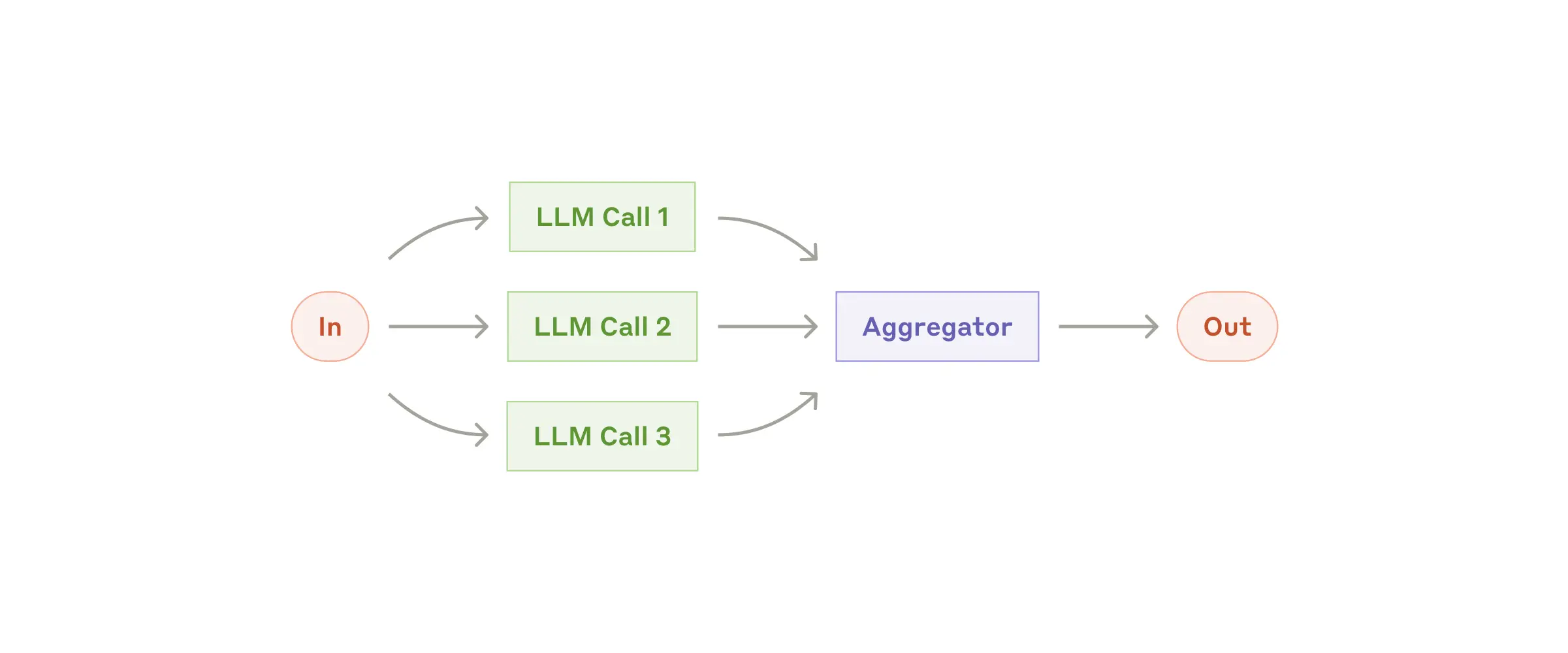
将任务分发给多个子 Agent,再汇总结果。每个子任务都是一个 AugmentedLLM,整个 Parallel 工作流也是如此,这意味着每个子任务本身都可以是更复杂的工作流。
说明
示例
proofreader = Agent(name="proofreader", instruction="Review grammar...")
fact_checker = Agent(name="fact_checker", instruction="Check factual consistency...")
style_enforcer = Agent(name="style_enforcer", instruction="Enforce style guidelines...")

grader = Agent(name="grader", instruction="Combine feedback into a structured report.")

parallel = ParallelLLM(
    fan_in_agent=grader,
    fan_out_agents=[proofreader, fact_checker, style_enforcer],
    llm_factory=OpenAIAugmentedLLM,
)

result = await parallel.generate_str("Student short story submission: ...", RequestParams(model="gpt4-o"))
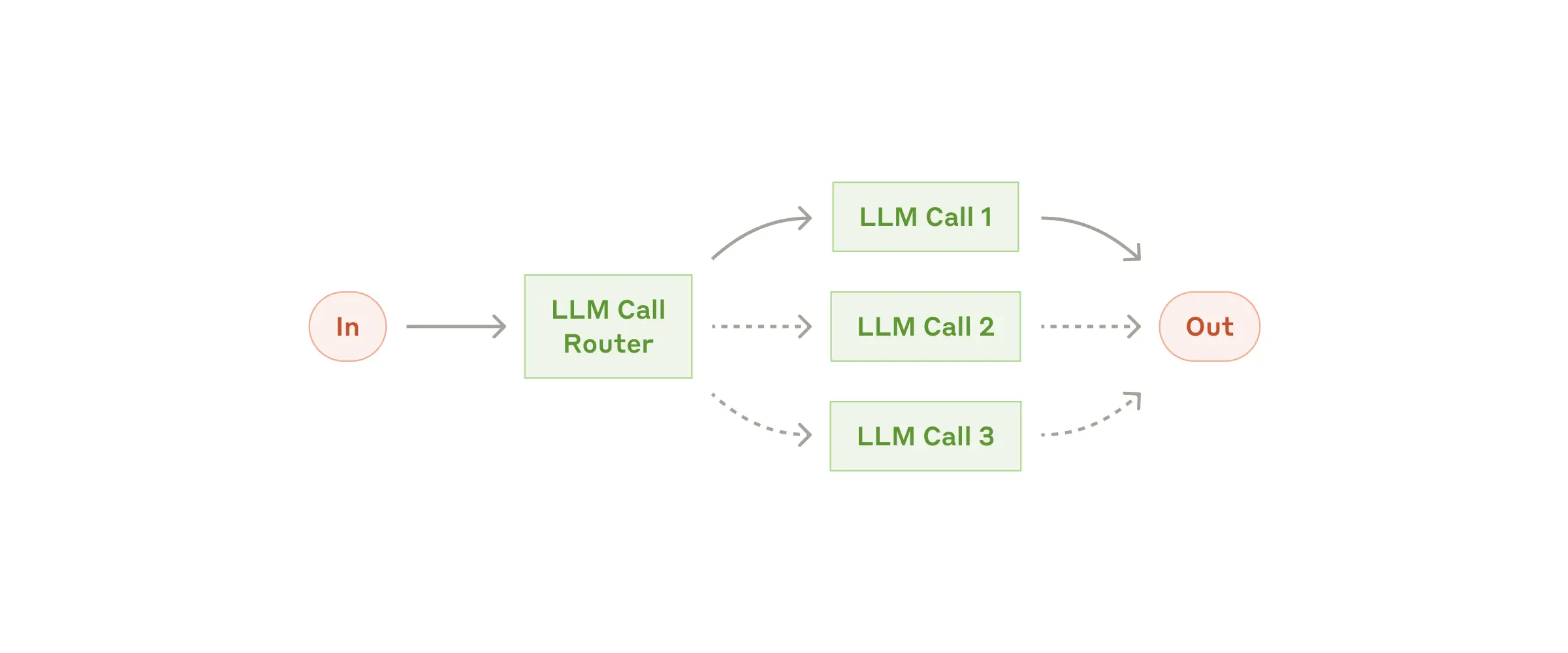
给定输入后,将其路由到最相关的 top_k 个类别。类别可以是 Agent、MCP 服务或常规函数。
mcp-agent 提供了多种路由器实现,包括:
EmbeddingRouter:使用嵌入模型进行分类LLMRouter:使用 LLM 进行分类
说明
示例
def print_hello_world:
     print("Hello, world!")

finder_agent = Agent(name="finder", server_names=["fetch", "filesystem"])
writer_agent = Agent(name="writer", server_names=["filesystem"])

llm = OpenAIAugmentedLLM()
router = LLMRouter(
    llm=llm,
    agents=[finder_agent, writer_agent],
    functions=[print_hello_world],
)

results = await router.route( # Also available: route_to_agent, route_to_server
    request="Find and print the contents of README.md verbatim",
    top_k=1
)
chosen_agent = results[0].result
async with chosen_agent:
    ...
IntentClassifier
意图分类器模式与 Router 密切相关,用于识别与给定输入最匹配的 top_k 个意图。
与 Router 一样,mcp-agent 同时提供基于嵌入和基于 LLM 的意图分类器。
Evaluator-Optimizer
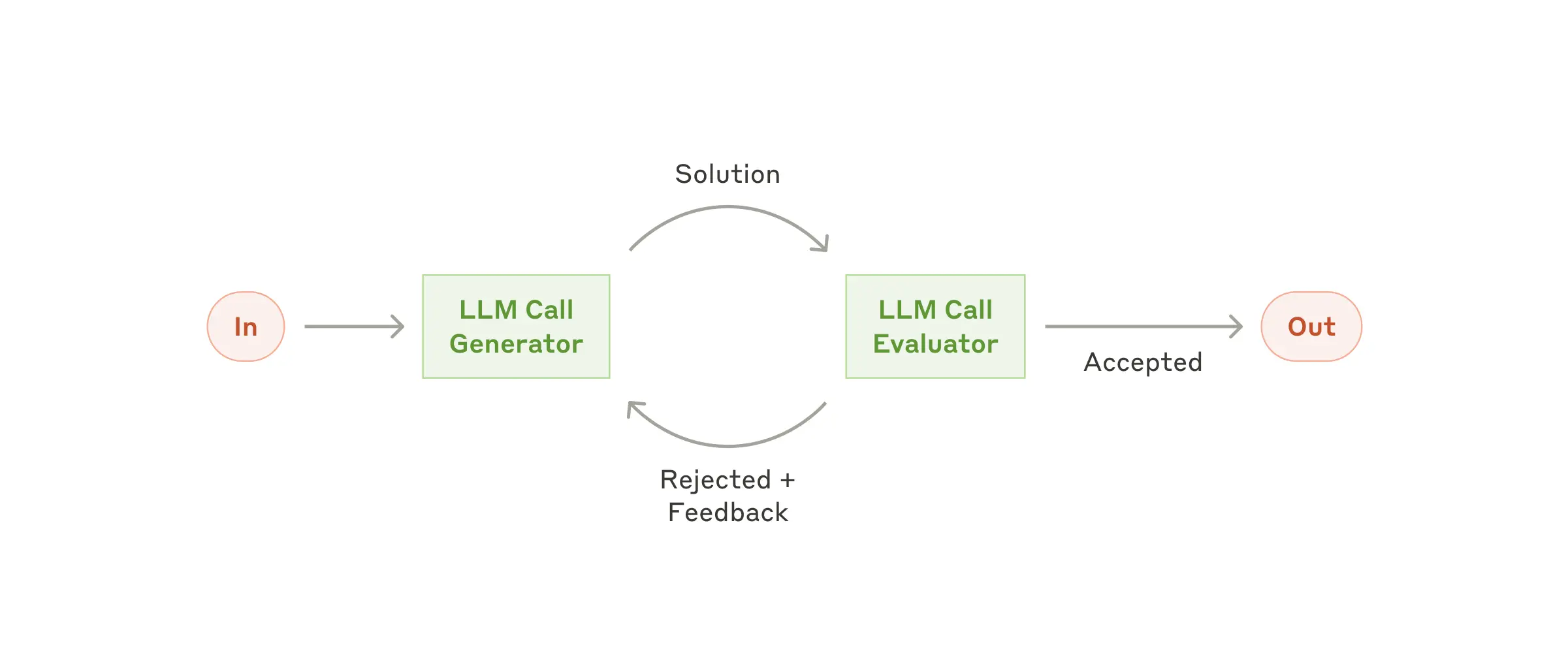
一个 LLM(“优化器”)负责优化响应,另一个 LLM(“评估器”)负责评判响应,直到响应达到质量标准。
说明
示例
optimizer = Agent(name="cover_letter_writer", server_names=["fetch"], instruction="Generate a cover letter ...")
evaluator = Agent(name="critiquer", instruction="Evaluate clarity, specificity, relevance...")

llm = EvaluatorOptimizerLLM(
    optimizer=optimizer,
    evaluator=evaluator,
    llm_factory=OpenAIAugmentedLLM,
    min_rating=QualityRating.EXCELLENT, # Keep iterating until the minimum quality bar is reached
)

result = await eo_llm.generate_str("Write a job cover letter for an AI framework developer role at LastMile AI.")
print("Final refined cover letter:", result)
Orchestrator-workers
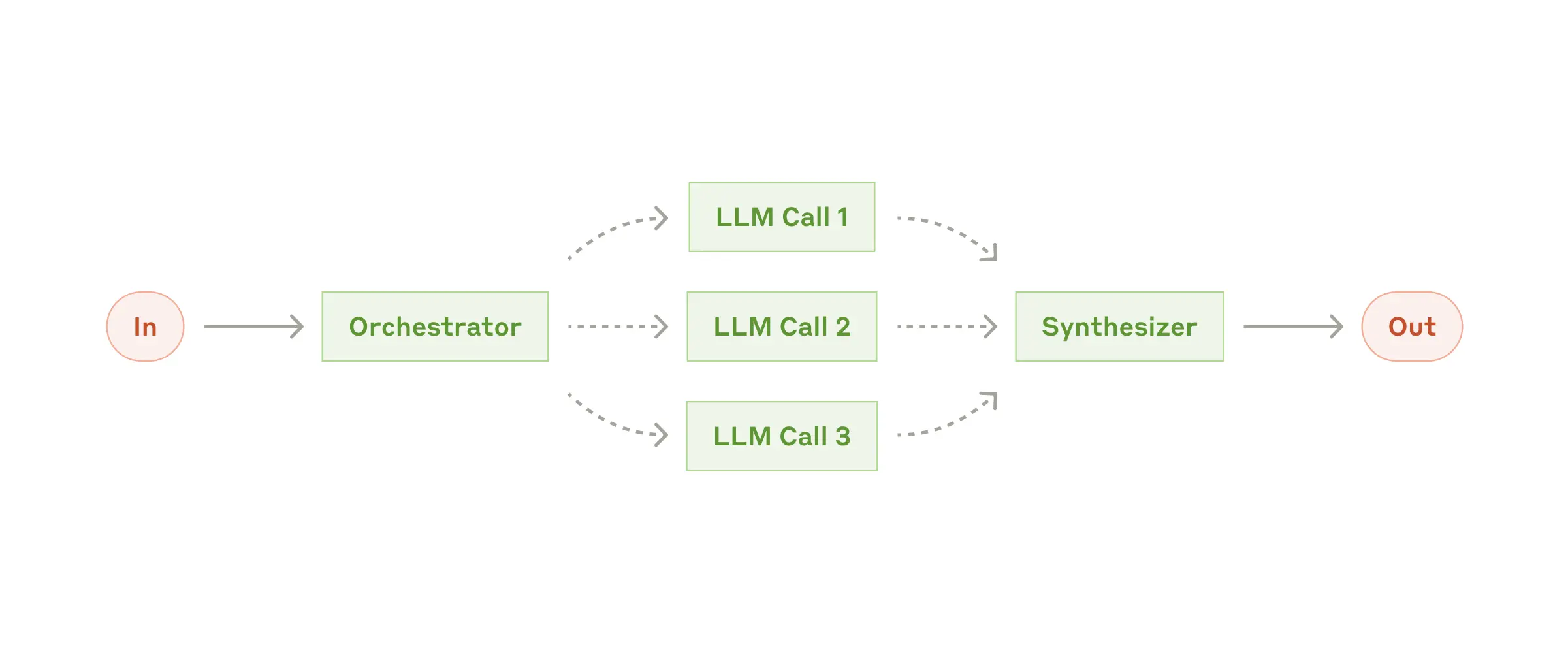
更高层级的 LLM 生成计划,然后将任务分配给子 Agent,并综合结果。 编排器工作流会自动并行处理可并行执行的步骤,并等待依赖项完成。
说明
示例
finder_agent = Agent(name="finder", server_names=["fetch", "filesystem"])
writer_agent = Agent(name="writer", server_names=["filesystem"])
proofreader = Agent(name="proofreader", ...)
fact_checker = Agent(name="fact_checker", ...)
style_enforcer = Agent(name="style_enforcer", instructions="Use APA style guide from ...", server_names=["fetch"])

orchestrator = Orchestrator(
    llm_factory=AnthropicAugmentedLLM,
    available_agents=[finder_agent, writer_agent, proofreader, fact_checker, style_enforcer],
)

task = "Load short_story.md, evaluate it, produce a graded_report.md with multiple feedback aspects."
result = await orchestrator.generate_str(task, RequestParams(model="gpt-4o"))
print(result)
Swarm
OpenAI 有一种名为 Swarm 的实验性多 Agent 模式,mcp-agent 提供了与模型无关的参考实现。

mcp-agent 的 Swarm 模式可与 MCP 服务无缝协作,并以 AugmentedLLM 的形式提供,因此可以与上述其他模式组合使用。
说明
示例
triage_agent = SwarmAgent(...)
flight_mod_agent = SwarmAgent(...)
lost_baggage_agent = SwarmAgent(...)

# The triage agent decides whether to route to flight_mod_agent or lost_baggage_agent
swarm = AnthropicSwarm(agent=triage_agent, context_variables={...})

test_input = "My bag was not delivered!"
result = await swarm.generate_str(test_input)
print("Result:", result)
高级
可组合性
可组合性的一个示例是将 Evaluator-Optimizer 工作流用作 Orchestrator 工作流中的规划器 LLM。生成高质量的执行计划对于确保可靠运行至关重要,而评估器-优化器可以帮助实现这一点。
在 mcp-agent 中,这种组合方式十分简便,因为每个工作流都实现为 AugmentedLLM。
示例
optimizer = Agent(name="plan_optimizer", server_names=[...], instruction="Generate a plan given an objective ...")
evaluator = Agent(name="plan_evaluator", instruction="Evaluate logic, ordering and precision of plan......")

planner_llm = EvaluatorOptimizerLLM(
    optimizer=optimizer,
    evaluator=evaluator,
    llm_factory=OpenAIAugmentedLLM,
    min_rating=QualityRating.EXCELLENT,
)

orchestrator = Orchestrator(
    llm_factory=AnthropicAugmentedLLM,
    available_agents=[finder_agent, writer_agent, proofreader, fact_checker, style_enforcer],
    planner=planner_llm # It's that simple
)

...
信号:框架可以暂停和恢复任务。Agent 或大模型可能会发出信号,表示需要用户输入,因此工作流会等待。开发者也可以在工作流中发出信号,以便在继续工作流之前请求批准或审核。
人工输入:如果 Agent 配置了 human_input_callback,大模型可以调用 __human_input__ 工具,在工作流中途请求用户输入。
示例
Swarm 示例展示了这一功能。
from mcp_agent.human_input.handler import console_input_callback

lost_baggage = SwarmAgent(
    name="Lost baggage traversal",
    instruction=lambda context_variables: f"""
        {
        FLY_AIR_AGENT_PROMPT.format(
            customer_context=context_variables.get("customer_context", "None"),
            flight_context=context_variables.get("flight_context", "None"),
        )
    }\n Lost baggage policy: policies/lost_baggage_policy.md""",
    functions=[
        escalate_to_agent,
        initiate_baggage_search,
        transfer_to_triage,
        case_resolved,
    ],
    server_names=["fetch", "filesystem"],
    human_input_callback=console_input_callback, # Request input from the console
)
应用配置
创建 mcp_agent.config.yaml 和一个会被 git 忽略的 mcp_agent.secrets.yaml,以定义 MCP 应用配置。此配置用于控制日志记录、执行、大模型提供商 API 和 MCP 服务配置。
MCP 服务管理
mcp-agent 让连接 MCP 服务变得轻而易举。创建 mcp_agent.config.yaml,在 mcp 部分定义服务配置:
mcp:
  servers:
    fetch:
      command: "uvx"
      args: ["mcp-server-fetch"]
      description: "Fetch content at URLs from the world wide web"
gen_client
在异步上下文管理器中管理 MCP 服务的生命周期:
from mcp_agent.mcp.gen_client import gen_client

async with gen_client("fetch") as fetch_client:
    # Fetch server is initialized and ready to use
    result = await fetch_client.list_tools()

# Fetch server is automatically disconnected/shutdown
gen_client 函数可以轻松建立与 MCP 服务的连接。
持久服务连接
在许多情况下,你可能希望 MCP 服务保持在线,以便持续使用(例如,在多步骤工具使用工作流中)。 对于持久连接,请使用:
from mcp_agent.mcp.gen_client import connect, disconnect

fetch_client = None
try:
     fetch_client = connect("fetch")
     result = await fetch_client.list_tools()
finally:
     disconnect("fetch")
MCPConnectionManager如需对服务连接进行更精细的控制,可以使用 MCPConnectionManager。
示例
from mcp_agent.context import get_current_context
from mcp_agent.mcp.mcp_connection_manager import MCPConnectionManager

context = get_current_context()
connection_manager = MCPConnectionManager(context.server_registry)

async with connection_manager:
fetch_client = await connection_manager.get_server("fetch") # Initializes fetch server
result = fetch_client.list_tool()
fetch_client2 = await connection_manager.get_server("fetch") # Reuses same server connection

# All servers managed by connection manager are automatically disconnected/shut down
MCP 服务聚合器
MCPAggregator 充当“服务之服务”。
它提供一个统一的 MCP 服务接口,用于与多个 MCP 服务交互。
这样,你就可以向大模型应用开放来自多个服务的工具。
示例
from mcp_agent.mcp.mcp_aggregator import MCPAggregator

aggregator = await MCPAggregator.create(server_names=["fetch", "filesystem"])

async with aggregator:
   # combined list of tools exposed by 'fetch' and 'filesystem' servers
   tools = await aggregator.list_tools()

   # namespacing -- invokes the 'fetch' server to call the 'fetch' tool
   fetch_result = await aggregator.call_tool(name="fetch-fetch", arguments={"url": "https://www.anthropic.com/research/building-effective-agents"})

   # no namespacing -- first server in the aggregator exposing that tool wins
   read_file_result = await aggregator.call_tool(name="read_file", arguments={})
参与贡献
我们欢迎各种形式的贡献。请参阅贡献指南以开始参与。
特别鸣谢
已有许多杰出的社区贡献者正在推动本项目向前发展:
- Shaun Smith (@evalstate) —— 他一直在推动
mcp-agent和整个 MCP 生态系统的众多复杂改进。 - Jerron Lim (@StreetLamb) —— 他为本项目贡献了大量时间、出色的示例和优秀的想法。
- Jason Summer (@jasonsum) —— 感谢他发现了若干问题,并调整自己的 Gmail MCP 服务,使其能够与 mcp-agent 配合使用。
路线图
我们将添加一份详细的路线图(理想情况下由你的反馈推动)。当前的优先事项包括:
- 持久执行 —— 支持暂停和恢复工作流,并序列化状态,以便重放或无限期暂停。我们正在集成 Temporal 来实现这一目标。
- 记忆 —— 增加对长期记忆的支持
- 流式传输 —— 支持流式监听器,以展示迭代进度
- 更多 MCP 功能 —— 将支持范围从工具调用扩展至:
- 资源
- 提示词
- 通知
常见问题
使用 mcp-agent 有哪些核心优势?
mcp-agent 提供了一种简化的方法,可利用 MCP(Model Context Protocol)服务公开的能力构建 AI Agent。
MCP 的抽象层级较低,而这个框架负责处理连接服务、与大模型协作、处理外部信号(例如人工输入),以及通过持久化执行支持持久状态等机制。这样,你作为开发者就可以专注于 AI 应用的核心业务逻辑。
核心优势:
- 🤝 互操作性:确保任意数量的 MCP 服务所公开的任何工具,都能无缝接入你的 Agent。
- ⛓️ 可组合性与可定制性:实现定义明确的工作流,同时支持以可组合的方式构建复合工作流,并全面自定义模型提供商、日志记录、编排器等。
- 💻 以编程方式控制流程:让事情保持简单,开发者只需编写代码,无需考虑图、节点和边。对于分支逻辑,编写
if语句;对于循环,使用while循环。 - 🖐️ 人工输入与信号:支持暂停工作流以等待外部信号,例如人工输入;这些信号会以 Agent 可调用的工具调用形式提供。
使用 mcp-agent 需要 MCP 客户端吗?
不需要,你可以在任何地方使用 mcp-agent,因为它会为你处理 MCPClient 的创建。这让你可以在 Claude Desktop 等 MCP 宿主之外使用 MCP 服务。
以下是设置 mcp-agent 应用的所有方式:
MCP-Agent 服务
你可以将 mcp-agent 应用作为 MCP 服务公开(请参阅示例),让 MCP 客户端通过 MCP 服务的标准工具 API 与复杂的 AI 工作流交互。这实际上是一个由服务组成的服务。
MCP 客户端或宿主
你可以将 mcp-agent 直接嵌入 MCP 客户端,以管理多个 MCP 服务之间的编排。
独立运行
你可以独立使用 mcp-agent 应用(也就是说,它们不属于 MCP 客户端)。examples 中的应用都是独立运行的。
告诉我一个有趣的事实
我曾考虑将这个项目命名为 silsila(سلسلہ),它在乌尔都语中意为事件链。mcp-agent 这个名字更直白,不过项目中仍然藏着一个向 silsila 致敬的小彩蛋。
评论
一个开放协议,规定了 AI 应用如何以统一方式连接外部工具与数据源。客户端负责与模型对话,MCP 服务负责提供工具、资源和提示模板,两者通过标准消息通信,同一个服务可以被不同客户端复用。