
关于 Mcp Marketplace
Mcp Marketplace 是面向 Agent 开发者和工作流构建者的开源 MCP 服务与工具索引、搜索服务及网页客户端。它将元数据和配置发现与 API、SDK、网页客户端及 `mcpm` 命令行工具结合。
主要功能
- 01搜索和浏览 MCP 服务列表
- 02查看工具 Schema 与配置元数据
- 03通过网页客户端连接并使用工具
- 04公开市场 API 和 Python SDK
- 05从配置启动客户端的 `mcpm` 命令行工具
- 06用于市场发现的工具调度 Agent
适用场景
- 01按关键词或类别查找 MCP 服务
- 02集成前检查工具 Schema
- 03在网页客户端连接并使用所选工具
- 04在 Agent 工作流中搜索市场数据
MCP 相关
该项目收录 MCP 服务、工具、Schema 和配置数据,并提供网页 MCP 客户端及 API。`mcpm` 命令行工具可从 `mcp_config.json` 启动 MCP 客户端。
配置
本地服务的配置在各客户端中通用,复制后粘贴到客户端的 MCP 配置文件即可。
我们还没有获取到这个服务的安装包或远程地址,请按项目 README 中的说明安装。
工具
本地服务需要在你的电脑上运行后才能读取工具,维护者暂未提供工具列表。
详细介绍
开放 MCP 市场 | AI Agent 商店市场索引 | OneKey MCP Router | AI Agent 与 MCP 变现收益分成计划 | DeepNLP 的 MCP 工具使用 Agent
|
|
微信
访问网站 MCP 工具使用 Agent 应用,探索 MCP 服务,体验先进的 Agentic AI 搜索/深度研究、金融数据、图表创建、Excel 电子表格/PowerPoint 使用。
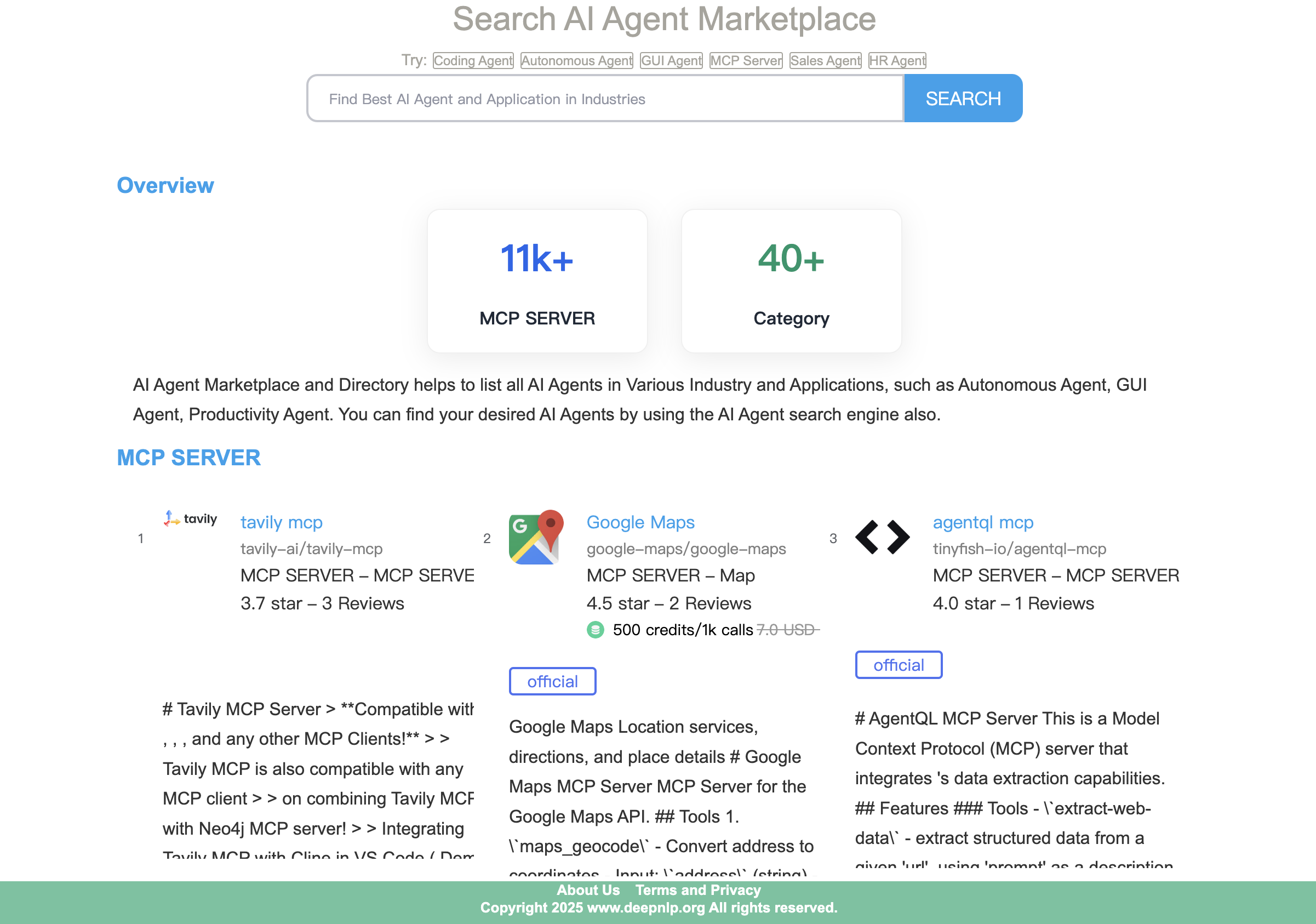
基础介绍
Open MCP Marketplace 是一个开源项目,旨在让 MCP 服务集成到你的 AI Agent 工作流中变得更轻松。
- MCP 搜索引擎和市场:MCP 市场索引和 MCP 搜索引擎
- MCP OneKey Router:只需一个访问密钥,即可验证身份并使用商业 MCP 服务,以及参与 AI Agent 与 MCP 变现收益分成计划:OneKey MCP Router介绍和代理Onekey MCP servers App。
- MCP 服务工具元数据和配置:你可以获取整理完善的 MCP 服务工具元数据信息、工具和配置架构等。
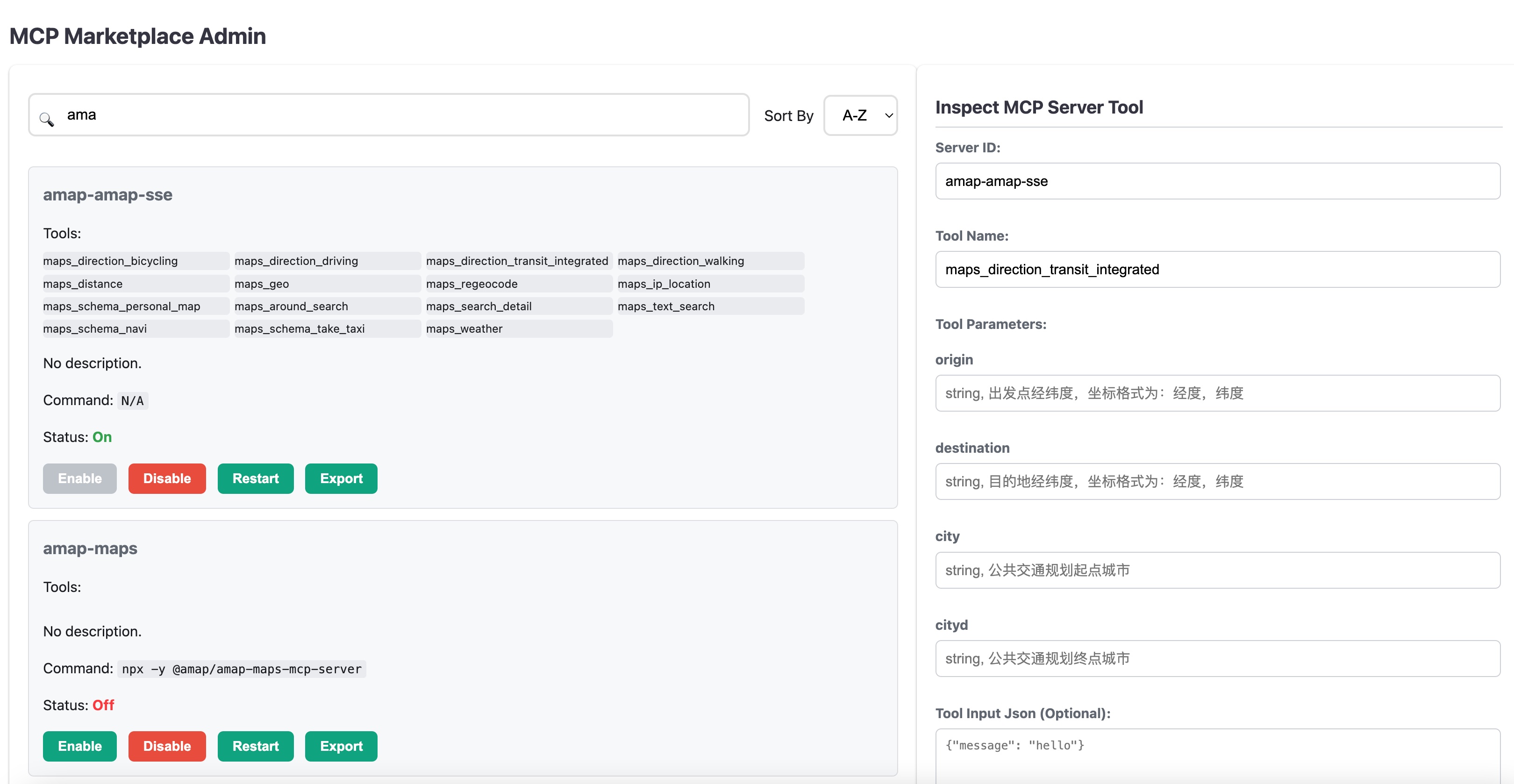
- 带管理页面的 Web MCP 客户端:与 Claude Desktop、Cursor 和许多其他客户端类似,Open MCP-Marketplace 提供纯 Web MCP 客户端和管理页面,用于连接(启动/结束)并使用 MCP 工具。
- Agent 工具箱:探索并搜索开放 MCP 市场中的 11k+ 种 MCP 服务。你还可以按类别筛选,例如官方服务、浏览器使用、地图、金融、编码、办公软件使用等。
- 支持各种 AI Agent 应用:你可以轻松将此应用集成到现有的聊天机器人、AI 搜索/深度研究引擎、Excel 电子表格/PowerPoint 创建、视频/图像生成、编码 IDE 等应用中。
- 公共 API 访问:访问 API 文档,按关键词、类别等搜索相关 MCP 服务和工具。
- MCP 工具使用 Agent 和工作流应用:MCP 工具使用 Agent 源代码
- 支持 Python/Typescript 包:Pypi、Npm
新闻
- 多 Agent 并行运行:多 Agent 并行运行已上线,你可以同时调用 3-5 个旅行/规划、深度研究 Agent。
- CLI
mcpm:命令行工具,可根据你的 mcp_config.json 启动基于 Python 的 MCP 客户端,类似于 cursor/Claude。适用于 MCP 基准测试,并提供 REST API 端点。 - OneKey MCP Router:使用 OneKey 访问商业 MCP。详情请访问 OneKey MCP Router。
- 升级:Office 文件 Agent 和可视化 Agent:Excel 电子表格数据写入和数据分析 Agent、Powerpoint 生成、图表创建。Excel Spreadsheet Agent、Visualization Agent
- 实时 MCP 工具使用 Agent 已上线:访问 MCP Tool Use Agent App 查看工作流
按类别划分的 MCP 用例
| 领域 | 相关 MCP 服务 | 演示 |
|---|---|---|
| Office 文件 Agent | Excel 电子表格、Powerpoint、PDF 等 | 示例 MCP |
| AI 搜索/深度研究 | Bing/Google Custom/Perplexity/Tavily/Firecrawl | 演示 MCP |
| 地图旅行规划 | GoogleMap、Amap(Gaode)、BaiduMap 等 | 示例 MCP 使用 MCP |
| 浏览器使用 | Playwright、Puppeteer 等 | 演示 MCP |
| 图表、图形、图像 | Gemini NanoBanana3、everart、mcp-server-charts(AntV)、canva-mcp、bing-image-search-mcp | 示例 MCP |
| 多 Agent 并行运行 | DeepSearch/旅行规划 | 示例 |
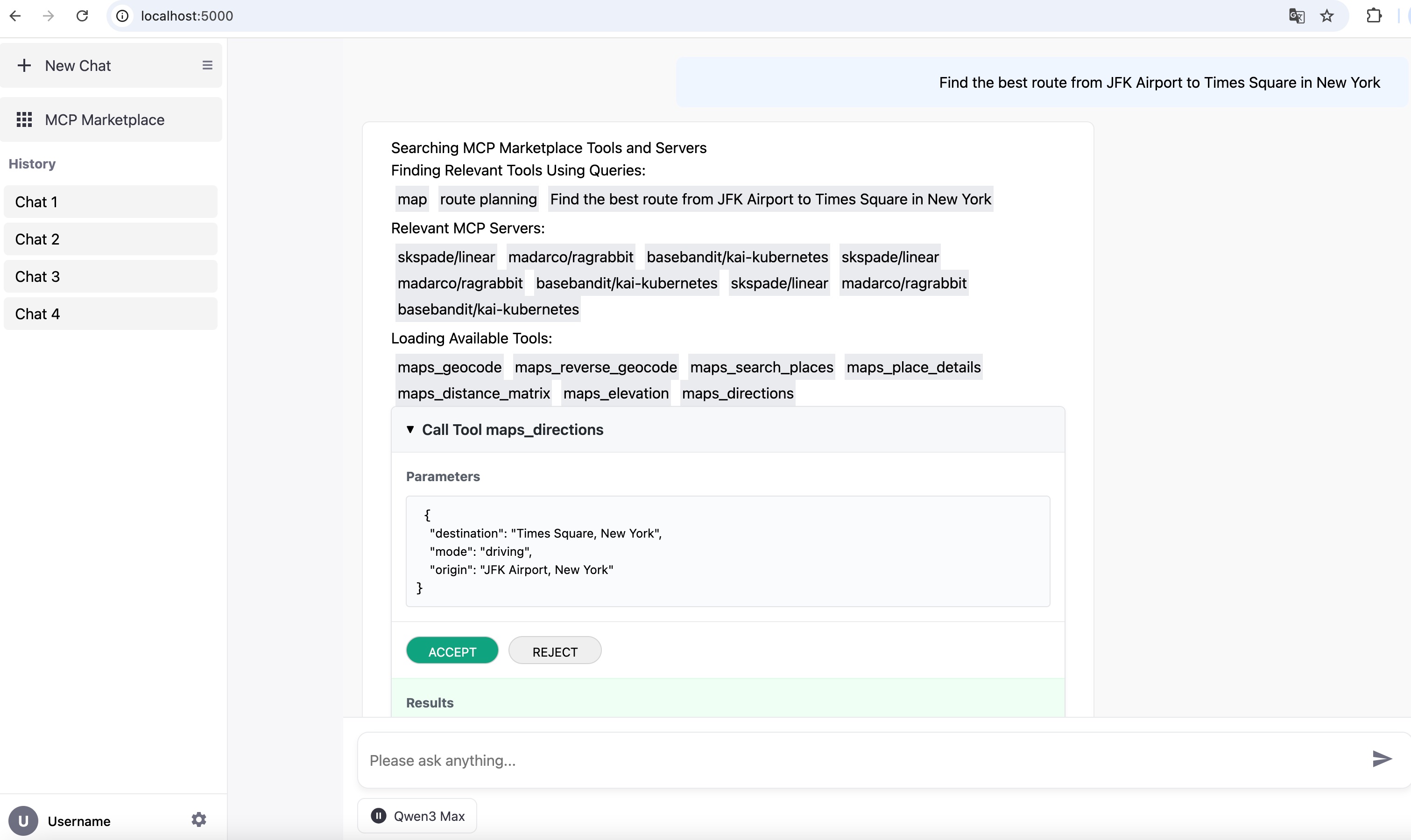
| 示例:使用 Google Map MCP 规划路线 |
q=Find the best route from JFK Airport to Times Square in New York
示例:Office Agent 创建 Excel 电子表格和 Powerpoint 的用法
q=Write below information to an excel spreadsheet. Derek: male, graduated in years 2019, IT department, Jenifer: female graduated in 2024 Sales and Marketing department, Alan: male, graduated in 2021 in R&D department, Paul: mail, graduated in 2015, Staff in Operations department. Please formalize the data into three columns: name, graduation year and department. Then use spreadsheet formula to calculate the percentage of employees graduated within 3 years.
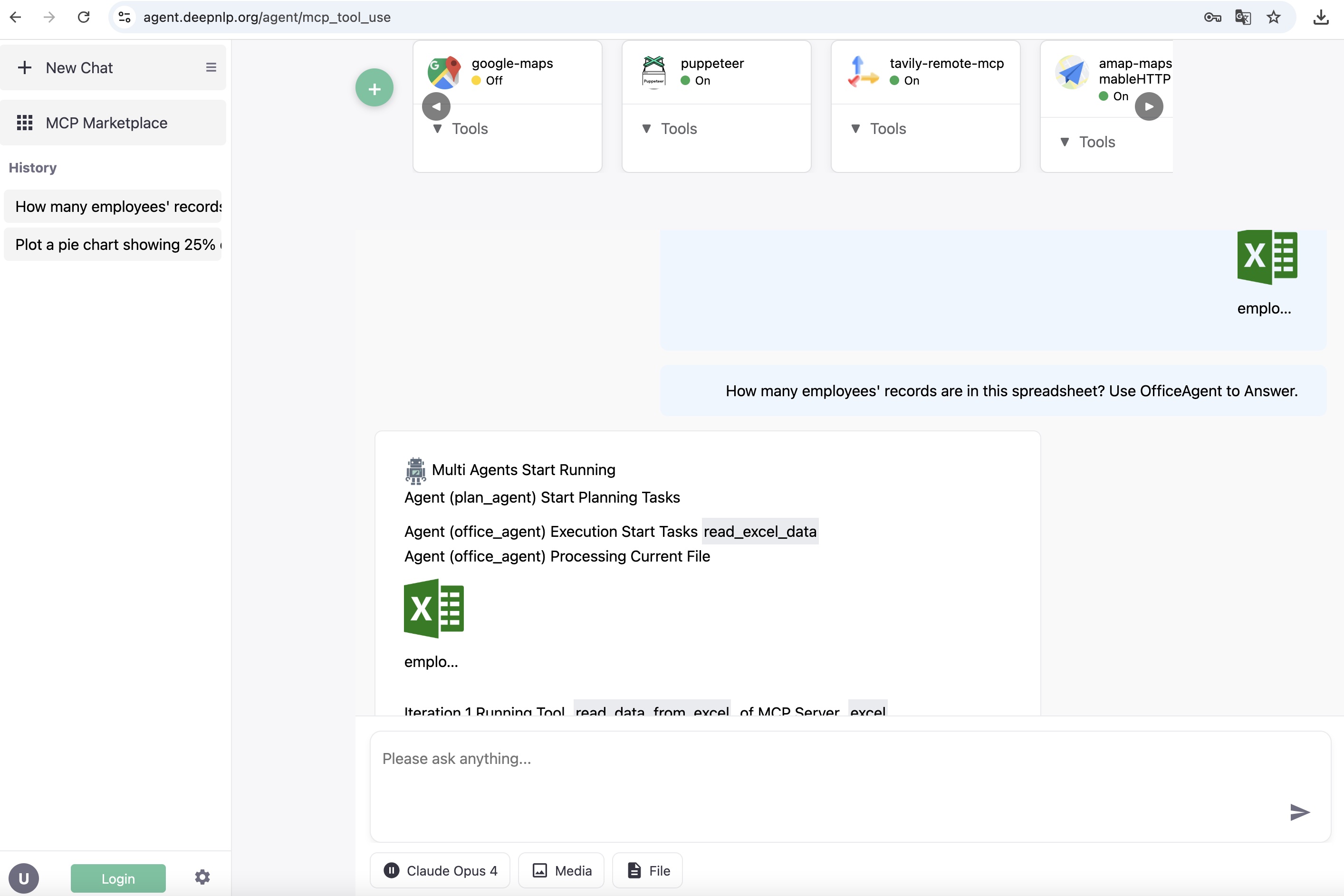
Excel 电子表格和 Powerpoint Office Agent
示例:绘制图表
q=Plot a pie chart showing 25% of employees graduated within 3 years and 75% graduated more than 3 years ago.
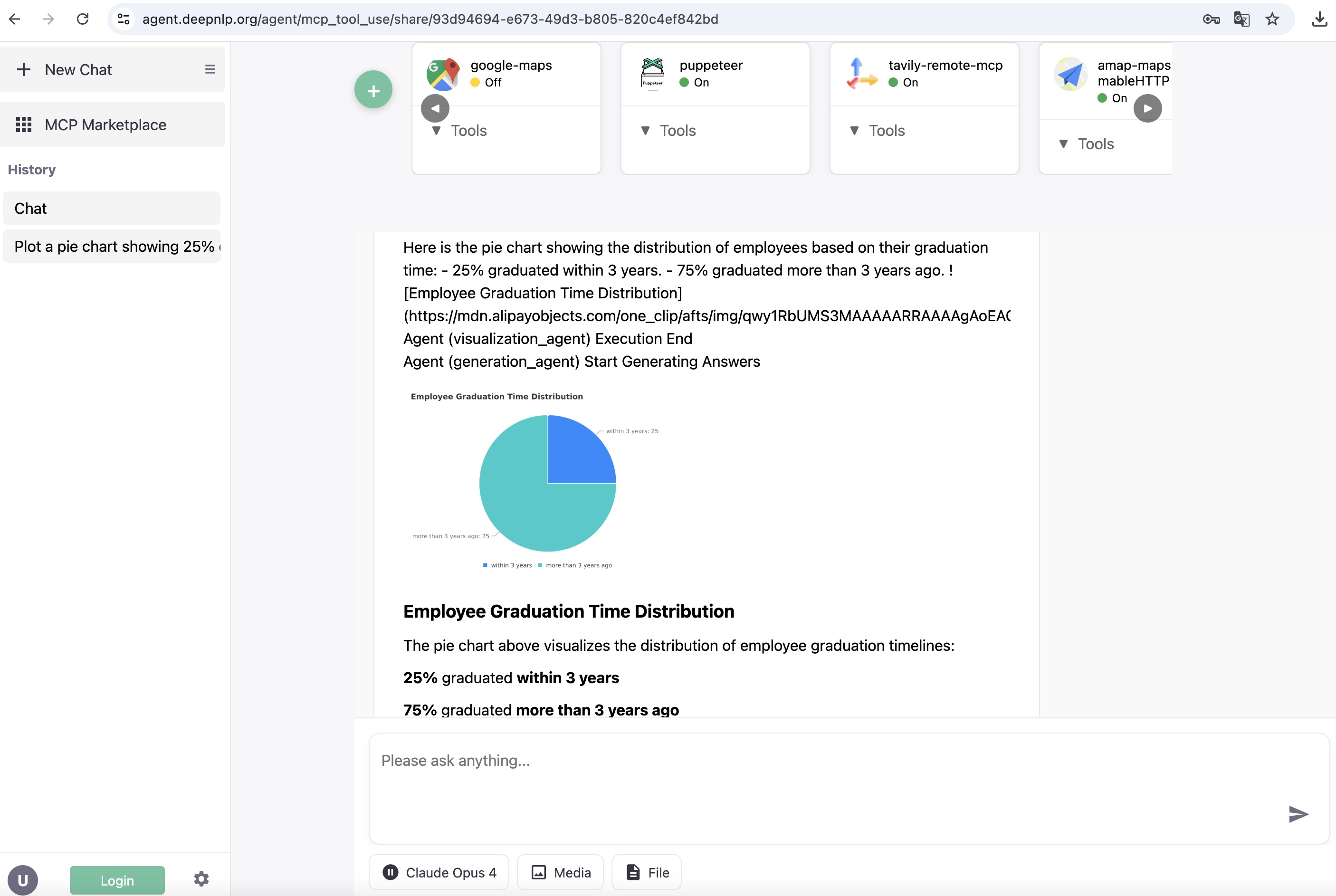
Excel 电子表格和 Powerpoint Office Agent
示例:AI 搜索深度研究
访问 MCP 工具使用应用
示例:用于管理工具和服务的 MCP 管理后台与 Playground
访问 MCP 工具使用应用
主要功能
-
MCP 服务工具架构和配置文件公开索引 收集来自 5000 多个 MCP 服务的工具/函数调用架构数据集,可用于工具 RAG、工具调度器研究和研发。你可以在原始架构文件中搜索路线规划或“map”等关键词。欢迎将你的配置添加到索引中。MCP 工具架构
-
MCP Marketplace Web 集成,查看 Web 演示和视频,了解如何将开放的 MCP Marketplace 集成到 AI 搜索引擎或 Agent 工作流中。
- 纯 Web 插件:显示开放的 MCP Marketplace 中可用的 MCP 工具面板,支持筛选、搜索和安装。
- 浏览、导航和分页:用户可以按类别浏览 MCP 工具,并使用分页进行导航。
- 自定义 MCP 服务选择与安装:用户可以从 MCP 工具市场中选择要用于执行任务的工具,例如具备类似功能的地图位置、搜索、获取、支付等工具。
- 徽章:在你的主页上放置徽章,跟踪 MCP 服务的用户评论和评分,例如
- 为 AI 客户端开发提供 MCP API 端点支持
- 多种 MCP Marketplace API 端点:获取服务架构,例如 pulsemcp.com、deepnlp.org、aiagenta2z.com 等。
- GET/UPDATE/CREATE MCP 服务元信息,让你的 MCP 服务获得更高的曝光度。
- Python 和 Typescript SDK:搜索和注册 MCP 服务及工具。
- 丰富的元数据:工具和服务描述、URL、类别、Github 星标、用户评论分数、评分及更多统计信息。
- MCP Marketplace 的 Agent 工作流
- MCP 工具调度 Agent:MCP 工具调度 Agent 可从 Marketplace 中成千上万个 MCP 服务和工具中检索相关工具,并减少函数调用大模型的上下文 token 长度。
- MCP 客户端支持 CLI
mcpm,可从配置文件启动 MCP 服务
- 轻量级 MCP 客户端:像使用 cursor/Claude Desktop 一样启动 MCP 客户端。(npx/python)
- 基准测试:支持用于运行 tool/call 的 Rest API(Google-maps/perplexity/Deep Search Web 客户端等)
1. MCP 服务工具公开索引的架构和 mcp.config 文件
详情请参阅 MCP 工具架构。
收集自 google map MCP 的工具架构
{"name": "maps_geocode", "description": "Convert an address into geographic coordinates", "input_schema": {"type": "object", "properties": {"address": {"type": "string", "description": "The address to geocode"}}, "required": ["address"]}}
{"name": "maps_directions", "description": "Get directions between two points", "input_schema": {"type": "object", "properties": {"origin": {"type": "string", "description": "Starting point address or coordinates"}, "destination": {"type": "string", "description": "Ending point address or coordinates"}, "mode": {"type": "string", "description": "Travel mode (driving, walking, bicycling, transit)", "enum": ["driving", "walking", "bicycling", "transit"]}}, "required": ["origin", "destination"]}}
2. MCP Marketplace Web 客户端集成
MCP 工具使用 Agent
浏览 MCP Marketplace 并翻页查看 MCP 服务 演示

3. 为 AI 客户端开发提供多种 API 端点支持
支持的 MCP Marketplace API 提供方
| 端点 | API | 网站 |
|---|---|---|
| deepnlp.org | https://www.deepnlp.org/api/mcp_marketplace/v1 | https://www.deepnlp.org/doc/mcp_marketplace |
| pulsemcp.com | https://api.pulsemcp.com/v0beta/servers | https://www.pulsemcp.com/api |
Python 和 Typescript SDK
MCP Marketplace API 的官方文档请参阅 https://www.deepnlp.org/doc/mcp_marketplace 、Python SDK 和 Typescript SDK(WIP)
安装
pip install mcp-marketplace
用法
搜索 MCP 服务
通过唯一 ID、查询词或类别,根据元信息搜索 MCP 服务
import mcp_marketplace as mcpm

## endpoint: deepnlp
mcpm.set_endpoint("deepnlp")
result = mcpm.search(query="map", page_id=0, count_per_page=20, mode="dict")
print (result)

server_id = "financial-datasets/mcp-server"
result2 = mcpm.search(query="financial datasets", count_per_page=20, offset=0)
print (result2)

## Search By Unique ID:  e.g. github {owner_name}/{repo_name}
result_id = mcpm.search(id="puppeteer/puppeteer", mode="list", page_id=0, count_per_page=100, config_name="deepnlp")

# search by batch query
query_list = ["map", "navigation", "route planning"]
params_list = [{"query": query, "page_id":0, "count_per_page":50} for query in query_list]
results = mcpm.search_batch(params_list)
Curl 端点
curl https://www.deepnlp.org/api/mcp_marketplace/v1/server/google-maps/google-maps
结果
{
  "total_hits": 1,
  "id": "google-maps/google-maps",
  "items": [{
    "content_name": "Google Maps",
    "publisher_id": "pub-google-maps",
    "website": "https://github.com/modelcontextprotocol/servers/tree/main/src/google-maps",
    "review_cnt": "2",
    "rating": "4.5",
    "description": "Google Maps  Location services, directions, and place details\r\n\r\n# Google Maps MCP Server\r\n\r\nMCP Server for the Google Maps API.\r\n\r\n## Tools\r\n\r\n1. \\`maps_geocode\\`\r\n\r\n   - Convert address to coordinates\r\n   - Input: \\`address\\` (string)\r\n   - Returns: location, formatted_address, place_id\r\n\r\n2. \\`maps_reverse_geocode\\`\r\n\r\n   - Convert coordinates to address\r\n   - Inputs:\r\n     - \\`latitude\\` (numb",
    "ext_info": {
      "tools": []
    },
    "subfield": "MAP",
    "field": "MCP SERVER",
    "id": "google-maps/google-maps",
    "content_tag_list": "official",
    "config": [],
    "thumbnail_picture": "https://118.190.154.215/scripts/img/ai_service_content/b7fe82a3ab985ce1a953f7b4ad9c5e01.jpeg"
  }]
}
列出可用工具
import mcp_marketplace as mcpm

server_id = "google-maps/google-maps"
result = mcpm.list_tools(id=server_id, config_name="deepnlp_tool")

server_id = "puppeteer/puppeteer"
result = mcpm.list_tools(id=server_id, config_name="deepnlp_tool")
Curl 端点
curl https://www.deepnlp.org/api/mcp_marketplace/v1/tools/google-maps/google-maps
{"id":"/google-maps/google-maps","tools":[{"name":"maps_geocode","description":"Convert an address into geographic coordinates","input_schema":{"type":"object","properties":{"address":{"type":"string","description":"The address to geocode"}},"required":["address"]}},{"name":"maps_reverse_geocode","description":"Convert coordinates into an address","input_schema":{"type":"object","properties":{"latitude":{"type":"number","description":"Latitude coordinate"},"longitude":{"type":"number","description":"Longitude coordinate"}},"required":["latitude","longitude"]}},{"name":"maps_search_places","description":"Search for places using Google Places API","input_schema":{"type":"object","properties":{"query":{"type":"string","description":"Search query"},"location":{"type":"object","properties":{"latitude":{"type":"number"},"longitude":{"type":"number"}},"description":"Optional center point for the search"},"radius":{"type":"number","description":"Search radius in meters (max 50000)"}},"required":["query"]}},{"name":"maps_place_details","description":"Get detailed information about a specific place","input_schema":{"type":"object","properties":{"place_id":{"type":"string","description":"The place ID to get details for"}},"required":["place_id"]}},{"name":"maps_distance_matrix","description":"Calculate travel distance and time for multiple origins and destinations","input_schema":{"type":"object","properties":{"origins":{"type":"array","items":{"type":"string"},"description":"Array of origin addresses or coordinates"},"destinations":{"type":"array","items":{"type":"string"},"description":"Array of destination addresses or coordinates"},"mode":{"type":"string","description":"Travel mode (driving, walking, bicycling, transit)","enum":["driving","walking","bicycling","transit"]}},"required":["origins","destinations"]}},{"name":"maps_elevation","description":"Get elevation data for locations on the earth","input_schema":{"type":"object","properties":{"locations":{"type":"array","items":{"type":"object","properties":{"latitude":{"type":"number"},"longitude":{"type":"number"}},"required":["latitude","longitude"]},"description":"Array of locations to get elevation for"}},"required":["locations"]}},{"name":"maps_directions","description":"Get directions between two points","input_schema":{"type":"object","properties":{"origin":{"type":"string","description":"Starting point address or coordinates"},"destination":{"type":"string","description":"Ending point address or coordinates"},"mode":{"type":"string","description":"Travel mode (driving, walking, bicycling, transit)","enum":["driving","walking","bicycling","transit"]}},"required":["origin","destination"]}}]}
列出 MCP 配置文件
API
GET /api/mcp_marketplace/v1/server/${owner_id}/${repo_name}
资源
徽章
在主页 Markdown 中放置徽章,以跟踪 MCP 服务的用户评价和评分,例如 。
将 google-maps/google-maps 替换为你的 MCP“owner_name”/“repo_name”
](https://www.deepnlp.org/store/ai-agent/mcp-server/pub-${owner_name}/${repo_name})
## google map
](https://www.deepnlp.org/store/ai-agent/mcp-server/pub-google-maps/google-maps)
4. MCP Marketplace 的 Agent 工作流
(WIP)以下示意图展示了 MCP Marketplace 如何集成到你的 Agent 工作流中
graph TD
    Start --> Search[Query Plan]
    Search[Query Plan] --> QueryPlanning[Query Planning Agent]
    QueryPlanning --> SearchTask1[Search]
    SearchTask1 --> DocList[DocList]
    DocList --> Generation

    Search[Query Plan] --> ToolDispatcher[Tool Dispatcher Agent]
    ToolDispatcher --> Task1[MCP Server 1]
    ToolDispatcher --> Task2[MCP Server 2]
    ToolDispatcher --> Task3[MCP Server 3]
    Task1 --> Tool1[Tool List 1]
    Task2 --> Tool2[Tool List 2]
    Task3 --> Tool3[Tool List 3]

    Tool1 --> LLM[LLM Function Call Agent]
    Tool2 --> LLM[LLM Function Call Agent]
    Tool3 --> LLM[LLM Function Call Agent]

    LLM -->  ToolSelection

    ToolSelection --> ToolResult[Tool Execution Result]

    ToolResult --> Generation
5. 供个人使用或基准测试的 MCP 客户端 mcpm CLI 工具
安装
你可以从 mcp-marketplace pypi 软件包安装命令行工具 mcpm,并使用本地
mcp_config.json 文件启动 MCP 客户端
## Basic Usage MCP Index and Search
pip install mcp-marketplace

## MCPClient Supports User Defined mcp_config.json, Just Like Other Clients Cursor/Claude
pip install mcp-marketplace[mcp_tool_use]
CLI 'mcpm' 将位于 Python 路径中
mcp run --host 0.0.0.0 --port 5000

## Use Local Config File
cd python/tests

mcpm run --port 5000 --config "./mcp_config_onekey.json"

mcpm run --port 5000 --config "./mcp_config.json"
然后,你可以访问 http://0.0.0.0:5000 使用 Web 控制台,并访问 http://0.0.0.0:5000/mcp 进行 MCP 管理
基准测试
你也可以通过客户端的 REST API 运行各种 MCP 基准测试
| API | 描述 |
|---|---|
| /api/query | 用于提交工具参数并获取工具调用结果的端点 |
CURL 测试
启动服务并运行目标 MCP 服务后,你可以通过 REST API 调用工具。
例如,向服务器 puppeteer 发送请求,并测试工具 puppeteer_navigate,让 Chrome 跳转到某个网页。
端点:http://127.0.0.1:5000/api/query
curl -X POST -H "Content-Type: application/json" -d '{
    "server_id": "puppeteer",
    "tool_name": "puppeteer_navigate",
    "tool_input": {
        "url": "https://arxiv.org/list/cs/new"
    }
}' http://127.0.0.1:5000/api/query
结果
{"success":true,"data":["Navigated to https://arxiv.org/list/cs/new"],"error":null}%
通过 Python/Typescript 等发送 REST GET/POST 请求
例如,向 MCP:amap-amap-sse 发送 POST 请求,调用工具:Get Weather 获取当地天气。运行命令行之前,需要先启动 MCP 服务 'amap-amap-sse'。
cd ./tests
python run_mcp_request.py

## define input_params
        input_params = {
            "server_id": "amap-amap-sse",
            "tool_name": 'maps_weather',
            "tool_input": {
                "city": "乌鲁木齐"
            }
        }
结果
{'success': True, 'data': ['{"city":"乌鲁木齐市","forecasts":[{"date":"2025-06-30","week":"1","dayweather":"多云","nightweather":"多云","daytemp":"31","nighttemp":"20","daywind":"西北","nightwind":"西北","daypower":"1-3","nightpower":"1-3","daytemp_float":"31.0","nighttemp_float":"20.0"},{"date":"2025-07-01","week":"2","dayweather":"多云","nightweather":"多云","daytemp":"28","nighttemp":"20","daywind":"西北","nightwind":"西北","daypower":"1-3","nightpower":"1-3","daytemp_float":"28.0","nighttemp_float":"20.0"},{"date":"2025-07-02","week":"3","dayweather":"多云","nightweather":"多云","daytemp":"28","nighttemp":"20","daywind":"西北","nightwind":"西北","daypower":"1-3","nightpower":"1-3","daytemp_float":"28.0","nighttemp_float":"20.0"},{"date":"2025-07-03","week":"4","dayweather":"多云","nightweather":"晴","daytemp":"30","nighttemp":"21","daywind":"西北","nightwind":"西北","daypower":"1-3","nightpower":"1-3","daytemp_float":"30.0","nighttemp_float":"21.0"}]}'], 'error': None}
贡献
资源
评论
一个开放协议,规定了 AI 应用如何以统一方式连接外部工具与数据源。客户端负责与模型对话,MCP 服务负责提供工具、资源和提示模板,两者通过标准消息通信,同一个服务可以被不同客户端复用。