
关于 map-traveler-mcp
map-traveler-mcp 是一个 MCP 服务,为虚拟形象在 Google Maps 上模拟旅行提供环境。用户可通过 Claude Desktop 等客户端下达指令,并以照片形式查看旅程进展。项目同时支持 stdio 与 Streamable-HTTP 两种运行方式。
主要功能
- 01在 Google Maps 上模拟虚拟旅行
- 02生成带形象合成的街景旅行图片
- 03支持 stdio 与 Streamable-HTTP 传输
- 04可配置多种图像生成后端与 SNS 发布
适用场景
- 01在 Claude Desktop 中让虚拟形象探索街景并汇报
- 02在 LibreChat 中接入旅行类 MCP 工具
- 03将旅程进展自动发布到 Bluesky
MCP 相关
该项目是 MCP 服务器,向 MCP 客户端暴露旅行相关工具,例如设置旅行者位置与获取提示。
配置
本地服务的配置在各客户端中通用,复制后粘贴到客户端的 MCP 配置文件即可。
npx -y @mfukushim/map-traveler-mcpMT_GOOGLE_MAP_KEY密钥[Map] Google Map API keyMT_GEMINI_IMAGE_KEY密钥[Image.gemini] Gemini Image Api keyMT_MAX_RETRY_GEMINI[Image.gemini] Number of retries when generating Gemini images Default: 0MT_AVATAR_IMAGE_URI[Image.gemini] Character reference image uri (file:// or https://) when generating Gemini image. Multiple settings can be made by separating them with the '|'. When multiple settings are made, they will be selected randomly.MT_MAP_API_URL[Map.etc] Optional: Map API custom endpoint. Example: direction=https://xxxx,places=https://yyyyMT_TIME_SCALE[Map] Optional:Scale of travel time on real roads duration. default 4MT_SQLITE_PATH[db.local] db save path: e.g. %USERPROFILE%/Desktop/traveler.sqlite ,$HOME/traveler.sqliteMT_TURSO_URL[db.api] Turso sqlite API URLMT_TURSO_TOKEN密钥[db.api] Turso sqlite API access tokenMT_REMBG_PATH[rembg.local] absolute path of the installed rembg cliMT_REMBG_URL[rembg.api] withoutbg.com rembg API URLMT_REMBG_WO_KEY密钥[rembg.api] withoutbg.com rembg API keyMT_PIXAI_KEY密钥[Image.pixAi] pixAi API keyMT_SD_KEY密钥[Image.sd] Stability.ai image generation API keyMT_PIXAI_MODEL_ID[Image.pixAi] Optional: pixAi ModelId, if not set use default model 1648918127446573124MT_COMFY_URL[Image.local.ComfyUi] Option: Generate image using ComfyUI API at specified URL. Example: http://192.168.1.100:8188MT_COMFY_WORKFLOW_T2I[Image.local.ComfyUi] Optional: Path to API workflow file when using text to image with ComfyUI. If not specified: assets/comfy/t2i_sample.jsonMT_COMFY_WORKFLOW_I2I[Image.local.ComfyUi] Optional: Path of API workflow file when image to image in ComfyUI. If not specified: assets/comfy/i2i_sample.jsonMT_COMFY_PARAMS[Image.local.ComfyUi] Optional: Variable values to send to the workflow via comfyUI APIMT_FIXED_MODEL_PROMPT[Image] Optional: Fixed avatar generation prompt. You will no longer be able to change your avatar during conversations.MT_BODY_AREA_RATIO[Image] Optional: Acceptable avatar image area ratio. default 0.042MT_BODY_HW_RATIO[Image] Optional: Acceptable avatar image aspect ratios. default 1.5~2.3MT_BODY_WINDOW_RATIO_W[Image] Optional: Avatar composite window horizontal ratio. default 0.5MT_BODY_WINDOW_RATIO_H[Image] Optional: Avatar composite window aspect ratio. default 0.75MT_BS_ID[Sns.Bs] Bluesky sns registration addressMT_BS_PASS密钥[Sns.Bs] bluesky sns passwordMT_BS_HANDLE[Sns.Bs] bluesky sns handle name: e.g. xxxxxxxx.bsky.socialMT_FILTER_TOOLS[etc] Optional: Directly filter the tools to be used. All are available if not specified. e.g. tips,set_traveler_locationMT_MOVE_MODE[etc] Option: Specify whether the movement mode is 'realtime' or 'skip'. default realtimeMT_IMAGE_WIDTH[Image] Option: Output image width (pixels) Default is 512MT_NO_IMAGE[Image] Options: 'true' = do not output image, not specified = output image if possible, default is not specifiedMT_NO_AVATAR[Image] Option: 'true' = Output StreetView image as is without avatar superimposition. Not specified = Superimpose avatar image. Default is not specified.MT_FEED_TAG[Sns] Optional: Specify the feed tag when posting to SNS (#required, 15 characters or more) Default is #geo_less_travelerMT_MAX_SESSIONS[Streamable-http] Maximum number of sessions when using Streamable-httpMT_SESSION_TTL_MS[Streamable-http] Session TTL when using Streamable-httpMT_SERVICE_TTL_MS[Streamable-http] Service TTL when using Streamable-http本地服务需要在你的电脑上安装运行环境(如 Node.js 18+)。各客户端的配置文件位置不同,请参考客户端文档。
工具
本地服务需要在你的电脑上运行后才能读取工具,维护者暂未提供工具列表。
详细介绍
MCP 虚拟旅行机器人环境
我们目前正在开发新一代旅行机器人系统。系统还需要一些时间才能完成,在此期间,欢迎使用这个以 MCP v1 模式运行的 MCP 服务。
English / 日语
这是一个 MCP 服务,可在 Google Maps 上为虚拟旅行的虚拟形象创建环境。
你可以通过 Claude Desktop 等 MCP 客户端向虚拟形象发送指令,并让它通过照片汇报旅程进展。
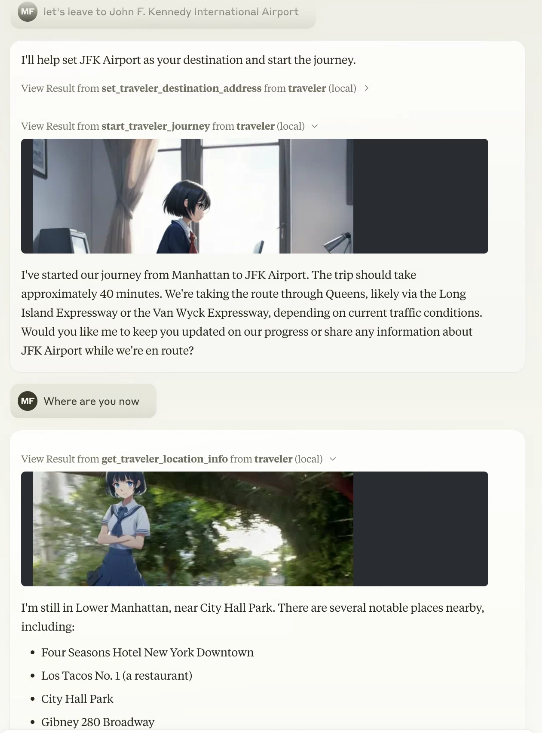
正在准备支持 MCP Registry:https://blog.modelcontextprotocol.io/posts/2025-09-08-mcp-registry-preview/
已在旅行图像生成中加入 gemini-2.5-flash-image-preview(nano-banana)
现已支持 nano-banana。nano-banana 的语义蒙版可让你在不设置 remBg 的情况下,快速生成合成旅行图像。
虽然仍可使用传统的图像合成方式,但我们推荐使用 Gemini nano-banana。
同时支持 Streamable-HTTP 和 stdio(符合 Smithery.ai 的 config 接口规范)
除了一如既往地作为 stdio 类型的 MCP 使用外,也可以作为 Streamable-HTTP 使用。
虽然支持多用户,但必须通过 Smithery.ai 的 config 接口为每个会话指定数据库 API。
由于同时支持 Streamable-HTTP 和 stdio,预计它可以直接与之前的 MCP 客户端配合使用;但如果使用之前的 stdio 版本,请使用 v0.0.x(v0.0.81)。
npx -y @mfukushim/[email protected]
Now supports librechat https://www.librechat.ai/.
Now supports Smithery https://smithery.ai/server/@mfukushim/map-traveler-mcp (images are excluded because they are heavy to run).
Now verified MseeP https://mseep.ai/app/mfukushim-map-traveler-mcp
Functions
MCP server tools function
The following functions can be used as an MCP server. The available functions vary depending on the settings and execution state.
You can specify the function name directly, but Claude LLM will automatically recognize it, so you can specify the operation in general terms.
Example: "Where are you now?" "Let's leave for Tokyo Station."
- get_traveler_view_info(includePhoto:boolean,includeNearbyFacilities:boolean)
Gets information about the current travel avatar's location.- includePhoto: Gets nearby Google Street View photos. If you have set up an image generation AI, it will synthesize the avatar.
- includeNearbyFacilities: Gets information about nearby facilities.
- get_traveler_location()
Gets information about the current travel avatar's address and nearby facilities. - reach_a_percentage_of_destination() Reach a specified percentage of the destination (moveMode=skip only) timeElapsedPercentage: Percent progress towards destination(0~100)
- set_traveler_location(address: string)
Sets the current travel avatar's location.- address: Address information (exact address, or general name that Google Maps or Claude can recognize, etc.)
- get_traveler_destination_address
Get the destination of the travel avatar you set - set_traveler_destination_address(address: string)
Set the destination of the travel avatar- address: Address information (exact address, or general name that Google Maps or Claude can recognize, etc.)
- start_traveler_journey
Start the journey at the destination.(moveMode=realtime only) - stop_traveler_journey
Stop the journey.(moveMode=realtime only) - set_traveler_info(settings:string)
Set the traveler's attributes. Set the traveler's personality that you want to change dynamically, such as name and personality. However, if you use a role script, the script is more stable.- settings: Setting information such as name and personality.
- get_traveler_info
Get the traveler's attributes. Get the traveler's personality. - set_avatar_prompt(prompt:string)
Set the prompt when generating the travel avatar image. The default is an anime-style woman. The anime style is enforced to prevent fake images.- prompt
- reset_avatar_prompt
Reset avatar generation prompts to default. - get_sns_feeds
Gets Bluesky SNS articles for the specified custom feed (feeds containing a specific tag). - get_sns_mentions
Gets recent mentions (likes, replies) to Bluesky SNS posts that you made yourself. - post_sns_writer(message:string)
Posts an article to Bluesky SNS with the specified custom feed. Set a specific tag so that it can be determined that the post was generated by the travel bot.- message: article
- reply_sns_writer(message:string,id:string)
Reply to the article with the specified id. Set a specific tag so that it can be determined that the post was generated by the travel bot.- message: reply
- id: The ID of the post to reply to
- add_like(id:string)
Add a like to the specified post.- id: The ID of the post to like
- tips
Guides you on how to set up features that have not yet been set. - get_setting
Get environment and image settings.
MCP resources
Has five custom prompt samples. When you import a prompt with Claude Desktop, Claude will act as a traveler. The SNS-compatible version controls SNS input and output while having a travel conversation.
-
role.txt
Claude will act as a traveler. -
roleWithSns.txt
Claude will act as a traveler. It also controls reading and posting to SNS. -
carBattle.txt
This is a small novel game about a story of transporting secret documents from Yokohama to Tokyo. Scenes are automatically generated. Set moveMode=skip to play. -
japanMapChallenge.txt,japanMapChallenge2.txt
Two AIs communicate with each other via SNS and play a challenge game using landscape images.
To play, you need two Bluesky accounts and two Claude Desktops. Also set moveMode=skip. (However, the operation is somewhat unstable.)
japanMapChallenge2 has a challenge reflection rule.
Setting
You will need to obtain and set access keys for multiple APIs, such as for accessing multiple Google maps and generating images. Use of the API may incur charges.
Settings for using with Claude Desktop
- claude_desktop_config.json (stdio type)
{
  "mcpServers": {
    "traveler": {
      "command": "npx",
      "args": ["-y", "@mfukushim/map-traveler-mcp"],
      "env":{
        "MT_GOOGLE_MAP_KEY":"(Google Map API key)",
        "MT_GEMINI_IMAGE_KEY": "(Gemini Image Api key)",
        "MT_MAX_RETRY_GEMINI": "(Number of retries when generating Gemini images Default: 0)",
        "MT_AVATAR_IMAGE_URI": "(Character reference image uri (file:// or https://) when generating Gemini image. Multiple settings can be made by separating them with the '|'. When multiple settings are made, they will be selected randomly.)",
        "MT_MAP_API_URL": "(Optional: Map API custom endpoint. Example: direction=https://xxxx,places=https://yyyy )",
        "MT_TIME_SCALE": "(Optional:Scale of travel time on real roads duration. default 4)",
        "MT_SQLITE_PATH":"(db save path: e.g. %USERPROFILE%/Desktop/traveler.sqlite ,$HOME/traveler.sqlite )",
        "MT_TURSO_URL":"(Turso sqlite API URL)",
        "MT_TURSO_TOKEN":"(Turso sqlite API access token)",
        "MT_REMBG_PATH": "(absolute path of the installed rembg cli)",
        "MT_REMBG_URL": "(rembg API URL)",
        "MT_REMBG_WO_KEY": "(withoutbg.com rembg API key)",
        "MT_PIXAI_KEY":"(pixAi API key)",
        "MT_SD_KEY":"(or Stability.ai image generation API key",
        "MT_PIXAI_MODEL_ID": "(Optional: pixAi ModelId, if not set use default model 1648918127446573124 ",
        "MT_COMFY_URL": "(Option: Generate image using ComfyUI API at specified URL. Example: http://192.168.1.100:8188)",
        "MT_COMFY_WORKFLOW_T2I": "(Optional: Path to API workflow file when using text to image with ComfyUI. If not specified: assets/comfy/t2i_sample.json)",
        "MT_COMFY_WORKFLOW_I2I": "(Optional: Path of API workflow file when image to image in ComfyUI. If not specified: assets/comfy/i2i_sample.json)",
        "MT_COMFY_PARAMS": "(Optional: Variable values to send to the workflow via comfyUI API)",
        "MT_FIXED_MODEL_PROMPT": "(Optional: Fixed avatar generation prompt. You will no longer be able to change your avatar during conversations.)",
        "MT_BODY_AREA_RATIO": "(Optional: Acceptable avatar image area ratio. default 0.042)",
        "MT_BODY_HW_RATIO": "(Optional: Acceptable avatar image aspect ratios. default 1.5~2.3)",
        "MT_BODY_WINDOW_RATIO_W": "(Optional: Avatar composite window horizontal ratio. default 0.5)",
        "MT_BODY_WINDOW_RATIO_H": "(Optional: Avatar composite window aspect ratio. default 0.75)",
        "MT_BS_ID":"(Bluesky sns registration address)",
        "MT_BS_PASS":"(bluesky sns password)",
        "MT_BS_HANDLE":"(bluesky sns handle name: e.g. xxxxxxxx.bsky.social )",
        "MT_FILTER_TOOLS": "(Optional: Directly filter the tools to be used. All are available if not specified. e.g. tips,set_traveler_location)",
        "MT_MOVE_MODE": "(Option: Specify whether the movement mode is realtime or skip. default realtime)",
        "MT_IMAGE_WIDTH": "(Option: Output image width (pixels) Default is 512)",
        "MT_NO_IMAGE": "(Options: true = do not output image, not specified = output image if possible, default is not specified)",
        "MT_NO_AVATAR": "(Option: true = Output StreetView image as is without avatar superimposition. Not specified = Superimpose avatar image. Default is not specified.)",
        "MT_FEED_TAG": "(Optional: Specify the feed tag when posting to SNS (#required, 15 characters or more) Default is #geo_less_traveler)",
        "MT_MAX_SESSIONS": "(Maximum number of sessions when using Streamable-http)",
        "MT_SESSION_TTL_MS": "(Session TTL when using Streamable-http)",
        "MT_SERVICE_TTL_MS": "(Service TTL when using Streamable-http)"
      }
    }
  }
}
- claude_desktop_config.json(streamable-http 类型)
上述 MT_ 环境变量应设置为运行 map-traveler-mcp Web 服务的服务端环境变量。
{
  "mcpServers": {
    "traveler": {
      "type": "streamable-http",
      "url": "https://(mcp server address)/mcp?config=(base64 config json)"
    }
  }
}
base64 config json(Smithery.ai 扩展)
将符合以下格式的 json 拼接成一个字符串,转换为 base64,并将其设置为(base64 设置 json),即可为每个用户会话覆盖不同的 API 和设置。
如果未在 base64 config json 中设置数据库,该数据库将在整个服务中共享(旅行者的位置将在数据库之间共享,并计为同一个人)。
待 MCP 身份验证机制更加明朗后,我们计划重新考虑为每个会话分配独立 UserId 的操作方式。
{
  "MT_GOOGLE_MAP_KEY": "xxxyyyzzz",
  "MT_GEMINI_IMAGE_KEY": "xxyyzz",
  "MT_MAX_RETRY_GEMINI": "1",
  "MT_AVATAR_IMAGE_URI": "file:///C:/Users/xxxx/Desktop/avatar.png",
  "MT_TURSO_URL": "libsql://xxxyyyzzz",
  "MT_TURSO_TOKEN": "abcdabcd",
  "MT_BS_ID": "xyxyxyxyx",
  "MT_BS_PASS": "1234xyz",
  "MT_BS_HANDLE": "aabbccdd",
  "MT_FILTER_TOOLS": "tips,set_traveler_location",
  "MT_MOVE_MODE": "direct",
  "MT_FEED_TAG": "#abcdefgabcdefgabcdefg"
}
(所有 json 值均可省略)
↓(拼接 json 文本)
{"MT_GOOGLE_MAP_KEY": "xxxyyyzzz", "MT_GEMINI_IMAGE_KEY": "xxyyzz", "MT_MAX_RETRY_GEMINI": "1", "MT_TURSO_URL": "libsql://xxxyyyzzz", "MT_TURSO_TOKEN": "abcdabcd", "MT_BS_ID": "xyxyxyxyx", "MT_BS_PASS": "1234xyz", "MT_BS_HANDLE": "aabbccdd", "MT_FILTER_TOOLS": "tips,set_traveler_location", "MT_MOVE_MODE": "direct", "MT_FEED_TAG": "#abcdefgabcdefgabcdefg"}
↓(将 base64 版本设置为 config=)
eyJNVF9HT09HTEVfTUFQX0tFWSI6ICJ4eHh5eXl6enoiLCAiTVRfR0VNSU5JX0lNQUdFX0tFWSI6ICJ4eHl5enoiLCAiTVRfTUFYX1JFVFJZX0dFTUlOSSI6ICIxIiwgIk1UX1RVUlNPX1VSTCI6ICJsaWJzcWw6Ly94eHh5eXl6enoiLCAiTVRfVFVSU09fVE9LRU4iOiAiYWJjZGFiY2QiLCAiTVRfQlNfSUQiOiAieHl4eXh5eHl4IiwgIk1UX0JTX1BBU1MiOiAiMTIzNHh5eiIsICJNVF9CU19IQU5ETEUiOiAiYWFiYmNjZGQiLCAiTVRfRklMVEVSX1RPT0xTIjogInRpcHMsc2V0X3RyYXZlbGVyX2xvY2F0aW9uIiwgIk1UX01PVkVfTU9ERSI6ICJkaXJlY3QiLCAiTVRfRkVFRF9UQUciOiAiI2FiY2RlZmdhYmNkZWZnYWJjZGVmZyJ9
注意:环境变量已重命名为标准 snake case。添加 MT_ 前缀是因为它们可能会与 librechat 等使用的其他环境变量一起使用。为保证向后兼容,仍可使用旧名称。
请为 Google Map API 设置以下三项凭据。
- Street View Static API
- Places API (New)
- Time Zone API
- Directions API
https://developers.google.com/maps/documentation/streetview/get-api-key
如果你想使用图像生成 AI,请设置 pixAi_key 或 sd_key。你还需要在电脑上安装 python3.7~3.11,并安装 rembg cli(建议使用虚拟环境)。
https://platform.pixai.art/docs
https://platform.stability.ai/docs/api-reference#tag/SDXL-1.0-and-SD1.6/operation/textToImage
bluesky SNS 地址/密码为可选项。由于系统会自动发帖,建议创建专用账号。
你也可以在实践模式下运行,无需 API 密钥即可进行验证。
实践模式设置
claude_desktop_config.json
{
  "mcpServers": {
    "traveler": {
      "command": "npx",
      "args": ["-y", "@mfukushim/map-traveler-mcp"]
    }
  }
}
使用方法
使用练习模式
-
安装 nodejs 22。
-
设置好 Claude Desktop。
-
在 claude_desktop_config.json 中配置上述任意一项设置。
-
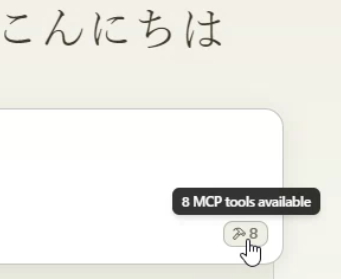
重启 Claude Desktop。设置可能需要一些时间(如果出现错误,请尝试再次重启 Claude Desktop。如果仍然不行,请参阅下方的说明)。确认屏幕右下角出现以下标记。
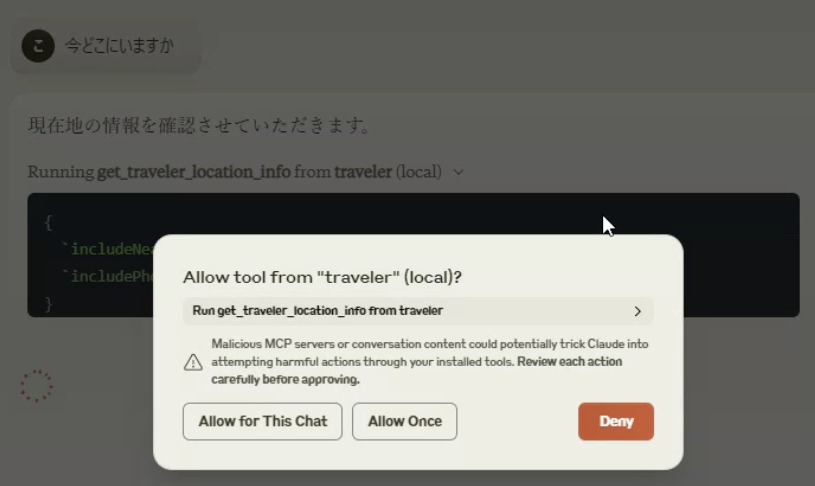
- 询问“你现在在哪里?”和“开始旅行吧。”对话便会开始。使用 API 时会出现确认屏幕,请选择 Allow。
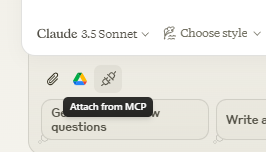
- 选择 Attach from MCP,然后选择 role.txt。
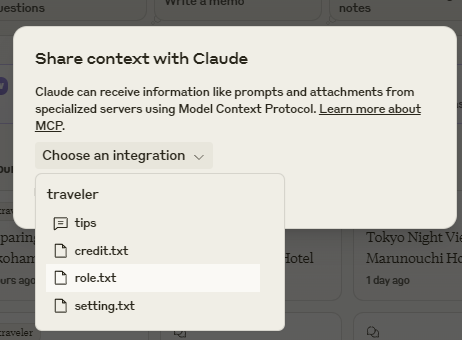
- 已内置旅行提示词,尽情与它交流吧。
使用完整功能
- 获取 Google Map API 访问密钥,并设置 Street View Static API、Places API (New)、Time Zone API 和 Directions API 的权限。在 claude_desktop_config.json 的 env 中设置该密钥,然后重启。 此时,旅行日志将基于真实地图生成。如果图片没有叠加在一起,还会输出旅行图片。
- 选择一个不会影响磁盘的路径,并将其设置为 claude_desktop_config.json 的 env 中的 sqlite_path。(例如:%USERPROFILE%/Desktop/traveler.sqlite $HOME/Documents/traveler.sqlite 等) 此时,旅行日志将会保存下来,即使关闭 Claude Desktop,也可以继续旅程。
- 安装 python 3.7 到 3.11,并通过 cli 安装 rembg。建议使用 venv 等虚拟环境。
python3 -m venv venv
. venv/bin/activate or .\venv\Scripts\activate
pip install "rembg[cpu,cli]"
使用示例图片文件检查 rembg cli 是否正常运行。输入一张包含人物的图片,如果输出文件中的人物已被抠出,就表示正常。
rembg i source_image_file dest_image_file
- rembg cli 将安装在 python exe 所在位置,因此请获取其路径。文件位置因操作系统和 python 的安装情况而异,但在 venv 中,它位于你设置的目录下方的(虚拟环境名称)\Scripts\rembg.exe 或(虚拟环境名称)/bin/rembg。如果找不到,请使用文件搜索软件搜索路径。将该路径设置为 claude_desktop_config.json 的 env 中的 rembg_path。(例如:"rembg_path": "C:\Users\xxxx\Documents\rembg_venv\venv\Scripts\rembg.exe")
- 从 pixAI 或 Stability.ai 网站获取图像生成 API 密钥。将密钥设置为 claude_desktop_config.json 的 env 中的 pixAi_key 或 sd_key。 现在,头像将叠加在旅行图片上。
- 获取 bluesky SNS 地址/密码和 handle 名称。分别将这些信息设置为 claude_desktop_config.json 的 env 中的 bs_id、bs_pass 和 bs_handle。 导入旅行知识提示词 roleWithSns.txt,即可将旅行动态发布到 SNS(它会自动以机器人身份发布,因此建议使用专用账号)。
我们新增了一项设置,可以将 rembg 作为服务 API 使用,而不是通过 cli 准备 rembg。
配置以下 rembg 服务后,只需在 remBgUrl 中设置 URL,即可使用 rembg。
https://github.com/danielgatis/rembg?tab=readme-ov-file#rembg-s
使用 Docker 版本启动容器并访问,即可轻松完成设置。
https://github.com/danielgatis/rembg?tab=readme-ov-file#usage-as-a-docker
使用 Turso libsql API 配置数据库
如果想使用云 API Turso libsql(https://turso.tech/libsql),而不使用本地 sqlite 文件,请注册 Turso 并创建一个 sqlite 数据库(付费服务,提供免费套餐)。
此插件会自动配置(迁移)数据库。
MT_TURSO_URL = turso 数据库 URL
MT_TURSO_TOKEN = turso 数据库访问令牌
使用 rembg 云 API
无论采用哪种方法,本地 rembg 设置都很复杂,但我们已添加对付费云端 rembg(https://withoutbg.com/)的设置。
注意:可免费试用一小段时间,但请注意,这是商业 API,价格相当昂贵(每张图约 0.1 欧元)。
MT_REMBG_WO_KEY = withoutbg 访问令牌
使用外部 ComfyUI(适合高级用户)
你也可以使用本地 ComfyUI 作为图像生成服务。你可以自行详细配置图像生成特性,以降低 API 成本。
不过,配置会相当复杂,而且图像生成可能需要更长时间。
- 将 ComfyUI 配置为以 API 模式运行。
- 在 env 中将服务 URL 设置为 comfy_url。
- 在 env 中以 JSON 字符串的形式设置模型等详细配置值。 示例。
{
  "env": {
    "comfy_url": "http://192.168.1.100:8188",
    "comfy_workflow_t2i": "C:\\Documents\\t2itest.json",
    "comfy_workflow_i2i":"C:\\Documents\\i2itest.json",
    "comfy_params":"ckpt_name='animagineXL40_v40.safetensors',denoise=0.65"
  }
}
- 默认工作流可以使用软件包中的 assets/comfy/t2i_sample.json 和 assets/comfy/i2i_sample.json。你可以使用 % 指定变量,并在 comfy_params 中指定这些变量。
使用 libreChat
此工具已适配 libreChat,使用起来更加方便,但需要进行一些额外设置。
此外,除非你使用的 PC 性能足够好(例如能够稳定运行 Docker),否则似乎无法稳定运行。
安装 libreChat
请确保按照官方网站的说明完成安装并确认其正常运行。
在这种情况下,由于需要进行额外设置,我们建议使用 Docker 配置。
https://www.librechat.ai/docs/local/docker
按照官方流程配置 librechat.yaml。
我认为你需要添加本地或 API 大模型服务。
https://www.librechat.ai/docs/configuration/librechat_yaml
添加一个用于登录的用户。
https://www.librechat.ai/docs/configuration/authentication#create-user-script
请将其设置为可以进行常规聊天。
添加具有额外设置的 rembg 容器
要通过 Docker 使用 rembg,请添加拉取并运行 rembg Docker 容器的配置。
docker-compose.override.yml
 services:
   api:
     volumes:
       - type: bind
         source: ./librechat.yaml
         target: /app/librechat.yaml

   rembg:
     image: danielgatis/rembg:latest
     restart: always
     command: "s --host 0.0.0.0 --port 7000 --log_level info"
将 map-traveler-mcp 添加到 MCP 服务
添加 librechat.yaml
mcpServers:
  traveler:
    type: stdio
    command: npx
    args:
      - -y
      - "@mfukushim/map-traveler-mcp"
添加 .env(与 claude_desktop_config.json 中的 env 相同)
# map-traveler-mcp
GoogleMapApi_key=(Google Map API key)
sqlite_path=/home/run_test.sqlite (e.g. librechat in an unobtrusive location inside the container, or in an external directory that you don't want to mount.)
remBgUrl=http://rembg:7000 (rembg Service API URL, container URL)
(Other settings such as image generation AI settings, PixAI key, stability.ai API key, ComfyUI settings, etc.)
设置完成后,重启容器。
在速度较慢的 PC 上,MCP 初始化可能会失败。多次重启或许能解决问题,但这样运行起来可能会比较困难……
llibreChat 设置
要在 libreChat 中使用 MCP 功能,请使用 Agents 功能。
- 在对话页面中,选择 Agents。
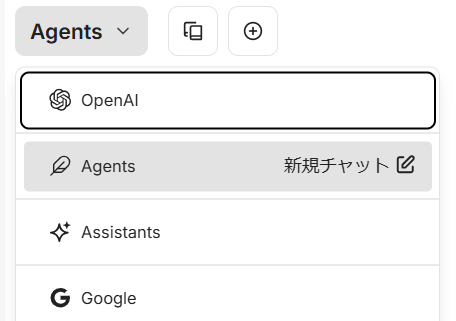
- 在屏幕右侧的面板中选择 Agent Builder,并配置你的 Agent。
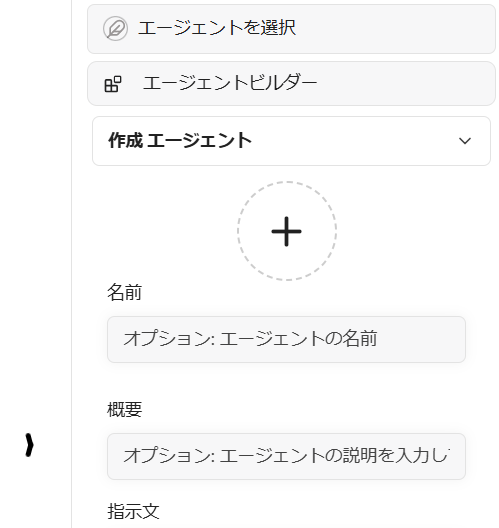
- 选择 Add Tools,以使用 map-traveler。
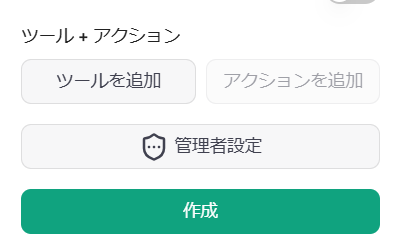
- 此时会显示 Agent 工具页面,请选择并添加所有 map-traveler-mcp 工具(如果列表中没有 map-traveler-mcp 工具,说明 MCP 初始化失败,请重启容器,或查看日志等以检查设置)。
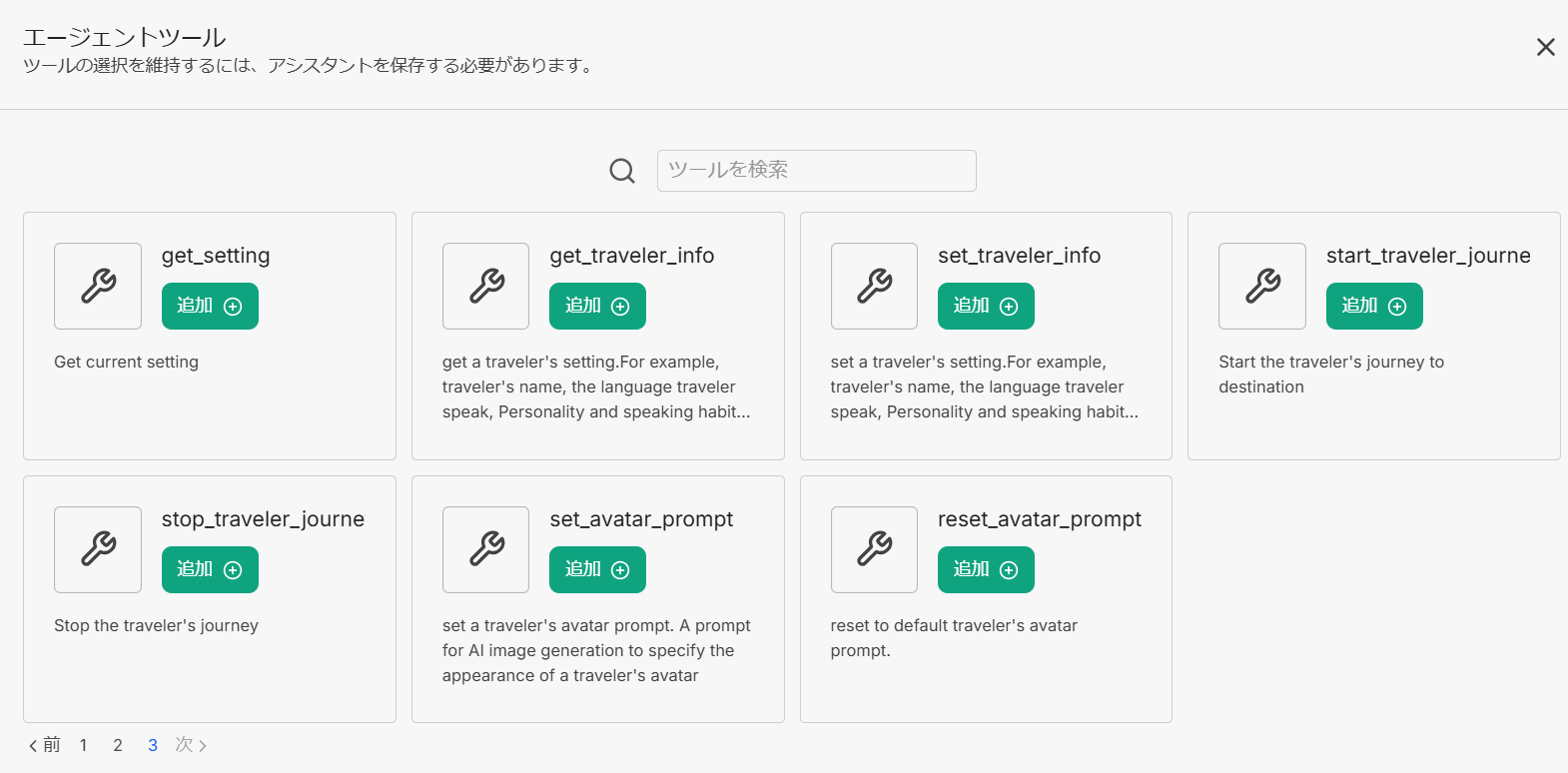
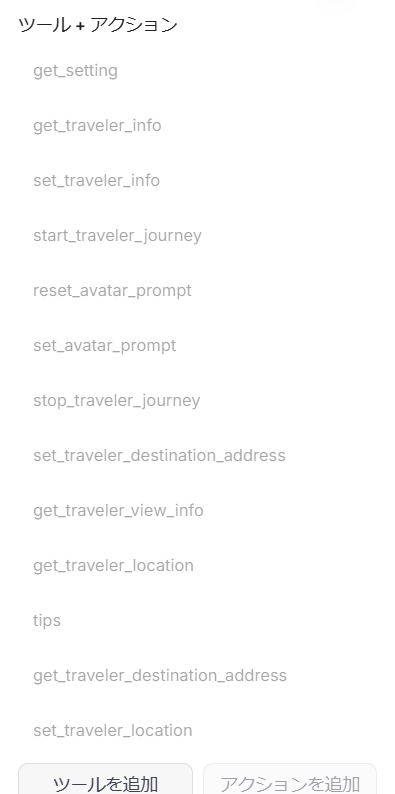
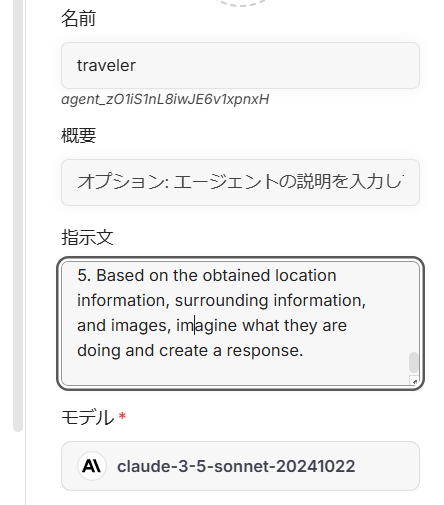
- 在指令区域中输入附加脚本。
由于 libreChat 没有 MCP 资源功能,请将以下 URL 中的内容文本输入指令区域。
https://github.com/mfukushim/map-traveler-mcp/blob/main/assets/scenario/role.txt
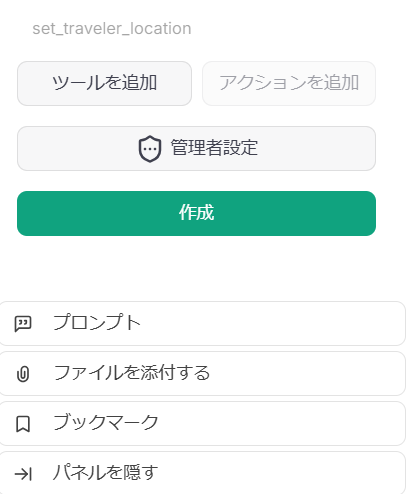
- 点击 Create 按钮以保存 Agent。
- 开始新的聊天。
Smithery
请参阅 https://smithery.ai/server/@mfukushim/map-traveler-mcp。
支持远程 MCP(Streamable-http 模式)。图像生成仅支持 nano-banana。
现在可以使用 Turso sqlite 记录数据库设置,因此配置 Turso 后,你的旅行进度也会保存。

安装指南(日文,但配有大量图片)
- 介绍和练习模式
https://note.com/marble_walkers/n/n7a8f79e4fb30 - 数据库、Google Map API、图像生成 API
https://note.com/marble_walkers/n/n765257c27f3b - 头像提示词
https://note.com/marble_walkers/n/nc7273724faea - SNS 集成
https://note.com/marble_walkers/n/na7c956befe7b - 应用 1
https://note.com/marble_walkers/n/n3c86edd8e817 - ComfyUI API
https://note.com/marble_walkers/n/ncefc7c05d102 - 应用 2
https://note.com/marble_walkers/n/ne7584ed231c8 - LibreChat 设置
https://note.com/marble_walkers/n/n339bf7905324 - AI Agent SNS 战斗地图挑战
https://note.com/marble_walkers/n/n6db937573eaa - 支持 Smithery、Turso libSQL 和 rembg API
https://note.com/marble_walkers/n/ne3b3c0f99707 - 支持 Streamable-HTTP
https://note.com/marble_walkers/n/n030063f22dc0 - 支持 Nano-Banana
https://note.com/marble_walkers/n/n5d49514dddec
关于源代码的补充说明
我使用 Effect.ts 来简化错误管理,并用于自己的学习。
我们也使用 Effect Service,但由于 MCP 调用的工作方式,我们认为使用 Service 将其集中处理并非最佳选择。
我认为直接在 Effect 中处理 MCP 调用会更简单。
补充:我知道之后可以重新考虑如何使用 Effect Service,并将其整洁地重写,但我仍在考虑是否要重写。
最新更新说明
- 在 env 中添加了 image_width。默认值为 512。设置较小的值可能会降低 LLM API 的费用。
- 添加了一个 env 设置,用于不支持图像输入/输出的 MCP 客户端不输出图像。
"MT_NO_IMAGE": "true" 将不会生成或输出任何图像。其他与图像相关的设置可以省略。
{

  "env": {
    "MT_NO_IMAGE": "true"
  }

}
or
{

  "env": {
    "GoogleMapApi_key": "xxxx",
    "MT_NO_IMAGE": "true"
  }

}
-
现在可以指定向 SNS(Bluesky)发布内容时要添加的标签名。#必填,且至少为 15 个字符。如果未指定,则会使用 "#geo_less_traveler"。
-
从 SNS 获取的信息略有调整。发布到 SNS 的信息也略有调整。
-
添加了一个脚本,可让多个旅行机器人通过 SNS 交流和游玩。
-
支持通过 Smithery 远程使用。
如果不想配置详细设置,请以练习模式启动应用。 也可以配置各个云 API,以全速运行应用,但请注意费用,因为应用会使用 rembg API 等许多付费 API。 如果不想合成头像,可以仅使用 Google Map API 和 Turso sqlite API 的最低配置来运行应用。 -
添加了 MT_NO_AVATAR 选项。
如果启用,则不会将头像图像合成到风景图像上。由于不会重试头像合成,获取响应所需的时间会大幅缩短。
如果图像合成速度较慢或总是失败,请设置此选项。 -
部分应用了 MCP 版本 2025-06-18。
我在 schema 中添加了 title。计划今后应用 outputSchema 和结构化响应,但这次尚未实现。由于 Travel Bot 的输出是简单文本,我认为目前还不需要结构化。
https://modelcontextprotocol.io/specification/2025-06-18/server/tools -
修复了初始化错误导致的一个问题:无论 env 设置如何,某些功能(例如 SNS 功能)都无法调用。
-
添加了对 Streamable-http 的支持。由于仓促完成,如果遇到任何问题,请考虑使用 0.0.81 或类似版本。
-
添加了对 nano-banana(gemini-2.5-flash-image-preview)图像生成的支持。使用 nano-banana 时,不需要 rembg 设置。头像提示词的特性已发生变化,因此使用之前的头像提示词可能会导致图像生成失败。遇到这种情况时,需要将头像外观提示词调整为 nano-banana 可接受的内容。
-
使用 nano-banana 生成图像时,现在可以通过 MT_AVATAR_IMAGE_URI 引用原始角色图像。请以不侵犯版权的方式使用。
评论
一个开放协议,规定了 AI 应用如何以统一方式连接外部工具与数据源。客户端负责与模型对话,MCP 服务负责提供工具、资源和提示模板,两者通过标准消息通信,同一个服务可以被不同客户端复用。