
关于 Relay
Relay 是一个 MCP 消息中继,用于在 Claude Desktop 和 Claude Code 之间传递文件、代码与指令,同时保持双方上下文独立。消息原样传递,通常由用户主动获取。
主要功能
- 01在客户端之间发送和获取消息
- 02清空共享消息缓冲区
- 03收到消息时发送系统通知
- 04启动时预览待处理消息
- 05直接访问最新消息
适用场景
- 01将 Desktop 草稿发送给 Code 实现
- 02请 Desktop 审阅 Code 中的代码
- 03在会话间传递错误、配置和指标
MCP 相关
Relay 作为 MCP 服务连接 Claude Desktop 和 Claude Code,提供发送、获取和清空中继消息的工具。它还提供可直接读取最新消息的资源。
配置
本地服务的配置在各客户端中通用,复制后粘贴到客户端的 MCP 配置文件即可。
工具
本地服务需要在你的电脑上运行后才能读取工具,维护者暂未提供工具列表。
详细介绍
Relay
一个极其简单的工具,可在 Claude Desktop 和 Claude Code 之间传递信息——文件、代码、数据、评论、指示等,同时让它们各自的主上下文窗口保持独立。
两个 Claude 都可以自主发送消息——当它们需要另一端提供输入时,只需直接发送即可。收到消息时,你会收到系统通知。准备好后再获取消息。
为什么? Desktop 和 Code 各有所长。Desktop 更适合对话——规划、头脑风暴、审阅和迭代文案。Code 更适合执行——编辑文件、运行命令、排查错误。但它们不会共享上下文。如果你在 Desktop 中起草了内容并希望 Code 实现,或想听听 Desktop 对你正在编写的代码有何看法,就只能在应用之间复制粘贴。
Relay 无需你手动指定问题,也不必在窗口之间复制粘贴,就能将它们连接起来。这是 Anthropic 本应集成的基础功能。
由你掌控。 获取消息通常由用户操作——输入 get 或 /get。模型可以在决定需要另一端提供输入时发送或获取消息,但不会在后台自动同步。不会出现失控的模型间对话耗尽你的 token。
快速示例
[In Desktop]
You:     Send my last error message to Code.
Desktop: [sends via relay]

[notification pops up in Code's terminal]

[In Code]
You:     /get
Code:    Got it. That's from line 47 in parser.py—the regex isn't matching.
         [fixes the bug]
扩展示例
[In Code]
You:     My classifier's stuck at 72% accuracy. Send the
         training config and last epoch's metrics to Desktop.
Code:    [sends config.yaml and metrics via relay]

[System notification appears that a message has been sent to Desktop]

[In Desktop]
You:     /get
Desktop: [fetches config and metrics]
         The loss curve suggests you're underfitting. Learning
         rate 1e-5 is conservative for a model this size...

You:     What would you try?
Desktop: Bump to 3e-5, add warmup steps, and your batch size
         of 8 is small—if memory allows, try 16. Also the
         class imbalance is brutal: 80/15/5 split. Consider
         weighted loss or oversampling the minority classes.

You:     Specify the changes.
Desktop: [sends updated config via relay]

[System notification appears that a message has been sent to Code]

[In Code]
You:     /get
Code:    Got it. Updating config.yaml and adding class weights
         to the loss function.
         [edits files, starts training run]

         Epoch 12: accuracy up to 79%, but precision on
         class 2 dropped. Want Desktop's take?

You:     Yeah, send the confusion matrix.
Code:    [sends via relay]

[In Desktop]
You:     /get
Desktop: Class 2 is getting confused with class 0—they may be
         semantically close. I need more examples.
         [automatically sends request to Code via relay]
用法
在 Desktop 中输入 get,或在 Code 中输入 /get,即可查看另一端发来的消息。这是主要的交互方式。
命令变体:
/get— 获取并执行来自 Desktop 的消息/get status— 显示消息数量和最近活动/get clear— 清除缓冲区中的所有消息/get <message>— 向 Desktop 发送消息
资源访问: 你也可以使用 @relay:messages://latest 直接引用消息。这比 /get 更快,也可在计划模式下使用。
启动预览: Code 启动时,你会看到来自 Desktop 的待处理消息预览。使用 /get 查看完整内容。
发送操作简单且无需明确指示。当你说“问问 Desktop 这样看起来对不对”或“把 README 发给 Code”时,模型会识别你的意图并自动调用 relay。
通知
收到消息时,你会收到系统通知,提醒你查看另一端。无需手动轮询。
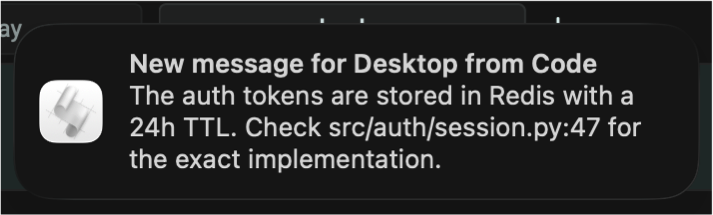
| 平台 | 方式 | 说明 |
|---|---|---|
| macOS | osascript | 原生通知中心 |
| Linux | notify-send | 需要 libnotify |
| Windows | PowerShell toast | 原生 toast 通知 |
声音: 添加 --sound 可启用通知声音。不指定值时,使用平台默认声音;指定值时,使用相应声音:
| 平台 | 默认值 | 自定义示例 |
|---|---|---|
| macOS | blow | --sound tink |
| Linux | freedesktop 消息提示音 | --sound /path/to/sound.oga |
| Windows | 系统默认声音 | --sound ms-winsoundevent:Notification.IM |
通知时长和显示方式由操作系统设置控制。
设计理念
传输,而非记忆。 中继是一个消息总线。它不会总结、压缩、改写或解读消息。没有共享的隐藏上下文、合并的系统提示词或跨 Agent 规划。消息原样传递。这能让各项职责清晰分离,并避免认知污染。
主要由用户控制。 获取消息通常是用户的显式操作(get 或 /get),而非后台进程。这样可以防止上下文失控增长和反馈循环。不过,模型也可以在判断需要对方输入时自主发送或获取消息——系统允许这种行为,但不会鼓励。
界面彼此独立。 Desktop 和 Code 均可独立完整使用。你可以在 Desktop 中长时间对话而不使用 Code,也可以在 Code 中调试数小时而不使用 Desktop。中继会在你需要时连接它们,但不会将它们耦合起来。这也意味着没有 API 费用——两个界面都使用你已有的订阅。
功能范围精简。 中继只做三件事:发送、获取、清除。它不试图提供编排、仲裁、共识或自主行为。这样的克制是有意为之。大多数多 Agent 设计之所以失败,是因为模糊了本应保持清晰的边界。
可自然扩展。 多个 Code 会话可以连接到同一个 Desktop——你可以将消息发往相应的对话。更多使用 MCP 通信的对等端、替代存储后端、按项目划分的缓冲区,以及只读观察者,都可以基于此设计顺畅扩展。
这定义了一种独特的基础设施类型:由人类协调、显式同步的多 Agent 消息总线。
设计说明
中继是全局的。 ~/.relay_buffer.db 中的缓冲区由所有项目共享。Desktop 不知道你正在处理哪个项目,因此按项目隔离并不实用。这是有意为之:一位用户、一台机器、一个中继。
如果你在 Code 中切换项目,中继也会随之使用。上一个项目的旧消息可能仍然存在;如果想重新开始,请使用 /get clear。
大文件处理较慢。 对于一两页长的消息,中继速度很快。对于大文件,直接将文件拖入你要使用的界面会更快。你仍然可以通过中继发送相关上下文。
设置
什么是 uvx? uvx 可以直接运行 Python 包,而无需全局安装。它会自动处理依赖项。如果你还没有安装:curl -LsSf https://astral.sh/uv/install.sh | sh(更多信息请参阅 astral.sh/uv。)
1. 配置 Claude Desktop
将以下内容添加到 Claude Desktop 配置文件中:
- macOS:
~/Library/Application Support/Claude/claude_desktop_config.json - Linux:
~/.config/Claude/claude_desktop_config.json - Windows:
%APPDATA%\Claude\claude_desktop_config.json
{
  "mcpServers": {
    "relay": {
      "command": "uvx",
      "args": ["mcp-server-relay", "--client", "desktop", "--sound"]
    }
  }
}
重启 Claude Desktop,然后告诉它记住以下指令:
记住:当用户单独说“get”或“/get”时,使用 relay_fetch 获取中继中的近期消息。
你可以说“Show me my memory edits.”来确认它是否已记录。
2. 配置 Claude Code
将以下内容添加到项目根目录中的 .mcp.json:
{
  "mcpServers": {
    "relay": {
      "command": "uvx",
      "args": ["mcp-server-relay", "--client", "code"]
    }
  }
}
注意:只有 Desktop 需要 --sound,因为它会处理两端的通知。
3. 安装 /get 命令和启动钩子
uvx mcp-server-relay --setup-code
这会安装 /get 斜杠命令和一个 SessionStart 钩子,以便在 Code 启动时显示待处理的消息。
备选方案:从 GitHub 安装
如果你不想使用 uvx,可以克隆代码库并直接运行:
git clone https://github.com/mhcoen/mcp-relay.git
cd mcp-relay
python -m venv .venv
.venv/bin/pip install -e .
然后在配置文件中使用完整路径:
Claude Desktop(claude_desktop_config.json):
{
  "mcpServers": {
    "relay": {
      "command": "/path/to/mcp-relay/.venv/bin/python",
      "args": ["/path/to/mcp-relay/relay_server.py", "--client", "desktop", "--sound"]
    }
  }
}
Claude Code(.mcp.json):
{
  "mcpServers": {
    "relay": {
      "command": "/path/to/mcp-relay/.venv/bin/python",
      "args": ["/path/to/mcp-relay/relay_server.py", "--client", "code"]
    }
  }
}
将 /path/to/mcp-relay 替换为你实际的克隆位置。
工具
| 工具 | 描述 |
|---|---|
relay_send(message, sender) | 发送消息(sender:“desktop”或“code”) |
relay_fetch(limit, reader, unread_only) | 获取最近的消息,可选择标记为已读 |
relay_clear() | 删除缓冲区中的所有消息 |
技术详情
- 缓冲区:位于
~/.relay_buffer.db的 SQLite - 滚动窗口:最多 20 条消息(优先移除最早的消息)
- 消息大小限制:每条消息 8 KB
- 空闲超时:1 小时(服务在不活动时自动退出)
- 传输方式:stdio(标准 MCP)
- Python:3.9+
作者
Michael Coen — [email protected] · [email protected]
评论
一个开放协议,规定了 AI 应用如何以统一方式连接外部工具与数据源。客户端负责与模型对话,MCP 服务负责提供工具、资源和提示模板,两者通过标准消息通信,同一个服务可以被不同客户端复用。