
关于 context
context 是面向 AI Agent 的本地文档检索 MCP 服务,通过社区注册表或自定义来源提供版本对应的文档。文档下载后存为 SQLite 数据库,可离线查询。
主要功能
- 01检索社区注册表中的文档包
- 02从代码库、目录和网站构建文档包
- 03本地 SQLite 查询
- 04支持离线使用
- 05通过 CLI 安装、管理和分享文档包
适用场景
- 01查询特定版本的库文档
- 02为内部或私有库构建文档包
- 03离线检索本地文档
- 04在团队成员间分享文档包
MCP 相关
作为 MCP 服务,context 可连接兼容的 Agent,按需从注册表获取文档包并在本地查询。也可通过 HTTP 传输运行。
配置
本地服务的配置在各客户端中通用,复制后粘贴到客户端的 MCP 配置文件即可。
工具
本地服务需要在你的电脑上运行后才能读取工具,维护者暂未提供工具列表。
详细介绍
Context
为 AI Agent 提供最新文档——本地、即时、即插即用。




AI Agent 使用的文档已经过时。当库发布新版本时,你的 AI 并不知情——却会信心十足地给出错误答案。
// Your AI, mass-trained on AI SDK v5 docs, will suggest:
import { Experimental_Agent as Agent, stepCountIs } from 'ai';

// But v6 changed the API entirely:
import { ToolLoopAgent } from 'ai';
解决办法不是改进提示词,而是为 AI 提供正确的文档。
工作原理
Context 是一个 MCP 服务,由社区驱动的软件包注册表提供支持,其中已有 100+ 个热门库构建完毕,可供使用。当你的 AI Agent 需要文档时,它会搜索注册表、下载合适的软件包,并在本地查询——所有过程都会自动完成。
只需安装一次、配置一次,之后直接向 AI 提问即可。
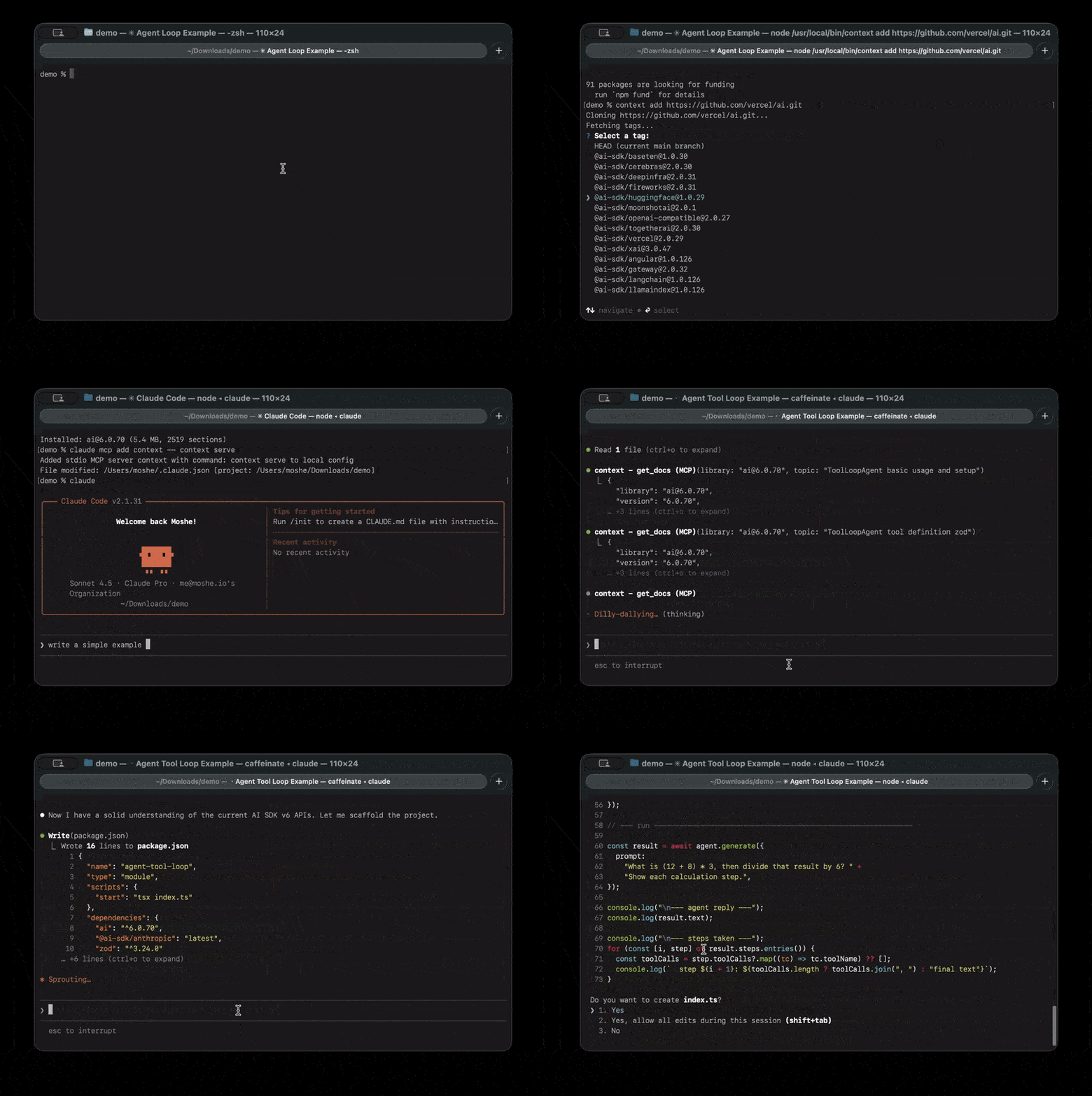

:rocket: 快速开始
1. 安装
npm install -g @neuledge/context
2. 连接到你的 AI Agent
Context 兼容所有 MCP 客户端。选择你的客户端:
Claude Code
claude mcp add context -- context serve
Claude Desktop
添加到配置文件:
- Linux:
~/.config/claude/claude_desktop_config.json - macOS:
~/Library/Application Support/Claude/claude_desktop_config.json - Windows:
%APPDATA%\Claude\claude_desktop_config.json
{
  "mcpServers": {
    "context": {
      "command": "context",
      "args": ["serve"]
    }
  }
}
重启 Claude Desktop 以应用更改。
Cursor
添加到 ~/.cursor/mcp.json(全局)或 .cursor/mcp.json(项目专用):
{
  "mcpServers": {
    "context": {
      "command": "context",
      "args": ["serve"]
    }
  }
}
也可以使用 Settings > Developer > Edit Config,通过界面添加服务。
OpenAI Codex
可以使用命令行
codex mcp add context -- context serve
也可以添加到 ~/.codex/config.toml(全局)或 .codex/config.toml(项目专用):
[mcp_servers.context]
command = "context"
args = ["serve"]
重启 OpenAI Codex 以应用更改。
VS Code(GitHub Copilot)
需要 VS Code 1.102+ 和 GitHub Copilot
添加到工作区中的 .vscode/mcp.json:
{
  "servers": {
    "context": {
      "type": "stdio",
      "command": "context",
      "args": ["serve"]
    }
  }
}
点击文件中出现的 Start 按钮,然后在 Copilot Chat 中使用 Agent 模式。
Windsurf
添加到 ~/.codeium/windsurf/mcp_config.json:
- Windows:
%USERPROFILE%\.codeium\windsurf\mcp_config.json
{
  "mcpServers": {
    "context": {
      "command": "context",
      "args": ["serve"]
    }
  }
}
也可以通过 Windsurf Settings > Cascade > MCP Servers 访问。
Zed
添加到 Zed 的 settings.json(按两次 cmd+, 或 ctrl+,):
{
  "context_servers": {
    "context": {
      "command": {
        "path": "context",
        "args": ["serve"]
      }
    }
  }
}
检查 Agent Panel 设置,确认服务显示绿色指示灯。
Goose
运行 goose configure 并选择 Command-line Extension,或直接添加到 ~/.config/goose/config.yaml:
extensions:
  context:
    type: stdio
    command: context
    args:
      - serve
    timeout: 300
OpenCode
添加到 ~/.config/opencode/opencode.json:
{
  "mcp": {
    "context": {
      "command": ["context", "serve"],
      "enabled": true,
      "type": "local"
    }
  }
}
就是这样。直接提问:
“如何在 Next.js 中创建中间件?”
你的 Agent 会搜索社区注册表,下载文档,并根据准确且特定于版本的信息作答。整个过程会自动完成——对于注册表中的软件包,无需手动运行 context install。
社区注册表
注册表让 Context 即装即用。它是由社区维护、不断增长的文档软件包集合,包含 100+ 个预构建的软件包。可以把它看作专为 AI 就绪文档打造的软件包管理器。
目前提供的热门软件包:
| 类别 | 库 |
|---|---|
| 框架 | Next.js、Nuxt、Astro、SvelteKit、Remix、Hono |
| React 生态系统 | React、React Router、TanStack Query、Zustand、Redux Toolkit |
| 数据库和 ORM | Prisma、Drizzle、Mongoose、TypeORM |
| 样式 | Tailwind CSS、shadcn/ui、Styled Components |
| 测试 | Vitest、Playwright、Jest、Testing Library |
| API 和身份验证 | tRPC、GraphQL、NextAuth.js、Passport |
| AI 和大模型 | LangChain、AI SDK、OpenAI、Anthropic SDK |
任何人都可以贡献。 如果你使用的库尚未列出,提交 PR 将其添加进来——你的贡献能帮助每位 Context 用户。
为什么选择本地运行?
Context 完全在你的计算机上运行。文档只需下载一次,就会作为精简的 SQLite 数据库存储在 ~/.context/packages/ 中。此后,一切都在本地完成。
- 快速 — 本地 SQLite 查询可在 10ms 内返回
- 离线 — 坐飞机、在咖啡馆或身处任何地方都能使用
- 私密 — 你的查询不会离开你的计算机
- 免费 — 无订阅、无速率限制、无使用上限
- 可靠 — 不会中断、没有 API 变更,也不会关闭服务
不止于注册表
注册表涵盖了热门的开源库,但 Context 也适用于任何文档来源。使用 context add,从私有仓库、内部库、带有 llms.txt 的网站,或尚未列入注册表的任何内容构建软件包。
# Build from a git repository
context add https://github.com/your-company/design-system

# Build from a local directory
context add ./my-project

# Specific version tag
context add https://github.com/vercel/next.js/tree/v16.0.0

# Build from a website's llms.txt
context add https://svelte.dev
构建完成后,可与团队共享软件包——它们是可移植的 .db 文件,可立即安装:
# Export a package
context add ./my-project --name my-lib --pkg-version 2.0 --save ./packages/

# Teammate installs it (no build step needed)
context add ./packages/[email protected]
重建和安装时,会在目标位置旁暂存替换文件,然后关闭并验证该文件,再替换已安装的软件包。如果构建、下载或替换失败,之前的软件包仍可使用。软件包发现过程会排除临时文件。如果操作系统阻止替换已打开的文件(例如在 Windows 上),请关闭读取器,然后重试安装。
:whale: Docker
将 Context 作为容器化 HTTP 服务运行,以支持多客户端或 Kubernetes 部署:
# Run from the repository root (required for the monorepo lockfile)
docker build -t context:local -f packages/context/Dockerfile .
docker run --rm -p 8080:8080 context:local
容器会在端口 8080 上通过 HTTP 传输启动 Context,可通过 http://localhost:8080/mcp 访问。该镜像采用多阶段构建,并使用 node:22-bookworm-slim 以确保原生模块兼容性。
:books: CLI 参考
context browse <package>
搜索注册表服务上可用的软件包。
# Browse by registry/name
context browse npm/next

# Output:
#   npm/[email protected]           3.4 MB  The React Framework for the Web
#   npm/[email protected]           3.2 MB  The React Framework for the Web
#   ...
#
#   Found 12 versions. Install with: context install npm/next

# Browse with just a name (defaults to npm)
context browse react
context install <registry/name> [version]
从注册表服务下载并安装预构建的软件包。
# Install latest version
context install npm/next

# Install a specific version
context install npm/next 15.0.4

# Install from other registries
context install pip/django
context add <source>
从源构建并安装文档包。适用于注册表中没有的库,或私有/内部文档。系统会自动检测源类型。
从 Git 仓库添加:
支持 GitHub、GitLab、Bitbucket、Codeberg 或任何 Git URL:
# HTTPS URLs
context add https://github.com/vercel/next.js
context add https://gitlab.com/org/repo
context add https://bitbucket.org/org/repo

# Specific tag or branch
context add https://github.com/vercel/next.js/tree/v16.0.0

# SSH URLs
context add [email protected]:user/repo.git
context add ssh://[email protected]/user/repo.git

# Custom options
context add https://github.com/vercel/next.js --path packages/docs --name nextjs
从本地目录添加:
从本地文件夹中的文档构建软件包:
# Auto-detects docs folder (docs/, documentation/, doc/)
context add ./my-project

# Specify docs path explicitly
context add /path/to/repo --path docs

# Custom package name and version
context add ./my-lib --name my-library --pkg-version 1.0.0
| 选项 | 描述 |
|---|---|
--pkg-version <version> | 自定义版本标签 |
--path <path> | 仓库/目录中文档文件夹的路径 |
--name <name> | 自定义软件包名称 |
--save <path> | 将软件包副本保存到指定路径 |
保存软件包以供分享:
# Save to a directory (auto-names as [email protected])
context add https://github.com/vercel/next.js --save ./packages/

# Save to a specific file
context add ./my-docs --save ./my-package.db
从网站(llms.txt)添加:
许多网站会发布 llms.txt 文件,提供适用于 AI 的文档。Context 会自动检测并获取该文件。如果网站只提供 llms.txt(链接索引,而非内联的 llms-full.txt),Context 会跟随其中的每个链接并获取对应文档:
# Auto-fetches llms-full.txt or llms.txt from the site
context add https://svelte.dev
context add https://mui.com/material-ui

# Direct URL to a specific llms.txt file
context add https://svelte.dev/docs/svelte/llms.txt

# Custom package name
context add https://react-aria.adobe.com --name react-aria
对于你拥有付费账号的平台上的订阅专享内容,请参阅下文的 context auth。
从任意 URL 添加(博客文章、文章、原始 Markdown):
如果没有找到 llms.txt,Context 会改为直接获取页面。HTML 页面会经过可读性提取器(defuddle)处理,以免订阅 CTA、导航和评论组件被打包进去:
# A blog post
context add https://overreacted.io/things-i-dont-know-as-of-2018/

# Raw Markdown from GitHub
context add https://raw.githubusercontent.com/neuledge/context/main/README.md --name context-readme
从 URL 添加:
context add https://cdn.example.com/[email protected]
从本地文件添加:
context add ./[email protected]
查找合适的文档仓库:
许多热门项目会将文档存放在与主代码库分开的仓库中。如果你看到“找到的章节较少”的警告,文档可能存放在其他位置:
# Example: React's docs are in a separate repo
context add https://github.com/facebook/react
# ⚠️  Warning: Only 45 sections found...
# The warning includes a Google search link to help find the docs repo

# The actual React docs repository:
context add https://github.com/reactjs/react.dev
文档仓库常见命名模式:
project-docs(例如,prisma/docs)project.dev或project.io(例如,reactjs/react.dev)project-website(例如,expressjs/expressjs.com)
当 CLI 检测到文档章节较少时,会显示 Google 搜索链接,帮助你找到正确的仓库。
context list
显示已安装的软件包。
$ context list

Installed packages:

  [email protected]              4.2 MB    847 sections
  [email protected]              3.9 MB    790 sections
  react@18                 2.1 MB    423 sections

Total: 3 packages (10.2 MB)
同一软件包的多个版本可以并列安装;每个名称下都会按从新到旧的顺序列出版本。不指定版本的软件包名称(context query react、context serve --libs react)会使用已安装的最高版本。
context remove <name>
移除软件包。传入 name@version 可移除特定版本。仅当某个软件包只安装了一个版本时,才能只传入名称;否则命令会列出已安装的版本并让你选择,以免误删。
context remove nextjs
context remove [email protected]
context auth
存储各平台的 Cookie 或请求头,以便 context add <url> 获取你拥有合法账号的平台上的订阅专享内容(例如,付费 Substack 或 Medium 订阅)。凭据会以 0600 权限存储在 ~/.context/auth.json 中,并按域名匹配(对子域名会回退匹配一级父域名)。
# Store cookies for a domain
context auth add substack.com --cookies "substack.sid=YOUR_SID"

# Add a custom header too
context auth add medium.com --cookies "sid=..." --header "x-frontend: web"

# List configured auth
context auth list

# Remove auth
context auth remove substack.com
context serve
启动 MCP 服务(供 AI Agent 使用)。
# Stdio transport (default, for single-client MCP integrations)
context serve

# HTTP transport (for multi-client access over the network)
context serve --http
context serve --http 3000
context serve --http 3000 --host 0.0.0.0

# Restrict the session to a subset of installed packages
context serve --libs react [email protected]
| 选项 | 描述 |
|---|---|
--http [port] | 以 HTTP 服务而非 stdio 方式启动(默认端口:8080) |
--host <host> | 绑定的主机(默认:127.0.0.1) |
--libs <names...> | 将会话限制为一组固定的已安装库。每个条目可以是名称(react,公开所有已安装版本),也可以是 name@version([email protected],仅公开该版本)。设置此选项后,search_packages 和 download_package 将被隐藏,因此会话仅限于该列表。适用于全局安装了许多软件包时按项目限定范围。 |
HTTP 传输使用 MCP Streamable HTTP 协议,允许本地网络中的多个客户端连接到同一个服务实例。端点地址为 http://<host>:<port>/mcp。
stdio 会话会自动重新加载。当 stdio context serve 处于连接状态时,单独执行 context add 或 context remove 会更新服务已安装的软件包列表,并刷新 get_docs 工具,因此已连接的 MCP 客户端无需重新连接或重启服务,即可通过 tools/list_changed 通知获取更改。此实时重新加载仅适用于 stdio:使用 --http 启动的 HTTP 服务不会监视软件包目录,因此 CLI 添加或移除软件包后,需要重启服务才能看到更改。
context query <library> <topic>
直接从命令行查询文档,适用于测试和调试。
# Query a package (use name@version format from 'context list')
context query '[email protected]' 'middleware authentication'

# A bare name queries the highest installed version
context query nextjs 'middleware authentication'

# Returns the same JSON format as the MCP get_docs tool
主题是按字面匹配的关键词,多个关键词之间为 AND 关系。标点符号会分隔单词,
因此可以直接使用 ExecStart=、systemctl --user 和 spring.main.banner-mode。
下划线会保留在单词中,因此 spring_boot 会匹配该标识符,而不是两个分开的单词。
AND、OR、NOT 和 NEAR 等词会作为文本进行搜索;
不支持高级 FTS 语法。
使用成对的双引号搜索短语,例如
context query nextjs '"server components" rendering'。短语中的词必须按顺序相邻出现,并遵循通常的搜索词干提取规则。未配对的双引号会被忽略,其余单词会作为关键词进行搜索。空主题或仅包含标点符号的主题不会返回结果。这些规则同样适用于 MCP get_docs。
:gear: 架构
┌─────────────────────────────────────────────────────────┐
│                     Your Machine                        │
│                                                         │
│  ┌──────────┐    ┌──────────────────┐    ┌────────────┐ │
│  │    AI    │    │   Context MCP    │    │ ~/.context │ │
│  │  Agent   │───▶│     Server       │───▶│  /packages │ │
│  │          │    │                  │    └────────────┘ │
│  └──────────┘    └────────┬─────────┘         │         │
│                           │            ┌──────────┐     │
│                           │            │  SQLite  │     │
│                           │            │   FTS5   │     │
│                           │            └──────────┘     │
└───────────────────────────┼─────────────────────────────┘
                            │ (first use only)
                            ▼
                   ┌────────────────┐
                   │   Community    │
                   │   Registry     │
                   └────────────────┘
首次查询某个库时:
- MCP 服务搜索社区注册表
- 下载预构建的文档软件包(SQLite
.db文件) - 将其存储在本地的
~/.context/packages/
之后每次查询时:
- FTS5 全文搜索会在本地查找相关章节
- 智能筛选会将结果控制在令牌预算范围内
- AI 会在 10 毫秒内获得重点明确、准确的文档
:question: 常见问题
我可以将 Context 用于 Spring Boot、Django 或 Rails 等非 JavaScript 框架吗?
可以! Context 与语言无关。它原生支持 Markdown(.md、.mdx)、AsciiDoc(.adoc)、reStructuredText(.rst)和 HTML — 无需转换。
# Python - FastAPI (Markdown)
context add https://github.com/fastapi/fastapi --path docs/en/docs

# Python - Django (reStructuredText)
context add https://github.com/django/django --path docs

# Java - Spring Boot (AsciiDoc)
context add https://github.com/spring-projects/spring-boot --path spring-boot-project/spring-boot-docs/src/docs

# Rust - The Rust Book
context add https://github.com/rust-lang/book --path src
使用 --path 将文档文件夹指定给 Context,剩下的工作由它处理。
我可以为新的生态系统贡献软件包定义吗?
可以!registry/ 目录包含按软件包管理器分类的 YAML 定义:
registry/npm/— JavaScript/TypeScript(Next.js、React、Tailwind 等)registry/pip/— Python(FastAPI、Flask、Django、Pydantic)registry/maven/— Java(Spring Boot、JUnit、Micrometer)registry/go/— Go 模块,按完整模块路径组织(Cobra)
要添加软件包,请创建一个 YAML 文件。支持两种来源类型:
Git 来源 — 按版本标签克隆仓库:
# registry/pip/my-library.yaml
name: my-library
description: "Short description of the library"
repository: https://github.com/org/my-library

versions:
  - min_version: "2.0.0"
    source:
      type: git
      url: https://github.com/org/my-library
      docs_path: docs
    tag_pattern: "v{version}"
ZIP 来源 — 从 URL 下载 HTML 文档(支持 {version} 占位符):
# registry/python/python.yaml
name: python
description: "Python programming language official documentation"

versions:
  - versions: ["3.14", "3.13", "3.12"]
    source:
      type: zip
      url: "https://docs.python.org/3/archives/python-{version}-docs-html.zip"
      docs_path: "python-{version}-docs-html"
      exclude_paths:
        - "whatsnew/**"
        - "changelog.html"
支持 npm、PyPI、Maven Central、Hex 和 Go 模块代理的版本发现。示例请参见现有定义。
:wrench: 开发
# Install dependencies
pnpm install

# Build
pnpm build

# Test
pnpm test

# Lint
pnpm lint
:page_facing_up: License
评论
一个开放协议,规定了 AI 应用如何以统一方式连接外部工具与数据源。客户端负责与模型对话,MCP 服务负责提供工具、资源和提示模板,两者通过标准消息通信,同一个服务可以被不同客户端复用。