
关于 Linux MCP daemon (mcpd)
Linux MCP Daemon(mcpd)是基于 Go 的 MCP 服务,让 AI Agent 通过类型化工具而非 Shell 检查和管理 Linux 主机。它支持按调用隔离工作进程,并配置分级权限与审计。
主要功能
- 01检查进程、内存、磁盘和服务
- 02管理文件并读取系统日志
- 03按用户和工具授予权限
- 04每次调用使用独立工作进程
- 05记录调用参数与结果
适用场景
- 01诊断 Linux 主机性能问题
- 02不使用 SSH Shell 检查服务和日志
- 03限制 Agent 可执行的特权操作
- 04审计 Agent 在服务器上的活动
MCP 相关
通过 HTTPS 上的 SSE 和 JSON-RPC 暴露 Linux 系统工具与资源。MCP 客户端使用 Bearer Token 认证,权限按用户和工具配置。
配置
远程服务无需本地安装。选择你使用的客户端,复制配置或使用一键安装。
https://{host}:9091/sseclaude mcp add --transport sse nucleusv-linux-mcp-daemon https://{host}:9091/sse{"mcpServers":{"nucleusv-linux-mcp-daemon":{"type":"sse","url":"https://{host}:9091/sse"}}}在 Cursor 中打开{"servers":{"nucleusv-linux-mcp-daemon":{"type":"sse","url":"https://{host}:9091/sse"}}}在 VS Code 中打开{"mcpServers":{"nucleusv-linux-mcp-daemon":{"type":"sse","url":"https://{host}:9091/sse"}}}{"mcpServers":{"nucleusv-linux-mcp-daemon":{"serverUrl":"https://{host}:9091/sse"}}}命令在终端中运行;JSON 粘贴到对应客户端的 MCP 配置后重启。需要授权的服务会在首次连接时提示登录。
https://{host}:9091/sse需要授权工具
详细介绍

Linux MCP 守护进程




一个基于 Go 构建的高性能 Model Context Protocol(MCP)守护进程(mcpd),旨在安全地将 AI Agent 直接连接到 Linux 操作系统。
概述
本项目采用零依赖(以内核为先)的理念。它允许 AI Agent 直接通过原始系统调用和虚拟文件系统(/proc、/sys)检查并操作主机 Linux 系统,无需臃肿的第三方解析库。
AI Agent 与守护进程之间通过服务器发送事件(SSE)和 HTTPS 上的 JSON-RPC 直接通信,使用端口 9091(默认启用 TLS,首次启动时会生成自签名证书)。
为什么要用
帮助运行服务器的 AI Agent 需要查看服务器状态——负载、内存、磁盘、进程、服务、日志、网络——有时还需要对其执行操作。通常的做法是使用 SSH shell,而 shell 什么都能做:可以运行任何命令、访问账户能访问的任何文件;使用 sudo 时就拥有全部 root 权限,而且事后很难查明做过什么。mcpd 为 Agent 提供有类型的工具,而不是 shell:
- 无需 shell 即可诊断。“网站为什么变慢了?”——
processes/top、memory/usage、disks/usage、logs/journal-control、logs/dmesg、network/connections、services/list都能给出答案,并提供结构化输出(json/yaml),Agent 无需从top或df的输出中提取信息。 - **逐个工具授予 root 权限,而非整个会话。**用户以各自的操作系统账户运行每个工具;在
mcp-sudo.yaml中逐个工具授予 root 权限,并通过路径、网络目标和 sysctl 键加以限制——例如“可用 root 权限读取/var/log并重启服务”,而不是“拥有 root 权限”。 - **一个 Agent、一个账户、一个令牌。**每个 Agent 都有自己的用户,每次调用都会记录用户、工具、参数(敏感信息会隐藏)和结果——留下 Agent 操作的审计记录。
- **小巧且独立。**一个静态 Go 二进制文件,直接读取
/proc、/sys,并通过 D-Bus 与 systemd 通信;可运行在裸机、Docker 或 Kubernetes 中,而linuxctl则通过类似 kubectl 的命令行向用户提供相同的工具。
**谨慎授予权限。**授予 root 权限,意味着 Agent 在遵循其读取内容中指令时拥有 root 权限。一些看起来范围很窄的授权实际上等同于完整的 root 权限(写入
/etc、services/manage、写入 sysctl)。授予任何权限前,请阅读权限与风险。
工作原理
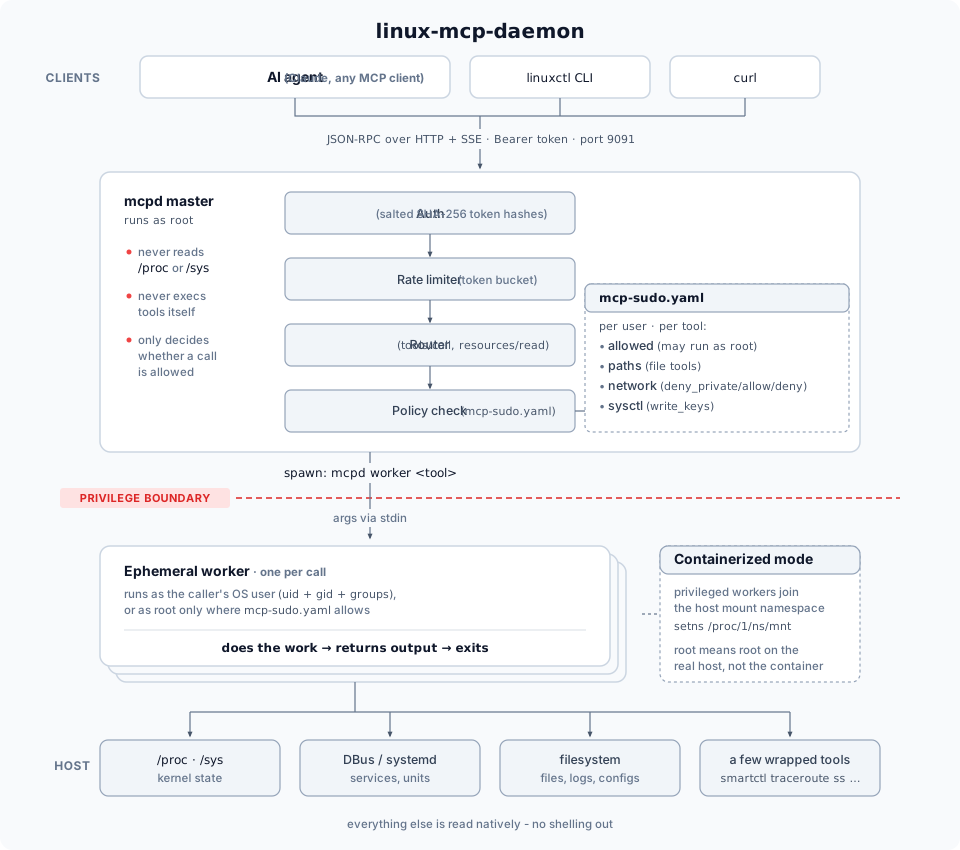
- 每次工具/资源调用都会启动一个全新的工作进程,并在调用后退出。 每次调用都不会保留长期状态——
internal/worker/spawner.go会以worker模式重新执行mcpd二进制文件本身(参数通过 stdin 传入,绝不使用 argv),并设置syscall.Credential{Uid, Gid, Groups},其值来自通过user.Lookup()查找的真实操作系统账户。这才是真正的权限隔离,并非配置标志:非特权用户的工作进程与特权用户的工作进程具有不同的 Linux UID。 configs/mcp-sudo.yaml决定是否针对特定用户和工具认可privileged: true。 资源有两种专门的授权(参见ARCHITECTURE.md的注意事项部分)——一种针对资源 URI 本身,另一种针对其背后的内部工作进程工具名称。- 当
mcpd在容器中运行时(configs/daemon.yaml中设置worker.containerized: true,这是本项目实际采用的 Kubernetes 部署方式),特权工作进程也会加入真实主机的挂载命名空间(对/proc/1/ns/mnt调用setns(CLONE_NEWNS),无需外部nsenter二进制文件)——因此,privileged: true表示在真实主机上以 root 身份运行,而不只是在守护进程自己的容器镜像中以 root 身份运行。 - Bearer 令牌在
users.yaml中经过加盐和哈希处理(token_salt+token_hash,使用sha256,并通过恒定时间比较;文件权限为0600),不会以明文存储。用户和授权只能在本地通过主机上的linuxctl <verb> mcpd user和linuxctl edit mcpd config进行编辑(采用类似visudo的方式验证)——没有 MCP 工具可以编辑这些内容,因此仅持有 Bearer 令牌的对象无法为自己授予任何权限。运行中的守护进程通过daemon/reload-config应用更改,无需重启;该命令只会重新读取文件,并拒绝无效文件(参见守护进程用户管理)。 - 每次读取都由架构定义驱动,而非手动列出。 每次调用时,
linuxctl都会从运行中的守护进程获取tools/list/resources/list/resources/templates/list,并据此解析其<verb> <group> [keyword]语法——服务端一旦添加新工具,客户端无需更改任何代码即可立即使用。
功能
- 直接与 AI 交互: 通过 HTTP/SSE 传输方式,实现 Agent 与守护进程的即时通信。
- 严格安全: 速率限制、加盐哈希 Bearer 令牌身份验证,以及目录遍历防护。
- 权限分离: 主守护进程以 root 身份运行,并根据
configs/mcp-sudo.yaml中定义的规则启动临时非特权/特权工作进程。 - 高性能: 使用
singleflight去重和 TTL 缓存,高效获取系统信息。 - 支持 Docker 和 Kubernetes: 完全容器化,采用多阶段 Docker 构建和 Kubernetes 部署清单,可安全地检查主机信息。
快速开始
在 Linux 上安装(systemd)
curl -fsSL https://raw.githubusercontent.com/nucleusv/linux-mcp-daemon/main/scripts/install.sh | sudo bash
需要在 amd64/arm64 主机上使用 sudo 和 curl(在精简的 ubuntu/debian 容器中:运行 apt update && apt install -y curl ca-certificates,然后以 root 身份将内容通过管道传给 bash)。此操作会下载适用于你架构(amd64/arm64)的最新版本,验证其 sha256 校验和,将 mcpd 和 linuxctl 安装到 /usr/local/bin,将干净的配置文件写入 /etc/mcpd/configs(不包含默认用户或令牌),创建首个用户 mcp 并仅显示一次其令牌,然后启动 mcpd systemd 服务。接下来:
export MCP_SERVER=https://127.0.0.1:9091
export MCP_TLS_FINGERPRINT=<printed by the installer>
export MCP_TOKEN=<token printed by the installer>
linuxctl get system os-release
linuxctl get processes top
- 升级: 再次运行相同的命令即可——保留配置,且仅在
mcpd发生变化时重启服务。从 v0.1.0 起,请为首个用户授予一次daemon/reload-config权限——参见升级。 - 固定版本/指定用户名:
... | sudo bash -s -- --version v0.1.0 --user alice - 添加更多用户: 每个用户都需要一个同名的 OS 账户——参见添加更多用户。
- 卸载:
... | sudo bash -s -- --uninstall(添加--purge可删除/etc/mcpd;mcpOS 账户会保留——运行sudo userdel -r mcp删除) - 软件包: 每个发布版本均提供适用于 amd64/arm64 的
.deb和.rpm——运行sudo apt install ./linux-mcp-daemon_<version>_amd64.deb或sudo dnf install ./linux-mcp-daemon-<version>-1.x86_64.rpm,然后按照其显示的后续步骤操作。 - 容器镜像:
ghcr.io/nucleusv/linux-mcp-daemon(amd64/arm64)——设置步骤见安装文档。 - macOS(仅 CLI): 同一脚本只会安装
linuxctl——运行curl -fsSL .../install.sh | bash -s -- --bin-dir ~/.local/bin,然后运行export PATH="$HOME/.local/bin:$PATH"(~/.local/bin不在 macOS 的默认 PATH 中)——用于控制远程 mcpd。
mcpd 通过 TLS 在所有接口上监听(首次启动时会创建自签名证书;客户端会固定其指纹)。默认禁用纯 HTTP——Bearer 令牌会以明文传输。工具的 root 权限在
mcp-sudo.yaml中按用户和工具分别授予。
完整指南:安装 · 连接 AI Agent · mcp-sudo.yaml
开发:从源代码构建
1. 构建并部署服务端(mcpd)
-
构建 Docker 镜像:
./scripts/build.sh -
部署到本地 Kubernetes 集群:
./scripts/deploy.sh
2. 构建客户端(linuxctl)
你可以直接在主机上构建 CLI 客户端(例如 macOS):
./scripts/build-cli.sh                  # writes executables/linuxctl
export PATH="$PWD/executables:$PATH"   # so the examples below run as written
通过发布版本(install.sh、.deb/.rpm)安装后,linuxctl 已位于你的 PATH 中。
3. 用法(本地开发)
守护进程在端口 9091 上运行。你可以通过 SSE 使用 AI 客户端连接,也可以使用 linuxctl CLI 工具:
# Set your token as an environment variable
export MCP_TOKEN="your_token_here"

# Ping the daemon
linuxctl ping
linuxctl 使用精简的动词/分组语法(linuxctl <verb> <group> [target-keyword] [args]),并从运行中的守护进程动态发现所有工具和资源——无需维护独立的客户端命令列表来保持同步。完整参考:linuxctl 文档或 man linuxctl。下方每个示例都展示两种形式:linuxctl,以及它解析为的原始 MCP JSON-RPC curl 调用——包含每个工具/资源这两种形式的完整参考,请参见 MCP API 文档。
使用 curl 直接调用 API
mcpd 使用 HTTP + SSE 传输 JSON-RPC 2.0,而非普通的请求/响应式 HTTP——每次调用都要进行两步握手:打开 SSE 流以获取一次性 POST 端点,然后向该端点 POST JSON-RPC 请求(实际结果会通过 SSE 连接流回,而不是包含在 POST 的响应正文中):
# 1. Open the SSE stream in the background and capture the endpoint it prints
curl -N -s --cacert mcpd.crt -H "Authorization: Bearer $MCP_TOKEN" https://localhost:9091/sse &
# server sends: event: endpoint / data: /message?session_id=...

# 2. POST a request to that endpoint
curl -s --cacert mcpd.crt -X POST "https://localhost:9091/message?session_id=<from step 1>" \
  -H "Authorization: Bearer $MCP_TOKEN" \
  -H "Content-Type: application/json" \
  -d '{"jsonrpc": "2.0", "id": "1", "method": "tools/list"}'

# 3. Watch the SSE stream from step 1 for the matching "id": "1" response
以下每个示例都遵循这一固定模式——只有 -d 负载会变化。
文件
# List a directory, as a table (get is the sole read verb - one result or many, same as kubectl)
$ linuxctl get files list /var/log --output table
MODIFIED              NAME               SIZE     IS_DIR
2026-09-22 18:38:14   alternatives.log   6522     false
2026-09-22 18:38:10   apt                4096     true
...
curl -s -X POST "$ENDPOINT" -H "Authorization: Bearer $MCP_TOKEN" -H "Content-Type: application/json" \
  -d '{"jsonrpc":"2.0","id":"1","method":"tools/call","params":{"name":"files/list","arguments":{"path":"/var/log","output_format":"table"}}}'
# Read a single file's contents (bare - no keyword needed, files' only other read candidate)
linuxctl get files /etc/hosts
curl -s -X POST "$ENDPOINT" -H "Authorization: Bearer $MCP_TOKEN" -H "Content-Type: application/json" \
  -d '{"jsonrpc":"2.0","id":"1","method":"tools/call","params":{"name":"files/read","arguments":{"path":"/etc/hosts"}}}'
资源(直接通过 URI)
# Read a static resource directly by URI (resource URIs always use scheme://path)
$ linuxctl resource os://uname
Sysname: Linux
Nodename: desktop-control-plane
Release: 7.0.12-linuxkit
...
curl -s -X POST "$ENDPOINT" -H "Authorization: Bearer $MCP_TOKEN" -H "Content-Type: application/json" \
  -d '{"jsonrpc":"2.0","id":"1","method":"resources/read","params":{"uri":"os://uname"}}'
磁盘
# Native partition geometry - parsed from /sys/class/block, no fdisk dependency
linuxctl get disks partitions vda --output json
curl -s -X POST "$ENDPOINT" -H "Authorization: Bearer $MCP_TOKEN" -H "Content-Type: application/json" \
  -d '{"jsonrpc":"2.0","id":"1","method":"tools/call","params":{"name":"disks/partitions","arguments":{"device":"vda","output_format":"json"}}}'
# Run a privileged tool (requires a root rule in configs/mcp-sudo.yaml)
linuxctl get disks free / --privileged true
curl -s -X POST "$ENDPOINT" -H "Authorization: Bearer $MCP_TOKEN" -H "Content-Type: application/json" \
  -d '{"jsonrpc":"2.0","id":"1","method":"tools/call","params":{"name":"disks/free","arguments":{"path":"/","privileged":true}}}'
进程:单个结果与多个结果,以及详细信息
# Same underlying tool - bare form lists many, a specific PID filters to one
linuxctl get processes --sort_by mem --limit 5
linuxctl get processes 1234
curl -s -X POST "$ENDPOINT" -H "Authorization: Bearer $MCP_TOKEN" -H "Content-Type: application/json" \
  -d '{"jsonrpc":"2.0","id":"1","method":"tools/call","params":{"name":"processes/list","arguments":{"pid":1234}}}'
# Rich aggregated detail (combines several reads, excludes secret-shaped data like environ)
linuxctl describe processes 1234
# describe aggregates multiple resources/read calls client-side - e.g. one of them:
curl -s -X POST "$ENDPOINT" -H "Authorization: Bearer $MCP_TOKEN" -H "Content-Type: application/json" \
  -d '{"jsonrpc":"2.0","id":"1","method":"resources/read","params":{"uri":"process://1234/status"}}'
日志(仅限主机的工具;容器化部署需要设置 privileged: true)
# journalctl only exists on the host, never in this daemon's own image
linuxctl get logs journal --unit kubelet.service --boot true --privileged true
curl -s -X POST "$ENDPOINT" -H "Authorization: Bearer $MCP_TOKEN" -H "Content-Type: application/json" \
  -d '{"jsonrpc":"2.0","id":"1","method":"tools/call","params":{"name":"logs/journal-control","arguments":{"unit":"kubelet.service","boot":true,"privileged":true}}}'
更改操作(服务、内核)
linuxctl restart system services nginx.service --privileged true
linuxctl update  kernel sysctl net.ipv4.ip_forward 1 --privileged true
curl -s -X POST "$ENDPOINT" -H "Authorization: Bearer $MCP_TOKEN" -H "Content-Type: application/json" \
  -d '{"jsonrpc":"2.0","id":"1","method":"tools/call","params":{"name":"services/manage","arguments":{"service":"nginx.service","action":"restart","privileged":true}}}'
Docker(读取、生命周期、执行)
通过其套接字与 Docker Engine API 通信——无需 docker CLI。每个 docker/* 工具都需要在 mcp-sudo.yaml 中单独授权;名称中指定容器的工具还需要设置 containers: 列表,这样 Agent 只能操作你列出的容器。
linuxctl get docker containers --all true          # running and stopped
linuxctl get docker images
linuxctl get docker network bridge                 # one network's full configuration
linuxctl get docker container web-1 status         # computed runtime summary (state, health, uptime, limits)
linuxctl resource docker-container://web-1/stats   # the same templates by URI: docker-container://, docker-image://, docker-volume://, docker-network://
linuxctl get docker logs web-1 --lines 50

# needs docker/manage and docker/exec grants that list web-1
linuxctl restart docker web-1
linuxctl exec docker web-1 ls /usr/share/nginx/html
linuxctl exec docker web-1 -- ls --color /etc      # after `--` everything goes to the container as-is
Crontab
使用 crontab 命令自身的规则读取、列出和替换 crontab(cron.allow/cron.deny 仍然适用)。写入 crontab 会以该用户身份安排命令,且任务在会话结束和令牌撤销后仍会继续运行——授权前请阅读 crontab 风险。
linuxctl get crontabs                                  # my own crontab, exactly as `crontab -l` prints it
linuxctl update crontabs --content "$(cat mycron.txt)" # replace my whole crontab
linuxctl edit crontabs                                 # open it in $EDITOR, write back if unchanged meanwhile

# another user's crontab: sudo plus a rule naming that account in mcp-sudo.yaml
linuxctl get crontabs --privileged true                # the users you may view that have a crontab
linuxctl get crontabs test_user --privileged true
linuxctl update crontabs test_user --privileged true --content "$(cat test_user.cron)"
查看 MCP 协议本身的信息
linuxctl get mcp-api info      # raw initialize response: protocol version + declared capabilities
linuxctl get mcp-api tools     # every tool, by literal name
linuxctl get mcp-api resources # every static resource + template
linuxctl get mcp-api prompts   # reports plainly that mcpd doesn't implement this MCP capability
curl -s -X POST "$ENDPOINT" -H "Authorization: Bearer $MCP_TOKEN" -H "Content-Type: application/json" \
  -d '{"jsonrpc":"2.0","id":"1","method":"initialize","params":{"protocolVersion":"2024-11-05","capabilities":{},"clientInfo":{"name":"curl","version":"1.0"}}}'
按名称直接调用的特殊入口(绕过动词语法)
linuxctl tool files/list --path /tmp # symmetric with `resource <uri>` above
curl -s -X POST "$ENDPOINT" -H "Authorization: Bearer $MCP_TOKEN" -H "Content-Type: application/json" \
  -d '{"jsonrpc":"2.0","id":"1","method":"tools/call","params":{"name":"files/list","arguments":{"path":"/tmp"}}}'
守护进程用户/令牌管理(仅限本地,完全不进行网络调用)
linuxctl create mcpd user alice   # generates a token, prints it once, writes to configs/*.yaml directly
linuxctl list mcpd users
这组功能没有对应的 curl 调用方式——请参阅守护进程用户管理,了解为何这些功能会被刻意完全排除在网络之外。
项目结构
cmd/mcpd/:主服务器应用程序入口。cmd/linuxctl/:CLI 客户端应用程序。configs/:配置文件(守护进程配置、Sudo 规则)。internal/:封装的业务逻辑:auth/:按用户进行速率限制。config/:解析和验证daemon.yaml、users.yaml和mcp-sudo.yaml(由 mcpd 和linuxctl共享)。rpc/:MCP JSON-RPC 处理程序——工具/资源注册表、授权、配置重新加载。worker/:以调用者的操作系统账户(或 root)身份,将每次调用作为短生命周期工作进程启动。tools/、resources/:每个工具和资源各有一个包。fsafe/:打开路径时不跟随符号链接(使用带 O_NOFOLLOW 的 openat)。kernel/、procstat/:解析/proc(套接字、进程)。logging/:分级结构化日志记录。netpolicy/:为network/curl和network/ping设置网络目标策略。
k8s/:Kubernetes 部署清单。scripts/:构建和部署自动化脚本。
发布
推送 SemVer 标签(git tag -a v0.1.0 -m v0.1.0 && git push origin v0.1.0)会运行 .github/workflows/release.yml:执行测试后,GoReleaser 会向 GitHub Releases 发布各平台的归档文件、checksums.txt 和更新日志,并向 ghcr.io/nucleusv/linux-mcp-daemon 发布多架构镜像。
许可证
Apache License 2.0——另请参阅 NOTICE。

评论
一个开放协议,规定了 AI 应用如何以统一方式连接外部工具与数据源。客户端负责与模型对话,MCP 服务负责提供工具、资源和提示模板,两者通过标准消息通信,同一个服务可以被不同客户端复用。