
关于 Source_map_parser
Source_map_parser 是基于 WebAssembly 的 Source Map 解析工具,可将 JavaScript 错误堆栈定位回源代码并提取上下文。它面向需要排查压缩代码问题的开发者,支持批量解析和源码提取。
主要功能
- 01将堆栈位置映射到源代码
- 02批量解析多个错误堆栈
- 03提取错误位置附近代码
- 04查询编译代码位置的源代码上下文
- 05从 Source Map 提取源文件
适用场景
- 01排查生产环境中的 JavaScript 错误
- 02定位压缩代码对应的源码位置
- 03批量分析多条错误堆栈
- 04从 Source Map 还原源文件内容
MCP 相关
该 MCP 服务向客户端提供堆栈解析、编译代码上下文查询和 Source Map 源文件提取工具。可通过 npx 启动,也可将工具集成到自有 MCP 服务进程中。
配置
本地服务的配置在各客户端中通用,复制后粘贴到客户端的 MCP 配置文件即可。
npx -y source-map-parser-mcpSOURCE_MAP_PARSER_CONTEXT_OFFSET_LINEContext lines around error locations in source codeSOURCE_MAP_PARSER_RESOURCE_CACHE_MAX_SIZEMaximum memory cache size in MB for source maps本地服务需要在你的电脑上安装运行环境(如 Node.js 18+)。各客户端的配置文件位置不同,请参考客户端文档。
工具
3收录的工具列表 · 更新于 3 周前
| 参数 | 类型 | 必填 | 说明 |
|---|---|---|---|
| stacks | array | 是 |
详细介绍
Source Map 解析器





本项目实现了一个基于 WebAssembly 的 Source Map 解析器,可将 JavaScript 错误堆栈追踪映射回源代码,并提取相关上下文信息。开发者可以轻松地将 JavaScript 错误堆栈追踪映射回源代码,以便快速发现并解决问题。本文档旨在帮助开发者更好地了解和使用此工具。
MCP 集成
注意:需要支持 Node.js 20+
选项 1:使用 NPX 直接运行
npx -y source-map-parser-mcp@latest
选项 2:下载构建产物
从 GitHub Release 页面下载对应版本的构建产物,然后运行:
node dist/main.es.js
用作 npm 包(使用你自己的 MCP 服务)
你可以将这些工具嵌入自己的 MCP 服务进程,并自定义其行为。
安装:
npm install source-map-parser-mcp
最小化服务端(TypeScript):
import { McpServer } from '@modelcontextprotocol/sdk/server/mcp.js';
import { StdioServerTransport } from '@modelcontextprotocol/sdk/server/stdio.js';
import {
  registerTools,
  Parser,
  type ToolsRegistryOptions,
} from 'source-map-parser-mcp';

const server = new McpServer(
  { name: 'your-org.source-map-parser', version: '0.0.1' },
  { capabilities: { tools: {} } }
);

// Optional: control context lines via env
const options: ToolsRegistryOptions = {
  contextOffsetLine:
    Number(process.env.SOURCE_MAP_PARSER_CONTEXT_OFFSET_LINE) || 1,
};

registerTools(server, options);

// Start as stdio server
const transport = new StdioServerTransport();
await server.connect(transport);

// If you need programmatic parsing without MCP:
const parser = new Parser({ contextOffsetLine: 1 });
// await parser.parseStack({ line: 10, column: 5, sourceMapUrl: 'https://...' });
// await parser.batchParseStack([{ line, column, sourceMapUrl }]);
构建和类型声明
本项目同时提供 ESM 和 CJS 构建产物,以及一个打包后的 TypeScript 声明文件。
- 构建产物:
- ESM:
dist/index.es.js - CJS:
dist/index.cjs.js - CLI 入口:
dist/main.es.js - 类型:
dist/index.d.ts(单个打包后的 d.ts 文件)
- ESM:
本地快速构建:
npm install
npm run build
在项目中使用类型:
import {
  Parser,
  registerTools,
  type ToolsRegistryOptions,
} from 'source-map-parser-mcp';
运行时参数配置
可以通过环境变量灵活配置系统运行时参数,以满足不同场景的需求
SOURCE_MAP_PARSER_RESOURCE_CACHE_MAX_SIZE:设置资源缓存占用的最大内存空间,默认为 200 MB。适当调整此值可平衡性能和内存使用情况。SOURCE_MAP_PARSER_CONTEXT_OFFSET_LINE:定义错误位置周围要显示的上下文代码行数,默认为 1 行。增加此值可提供更多上下文信息,便于诊断问题。
示例:
# Set 500MB cache and display 3 lines of context
export SOURCE_MAP_PARSER_RESOURCE_CACHE_MAX_SIZE=500
export SOURCE_MAP_PARSER_CONTEXT_OFFSET_LINE=3
npx -y source-map-parser-mcp@latest
功能概述
- 堆栈解析:根据提供的行号、列号和 Source Map 文件,解析相应的源代码位置。
- 批量处理:支持同时解析多个堆栈追踪并返回批量结果。
- 上下文提取:提取指定行数的上下文代码,帮助开发者更好地了解错误发生的环境。
- 上下文查找:查找特定编译代码位置对应的原始源代码上下文。
- 源文件解包:从 Source Map 中提取所有源文件及其内容。
MCP 服务工具说明
operating_guide
获取 MCP 服务的使用说明,了解如何通过聊天交互使用 MCP 服务。
parse_stack
通过提供堆栈追踪和 Source Map 地址来解析堆栈信息。
请求示例
- stacks:堆栈信息,包括行号、列号和 Source Map 地址。
- line:行号,必填。
- column:列号,必填。
- sourceMapUrl:Source Map 地址,必填。
{
  "stacks": [
    {
      "line": 10,
      "column": 5,
      "sourceMapUrl": "https://example.com/source.map"
    }
  ]
}
响应示例
{
  "content": [
    {
      "type": "text",
      "text": "[{\"success\":true,\"token\":{\"line\":10,\"column\":5,\"sourceCode\":[{\"line\":8,\"isStackLine\":false,\"raw\":\"function foo() {\"},{\"line\":9,\"isStackLine\":false,\"raw\":\"  console.log('bar');\"},{\"line\":10,\"isStackLine\":true,\"raw\":\"  throw new Error('test');\"},{\"line\":11,\"isStackLine\":false,\"raw\":\"}\"}],\"src\":\"index.js\"}}]"
    }
  ]
}
lookup_context
查找编译/压缩代码中指定行和列位置对应的原始源代码上下文。
请求示例
- line:编译后代码中的行号(从 1 开始),必填。
- column:编译后代码中的列号,必填。
- sourceMapUrl:Source Map 文件的 URL,必填。
- contextLines:要包含的上下文行数(默认值:5),可选。
{
  "line": 42,
  "column": 15,
  "sourceMapUrl": "https://example.com/app.js.map",
  "contextLines": 5
}
响应示例
{
  "content": [
    {
      "type": "text",
      "text": "{\"filePath\":\"src/utils.js\",\"targetLine\":25,\"contextLines\":[{\"lineNumber\":23,\"content\":\"function calculateSum(a, b) {\"},{\"lineNumber\":24,\"content\":\"  if (a < 0 || b < 0) {\"},{\"lineNumber\":25,\"content\":\"    throw new Error('Negative numbers not allowed');\"},{\"lineNumber\":26,\"content\":\"  }\"},{\"lineNumber\":27,\"content\":\"  return a + b;\"}]}"
    }
  ]
}
unpack_sources
从 Source Map 中提取所有源文件及其内容。
请求示例
- sourceMapUrl:要解包的 Source Map 文件的 URL,必填。
{
  "sourceMapUrl": "https://example.com/bundle.js.map"
}
响应示例
{
  "content": [
    {
      "type": "text",
      "text": "{\"sources\":{\"src/index.js\":\"import { utils } from './utils.js';\\nconsole.log('Hello World!');\",\"src/utils.js\":\"export const utils = { add: (a, b) => a + b };\"},\"sourceRoot\":\"/\",\"file\":\"bundle.js\",\"totalSources\":2}"
    }
  ]
}
解析结果说明
success:表示解析是否成功。token:解析成功时返回的 Token 对象,包含源代码行号、列号、上下文代码和其他信息。error:解析失败时返回的错误信息。
运行示例
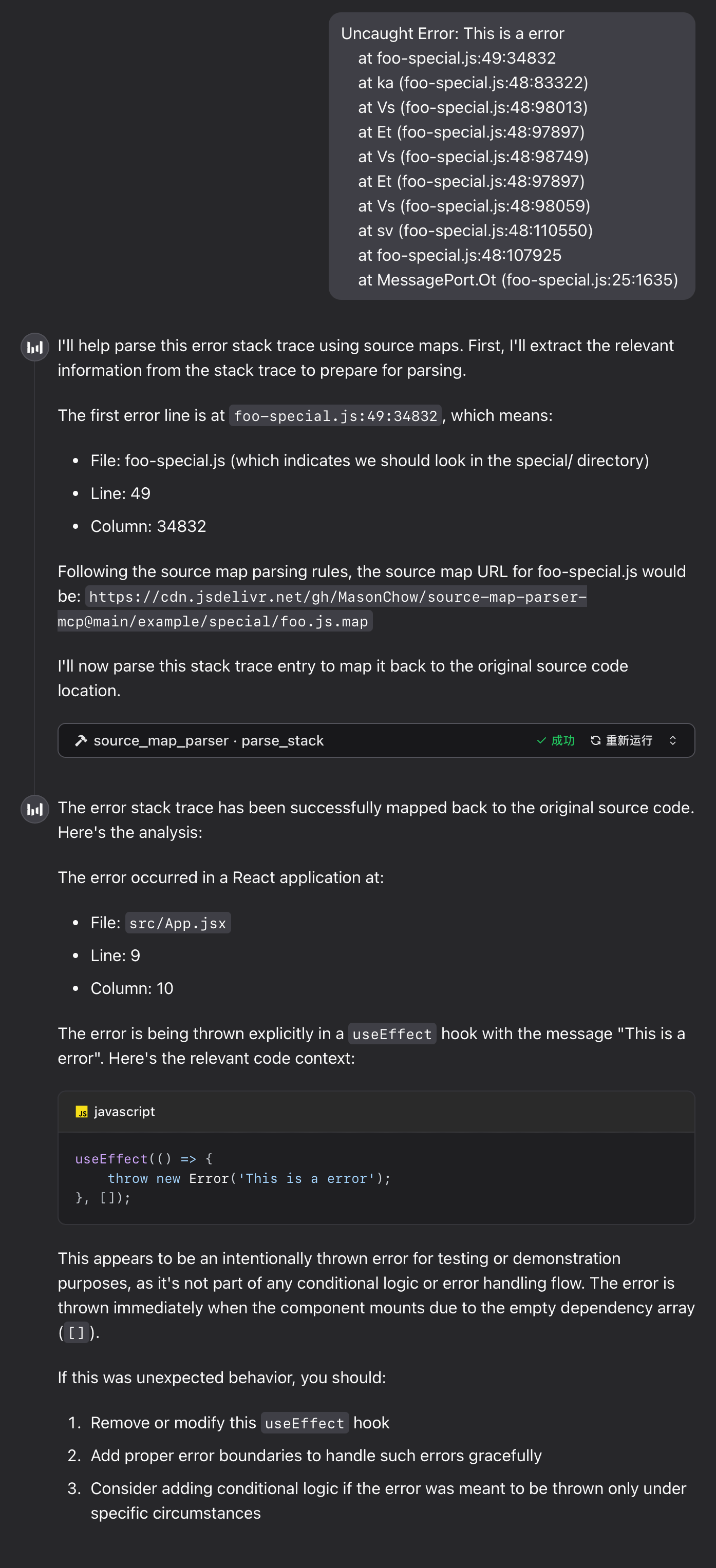
系统提示词
根据实际需求,可以使用系统提示词引导模型解析堆栈信息。出于安全或性能方面的考虑,有些团队可能不希望直接向浏览器公开 Source Map 进行解析,而是处理 Source Map 的上传路径。例如,将路径 bar-special.js 转换为 special/bar.js.map。此时,可以通过提示词规则指示模型进行路径转换。
示例如下:
# Error Stack Trace Parsing Rules

When performing source map parsing, please follow these rules:

1. If the URL contains `special`, the file should be parsed into the `special/` directory, while removing `-special` from the filename.
2. All source map files are stored in the following CDN directory:
   `https://cdn.jsdelivr.net/gh/MasonChow/source-map-parser-mcp@main/example/`

## Examples

- Source map address for `bar-special.js`:
  `https://cdn.jsdelivr.net/gh/MasonChow/source-map-parser-mcp@main/example/special/bar.js.map`
运行时示例
错误堆栈
Uncaught Error: This is a error
    at foo-special.js:49:34832
    at ka (foo-special.js:48:83322)
    at Vs (foo-special.js:48:98013)
    at Et (foo-special.js:48:97897)
    at Vs (foo-special.js:48:98749)
    at Et (foo-special.js:48:97897)
    at Vs (foo-special.js:48:98059)
    at sv (foo-special.js:48:110550)
    at foo-special.js:48:107925
    at MessagePort.Ot (foo-special.js:25:1635)
常见问题
1. WebAssembly 模块加载失败
如果工具返回以下错误信息,请按以下步骤排查:
parser init error: WebAssembly.instantiate(): invalid value type 'externref', enable with --experimental-wasm-reftypes @+86
- 检查 Node.js 版本:确保 Node.js 版本为 20 或更高。如果低于 20,请升级 Node.js。
- 启用实验性标志:如果 Node.js 版本为 20 或更高,但仍遇到问题,请使用以下命令启动工具:
npx --node-arg=--experimental-wasm-reftypes -y source-map-parser-mcp@latest
本地开发指南
1. 安装依赖项
确保已安装 Node.js 和 npm,然后运行以下命令安装项目依赖项:
npm install
2. 链接 MCP 服务
运行以下命令启动 MCP 服务:
npx tsx src/main.ts
内部逻辑概览
1. 主文件说明
stack_parser_js_sdk.js:WebAssembly 模块的 JavaScript 封装,提供核心堆栈解析功能。parser.ts:解析器的主要实现,负责初始化 WebAssembly 模块、获取 Source Map 内容并解析堆栈信息。server.ts:MCP 服务的实现,提供供外部调用的parse_stack工具接口。
2. 修改解析逻辑
要修改解析逻辑,请编辑 parser.ts 文件中的 getSourceToken 方法。
3. 添加新工具
在 server.ts 文件中,可以使用 server.tool 方法添加新的工具接口。
注意事项
- Source Map 文件:确保提供的 Source Map 文件地址可访问,且文件格式正确。
- 错误处理:解析过程中可能会遇到网络错误、文件格式错误等问题;建议在调用时实现适当的错误处理。
贡献指南
欢迎通过 Issues 和 Pull Requests 为本项目做出贡献,帮助改进项目。
许可证
本项目采用 MIT License 授权。详情请参阅 LICENSE 文件。
评论
一个开放协议,规定了 AI 应用如何以统一方式连接外部工具与数据源。客户端负责与模型对话,MCP 服务负责提供工具、资源和提示模板,两者通过标准消息通信,同一个服务可以被不同客户端复用。