
关于 Computing Mcp
Computing Mcp 是面向科学与工程计算的 MCP 服务,可供 AI 客户端执行符号运算、数值计算、数据分析和可视化。它还支持量子计算分析,并以容器方式运行。
主要功能
- 01符号数学与微分方程求解
- 02线性代数和矩阵运算
- 03量子计算分析
- 04数据统计与机器学习
- 05生成数据可视化
- 06支持 x86_64 与 ARM
适用场景
- 01求解微分方程和符号表达式
- 02计算张量积及复杂矩阵
- 03对数据集执行统计或聚类分析
- 04生成科学计算结果图表
MCP 相关
该项目是 MCP 服务,向 AI 客户端开放科学计算、数据分析和可视化能力。README 展示了通过 Docker 在 Claude for Desktop 中配置的方式。
配置
本地服务的配置在各客户端中通用,复制后粘贴到客户端的 MCP 配置文件即可。
工具
还没有获取到工具列表
本地服务需要在你的电脑上运行后才能读取工具,维护者暂未提供工具列表。
详细介绍
symbolica-mcp
一个用于科学计算的模型上下文协议(MCP)服务,可让 Claude 等 AI 执行符号计算、进行计算、分析数据并生成可视化内容。这在量子计算等科学和工程应用中尤其有用,且所有操作均在容器化环境中进行。
功能
- 使用 NumPy、SciPy、SymPy、Pandas 执行科学计算操作
- 进行符号数学运算并求解微分方程
- 支持线性代数运算和矩阵操作
- 量子计算分析
- 使用 Matplotlib 和 Seaborn 创建数据可视化
- 使用 scikit-learn 执行机器学习操作
- 执行张量操作和复杂矩阵计算
- 使用统计工具分析数据集
- 跨平台支持(自动检测 Windows、macOS 和 Linux),尤其适用于搭载 Mac M 系列芯片的用户
- 兼容 Intel/AMD(x86_64)和 ARM 处理器
快速开始
使用 Docker 镜像
# Pull the image from Docker Hub
docker pull ychen94/computing-mcp:latest

# Run the container (automatically detects host OS)
docker run -i --rm -v /tmp:/app/shared ychen94/computing-mcp:latest
Windows 用户:
docker run -i --rm -v $env:TEMP:/app/shared ychen94/computing-mcp:latest
与 Claude for Desktop 集成
- 打开 Claude for Desktop
- 打开“设置” ➝ “开发者” ➝ “编辑配置”
- 添加以下配置:
MacOS/Linux:
{
  "mcpServers": {
    "computing-mcp": {
      "command": "docker",
      "args": [
        "run",
        "-i",
        "--rm",
        "-v",
        "/tmp:/app/shared",
        "ychen94/computing-mcp:latest"
      ]
    }
  }
}
Windows:
{
  "mcpServers": {
    "computing-mcp": {
      "command": "docker",
      "args": [
        "run",
        "-i",
        "--rm",
        "-v",
        "%TEMP%:/app/shared",
        "ychen94/computing-mcp:latest"
      ]
    }
  }
}
示例
张量积
Can you calculate and visualize the tensor product of two matrices? Please run:

import numpy as np
import matplotlib.pyplot as plt

# Define two matrices
A = np.array([[1, 2],
              [3, 4]])
B = np.array([[5, 6],
              [7, 8]])

# Calculate tensor product using np.kron (Kronecker product)
tensor_product = np.kron(A, B)

# Display the result
print("Matrix A:")
print(A)
print("\nMatrix B:")
print(B)
print("\nTensor Product A ⊗ B:")
print(tensor_product)

# Create a visualization of the tensor product
plt.figure(figsize=(8, 6))
plt.imshow(tensor_product, cmap='viridis')
plt.colorbar(label='Value')
plt.title('Visualization of Tensor Product A ⊗ B')
符号数学
Can you solve this differential equation? Please run:
import sympy as sp
import matplotlib.pyplot as plt
import numpy as np

# Define symbolic variable
x = sp.Symbol('x')
y = sp.Function('y')(x)

# Define the differential equation: y''(x) + 2*y'(x) + y(x) = 0
diff_eq = sp.Eq(sp.diff(y, x, 2) + 2*sp.diff(y, x) + y, 0)

# Solve the equation
solution = sp.dsolve(diff_eq)
print("Solution:")
print(solution)

# Plot a particular solution (C1=1, C2=0)
solution_func = solution.rhs.subs({sp.symbols('C1'): 1, sp.symbols('C2'): 0})
print("Particular solution:")
print(solution_func)

# Create a numerical function we can evaluate
solution_lambda = sp.lambdify(x, solution_func)

# Plot the solution
x_vals = np.linspace(0, 5, 100)
y_vals = [float(solution_lambda(x_val)) for x_val in x_vals]

plt.figure(figsize=(10, 6))
plt.plot(x_vals, y_vals)
plt.grid(True)
plt.title("Solution to y''(x) + 2*y'(x) + y(x) = 0")
plt.xlabel('x')
plt.ylabel('y(x)')
plt.show()
数据分析
Can you perform a clustering analysis on this dataset? Please run:

import numpy as np
import pandas as pd
import matplotlib.pyplot as plt
from sklearn.cluster import KMeans
from sklearn.preprocessing import StandardScaler

# Create a sample dataset
np.random.seed(42)
n_samples = 300

# Create three clusters
cluster1 = np.random.normal(loc=[2, 2], scale=0.5, size=(n_samples//3, 2))
cluster2 = np.random.normal(loc=[7, 7], scale=0.5, size=(n_samples//3, 2))
cluster3 = np.random.normal(loc=[2, 7], scale=0.5, size=(n_samples//3, 2))

# Combine clusters
X = np.vstack([cluster1, cluster2, cluster3])

# Create DataFrame
df = pd.DataFrame(X, columns=['Feature1', 'Feature2'])
print(df.head())

# Standardize data
scaler = StandardScaler()
X_scaled = scaler.fit_transform(X)

# Apply KMeans clustering
kmeans = KMeans(n_clusters=3, random_state=42)
df['Cluster'] = kmeans.fit_predict(X_scaled)

# Plot the clusters
plt.figure(figsize=(10, 6))
for cluster_id in range(3):
    cluster_data = df[df['Cluster'] == cluster_id]
    plt.scatter(cluster_data['Feature1'], cluster_data['Feature2'],
                label=f'Cluster {cluster_id}', alpha=0.7)

# Plot cluster centers
centers = scaler.inverse_transform(kmeans.cluster_centers_)
plt.scatter(centers[:, 0], centers[:, 1], s=200, c='red', marker='X', label='Centers')

plt.title('K-Means Clustering Results')
plt.xlabel('Feature 1')
plt.ylabel('Feature 2')
plt.legend()
plt.grid(True)
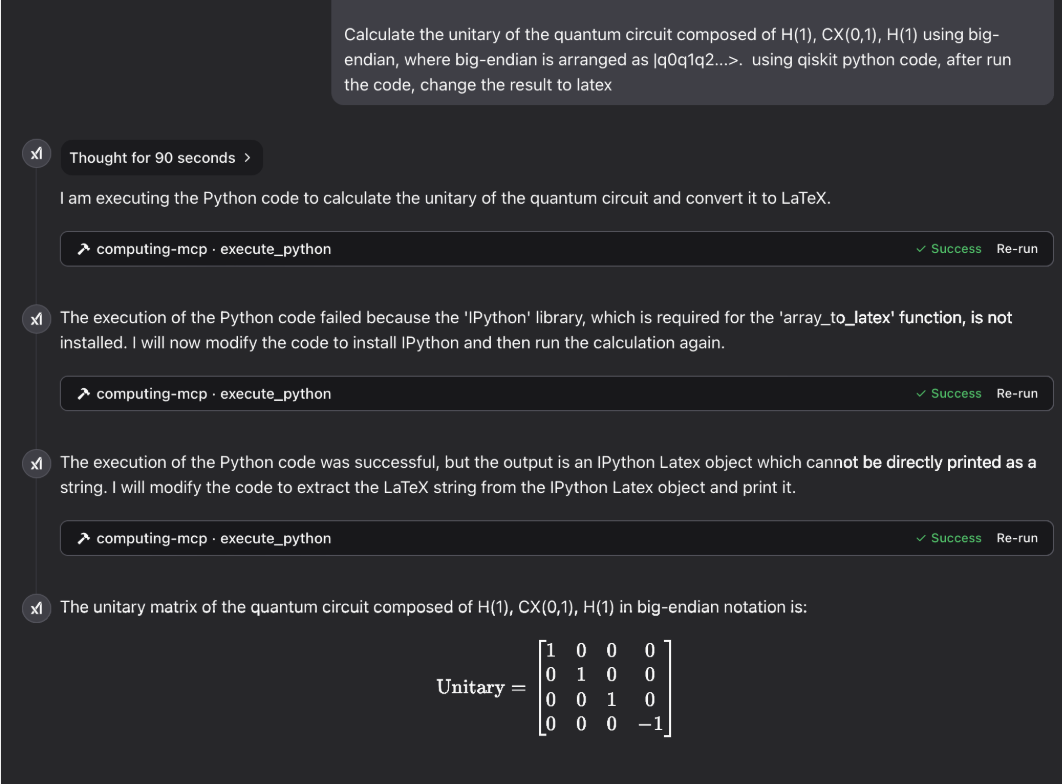
量子计算
图集
激光物理:

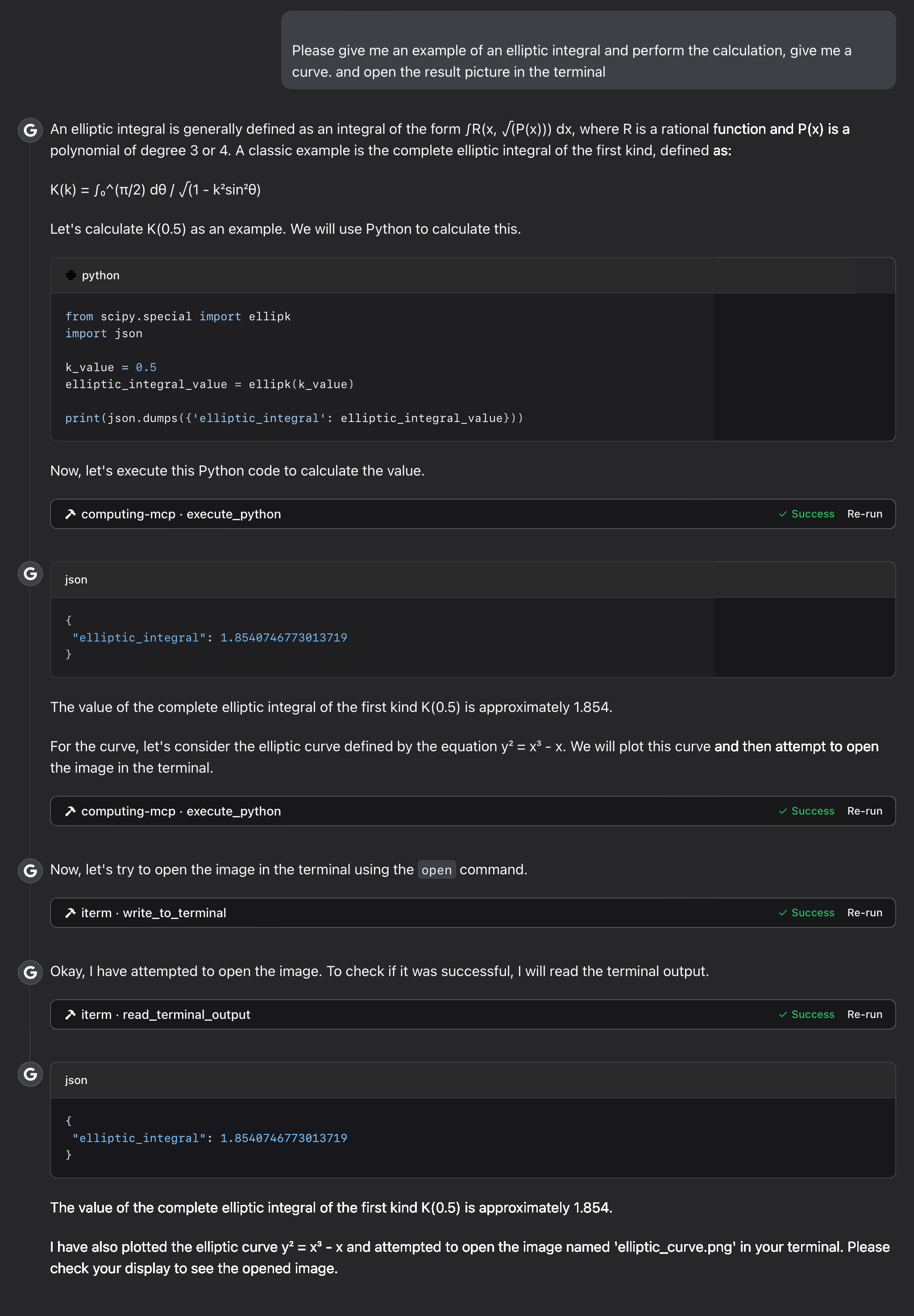
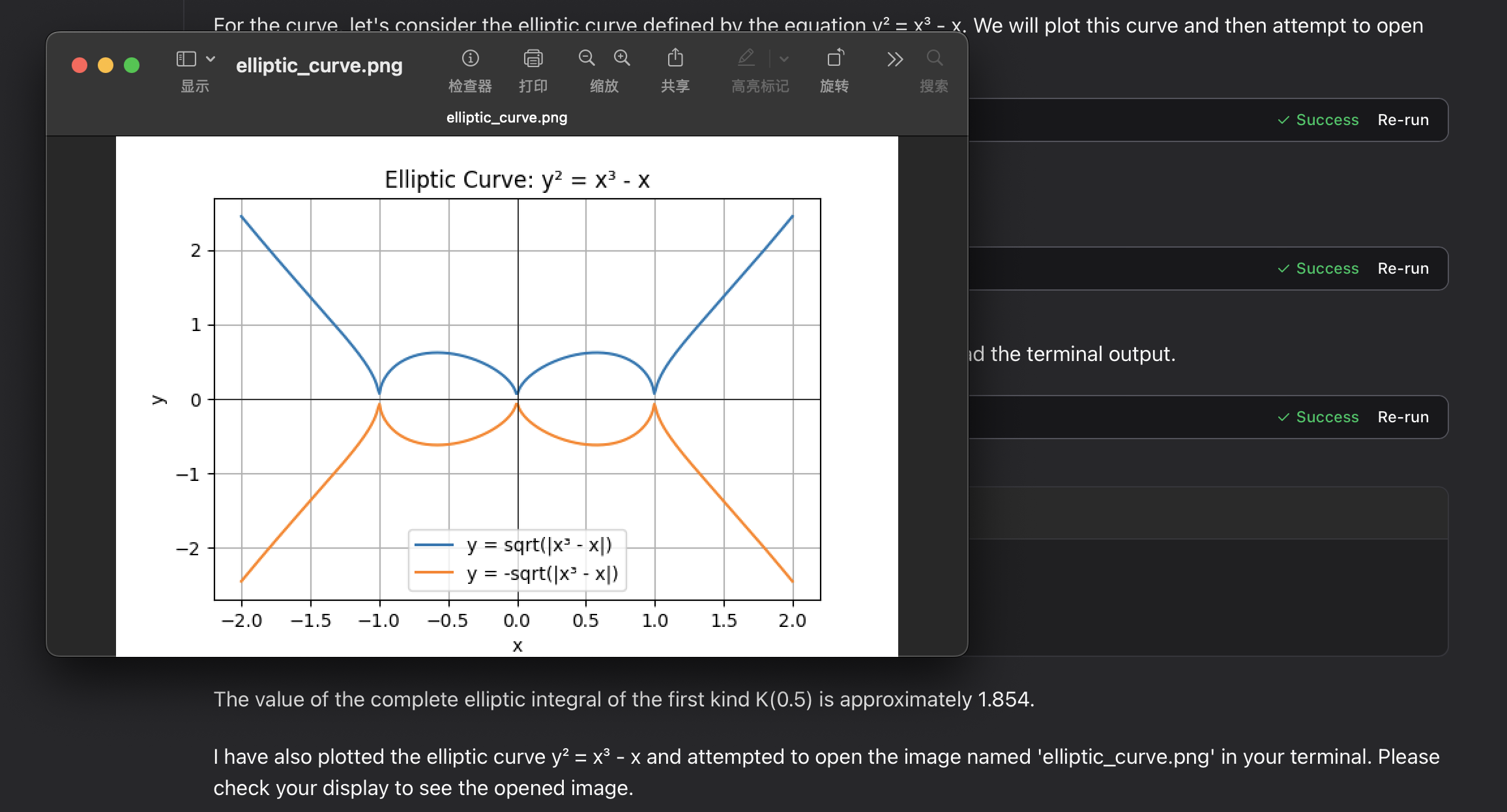
椭圆积分:
故障排除
常见问题
-
挂载卷时出现权限错误
- 确保挂载目录存在且具有适当的权限
-
未显示绘图图片文件
-
检查主机系统中的路径:macOS/Linux 使用
/tmp,Windows 使用临时文件夹 -
确认 Docker 有权限写入挂载位置
-
检查 MCP 工具的输出内容
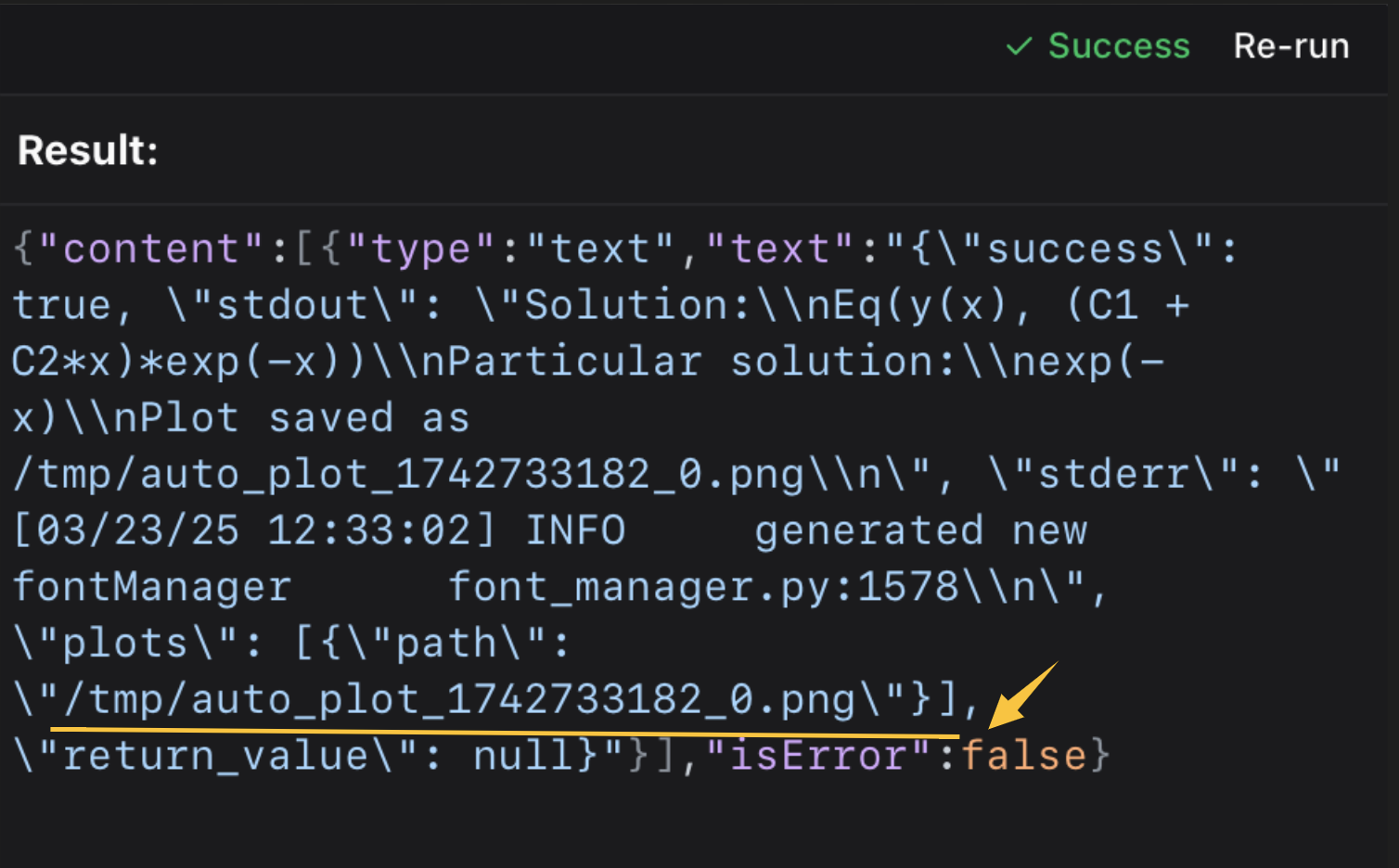 然后在终端或图片查看器中打开它。
⭐️ ⭐️ 我使用 iterm-mcp-server 或其他终端的 MCP 服务来打开文件,不会中断工作流。 ⭐️ ⭐️
-
支持
如果遇到问题,请提交 GitHub issue,并附上:
- 错误消息
- 操作系统和 Docker 版本
- 重现问题的步骤
许可证
本项目采用 MIT 许可证。 更多详情,请参阅本项目代码库中的 LICENSE 文件。
评论
支持 Markdown
一个开放协议,规定了 AI 应用如何以统一方式连接外部工具与数据源。客户端负责与模型对话,MCP 服务负责提供工具、资源和提示模板,两者通过标准消息通信,同一个服务可以被不同客户端复用。