
关于 x-openapi-flow-mcp
x-openapi-flow 为开发者提供 OpenAPI 工作流定义、验证和运行时执行能力。它将资源生命周期与状态转换纳入 API 规范,并可生成面向工作流的 SDK 和文档。
主要功能
- 01在 OpenAPI 中声明工作流与状态转换
- 02校验生命周期规则并生成流程图
- 03生成遵循状态规则的 TypeScript 和 Python SDK
- 04在 Express、Fastify 和 Hono 中拦截无效转换
- 05导出面向编码 Agent 的流程契约
适用场景
- 01在 CI 中检查 API 生命周期规则
- 02阻止生产请求执行无效状态转换
- 03为多步骤 API 集成生成 SDK
- 04向编码 Agent 提供明确的调用顺序与决策规则
MCP 相关
可将流程契约导出为 MCP 工具,供 Agent 查询 API 调用顺序、决策规则和字段引用。
配置
本地服务的配置在各客户端中通用,复制后粘贴到客户端的 MCP 配置文件即可。
工具
6收录的工具列表 · 更新于 2 周前
| 参数 | 类型 | 必填 | 说明 |
|---|---|---|---|
| file | string | 是 | 包含 x-openapi-flow 扩展的 .flow.yaml/json 或 OpenAPI 文件的绝对路径。 |
| profile | enum | 否 | 验证配置。'core' = 快速基线,'relaxed' = 执行图检查但不严格强制,'strict' = 完整的图健全性检查,包括初始状态、终止状态、可达性和循环检查。默认值:strict。core | relaxed | strict |
| semantic | boolean | 否 | 启用语义一致性验证:决策意图、证据引用、转换优先级。默认值:false。 |
| strict_quality | boolean | 否 | 将质量警告视为阻断性错误。默认值:false。 |
详细介绍
OpenAPI 描述 API。x-openapi-flow 将其转换为可执行工作流,供开发者和 AI Agent 使用。
在 openapi.x.json 中定义 API 工作流,无需编写自定义客户端或编排逻辑即可执行







🚀 前 3 周下载量突破 2,100 次!
⚡ 几秒内快速开始
npx x-openapi-flow init --suggest-transitions
这会生成一个 openapi.x.json 文件,你可以在其中以声明式方式定义 API 应如何执行,而不仅仅是描述 API。
只需一条简单命令,即可根据 OpenAPI 规范让 API 生命周期鲜活呈现
自动验证、编写文档并生成具备工作流感知能力的 SDK。
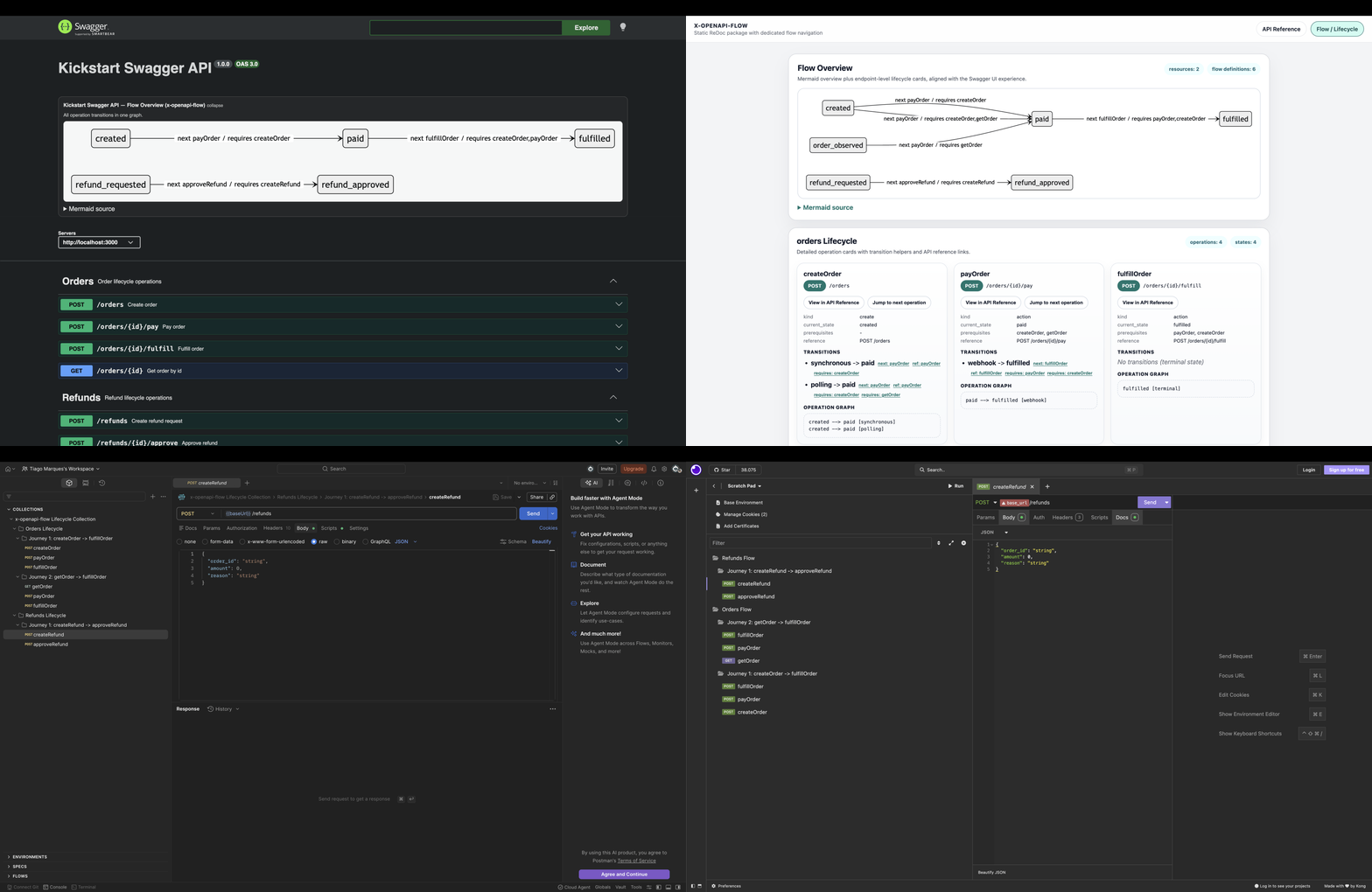
这是什么?
x-openapi-flow 为你的 OpenAPI 规范扩展了一个工作流层。
openapi.json → 描述你的 API
openapi.x.json → 描述如何使用它(工作流)
不再编写命令式代码来编排 API 调用,而是以声明式方式定义工作流,并在任何地方运行。
x-openapi-flow 为你的 OpenAPI 规范添加了一个声明式状态机。
为资源生命周期建模、强制执行有效的状态转换,并生成支持工作流的文档、SDK 和自动化产物。
🚀 示例
直接在 OpenAPI 操作中定义有状态工作流和生命周期转换:
{
  "operationId": "createOrder",
  "x-openapi-flow": {
    "version": "1.0",
    "id": "create-order",
    "current_state": "created",
    "description": "Creates an order and starts the lifecycle",
    "transitions": [
      {
        "transition_id": "order-created-to-paid",
        "trigger_type": "synchronous",
        "condition": "Payment is confirmed",
        "decision_rule": "payOrder:response.200.body.payment_status == 'approved'",
        "target_state": "paid",
        "next_operation_id": "payOrder",
        "operation_role": "mutate",
        "prerequisite_operation_ids": ["createOrder"],
        "evidence_refs": [
          "payOrder:response.200.body.payment_status"
        ],
        "propagated_field_refs": [
          "createOrder:response.201.body.order_id"
        ],
        "failure_paths": [
          {
            "reason": "Payment denied",
            "target_state": "payment_failed",
            "next_operation_id": "getOrder"
          }
        ]
      }
    ]
  }
}
此工作流直接在 OpenAPI 中定义了订单生命周期:
- 从
created状态开始 - 确认付款后转换到
paid状态 - 支持同步转换和基于轮询的转换
- 自动在各操作之间传递数据
- 可包含明确的决策/证据和失败路径元数据,以支持 AI 引导的编排
无需手动编排 API 调用,工作流已与 API 规范一同完整描述。
为什么存在
构建 API 并不难。构建团队能够正确使用的复杂多步骤 API却很难。
团队反复面临以下问题:
- 📄 手动编写文档很脆弱——OpenAPI 规范是静态的,往往与实际工作流不同步
- 🤖 AI Agent 可能会产生幻觉——如果工作流不清晰或没有文档说明,大模型和代码生成 Agent 可能会生成无效调用
- 🤯 工作流令人困惑——人类和 AI Agent 都难以跟踪多步骤操作
- ⚠️ 无效调用会漏网——由于没有强制执行生命周期规则,开发者容易犯错
- ⏱️ 集成进度变慢——SDK、Postman 集合和文档都需要不断手动更新
- 🛡️ 难以防止生产环境错误——没有明确的生命周期规则,无效操作可能进入线上系统,导致服务中断或数据不一致
x-openapi-flow 旨在解决这些痛点:明确生命周期、自动验证状态转换,并生成了解流程的文档和 SDK,让团队更快推进、减少错误,并自信地交付集成。
能够实现的功能
将 OpenAPI 规范转变为 API 行为的唯一事实来源:
- 在 Swagger UI 和 Redoc 中直接可视化 API 生命周期
- 在 CI 流水线中验证流程和状态转换
- 根据 OpenAPI 规范自动生成生命周期图
- 构建能够理解并遵循 API 工作流的 SDK
- 导出按生命周期组织的 Postman 和 Insomnia 集合
- 为智能体集成创建适用于 AI 的 API 契约
- 导出精简、非散文格式的编码 Agent 流程契约(
export-llm-flows)——也可以直接将其作为 MCP 工具调用——让 Claude Code 这样的 Agent 无需从面向人类的文档中重新推导,就能准确了解实现集成所需的调用顺序、决策规则和字段引用
快速开始(无需 OpenAPI 文件)
2 分钟快速上手(在线 Playground)
不想在本地进行设置?直接在浏览器中打开最小运行时保护演示:
- StackBlitz:https://stackblitz.com/github/tiago-marques/x-openapi-flow/tree/main/example/runtime-guard/minimal-order
- Codespaces(仓库):https://github.com/tiago-marques/x-openapi-flow
打开后,运行:
npm install
npm run start
然后在另一个终端中运行:
curl -s -X POST http://localhost:3110/orders
curl -i -X POST http://localhost:3110/orders/<id>/ship
预期结果:409 INVALID_STATE_TRANSITION。
最快了解其价值的方式(引导式脚手架):
npx x-openapi-flow quickstart
cd x-openapi-flow-quickstart
npm install
npm start
可选运行时:
npx x-openapi-flow quickstart --runtime fastify
然后运行:
curl -s -X POST http://localhost:3110/orders
curl -i -X POST http://localhost:3110/orders/<id>/ship
预期结果:409 INVALID_STATE_TRANSITION。
如果你已有 OpenAPI 文件,请使用 sidecar 工作流:
在项目中初始化流程支持:
npx x-openapi-flow init
# optional: infer suggested transitions using naming heuristics
npx x-openapi-flow init --suggest-transitions
重新生成 OpenAPI 文件后,应用并验证流程(可选):
npx x-openapi-flow apply openapi.yaml --out openapi.flow.yaml

npx x-openapi-flow validate openapi.flow.yaml --profile strict --strict-quality
此操作将:
- 为 OpenAPI 规范添加流程元数据
- 验证生命周期一致性
- 尽早发现无效状态转换
💡 提示:在 CI 中运行此操作,以强制确保 API 工作流正确
适用于大型流程的精简 DSL
对于较大的 API,你可以按资源定义流程规则(并共享状态转换和默认值),减少 sidecar 文件中的重复内容。
GitHub Action(一步完成 CI 验证)
使用官方可复用 Action,通过一个步骤在 CI 中验证生命周期规则:
- name: Validate OpenAPI flow rules
  uses: tiago-marques/x-openapi-flow@v1
  with:
    openapi-file: openapi.flow.yaml
    profile: strict
    strict-quality: "true"
集成指南:GitHub-Actions-Integration.md
真实生命周期示例
以下是使用 x-openapi-flow 表示的真实支付生命周期:
CREATED -> AUTHORIZED -> CAPTURED -> REFUNDED
生成生命周期的可视化图:
npx x-openapi-flow graph openapi.flow.yaml --format mermaid
生成的图表:
graph TD
CREATED --> AUTHORIZED
AUTHORIZED --> CAPTURED
CAPTURED --> REFUNDED
这种可视化让 API 工作流一目了然,便于沟通,也可直接用于文档或演示。
生成支持流程的 SDK
创建 TypeScript 或 Python SDK,遵循 API 的生命周期和状态转换规则,并采用 Stripe 和 Adyen 等领先公司的最佳实践:
- 按模型编排:每个资源都提供可强制执行有效状态转换的方法
- 可链式调用 API:自然、安全地执行一系列操作
npx x-openapi-flow generate-sdk openapi.flow.yaml --lang typescript --output ./sdk
npx x-openapi-flow generate-sdk openapi.flow.yaml --lang python --output ./sdk
使用示例(TypeScript):
const payment = await sdk.payments.create({ amount: 1000 });
await payment.authorize();
await payment.capture();
使用示例(Python — 零依赖、基于标准库 urllib 的客户端,生成于 ./sdk/src 下):
from src import FlowApiClient
from src.http_client import UrllibHttpClient

client = FlowApiClient(UrllibHttpClient("https://api.example.com"))
payment = client.payment.create({"body": {"amount": 1000}})
payment = payment.authorize()
payment = payment.capture()
此 SDK 会引导开发者沿有效的状态转换路径操作,采用市场领先者使用的模式,确保集成安全直观。
运行时强制执行(Express + Fastify + Hono)
CI 验证固然重要,但生产环境的安全性需要在请求时强制执行。
x-openapi-flow 现在包含适用于 Node.js 的官方运行时保护机制,可在处理请求时阻止无效的状态转换。
- 支持 Express 和 Fastify
- 根据
operationId(若可用)或方法 + 路由解析操作 - 使用你自己的持久化回调读取当前资源状态
- 阻止无效状态转换,并返回明确的
409错误负载
可直接在 API 服务端安装和使用:
const {
  createExpressFlowGuard,
  createFastifyFlowGuard,
  createHonoFlowGuard,
} = require("x-openapi-flow/lib/runtime-guard");
Express 示例:
const express = require("express");
const { createExpressFlowGuard } = require("x-openapi-flow/lib/runtime-guard");
const openapi = require("./openapi.flow.json");

const app = express();

app.use(
  createExpressFlowGuard({
    openapi,
    async getCurrentState({ resourceId }) {
      if (!resourceId) return null;
      return paymentStore.getState(resourceId); // your DB/service lookup
    },
    resolveResourceId: ({ params }) => params.id || null,
  })
);
Fastify 示例:
const fastify = require("fastify")();
const { createFastifyFlowGuard } = require("x-openapi-flow/lib/runtime-guard");
const openapi = require("./openapi.flow.json");

fastify.addHook(
  "preHandler",
  createFastifyFlowGuard({
    openapi,
    async getCurrentState({ resourceId }) {
      if (!resourceId) return null;
      return paymentStore.getState(resourceId);
    },
    resolveResourceId: ({ params }) => params.id || null,
  })
);
Hono 示例:
const { Hono } = require("hono");
const { createHonoFlowGuard } = require("x-openapi-flow/lib/runtime-guard");
const openapi = require("./openapi.flow.json");

const app = new Hono();

app.use(
  "*",
  createHonoFlowGuard({
    openapi,
    async getCurrentState({ resourceId }) {
      if (!resourceId) return null;
      return paymentStore.getState(resourceId);
    },
    resolveResourceId: ({ params }) => params.id || null,
  })
);
被阻止的状态转换的错误负载:
{
  "error": {
    "code": "INVALID_STATE_TRANSITION",
    "message": "Blocked invalid transition for operation 'capturePayment'. Current state 'CREATED' cannot transition to this operation.",
    "operation_id": "capturePayment",
    "current_state": "CREATED",
    "allowed_from_states": ["AUTHORIZED"],
    "resource_id": "pay_123"
  }
}
更多详情:运行时保护机制
内置持久化适配器
无需从头编写自己的 getCurrentState。x-openapi-flow 内置了五种现成的适配器:
const {
  MemoryAdapter,   // in-process Map — ideal for tests and single-instance dev
  FileAdapter,     // JSON file on disk — great for demos and local servers
  RedisAdapter,    // ioredis-backed — production-ready, requires: npm install ioredis
  GenericSQLAdapter, // any SQL DB (pg, mysql2, knex…) via query callback
  MongoAdapter,    // MongoDB Collection-backed, requires: npm install mongodb
} = require("x-openapi-flow/lib/runtime-guard");

// in-memory (testing / local)
const store = new MemoryAdapter();
app.use(createExpressFlowGuard({ openapi, ...store.forGuard() }));

// persist every transition to Redis
const Redis = require("ioredis");
const redisStore = new RedisAdapter({ client: new Redis(), prefix: "orders:" });
app.use(createExpressFlowGuard({ openapi, ...redisStore.forGuard() }));

// call setState after each successful request to keep the state in sync
app.post("/orders/:id/pay", async (req, res) => {
  await redisStore.setState({ resourceId: req.params.id, state: "paid" });
  res.json({ ok: true });
});
使用 pg 的 GenericSQLAdapter 示例:
const { Pool } = require("pg");
const pool = new Pool();
const sqlStore = new GenericSQLAdapter({
  query: (sql, params) => pool.query(sql, params).then(r => r.rows),
  dialect: "pg",
});
await sqlStore.ensureTable(); // CREATE TABLE IF NOT EXISTS xflow_state (…)
app.use(createExpressFlowGuard({ openapi, ...sqlStore.forGuard() }));
使用官方 mongodb 驱动的 MongoAdapter 示例:
const { MongoClient } = require("mongodb");
const client = await new MongoClient(process.env.MONGO_URL).connect();
const mongoStore = new MongoAdapter({
  collection: client.db("orders").collection("xflow_state"),
});
app.use(createExpressFlowGuard({ openapi, ...mongoStore.forGuard() }));
所有适配器都实现了 getCurrentState、setState、deleteState 和 forGuard() — 这是一个便捷方法,可返回保护机制选项所需的确切结构。
可观测性钩子(指标/审计)
你可以使用 onDecision 对运行时决策进行埋点,以便将数据发送到 Prometheus、日志或追踪系统。
const { Counter } = require("prom-client");
const { createExpressFlowGuard } = require("x-openapi-flow/lib/runtime-guard");

const flowDecisions = new Counter({
  name: "xflow_runtime_guard_decisions_total",
  help: "Runtime guard decisions by type and operation",
  labelNames: ["decision", "operation_id"],
});

app.use(
  createExpressFlowGuard({
    openapi,
    ...store.forGuard(),
    onDecision(event) {
      flowDecisions.inc({
        decision: event.decision,
        operation_id: event.operationId || "unknown",
      });
    },
  })
);
常见的决策值包括:
allowed_transitionallowed_idempotent_stateallowed_initial_statedenied_invalid_transitiondenied_missing_resource_iddenied_unknown_operationskipped_unknown_operation
想立即体验它的价值?请使用官方的最小化演示:
5 分钟内即可运行:
cd example/runtime-guard/minimal-order
npm install
npm start
创建订单,然后尝试在付款前发货(必须返回 409 INVALID_STATE_TRANSITION):
curl -s -X POST http://localhost:3110/orders
curl -i -X POST http://localhost:3110/orders/<id>/ship
等效的 HTTPie 命令:
http POST :3110/orders
http -v POST :3110/orders/<id>/ship
可编程状态机引擎
无需依赖 CLI 和 OpenAPI 解析,即可独立使用可复用的确定性引擎:
const { createStateMachineEngine } = require("x-openapi-flow/lib/state-machine-engine");

const engine = createStateMachineEngine({
  transitions: [
    { from: "CREATED", action: "confirm", to: "CONFIRMED" },
    { from: "CONFIRMED", action: "ship", to: "SHIPPED" },
  ],
});

engine.canTransition("CREATED", "confirm");
engine.getNextState("CREATED", "confirm");
engine.validateFlow({ startState: "CREATED", actions: ["confirm", "ship"] });
更多详情:状态机引擎
OpenAPI 到引擎适配器
将 x-openapi-flow 元数据转换为纯引擎定义:
const { createStateMachineAdapterModel } = require("x-openapi-flow/lib/openapi-state-machine-adapter");
const { createStateMachineEngine } = require("x-openapi-flow/lib/state-machine-engine");

const model = createStateMachineAdapterModel({ openapiPath: "./openapi.flow.yaml" });
const engine = createStateMachineEngine(model.definition);
更多详情:OpenAPI 状态机适配器
最适合的用户
x-openapi-flow 非常适合希望拥有清晰、可强制执行的 API 工作流的团队和组织:
- API 优先型组织 – 维护 API 行为的单一事实来源
- 构建 AI Agent 的团队 – 提供便于 AI 理解的契约并强制正确使用 API,使 Agent 能够按正确顺序安全调用端点,无需猜测,也不会违反工作流规则
- API 平台团队 – 确保各端点遵循一致的生命周期规则
- 拥有复杂 API 工作流的公司 – 减少多步骤流程中的错误和歧义
- SDK 团队 – 生成可感知流程、能引导开发者的 SDK
为什么选择 x-openapi-flow?
了解 x-openapi-flow 如何扩展 OpenAPI,让 API 工作流变得明确、可强制执行且可操作:
| 能力 | OpenAPI | x-openapi-flow |
|---|---|---|
| 端点契约 | ✅ 有 | ✅ 有(完全兼容并扩展) |
| 生命周期状态 | ❌ 无 | ✅ 有 – 为每种资源定义状态 |
| 转换验证 | ❌ 无 | ✅ 有 – 在运行时之前捕获无效调用 |
| 流程图 | ❌ 无 | ✅ 有 – 生成可视化生命周期图 |
| 使用指南(后续有效操作) | 有限/手动 | ✅ 通过生命周期元数据内置 – 为开发者和 AI Agent 提供指引 |
它与 OpenAPI Workflows (Arazzo) 和 AsyncAPI 相比如何?
| 维度 | x-openapi-flow | OpenAPI Workflows (Arazzo) | AsyncAPI |
|---|---|---|---|
| 主要关注点 | 资源生命周期状态和运行时强制执行 | 多步骤 API 工作流(编排脚本) | 事件驱动/异步消息 API |
| 生命周期状态 | ✅ 为每种资源定义明确的状态 | ❌ 无状态模型 | ❌ 无状态模型 |
| 运行时强制执行 | ✅ Express/Fastify/Hono 中间件(无效转换时返回 409) | ❌ 仅规范,无运行时保护 | ❌ 仅规范 |
| SDK 生成 | ✅ TypeScript、Python | ❌ 不支持代码生成 | 有限 |
| Postman / Insomnia 导出 | ✅ 内置适配器 | ❌ 不支持 | ❌ 不支持 |
| AI Agent 支持 | ✅ MCP sidecar + 面向机器的流程契约(export-llm-flows) | ❌ 不支持 | ❌ 不支持 |
| 破坏性变更检测 | ✅ diff --breaking-only --fail-on-breaking | ❌ 不支持 | ❌ 不支持 |
| CI 验证 | ✅ CLI + GitHub Action | ❌ 无官方 CLI | 有限 |
| OpenAPI 兼容性 | ✅ Sidecar 扩展现有规范 | 独立的 Arazzo 规范 | 独立的 AsyncAPI 规范 |
简而言之: 当你需要可强制执行、有状态的 API 生命周期,并希望超越文档范畴,涵盖运行时安全、SDK 生成和适用于 AI 的契约时,请使用 x-openapi-flow。使用 Arazzo 编写多步骤 HTTP 流程脚本。使用 AsyncAPI 记录事件/消息驱动系统。
集成演示
了解 x-openapi-flow 如何与常用 API 工具集成,让生命周期和流程明确呈现,便于文档编写和测试。
Swagger UI – 在文档中可视化流程
cd example/swagger-ui
npm install
npm run apply
npm start
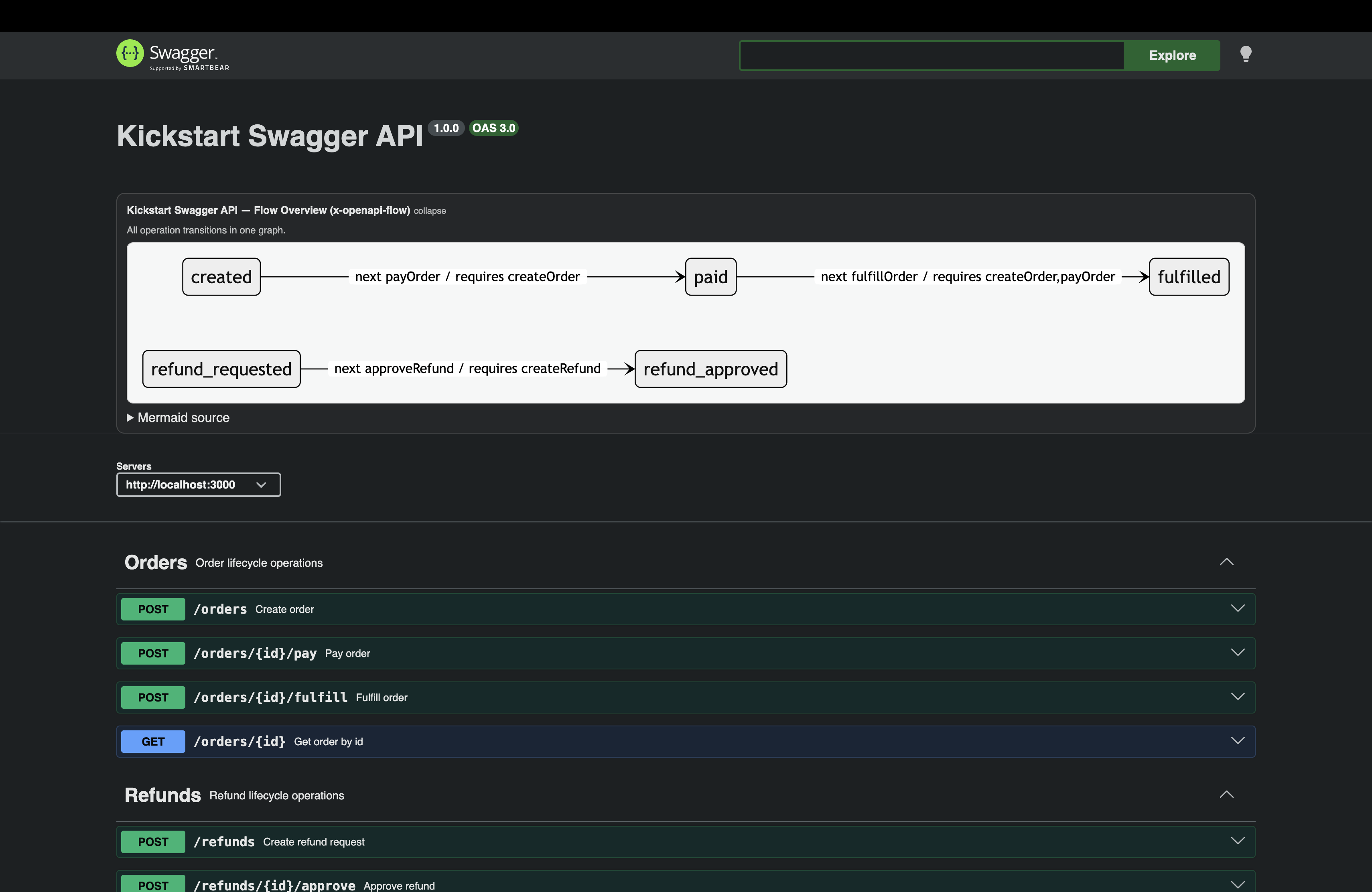
生命周期面板显示有效状态和转换
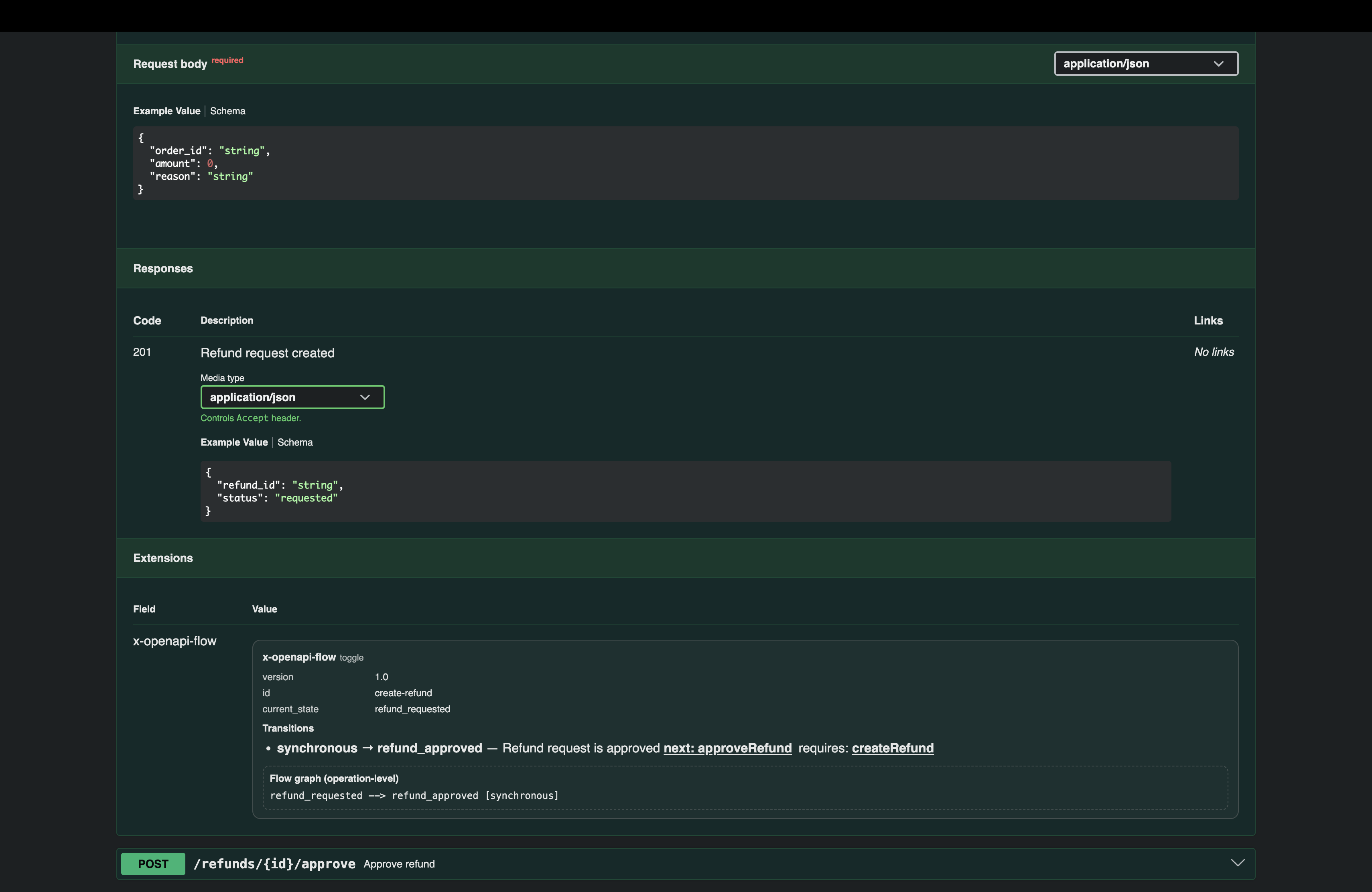
按操作查看转换详情
Redoc – 感知流程的文档
cd example/redoc
npm install
npm run apply
npm run generate
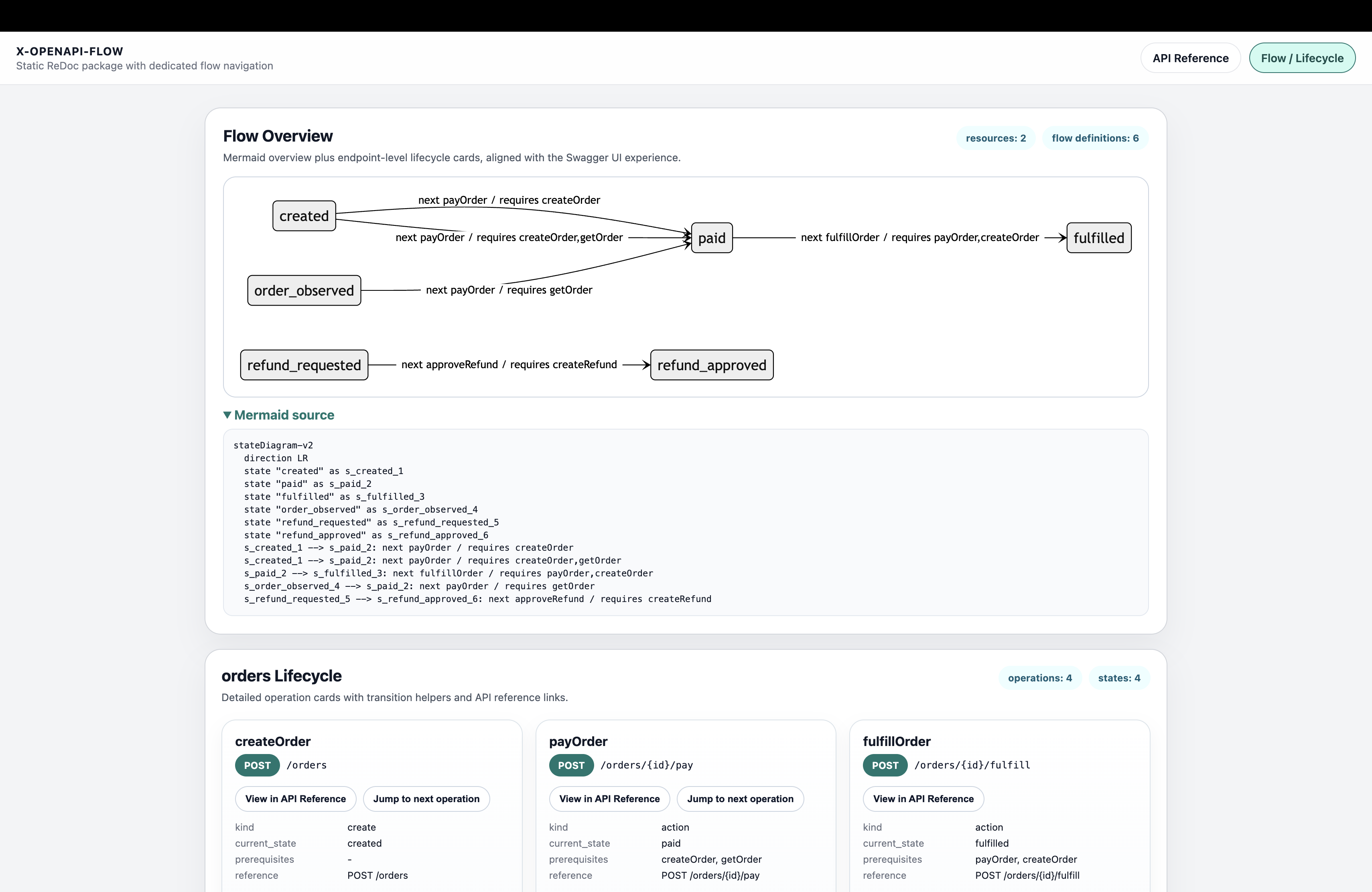
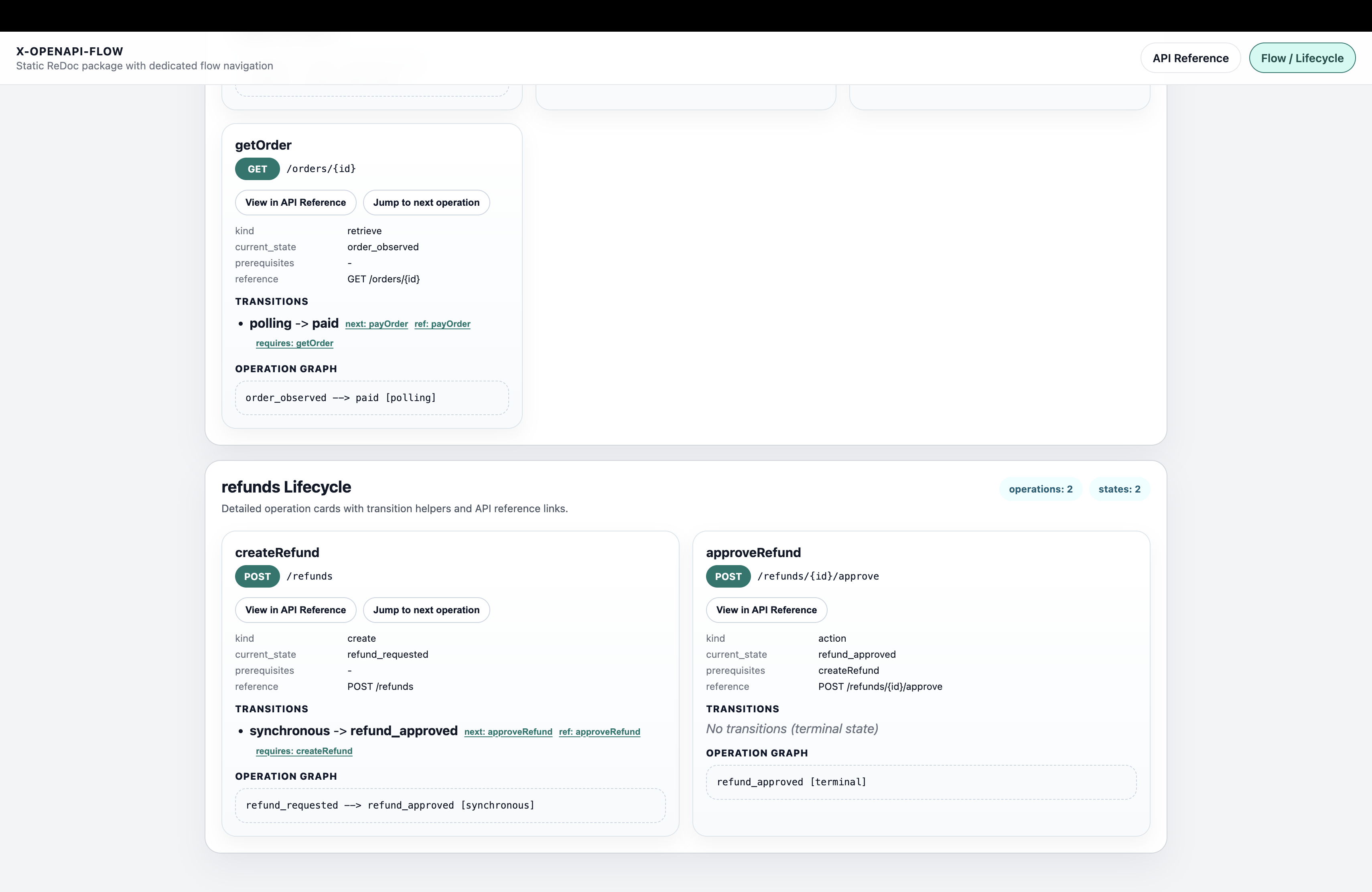
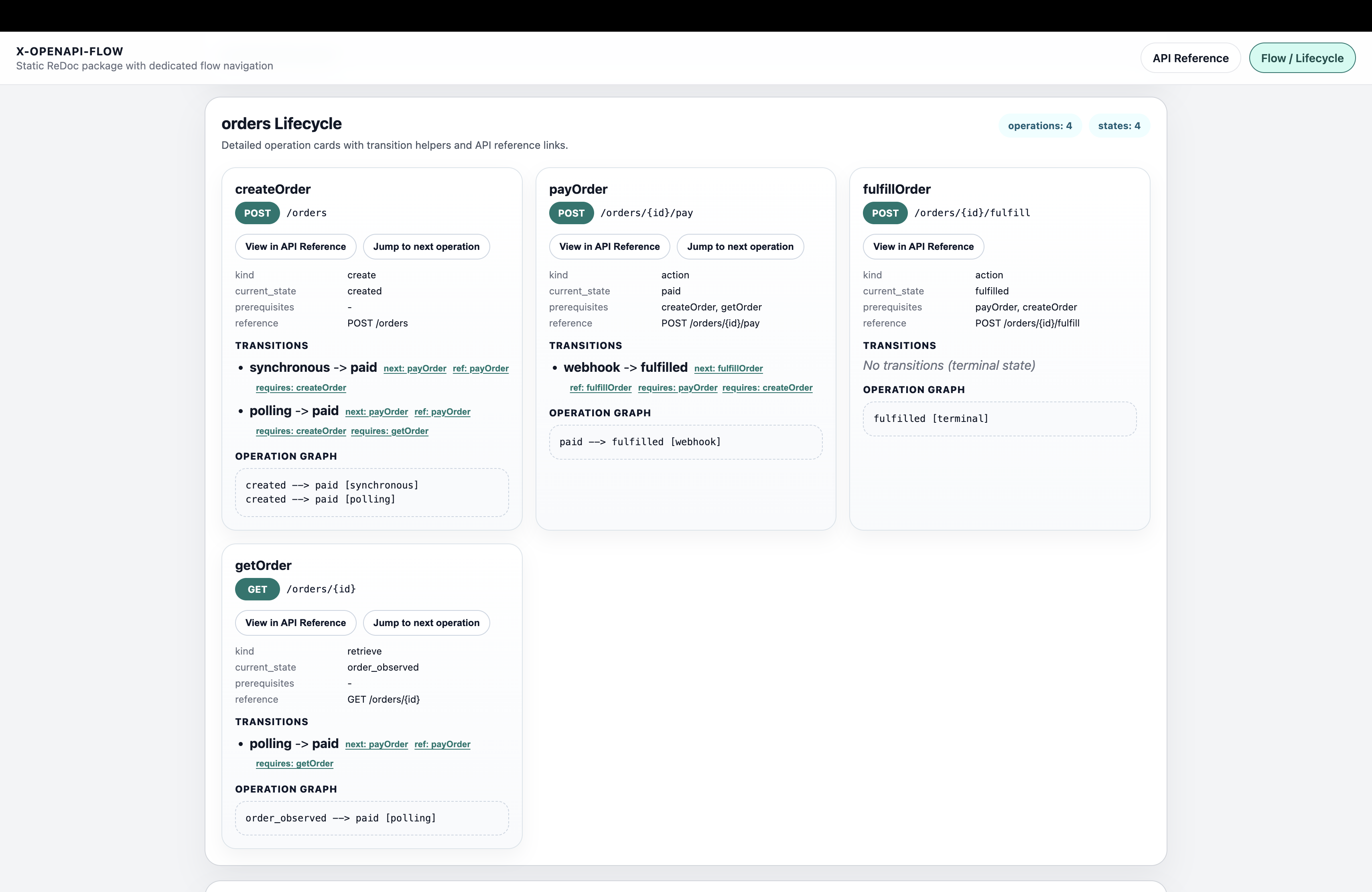
自动生成的生命周期图让文档清晰且一致
Postman – 有序 API 集合
cd example/postman
npm install
npm run apply
npm run generate
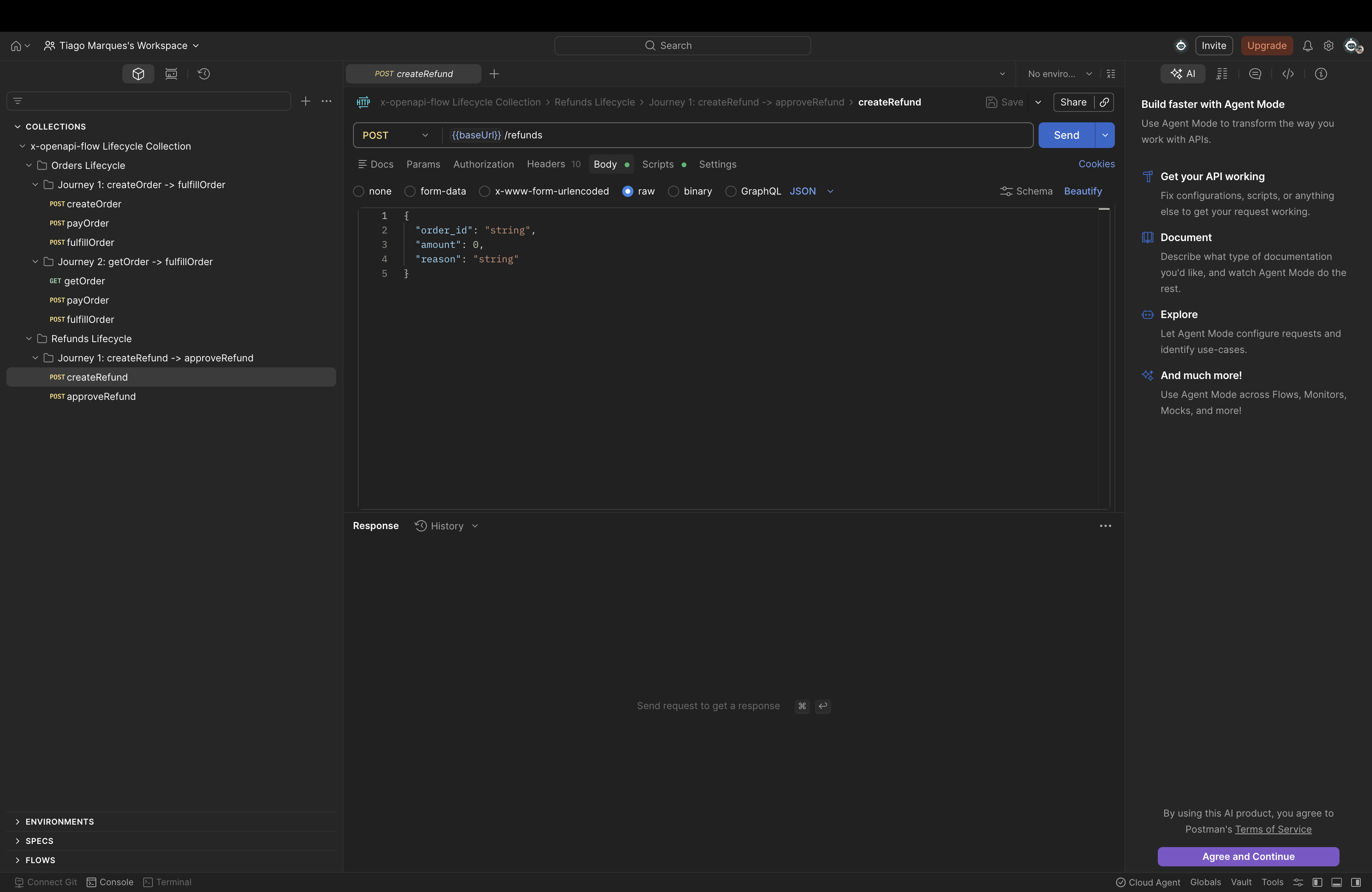
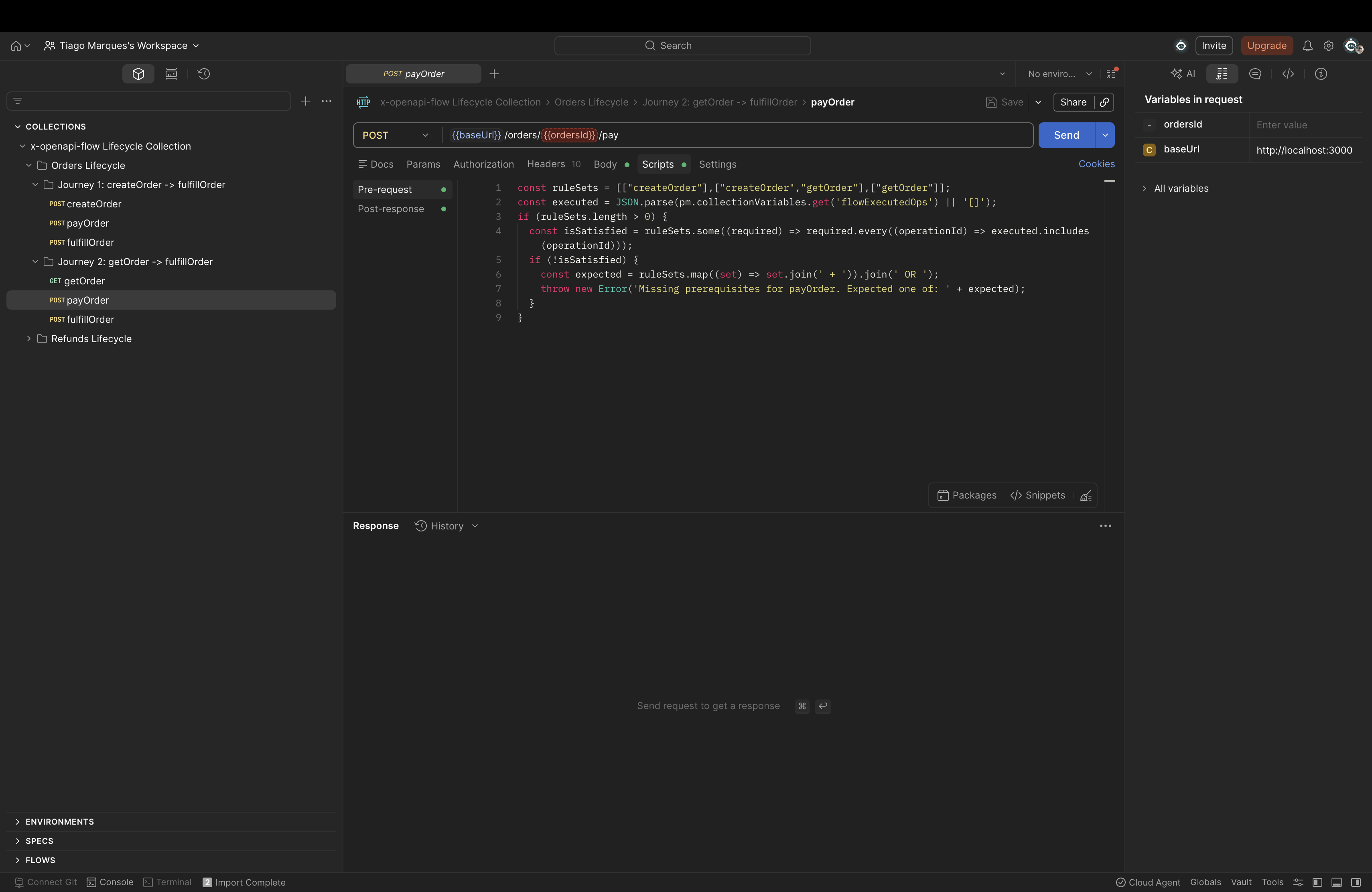
集合按生命周期顺序排列,可减少集成错误
Insomnia – 有序 API 集合
cd example/insomnia
npm install
npm run apply
npm run generate
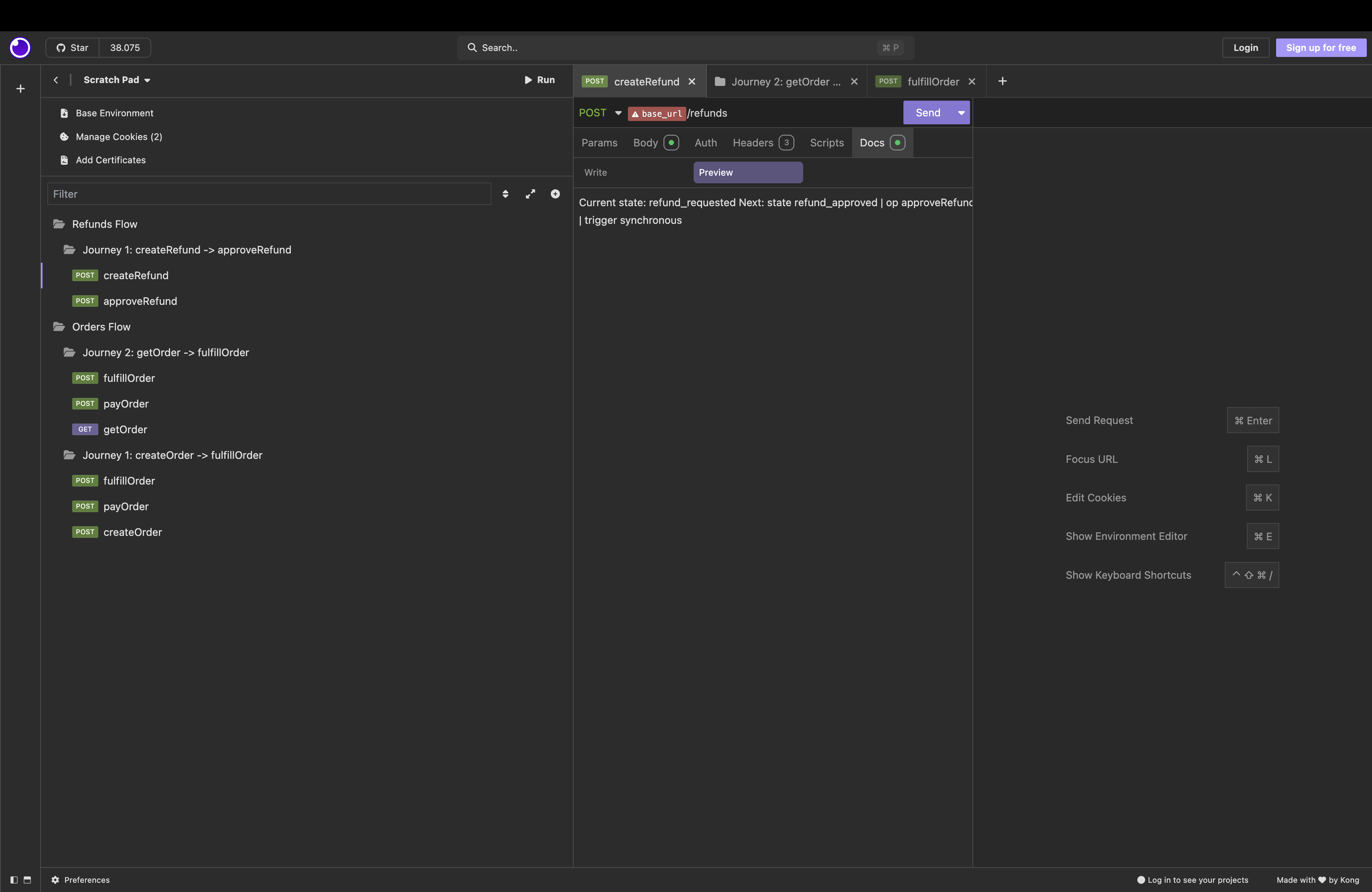
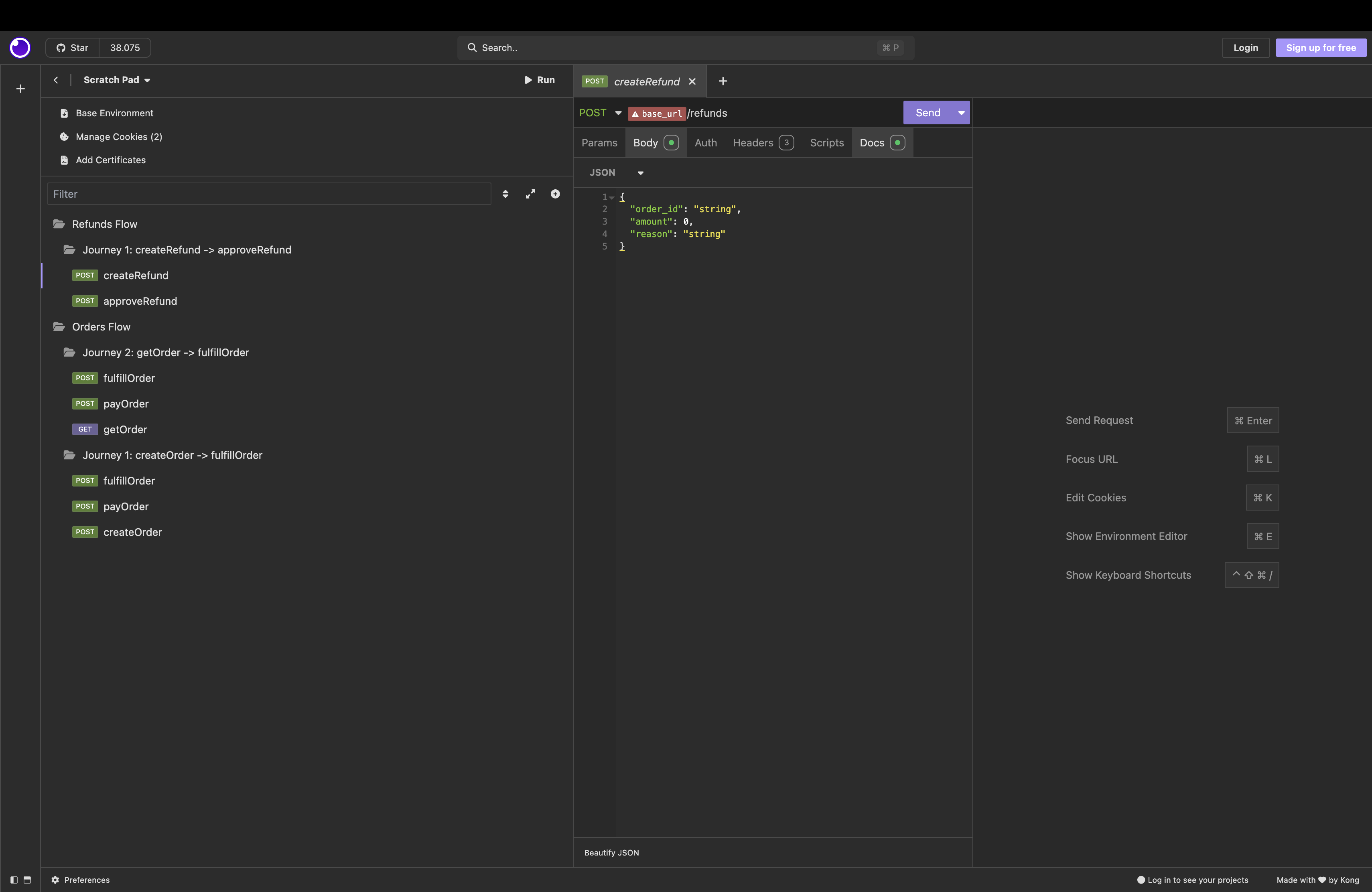
请求已根据生命周期转换预先排序
CLI 参考 – 常用命令
在命令行中使用 x-openapi-flow 管理、验证、可视化 API 工作流,并为其生成 SDK 和文档。
常规
npx x-openapi-flow help [command]         # show help for a specific command

npx x-openapi-flow --help                 # general help

npx x-openapi-flow version                # show version

npx x-openapi-flow doctor [--config path] # check setup and config

npx x-openapi-flow completion [bash|zsh]  # enable shell autocompletion

npx x-openapi-flow quickstart [--dir path] [--runtime express|fastify] [--force] # scaffold runnable onboarding project
工作流管理
# initialize flow support
npx x-openapi-flow init [--flows path] [--force] [--dry-run]

# apply flows to OpenAPI
npx x-openapi-flow apply [openapi-file] [--flows path] [--out path]

# validate transitions
npx x-openapi-flow validate <openapi-file> [--profile core|relaxed|strict] [--strict-quality] [--semantic]

# preview sidecar changes
npx x-openapi-flow diff [openapi-file] [--format pretty|json]

# detect breaking flow changes (use in CI to fail PRs)
npx x-openapi-flow diff [openapi-file] --breaking-only --fail-on-breaking

# generate a Markdown migration guide for breaking flow changes
npx x-openapi-flow migrate [openapi-file] [--flows path] [--format markdown|json] [--out path]
可视化与文档
# generate lifecycle diagrams
npx x-openapi-flow graph [openapi-file] [--format mermaid|json]

# generate Redoc docs
npx x-openapi-flow generate-redoc [openapi-file] [--output path]

# export human-readable flow docs (Mermaid diagrams + prose)
npx x-openapi-flow export-doc-flows [openapi-file] [--output path] [--format markdown|json]

# export a machine-oriented flow contract for coding agents (not for humans)
npx x-openapi-flow export-llm-flows [openapi-file] [--output path] [--format yaml|json]
SDK 生成
# generate flow-aware SDK (typescript or python)
npx x-openapi-flow generate-sdk [openapi-file] --lang typescript|python [--output path]
测试生成
# generate executable flow tests (happy path + invalid transitions)
npx x-openapi-flow generate-flow-tests [openapi-file] [--format jest|vitest|postman] [--output path]

# postman/newman-oriented collection with flow scripts
npx x-openapi-flow generate-flow-tests [openapi-file] --format postman [--output path] [--with-scripts]
完整详情:
NestJS 集成
专用软件包:x-openapi-flow-nestjs-kit
npm install x-openapi-flow x-openapi-flow-nestjs-kit
然后从 x-openapi-flow-nestjs-kit 导入。
此软件包封装了官方运行时防护辅助工具,并提供以 NestJS 为先的 API。
此软件包的发布自动化使用格式为 nestjs-v<version> 的专用标签
(例如:nestjs-v0.1.1),以避免与 x-openapi-flow 标签冲突。
选项 A:中间件(即插即用)
// flow-guard.middleware.ts
import { Injectable, NestMiddleware } from "@nestjs/common";
import { createFlowMiddleware, MemoryAdapter } from "x-openapi-flow-nestjs-kit";
import openapi from "./openapi.flow.json";

const store = new MemoryAdapter(); // swap for RedisAdapter or GenericSQLAdapter in production
const guard = createFlowMiddleware({ openapi, ...store.forGuard() });

@Injectable()
export class FlowGuardMiddleware implements NestMiddleware {
  use(req: any, res: any, next: () => void) {
    guard.use(req, res, next);
  }
}

// app.module.ts — apply to specific routes
export class AppModule implements NestModule {
  configure(consumer: MiddlewareConsumer) {
    consumer.apply(FlowGuardMiddleware).forRoutes("orders");
  }
}
选项 B:CanActivate 防护
// flow.guard.ts
import { CanActivate, ExecutionContext, Injectable } from "@nestjs/common";
import { createFlowGuard, MemoryAdapter } from "x-openapi-flow-nestjs-kit";
import openapi from "./openapi.flow.json";

const store = new MemoryAdapter();
const flowGuard = createFlowGuard({ openapi, ...store.forGuard() });

@Injectable()
export class FlowGuard implements CanActivate {
  canActivate(context: ExecutionContext) {
    return flowGuard.canActivate(context);
  }
}
每次成功执行状态变更请求后,调用 store.setState 以推进资源状态:
@Post(":id/pay")
async pay(@Param("id") id: string) {
  // … business logic …
  await store.setState({ resourceId: id, state: "paid" });
  return { ok: true };
}
文档和指南
通过详细的指南、示例和集成说明,充分发挥 x-openapi-flow 的作用:
-
采用指南 – docs/wiki/getting-started/Adoption-Playbook.md
了解如何高效地将 x-openapi-flow 引入 API 工作流 -
故障排除 – docs/wiki/reference/Troubleshooting.md
快速解决常见问题和验证错误 -
实际示例 – docs/wiki/engineering/Real-Examples.md
探索添加了生命周期元数据的真实 OpenAPI 规范 -
集成:
- GitHub Actions – docs/wiki/integrations/GitHub-Actions-Integration.md
在一个可复用的工作流步骤中,于 CI 中验证流程规则 - Swagger UI – docs/wiki/integrations/Swagger-UI-Integration.md
查看 Swagger UI 中支持流程的面板 - Redoc – docs/wiki/integrations/Redoc-Integration.md
在 Redoc 文档中生成生命周期图 - Postman – docs/wiki/integrations/Postman-Integration.md
根据有效转换整理集合 - Insomnia – docs/wiki/integrations/Insomnia-Integration.md
根据生命周期流程预先配置请求
- GitHub Actions – docs/wiki/integrations/GitHub-Actions-Integration.md
社区与成效证明
- 分享你的案例研究 – docs/wiki/community/Case-Study-Template.md
- 发起讨论并分享想法 – 使用 GitHub Issues 分享采用过程中的阻碍、指标和集成经验 :使用 .github/ISSUE_TEMPLATE/case-study.yml 和 .github/ISSUE_TEMPLATE/adoption-blocker.yml 中的结构化表单
- 用指标证明成效 – 跟踪采用前后的
denied_invalid_transition、入职周期和 CI 拦截率
路线图
我们正在积极扩展 x-openapi-flow,以支持多个平台和 SDK。查看进展:
-
🗂 路线图概览 – #2
查看计划中的功能和高层目标 -
🐍 Python SDK MVP – #3
让 Python 开发者能够使用支持流程的 SDK -
🏎 Go SDK MVP – #4
为 Go 项目引入支持生命周期的 SDK -
☕ Kotlin SDK MVP – #5
为 Android 和 JVM 开发者提供支持流程的 SDK
更新日志
跟踪 x-openapi-flow 的更新与改进:
-
最新版本(v1.7.0) – CHANGELOG.md#170---2026-04-02
查看当前版本中的发布内容 -
版本历史 – CHANGELOG.md
查看完整的版本历史和过往更新 -
发行说明 – GitHub Release v1.7.0
查看最新版本的详细说明,包括新功能和修复
文档语言政策
为确保全球开发者社区能够清晰、便捷地获取信息,所有项目文档都应使用英语编写。这有助于贡献者、用户和 AI Agent 统一理解和使用 x-openapi-flow。
评论
一个开放协议,规定了 AI 应用如何以统一方式连接外部工具与数据源。客户端负责与模型对话,MCP 服务负责提供工具、资源和提示模板,两者通过标准消息通信,同一个服务可以被不同客户端复用。