
关于 Cosmos Semantic
Cosmos Semantic 是以本体为核心的开源语义层,为 Agent 和应用统一指标、业务规则与概念,并为结果附上可核验依据。它通过多数据库查询和重放、对账功能,帮助解释数字及其变化。
主要功能
- 01定义统一指标、规则与业务概念
- 02跨多种数据库生成一致查询
- 03为结果附公式、规则和哈希依据
- 04重放查询并比较数字变化
- 05对账指标与现有 SQL 结果
- 06提供只读业务目录控制台
适用场景
- 01让 Agent 查询经治理的业务指标
- 02核验报告数字及其计算依据
- 03排查新旧 SQL 指标结果差异
- 04查看指标健康度和 Agent 使用成本
MCP 相关
Cosmos Semantic 提供原生 MCP 服务,客户端可搜索概念、解释规则、列出成员、查询指标并查看 SQL。每次调用都按令牌所属用户执行,个人数据不会传给 Agent。
配置
本地服务的配置在各客户端中通用,复制后粘贴到客户端的 MCP 配置文件即可。
uvx cosmos-semanticCOSMOS_API_KEY密钥The caller's key; its user context feeds the model's row filtersCOSMOS_DEV_API_KEYS密钥YAML file with development keys (local use); production uses an OIDC provider本地服务需要在你的电脑上安装运行环境(如 Node.js 18+)。各客户端的配置文件位置不同,请参考客户端文档。
工具
本地服务需要在你的电脑上运行后才能读取工具,维护者暂未提供工具列表。
详细介绍
Cosmos Semantic





一个以本体为核心的开源语义层,让 AI Agent 和应用在每个数据库上都得到相同的数字,并为每个答案提供证明。
控制台在线演示 · 快速入门 · 文档 · 文章 (葡萄牙语)
在原始表上编写 SQL 的 AI Agent 会返回看起来正确、却无人能解释的数字:“收入”有三种定义,“活跃客户”对一个团队来说是 60 天,对另一个团队则是 90 天。Cosmos Semantic 只定义一次指标、业务规则和概念,通过 MCP 将它们提供给 Agent,而不是让 Agent 猜测 SQL,并为每个答案附上证据。
| 多数据库 | 一个模型,在 Databricks、Snowflake、Oracle、SQL Server、Postgres、MySQL、MariaDB 和 DuckDB 上得到相同数字,并由测试套件在每次变更时验证 |
| 本体 | 双语业务词汇表(SKOS)、带有负责人和测试的版本化业务规则,以及包含团队、系统和流程的知识图谱 |
| 为 AI Agent 打造 | 原生 MCP 服务:Agent 查找概念、请求受治理的指标并获得确定性 SQL;个人数据绝不会传给它们 |
| 可验证的数字 | 每个答案都包含展开后的公式、规则、行筛选条件、参考日期和哈希;cosmos replay 可说明数字是否发生变化以及原因 |
| 对账 | 将受治理的指标与团队现有的旧版 SQL 进行比较,并指出每项差异可能的原因 |
| 开放,不受厂商锁定 | Apache 2.0、自有引擎,并支持从 dbt、Power BI、Cube 和 Apache Ossie 导入 |
YAML 格式采用 dbt Semantic Layer 词汇,并附带 JSON Schema;Cube 和 dbt 是导入来源和导出目标,而非依赖项。核心部分采用开放核心模式,遵循 Apache 2.0 许可(ADR 0005)。
**状态:**阶段 0 至 3 已实现:引擎、本体(词汇表和业务规则)、REST API、MCP 服务、OIDC 身份认证、可验证的数字(证据、回放、对账、影响分析、引导初始化)、业务上下文(规则版本、使用情况与成本、知识图谱、Power BI 导入、AI 辅助发现、零售套件、SKOS 导出)以及只读控制台。请参阅路线图。
快速入门
pip install "cosmos-semantic[duckdb,testdata]"
cosmos init demo && cd demo
cosmos demo-data
cosmos query revenue average_order_value --by orders.status --evidence
cosmos explain rule:active_customer
大约一分钟内,即可在本地 DuckDB 文件中获得一项受治理的指标及其证据(公式、规则、策略、as_of 和哈希)。快速入门将继续介绍业务规则、行筛选器、个人数据,以及如何通过 MCP 连接 AI Agent。额外组件:duckdb、postgres、sqlserver、mysql(MySQL 和 MariaDB)、oracle、databricks、snowflake、server(REST 和 MCP)、ai(cosmos suggest)、testdata。
控制台
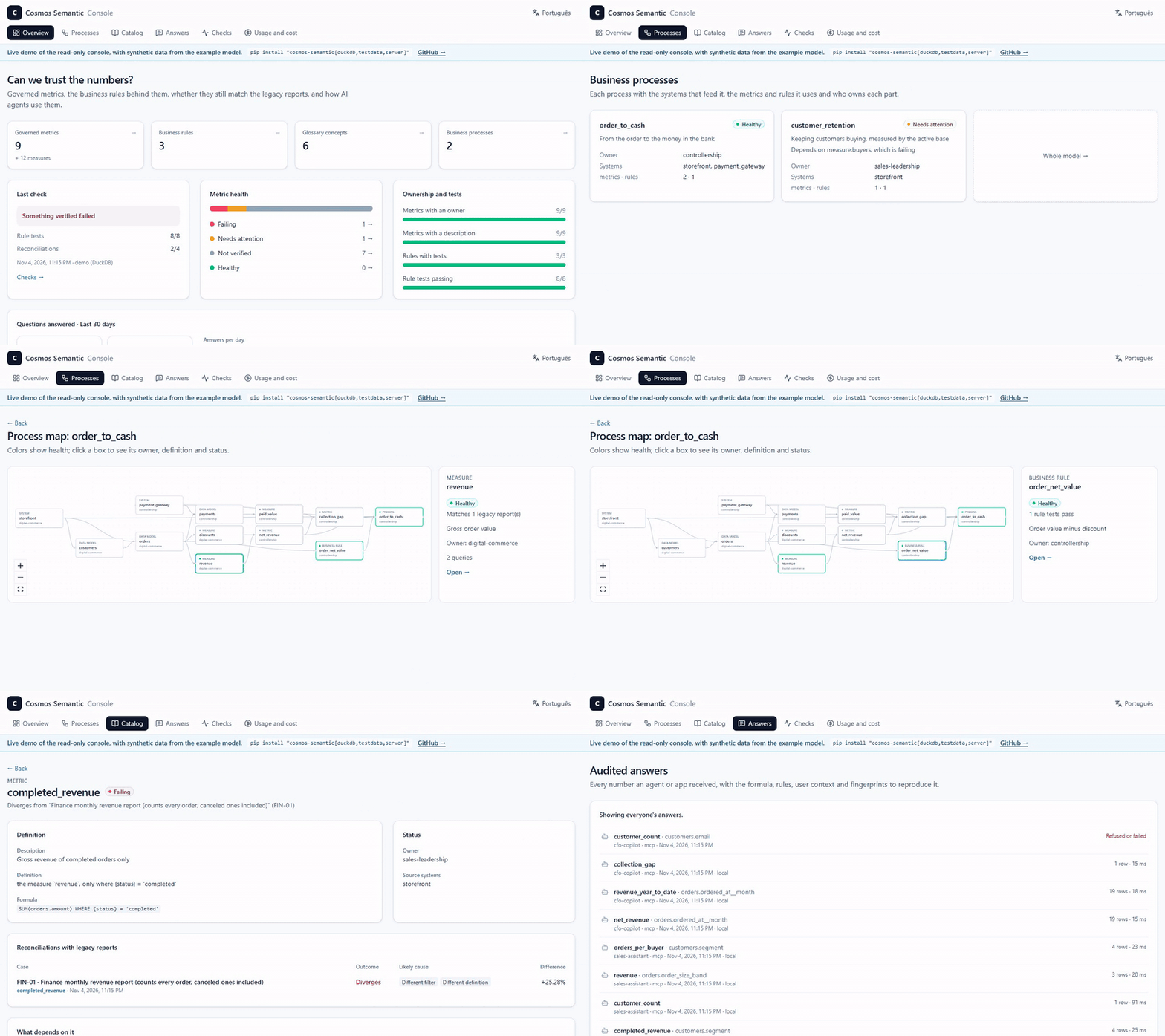
cosmos serve 还会在 /console 提供只读控制台,支持英语或葡萄牙语,面向决策者而非构建者:
- 指标健康状况和负责人;
- 以健康状况着色的业务流程图;
- 使用业务术语编写的目录;
- 每条经过审计的回答,以及用于重新生成回答的按钮;
- 每个 Agent 的使用情况和成本。
cosmos check 会记录针对旧版报告的规则测试和核对结果,因此控制台可以显示随时间变化的健康状况。
开发
需要 Python 3.11+ 和 uv。克隆此仓库后:
uv sync --all-extras

# Generate synthetic e-commerce data into a local DuckDB (data/ecommerce.duckdb)
uv run cosmos demo-data -c examples/ecommerce/connections.yml   # --locale pt_BR for Brazilian data with CPF

# Validate the example model
uv run cosmos validate -m examples/ecommerce/semantic

# Revenue and average order value by status
uv run cosmos query revenue average_order_value --by orders.status \
  -m examples/ecommerce/semantic -c examples/ecommerce/connections.yml

# Metrics from different models, with the user's row filter; --show-sql prints the generated SQL
uv run cosmos query revenue paid_value customer_count --by customers.region -u region=Midwest --show-sql \
  -m examples/ecommerce/semantic -c examples/ecommerce/connections.yml

# Business rules as a filter and as a grouping; --as-of pins "today"
uv run cosmos query customer_count --where "{rule.active_customer}" --by customers.segment \
  -u region=Northeast --as-of 2026-10-22 -m examples/ecommerce/semantic -c examples/ecommerce/connections.yml

# Evidence envelope: formulas, rules, policies, as_of and hashes; then replay the audited query
export COSMOS_AUDIT_LOG=data/audit.jsonl
uv run cosmos query average_order_value --by customers.segment --where "{rule.active_customer}"   -u region=Northeast --evidence -m examples/ecommerce/semantic -c examples/ecommerce/connections.yml
uv run cosmos replay <query_id> -m examples/ecommerce/semantic -c examples/ecommerce/connections.yml

# Reconcile a governed metric with legacy SQL or another model, and explain the divergence
uv run cosmos reconcile revenue --by orders.status --sql legacy_revenue.sql   -m examples/ecommerce/semantic -c examples/ecommerce/connections.yml
uv run cosmos reconcile --cases examples/ecommerce/divergence_zoo.yml   -m examples/ecommerce/semantic -c examples/ecommerce/connections.yml

# What a change affects, and who queried it (also: --changes-from <previous model>)
uv run cosmos impact rule:active_customer -m examples/ecommerce/semantic --audit data/audit.jsonl

# Past numbers under the rule in effect then, or under today's rule
uv run cosmos query customer_count -w "{rule.active_customer}" --as-of 2026-06-30 --rules-as-of 2026-10-23   -u region=Midwest -m examples/ecommerce/semantic -c examples/ecommerce/connections.yml

# Usage and estimated cost per metric, user, agent and data source (rates: `cost` in connections.yml)
uv run cosmos usage --audit data/audit.jsonl -m examples/ecommerce/semantic -c examples/ecommerce/connections.yml

# The business knowledge graph: owners, source systems and processes (Mermaid, DOT or JSON)
uv run cosmos graph --focus process:order_to_cash -m examples/ecommerce/semantic
uv run cosmos impact system:payment_gateway -m examples/ecommerce/semantic

# AI-assisted discovery: concepts, rules, metrics and descriptions, validated by the engine, for review
# (repeat --source to require that each suggestion runs on every database the model serves)
uv run cosmos suggest --source local -m examples/ecommerce/semantic -c examples/ecommerce/connections.yml -o suggestions.yml

# Industry pack mapped onto your tables by name (draft + report for review)
uv run cosmos pack list
uv run cosmos pack apply retail --source local --schema public -c examples/ecommerce/connections.yml -o semantic/retail.yml

# The business glossary as SKOS/RDF for data catalogs (turtle, jsonld or ntriples)
uv run cosmos export skos -m examples/ecommerce/semantic -o glossary.ttl --base https://data.example.com/glossary/

# Draft a model from the database catalog (keys, joins, measures, LGPD suggestions), then review it
uv run cosmos bootstrap -c examples/ecommerce/connections.yml -o semantic/draft.yml

# Business rule examples (on DuckDB, without touching the data sources) and reference queries
uv run cosmos test -m examples/ecommerce/semantic
uv run cosmos reference

# Import models from other tools
uv run cosmos import cube path/to/model -o semantic/imported.yml
uv run cosmos import dbt path/to/dbt/models --schema analytics -o semantic/dbt.yml
uv run cosmos import ossie model.yaml -o semantic/ossie.yml
uv run cosmos import powerbi model.bim -o semantic/powerbi.yml   # or a TMDL folder
REST API 和 MCP
cosmos serve 会在同一进程中启动 /v1 上的 REST API 和 /mcp 上的 MCP 服务;交互式文档位于 /docs。
# Production: tokens from the OIDC provider (Cosmos only validates, never issues)
export COSMOS_OIDC_ISSUER=https://login.microsoftonline.com/<tenant>/v2.0
export COSMOS_OIDC_AUDIENCE=api://cosmos-semantic
# Development: API keys bound to a fixed context (a file with `keys: {<key>: {subject, user}}`)
export COSMOS_DEV_API_KEYS=dev-keys.yml

uv run cosmos serve -m examples/ecommerce/semantic -c examples/ecommerce/connections.yml
curl -X POST localhost:8080/v1/query -H "X-API-Key: <key>" -H "content-type: application/json" \
  -d '{"metrics": ["revenue"], "dimensions": ["customers.segment"]}'
远程 MCP 客户端将 /mcp 用作受 OAuth 保护的资源:不带有效令牌的请求会收到 HTTP 401,并附带 WWW-Authenticate 标头,该标头指向 /.well-known/oauth-protected-resource,其中会标明身份提供方(在代理后设置 COSMOS_PUBLIC_URL)。
对于本地 MCP 客户端(Claude Desktop、Claude Code),请使用 stdio 传输:设置 COSMOS_API_KEY 后运行 cosmos mcp -m ... -c ...。可用工具包括 search_concepts、explain、list_members、query 和 show_sql。每次调用都以令牌所有者的身份运行;个人数据绝不会传递给 Agent。
数据源
本地 Postgres:运行 docker compose -p cosmos-semantic -f deploy/docker-compose.yml up -d,然后运行 cosmos demo-data --target postgres 和 cosmos reference --source postgres。若还要在 Postgres 上运行测试,请设置 COSMOS_PG_URI=postgresql://cosmos:cosmos@localhost:15432/cosmos。
本地 SQL Server:运行 docker compose -p cosmos-semantic -f deploy/docker-compose.yml --profile sqlserver up -d,并设置 COSMOS_MSSQL_URI='mssql+pymssql://sa:Cosmos!Passw0rd@localhost:14330/master'。每个数据源都支持在 connections.yml 中配置 schema_map(例如 public: dbo),以便在不同的架构中使用同一模型。
本地 MySQL、MariaDB 和 Oracle Database Free:运行 docker compose -p cosmos-semantic -f deploy/docker-compose.yml --profile mysql --profile mariadb --profile oracle up -d,然后设置 COSMOS_MYSQL_URI=mysql+pymysql://root:[email protected]:13306/、COSMOS_MARIADB_URI=mysql+pymysql://root:[email protected]:13307/、COSMOS_ORACLE_DSN=127.0.0.1:11521/FREEPDB1 和 COSMOS_ORACLE_PASSWORD=cosmos。Oracle 容器就绪后,以 SYSTEM 身份运行 deploy/oracle-setup.sql(命令写在该文件中)。在 Oracle 中,架构就是用户,因此 Oracle 数据源会将模型的 public 映射到其所有者(schema_map: { public: cosmos })。
Databricks:设置 DATABRICKS_HTTP_PATH(SQL 仓库)和 DATABRICKS_TOKEN,并配置 DATABRICKS_SERVER_HOSTNAME;或者设置 DATABRICKS_CONFIG_PROFILE,使用 Databricks CLI 配置文件(databricks auth login --profile <name>)。测试会将示例数据加载到 DATABRICKS_CATALOG 中指定的目录(默认为 cosmos_demo,该目录必须存在)。在 Windows 上使用 Git Bash 时,还要设置 MSYS_NO_PATHCONV=1,否则 Shell 会将 /sql/1.0/... 改写为 Windows 路径,导致仓库返回 404。
Snowflake:设置 SNOWFLAKE_ACCOUNT(<org>-<account>)、SNOWFLAKE_USER 和 SNOWFLAKE_PRIVATE_KEY_FILE(密钥对登录),或者设置 SNOWFLAKE_CONNECTION_NAME,并使用 ~/.snowflake/connections.toml 中的连接;还需设置 SNOWFLAKE_ROLE 和 SNOWFLAKE_WAREHOUSE。测试会将示例数据加载到 SNOWFLAKE_DATABASE(默认为 COSMOS_DEMO)。deploy/snowflake-setup.sql 会创建所需的仓库、数据库、角色和服务用户。
编辑器通过 schema/ 中的 JSON Schema 校验并补全模型文件,每个文件的第一行都会引用该 Schema(# yaml-language-server: $schema=...)。修改 spec.py 后,运行 uv run cosmos schema -o schema/cosmos-semantic.v1.schema.json 重新生成 Schema。
原则
- 引擎由我们打造。 语义模型、指标规划器和 SQL 生成是产品的核心。
- 兼容,而非依赖。 Cube、dbt 和 Ossie 是导入和导出格式。
- 直接查询数据源。 MVP 阶段不引入中间基础设施;缓存将在后续添加。
- 各处结果一致。 同一请求在所有受支持的数据库上都会返回相同结果。
- 每个阶段聚焦一个差异化优势。 只有经过验证后,才会扩大范围。
- 开放核心。 所有用于定义或计算数值的内容均采用 Apache 2.0 许可;付费部分涵盖企业身份管理、审计、托管运维和支持。
文档
| 文档 | 内容 |
|---|---|
| 快速入门 | 从 pip install 到受治理的指标、业务规则、策略,以及通过 MCP 使用的 AI Agent |
| 控制台 | 只读 Web 控制台:视图、cosmos check、访问和开发 |
| 产品愿景 | 问题、受众、定位、免费版和付费版 |
| 架构 | 组件、查询规划器、跨数据库保证、安全性、部署 |
| 语义模型 | 编写格式、生成的 SQL 和导出内容 |
| 互操作性 | 与 Apache Ossie 的映射,以及 dbt 和 Cube 导入 |
| 路线图 | 阶段、MVP 范围和退出标准 |
| 更新日志 | 各版本的变更内容 |
| 架构决策 | 决策记录(ADR);0004 取代 0001,0005 确定名称和许可证,0006 将本体纳入 MVP,0007 确定连接器、数据源、身份和导入,0008 将可验证数字作为第 2 阶段的差异化优势,0009 将业务上下文作为第 3 阶段的差异化优势,并暂停互联 BI 和托管产品,0010 增加 Snowflake 数据源,0011 增加 MySQL、MariaDB 和 Oracle,0012 增加只读控制台 |
仓库布局
src/cosmos_semantic/
  spec.py            v1 authoring format (Pydantic); source of the JSON Schema
  loader.py          reading YAML files
  compiler.py        validation and semantic graph, with joins inferred from entities
  expressions.py     {member} and $user references, and protection of caller filters
  planner.py         query plan and per-dialect SQL (SQLGlot)
  connectors.py      DuckDB, Postgres (ADBC), Databricks, Snowflake, Oracle, SQL Server and MySQL/MariaDB, always Arrow
  dialects.py        per-dialect rewrites SQLGlot does not cover (MySQL, Oracle)
  engine.py          model + connections -> executed queries
  ontology.py        business rules (virtual dimensions and tests) and SKOS glossary
  catalog.py         members, concept search and explanations
  auth.py            OIDC token validation and development keys
  evidence.py        evidence envelope: formulas, rules, policies, hashes
  reconcile.py       reconciliation with legacy SQL or another model, and divergence probes
  impact.py          impact analysis over the model graph and the audit log
  bootstrap.py       draft model from the database catalog
  service.py         querying with evidence, auditing and replay, shared by REST, MCP and CLI
  api.py             REST API (FastAPI) and the console at /console
  console.py         read-only console views: health, process graphs, catalog, answers
  checks.py          `cosmos check` runs (rule tests, reconciliations) and their log
  mcp_server.py      MCP server
  interchange/       dbt, Ossie and Cube import
  demo_data.py       synthetic data (en_US default, pt_BR optional)
  reference.py       running the reference queries
  cli.py             the `cosmos` command
schema/              JSON Schema of the format
examples/ecommerce/  example model, connections, the divergence zoo and reconciliation cases
reference/           reference queries (basic and advanced)
tests/fixtures/      example models in dbt, Ossie and Cube
console/             the console's web app (Next.js, React, Tailwind CSS)
deploy/              local docker compose
docs/                documentation and ADRs
许可证和贡献
核心部分采用 Apache 2.0 许可证(ADR 0005)。欢迎依据开发者原创证书(Developer Certificate of Origin)贡献代码;请参阅 CONTRIBUTING.md。请按照 SECURITY.md 中的说明,私下报告漏洞。
评论
一个开放协议,规定了 AI 应用如何以统一方式连接外部工具与数据源。客户端负责与模型对话,MCP 服务负责提供工具、资源和提示模板,两者通过标准消息通信,同一个服务可以被不同客户端复用。