
关于 lit-sheet-music
这是一项使用 Lit 和 OpenSheetMusicDisplay 创建乐谱 Web 组件的技能,可渲染 MusicXML。内容涵盖通过 src 属性或内嵌 XML 输入,并让显示适应浏览器宽度。
主要功能
- 01渲染 MusicXML 乐谱
- 02支持 src 属性或内嵌 XML
- 03输出 SVG 或 canvas
- 04随视口变化调整尺寸
适用场景
- 01在网页中显示乐谱
- 02呈现适应浏览器宽度的乐谱
安装
复制下面的命令,在终端中运行。
$
npx skills add https:/安装后在 Claude Code 中输入/lit-sheet-music确认已加载。
详细介绍
Lit 乐谱
本文将介绍如何设置 Lit Web 组件,并使用 opensheetmusicdisplay 从 src 属性或内嵌 XML 渲染 musicxml。

现在,任何乐谱都可以根据浏览器宽度渲染为 SVG 或 canvas(并会在视口变化时调整大小)。
前提条件
- Vscode
- Node >= 16
- Typescript
开始使用
首先,在终端中导航到项目所在位置并运行以下命令:
npm init @vitejs/app --template lit-ts
接着输入项目名称 lit-sheet-music,然后在 vscode 中打开项目并安装依赖项:
cd lit-sheet-music
npm i lit opensheetmusicdisplay
npm i -D @types/node
code .
使用以下内容更新 vite.config.ts:
import { defineConfig } from "vite";
import { resolve } from "path";

export default defineConfig({
  base: "/lit-sheet-music/",
  build: {
    lib: {
      entry: "src/lit-sheet-music.ts",
      formats: ["es"],
    },
    rollupOptions: {
      input: {
        main: resolve(__dirname, "index.html"),
      },
    },
  },
});
模板
打开 index.html 并使用以下内容更新:
<!DOCTYPE html>
<html lang="en">
  <head>
    <meta charset="UTF-8" />
    <link rel="icon" type="image/svg+xml" href="/src/favicon.svg" />
    <meta name="viewport" content="width=device-width, initial-scale=1.0" />
    <title>Lit Sheet Music</title>
    <script type="module" src="/src/sheet-music.ts"></script>
    <style>
      body {
        margin: 0;
        padding: 0;
      }
    </style>
  </head>

  <body>
    <sheet-music
      src="https://raw.githubusercontent.com/opensheetmusicdisplay/opensheetmusicdisplay/develop/demo/BrahWiMeSample.musicxml"
    >
    </sheet-music>
  </body>
</html>
如果要使用本地 musicxml,请使用以下内容更新 index.html:
<!DOCTYPE html>
<html lang="en">
<head>
<meta charset="UTF-8" />
<link rel="icon" type="image/svg+xml" href="/src/favicon.svg" />
<meta name="viewport" content="width=device-width, initial-scale=1.0" />
<title>Lit Sheet Music</title>
<script type="module" src="/src/sheet-music.ts"></script>
<style>
body {
margin: 0;
padding: 0;
}
</style>
</head>
<body>
<sheet-music>
<script type="text/xml">
<?xml version="1.0" standalone="no"?>
<!DOCTYPE score-partwise PUBLIC
"-//Recordare//DTD MusicXML Partwise//EN"
"http://www.musicxml.org/dtds/partwise.dtd">
<score-partwise>
<part-list>
<score-part id="P1">
<part-name>Voice</part-name>
</score-part>
</part-list>
<part id="P1">
<measure number="0" implicit="yes">
<attributes>
<divisions>4</divisions>
<key>
<fifths>-3</fifths>
<mode>major</mode>
</key>
<time>
<beats>2</beats>
<beat-type>4</beat-type>
</time>
<clef>
<sign>G</sign>
<line>2</line>
</clef>
<directive>Langsam, innig.</directive>
</attributes>
<note>
<pitch>
<step>G</step>
<octave>4</octave>
</pitch>
<duration>2</duration>
<type>eighth</type>
<stem>up</stem>
<notations>
<dynamics>
<p/>
</dynamics>
</notations>
<lyric>
<syllabic>single</syllabic>
<text>Wärst</text>
</lyric>
</note>
</measure>
<measure number="1">
<note>
<pitch>
<step>F</step>
<octave>4</octave>
</pitch>
<duration>3</duration>
<type>eighth</type>
<dot/>
<stem>up</stem>
<lyric>
<syllabic>single</syllabic>
<text>du</text>
</lyric>
</note>
<note>
<pitch>
<step>E</step>
<alter>-1</alter>
<octave>4</octave>
</pitch>
<duration>1</duration>
<type>16th</type>
<stem>up</stem>
<lyric>
<syllabic>single</syllabic>
<text>nicht,</text>
</lyric>
</note>
<note>
<pitch>
<step>E</step>
<alter>-1</alter>
<octave>4</octave>
</pitch>
<duration>2</duration>
<type>eighth</type>
<stem>up</stem>
<lyric>
<syllabic>begin</syllabic>
<text>heil</text>
</lyric>
</note>
<note>
<pitch>
<step>B</step>
<alter>-1</alter>
<octave>4</octave>
</pitch>
<duration>1</duration>
<type>16th</type>
<stem>up</stem>
<beam number="1">begin</beam>
<beam number="2">begin</beam>
<notations>
<slur type="start" number="1"/>
</notations>
<lyric>
<syllabic>end</syllabic>
<text>ger</text>
<extend/>
</lyric>
</note>
<note>
<pitch>
<step>G</step>
<octave>4</octave>
</pitch>
<duration>1</duration>
<type>16th</type>
<stem>up</stem>
<beam number="1">end</beam>
<beam number="2">end</beam>
<notations>
<slur type="stop" number="1"/>
</notations>
<lyric>
<extend/>
</lyric>
</note>
</measure>
</part>
</score-partwise>
</script>
</sheet-music>
</body>
</html>
本示例为 Web 组件传入了 src 属性,但也可以添加一个 script 标签,将 type 属性设为 text/xml,并在其中放入 json 内容。
Web 组件
更新组件之前,需要将 my-element.ts 重命名为 sheet-music.ts。
打开 sheet-music.ts 并使用以下内容更新:
import { html, css, LitElement } from "lit";
import { customElement, property, query } from "lit/decorators.js";
import { IOSMDOptions, OpenSheetMusicDisplay } from "opensheetmusicdisplay";

type BackendType = "svg" | "canvas";
type DrawingType = "compact" | "default";

@customElement("sheet-music")
export class SheetMusic extends LitElement {
  _zoom = 1.0;

  @property({ type: Boolean }) allowDrop = false;
  @property() src = "";

  @query("main") canvas!: HTMLElement;

  controller?: OpenSheetMusicDisplay;
  options: IOSMDOptions = {
    autoResize: true,
    backend: "canvas" as BackendType,
    drawingParameters: "default" as DrawingType,
  };

  static styles = css`
    main {
      overflow-x: auto;
    }
  `;

  render() {
    return html`<main></main>`;
  }

  async renderMusic(content: string) {
    if (!this.controller) return;
    await this.controller.load(content);
    this.controller.zoom = this._zoom;
    this.controller.render();
    this.requestUpdate();
  }

  private async getMusic(): Promise<string> {
    // Check if src attribute is set and prefer it over the slot
    if (this.src.length > 0) return fetch(this.src).then((res) => res.text());

    // Check if slot children exist and return the xml
    const elem = this.parentElement?.querySelector(
      'script[type="text/xml"]'
    ) as HTMLScriptElement;
    if (elem) return elem.innerHTML;

    // Return nothing if neither is found
    return "";
  }

  async firstUpdated() {
    this.controller = new OpenSheetMusicDisplay(this.canvas, this.options);
    this.requestUpdate();

    // Check for any music and update if found
    const music = await this.getMusic();
    if (music.length > 0) this.renderMusic(music);
  }
}

declare global {
  interface HTMLElementTagNameMap {
    "sheet-music": SheetMusic;
  }
}
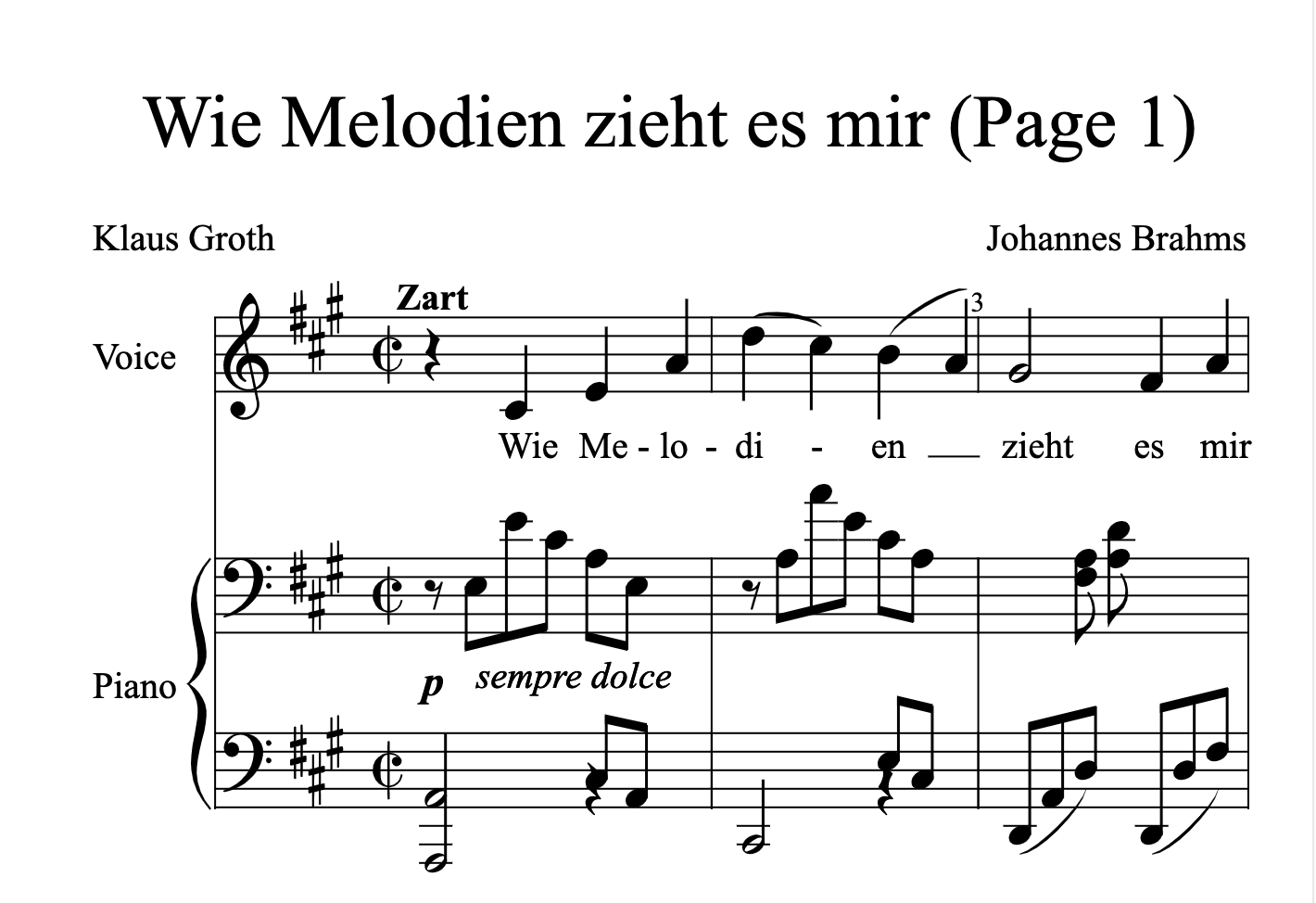
运行 npm run dev,如果一切顺利,应该会显示以下内容:
总结
如果想进一步了解如何使用 Lit 进行构建,可以阅读此处的文档。
此示例的源码可在此处找到。
评论
支持 Markdown