
关于 MCP CLI client
MCP CLI 客户端是一个简单的命令行工具,让用户在终端中与任何 MCP 兼容服务交互。支持多个 LLM 提供商、多模态输入和提示词模板。
主要功能
- 01支持多个 LLM 提供商
- 02MCP 服务工具集成
- 03图像输入和多模态支持
- 04提示词模板
- 05剪贴板和管道输入支持
适用场景
- 01在终端中运行 LLM 提示
- 02访问 MCP 服务提供的工具
- 03分析图像和截图
- 04使用预定义模板快速生成内容
MCP 相关
MCP CLI 客户端连接到 MCP 服务以访问其工具和资源,支持 stdio 和其他传输类型进行本地和远程服务集成。
详细介绍
MCP CLI 客户端
一个简单的 CLI 程序,用于运行大模型提示词并实现 Model Context Protocol (MCP) 客户端。
你可以从终端方便地使用任何 MCP 兼容服务。
该工具可作为 Claude Desktop 的替代客户端。此外,你还可以通过 llama 使用任何大模型提供商,如 OpenAI、Groq 或本地大模型。
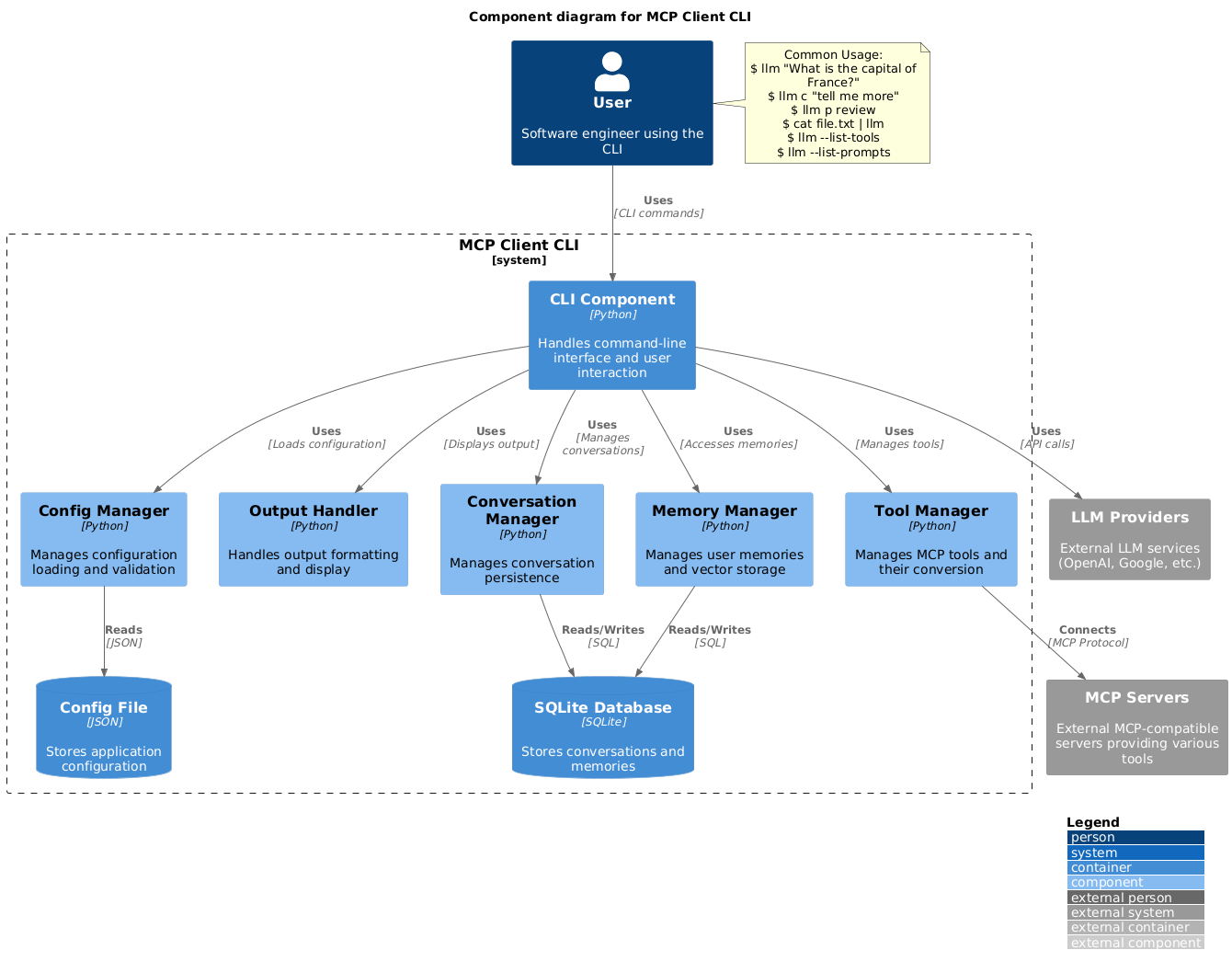
设置
-
通过 pip 安装:
pip install mcp-client-cli -
创建
~/.llm/config.json文件以配置你的大模型和 MCP 服务:{ "systemPrompt": "You are an AI assistant helping a software engineer...", "llm": { "provider": "openai", "model": "gpt-4", "api_key": "your-openai-api-key", "temperature": 0.7, "base_url": "https://api.openai.com/v1" // Optional, for OpenRouter or other providers }, "mcpServers": { "fetch": { "command": "uvx", "args": ["mcp-server-fetch"], "requires_confirmation": ["fetch"], "enabled": true, // Optional, defaults to true "exclude_tools": [] // Optional, list of tool names to exclude }, "brave-search": { "command": "npx", "args": ["-y", "@modelcontextprotocol/server-brave-search"], "env": { "BRAVE_API_KEY": "your-brave-api-key" }, "requires_confirmation": ["brave_web_search"] }, "youtube": { "command": "uvx", "args": ["--from", "git+https://github.com/adhikasp/mcp-youtube", "mcp-youtube"] } } }注意:
- 查看 CONFIG.md 了解配置格式的完整文档
- 使用
requires_confirmation指定哪些工具在执行前需要用户确认 - 大模型 API 密钥也可以通过环境变量
LLM_API_KEY或OPENAI_API_KEY设置 - 配置文件可以放在
~/.llm/config.json或$PWD/.llm/config.json - 你可以使用
//注释 JSON 配置文件,以便在配置之间切换
-
运行 CLI:
llm "What is the capital city of North Sumatra?"
使用
基本用法
$ llm What is the capital city of North Sumatra?
The capital city of North Sumatra is Medan.
你可以省略引号,但要小心 bash 特殊字符,如 &、|、; 等可能被你的 shell 解释的字符。
你也可以从其他命令或文件中管道输入:
$ echo "What is the capital city of North Sumatra?" | llm
The capital city of North Sumatra is Medan.

$ echo "Given a location, tell me its capital city." > instructions.txt
$ cat instruction.txt | llm "West Java"
The capital city of West Java is Bandung.
图像输入
你可以管道传入图像文件,以便用多模态大模型分析它们:
$ cat image.jpg | llm "What do you see in this image?"
[LLM will analyze and describe the image]

$ cat screenshot.png | llm "Is there any error in this screenshot?"
[LLM will analyze the screenshot and point out any errors]
使用提示词模板
你可以使用预定义的提示词模板,使用 p 前缀后跟模板名称及其参数:
# List available prompt templates
$ llm --list-prompts

# Use a template
$ llm p review  # Review git changes
$ llm p commit  # Generate commit message
$ llm p yt url=https://youtube.com/...  # Summarize YouTube video
触发工具
$ llm What is the top article on hackernews today?

================================== Ai Message ==================================
Tool Calls:
  brave_web_search (call_eXmFQizLUp8TKBgPtgFo71et)
 Call ID: call_eXmFQizLUp8TKBgPtgFo71et
  Args:
    query: site:news.ycombinator.com
    count: 1
Brave Search MCP Server running on stdio

# If the tool requires confirmation, you'll be prompted:
Confirm tool call? [y/n]: y

================================== Ai Message ==================================
Tool Calls:
  fetch (call_xH32S0QKqMfudgN1ZGV6vH1P)
 Call ID: call_xH32S0QKqMfudgN1ZGV6vH1P
  Args:
    url: https://news.ycombinator.com/
================================= Tool Message =================================
Name: fetch

[TextContent(type='text', text='Contents [REDACTED]]
================================== Ai Message ==================================

The top article on Hacker News today is:

### [Why pipes sometimes get "stuck": buffering](https://jvns.ca)
- **Points:** 31
- **Posted by:** tanelpoder
- **Posted:** 1 hour ago

You can view the full list of articles on [Hacker News](https://news.ycombinator.com/)
要绕过工具确认要求,使用 --no-confirmations 标志:
$ llm --no-confirmations "What is the top article on hackernews today?"
要在 bash 脚本中使用,添加 --no-intermediates,这样它只会打印最终消息,不会打印中间消息。
$ llm --no-intermediates "What is the time in Tokyo right now?"
继续对话
在你的消息前添加 c 前缀以继续上次的对话。
$ llm asldkfjasdfkl
It seems like your message might have been a typo or an error. Could you please clarify or provide more details about what you need help with?
$ llm c what did i say previously?
You previously typed "asldkfjasdfkl," which appears to be a random string of characters. If you meant to ask something specific or if you have a question, please let me know!
剪贴板支持
你可以使用 cb 命令从剪贴板中获取内容:
# After copying text to clipboard
$ llm cb
[LLM will process the clipboard text]

$ llm cb "What language is this code written in?"
[LLM will analyze the clipboard text with your question]

# After copying an image to clipboard
$ llm cb "What do you see in this image?"
[LLM will analyze the clipboard image]

# You can combine it with continuation
$ llm cb c "Tell me more about what you see"
[LLM will continue the conversation about the clipboard content]
剪贴板功能适用于:
- 原生 Windows/macOS/Linux 环境
- Windows:使用 PowerShell
- macOS:使用
pbpaste处理文本,使用pngpaste处理图像(可选) - Linux:使用
xclip(剪贴板支持所需)
- Windows 子系统 for Linux (WSL)
- 通过 PowerShell 访问 Windows 剪贴板
- 支持文本和图像
- 确保你可以从 WSL 访问
powershell.exe
剪贴板支持所需的工具:
- Windows:PowerShell(内置)
- macOS:
pbpaste(内置)用于文本pngpaste(可选)用于图像:brew install pngpaste
- Linux:
xclip:sudo apt install xclip或等效命令
CLI 会自动检测剪贴板内容是文本还是图像,并进行相应处理。
其他选项
$ llm --list-tools                # List all available tools
$ llm --list-prompts              # List available prompt templates
$ llm --no-tools                  # Run without any tools
$ llm --force-refresh             # Force refresh tool capabilities cache
$ llm --text-only                 # Output raw text without markdown formatting
$ llm --show-memories             # Show user memories
$ llm --model gpt-4               # Override the model specified in config
贡献
欢迎提交问题和拉取请求以改进或修复错误。
评论
一个开放协议,规定了 AI 应用如何以统一方式连接外部工具与数据源。客户端负责与模型对话,MCP 服务负责提供工具、资源和提示模板,两者通过标准消息通信,同一个服务可以被不同客户端复用。