
关于 SwiftMCP
SwiftMCP 是一个 Swift 包,为 iOS 和 macOS 实现 MCP 客户端,通过 JSON-RPC 接口与苹果原生 API 集成。包含 OpenAI 兼容的函数调用桥接和 MLX 本地大模型支持。
主要功能
- 01JSON-RPC 2.0 兼容接口
- 02HealthKit 和原生 API 函数定义
- 03OpenAI 函数调用桥接
- 04MLX 本地大模型集成
- 05自定义工具创建
适用场景
- 01iOS 和 macOS 应用中的健康数据访问
- 02通过 AI 助手进行自然语言设备控制
- 03本地大模型的函数调用和工具使用
- 04跨平台 API 集成和自动化
MCP 相关
SwiftMCP 实现 MCP 客户端,连接到 MCP 服务并通过 JSON-RPC 接口暴露苹果原生 API 及其他自定义工具。
详细介绍
SwiftMCP
一个 Swift 包,为 iOS 和 macOS 实现了 MCP(Model Context Protocol)客户端,通过 JSON-RPC 接口启用原生 API 集成。该包还包括 OpenAI 兼容的函数调用桥接。
功能特性
- Apple 原生 API(如 HealthKit)的开源函数定义
- JSON-RPC 2.0 兼容接口
- 部分测试覆盖
需求
- iOS 15.0+ / macOS 12.0+
- Swift 6.0+
- Xcode 15.0+
安装
Swift Package Manager
将以下依赖添加到你的 Package.swift 文件:
dependencies: [
    .package(url: "https://github.com/compiler-inc/SwiftMCP.git", from: "1.0.0")
]
架构
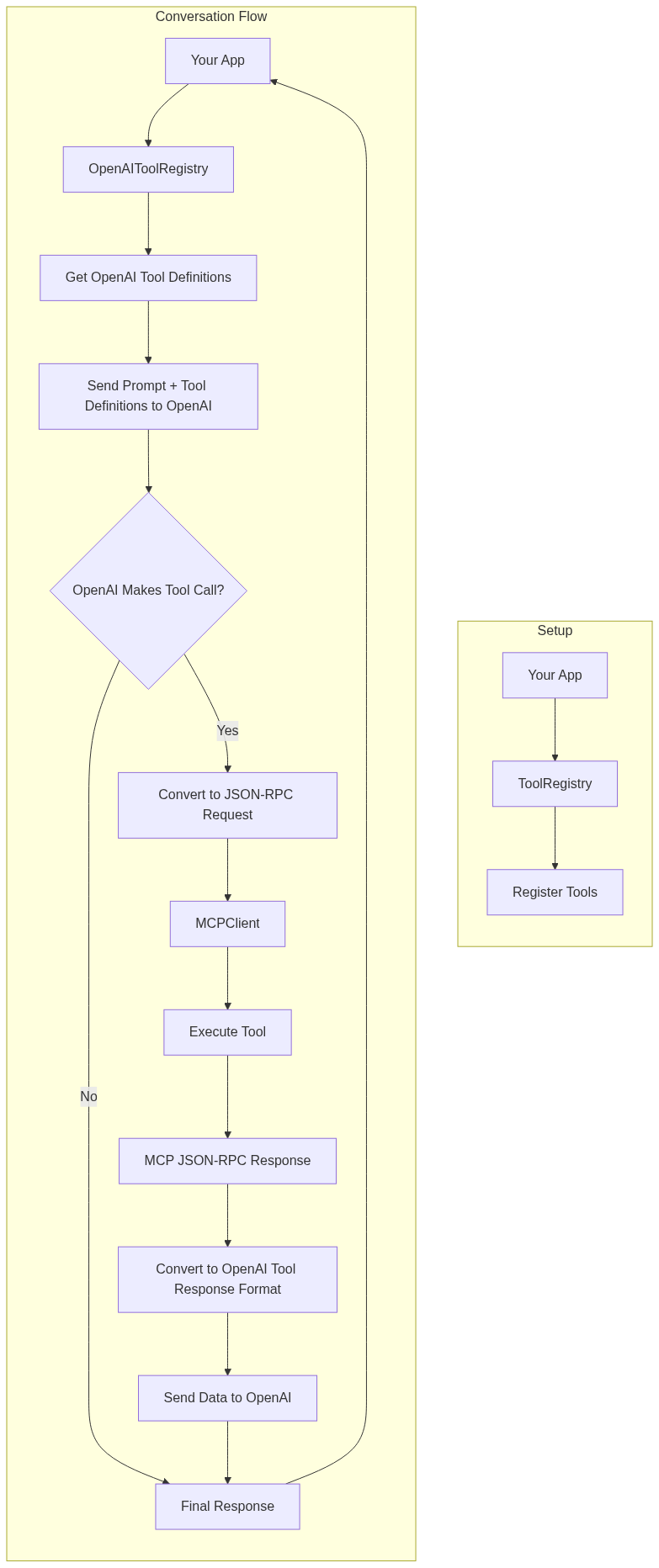
使用
基本设置
import SwiftMCP

// Create a tool registry
let registry = ToolRegistry()

// Create an MCP client with a response handler
let client = MCPClient(toolRegistry: registry) { response in
    print("Received response: \(response)")
}

// Register tools
do {
    let healthKitTool = try HealthKitTool()
    registry.register(tool: healthKitTool)
} catch {
    print("Failed to initialize HealthKit tool: \(error)")
}
OpenAI 集成
此示例演示:
- 使用 HealthKit 工具设置 MCP 客户端
- 创建 OpenAI 桥接并注册工具模式
- 将 MCP 工具转换为 OpenAI 函数定义
- 向 OpenAI 发送初始请求
- 通过 MCP 处理任何工具调用
- 将工具结果发送回 OpenAI 进行最终总结
该流程允许 OpenAI:
- 使用 HealthKit
getData操作请求步数数据 - 使用 HealthKit
getWorkouts操作请求锻炼数据 - 通过 MCP 接收实际的健康和锻炼数据
- 提供数据的自然语言总结
import SwiftMCP
import OpenAI

// 1. Set up MCP client and tools
let registry = ToolRegistry()
let client = MCPClient(toolRegistry: registry) { response in
    print("Received response: \(response)")
}

// Initialize HealthKit tool
let healthKitTool = try HealthKitTool()
registry.register(tool: healthKitTool)

// 2. Set up OpenAI bridge
let openAIRegistry = OpenAIToolRegistry()
let healthKitSchema = JSONSchema(
    type: .object,
    properties: [
        "action": .init(type: .string, enum: ["getData", "getWorkouts"]),
        "dataType": .init(type: .string, description: "Type of health data to retrieve (e.g., stepCount, heartRate)"),
        "timeRange": .init(type: .string, enum: ["today", "yesterday", "this_week", "last_week"]),
        "workoutType": .init(type: .string, enum: ["running", "cycling", "walking"]),
        "includeRoutes": .init(type: .boolean)
    ],
    required: ["action"]
)

// Register the HealthKit tool with its schema
openAIRegistry.registerTool(healthKitTool, schema: healthKitSchema)

// 3. Get OpenAI function definitions
let functions = try openAIRegistry.getOpenAIFunctions()

// 4. Create OpenAI client and chat request
let openAI = OpenAI(apiToken: "your-api-key")
let query = "What was my step count today and how many calories did I burn in my last run?"

let chatRequest = ChatRequest(
    model: .gpt4o,
    messages: [
        .init(role: .user, content: query)
    ],
    functions: functions,
    functionCall: "auto"
)

// 5. Send request to OpenAI
let result = try await openAI.chat(request: chatRequest)

// 6. Handle any tool calls from OpenAI
if let toolCalls = result.choices.first?.message.toolCalls {
    // Process each tool call through MCP
    let toolResponses = try await openAIRegistry.handleToolCalls(toolCalls)

    // 7. Send follow-up request to OpenAI with tool results
    let followUpRequest = ChatRequest(
        model: .gpt4,
        messages: [
            .init(role: .user, content: query),
            result.choices.first!.message,
            .init(role: .assistant, content: nil, toolCalls: toolResponses)
        ]
    )

    // 8. Get final summarized response
    let finalResult = try await openAI.chat(request: followUpRequest)
    print(finalResult.choices.first?.message.content ?? "No response")
}
注意:确保适当处理错误,并将"your-api-key"替换为你的实际 OpenAI API 密钥。
OpenAI 函数调用桥接
// Create and set up the OpenAI bridge
let openAIRegistry = OpenAIToolRegistry()

// Register your MCP tools with their schemas
openAIRegistry.registerTool(healthKitTool, schema: healthKitToolSchema)

// Get OpenAI function definitions
let functions = try openAIRegistry.getOpenAIFunctions()

// Handle OpenAI tool calls
let toolCalls: [OpenAIBridge.ToolCall] = ... // from OpenAI response
let toolResponses = try await openAIRegistry.handleToolCalls(toolCalls)
处理 JSON-RPC 请求
// Example JSON-RPC request for health data
let request = JSONRPCRequest(
    jsonrpc: "2.0",
    method: "healthKit",
    params: [
        "action": .string("getData"),
        "dataType": .string("stepCount"),
        "timeRange": .string("today")
    ],
    id: "1"
)

// Example JSON-RPC request for workouts
let workoutRequest = JSONRPCRequest(
    jsonrpc: "2.0",
    method: "healthKit",
    params: [
        "action": .string("getWorkouts"),
        "workoutType": .string("running"),
        "includeRoutes": .bool(true),
        "timeRange": .string("last_week")
    ],
    id: "2"
)

if let data = try? JSONEncoder().encode(request) {
    try await client.handleIncomingMessage(data: data)
}
创建自定义工具
class CustomTool: MCPTool {
    let methodName = "custom/method"

    func handle(params: [String: JSON]) async throws -> [String: JSON] {
        // Implement your custom functionality here
        return [
            "status": .string("success"),
            "result": .object(["data": .string("your data here")])
        ]
    }
}
可用工具
HealthKitTool
通过 MCP 接口提供对 HealthKit 数据的全面访问。
方法
-
healthKit-
操作:
-
getData: 获取健康指标- 参数:
dataType: 要获取的健康数据类型(例如 "stepCount"、"heartRate")timeRange(可选): 预定义范围("today"、"yesterday"、"this_week" 等)duration(可选): ISO 8601 时长字符串(例如 "P7D" 表示 7 天)
- 返回:
dataType: 获取的数据类型unit: 测量单位samples: 数据点数组,包含值和时间戳
- 参数:
-
getWorkouts: 获取锻炼数据- 参数:
workoutType(可选): 要筛选的锻炼类型(例如 "running"、"cycling")includeRoutes(可选): 布尔值,是否包含 GPS 路线数据timeRange(可选): 预定义范围duration(可选): ISO 8601 时长字符串
- 返回:
workouts: 锻炼数据数组,包括:type: 锻炼类型startDate: 开始时间戳endDate: 结束时间戳duration: 时长(秒)distance(可选): 距离(米)calories(可选): 消耗的能量(千卡)route(可选): GPS 坐标数组,包含时间戳
- 参数:
-
-
错误处理
该包使用 MCPError 类型进行错误处理,包括:
toolNotFound: 请求的方法不存在时invalidParams: 请求参数无效时toolError: 工具特定错误的通用错误情况,包含描述性消息jsonParsingError: JSON 解析失败时invalidRequest: JSON-RPC 请求格式无效时
贡献
我想向该仓库添加尽可能多的 iOS API。目标是为 iOS 开发创建一个全面的 MCP 兼容工具集合。
欢迎任何贡献!请随时提交 PR。
许可证
本项目采用 MIT 许可证 - 详见 LICENSE 文件。
MLX Swift 集成
概述
SwiftMCP 现已支持在设备本地运行的 MLX 模型的函数调用(工具使用)。此功能允许您利用本地大模型的强大功能和工具使用能力,无需依赖外部 API 服务。
设置
要使用 MLX Swift 函数调用,首先需要将 MLX Swift 依赖添加到您的项目中:
dependencies: [
    .package(url: "https://github.com/compiler-inc/SwiftMCP.git", from: "1.0.0")
    .package(url: "https://github.com/ml-explore/mlx-swift", from: "0.21.0")
]
基本用法
此示例演示:
- 设置 MLX 工具注册表
- 加载并初始化 MLX 模型
- 向 MLX 桥接器注册工具
- 生成具有工具调用能力的文本
import SwiftMCP
import MLX

// 1. Set up MLX Tool Registry
let mlxRegistry = MLXToolRegistry()

// 2. Register tools
let weatherTool = WeatherTool()
mlxRegistry.registerTool(weatherTool, schema: WeatherTool.getJSONSchema())

// 3. Create model handler and load model
let modelType = MLXModelFactory.detectModelType(from: modelURL)
let modelHandler = MLXModelFactory.createModelHandler(
    modelType: modelType,
    toolRegistry: mlxRegistry
)

try await modelHandler.loadModel(from: modelURL)

// 4. Generate text with function calling
let prompt = "What's the weather like in San Francisco?"
let response = try await modelHandler.generateWithFunctionCalling(
    prompt: prompt,
    systemPrompt: "You are a helpful assistant with access to weather information.",
    parameters: [
        "temperature": 0.7,
        "max_tokens": 1024
    ]
)

print(response)
支持的模型
MLX 集成目前支持以下模型架构:
- Mistral (7B, 8x7B)
- Llama (2, 3)
- Phi
模型加载
模型需要采用 MLX 格式,可通过使用 MLX 转换工具从 Hugging Face 转换模型获得。如需详细说明,请访问 MLX 仓库。
为 MLX 模型创建自定义工具
为 MLX 模型创建工具遵循与 SwiftMCP 中其他工具相同的模式:
class CustomTool: MCPTool {
    let methodName = "custom/method"

    func handle(params: [String: JSON]) async throws -> [String: JSON] {
        // Implement your custom functionality here
        return [
            "status": .string("success"),
            "result": .object(["data": .string("your data here")])
        ]
    }

    static func getJSONSchema() -> String {
        return """
        {
            "type": "function",
            "function": {
                "name": "custom_method",
                "description": "Performs a custom operation",
                "parameters": {
                    "type": "object",
                    "properties": {
                        "param1": {
                            "type": "string",
                            "description": "First parameter"
                        },
                        "param2": {
                            "type": "number",
                            "description": "Second parameter"
                        }
                    },
                    "required": ["param1"]
                }
            }
        }
        """
    }
}
评论
一个开放协议,规定了 AI 应用如何以统一方式连接外部工具与数据源。客户端负责与模型对话,MCP 服务负责提供工具、资源和提示模板,两者通过标准消息通信,同一个服务可以被不同客户端复用。