
MCP CLI client について
MCP CLI client は任意の MCP 互換サーバーに対応するコマンドラインツールで、OpenAI、Groq、ローカルモデルなど複数の LLM プロバイダに対応しています。
主な機能
- 01コマンドライン・インターフェース
- 02複数の LLM プロバイダ対応
- 03プロンプト・テンプレート
- 04画像入力解析
- 05ツール実行確認
- 06クリップボード統合
活用シーン
- 01ターミナルから LLM に素早くクエリする
- 02MCP サーバーで LLM 機能を拡張する
- 03プロンプト・テンプレートでタスク自動化
- 04画像やスクリーンショットを分析する
MCP 対応
このクライアントは任意の MCP 互換サーバーを使用するための CLI を提供し、ターミナルからツールを柔軟に設定・実行できます。
詳細
MCP CLIクライアント
LLM プロンプトを実行し、Model Context Protocol (MCP) クライアントを実装するシンプルな CLI プログラムです。
ターミナルから便利に MCP 互換サーバーを使用できます。
Claude Desktop の代替クライアントとして機能します。さらに、OpenAI、Groq、または llama 経由のローカル LLM モデルなど、任意の LLM プロバイダーを使用できます。
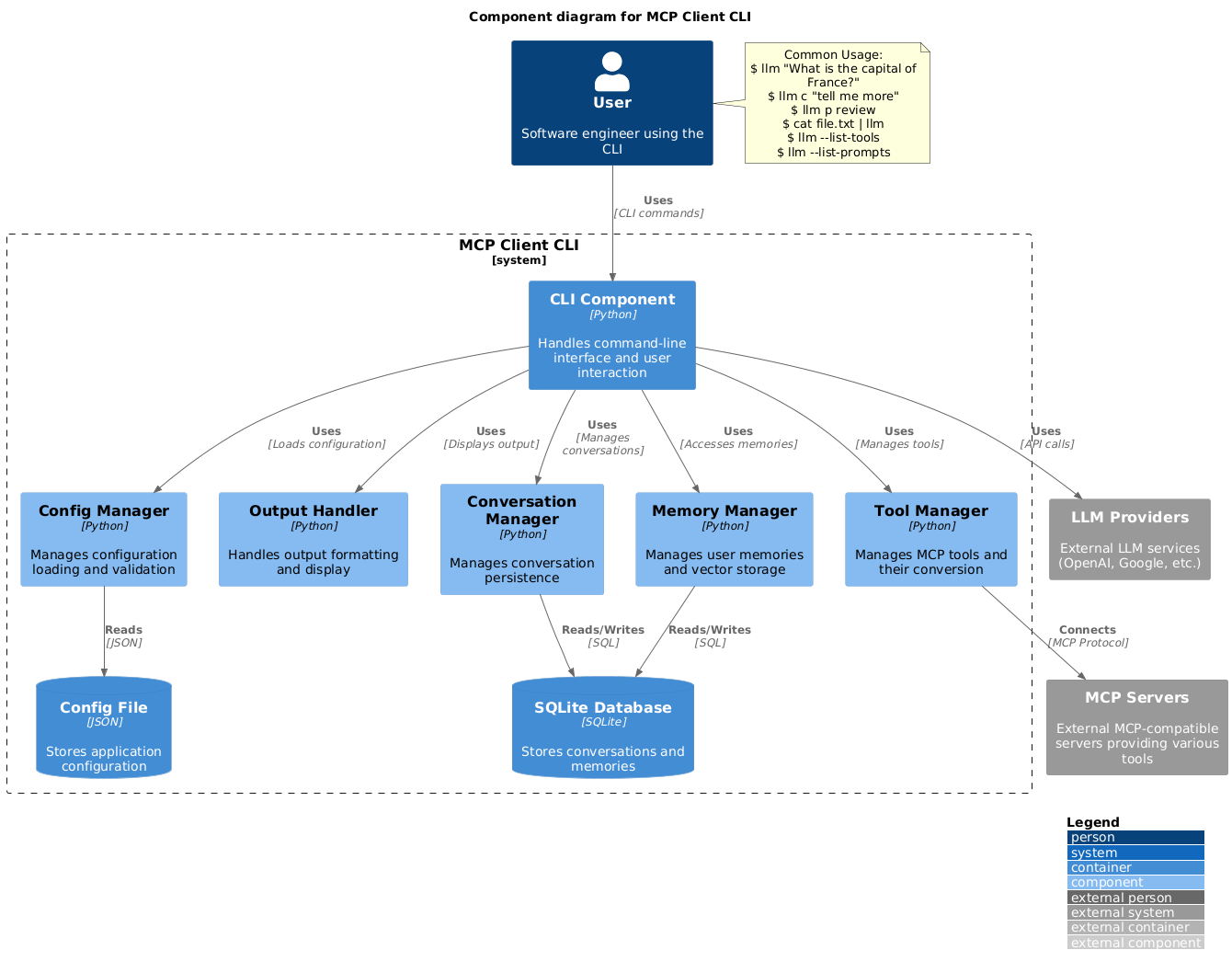
セットアップ
-
pip 経由でインストールします:
pip install mcp-client-cli -
LLM と MCP サーバーを構成するために
~/.llm/config.jsonファイルを作成します:{ "systemPrompt": "You are an AI assistant helping a software engineer...", "llm": { "provider": "openai", "model": "gpt-4", "api_key": "your-openai-api-key", "temperature": 0.7, "base_url": "https://api.openai.com/v1" // Optional, for OpenRouter or other providers }, "mcpServers": { "fetch": { "command": "uvx", "args": ["mcp-server-fetch"], "requires_confirmation": ["fetch"], "enabled": true, // Optional, defaults to true "exclude_tools": [] // Optional, list of tool names to exclude }, "brave-search": { "command": "npx", "args": ["-y", "@modelcontextprotocol/server-brave-search"], "env": { "BRAVE_API_KEY": "your-brave-api-key" }, "requires_confirmation": ["brave_web_search"] }, "youtube": { "command": "uvx", "args": ["--from", "git+https://github.com/adhikasp/mcp-youtube", "mcp-youtube"] } } }注記:
requires_confirmationを使用して、実行前にユーザーの確認が必要なツールを指定します- LLM API キーは環境変数
LLM_API_KEYまたはOPENAI_API_KEY経由で設定することもできます - 設定ファイルは
~/.llm/config.jsonまたは$PWD/.llm/config.jsonのいずれかに配置できます //を使用して JSON 設定ファイルにコメントを付けることで、設定を切り替えられます
-
CLI を実行します:
llm "What is the capital city of North Sumatra?"
使用方法
基本的な使用方法
$ llm What is the capital city of North Sumatra?
The capital city of North Sumatra is Medan.
引用符を省略することもできますが、シェルで解釈される可能性がある &、|、; などの bash 特殊文字に注意してください。
他のコマンドやファイルからの入力をパイプすることもできます:
$ echo "What is the capital city of North Sumatra?" | llm
The capital city of North Sumatra is Medan.

$ echo "Given a location, tell me its capital city." > instructions.txt
$ cat instruction.txt | llm "West Java"
The capital city of West Java is Bandung.
画像入力
マルチモーダル LLM で画像を分析するために、画像ファイルをパイプできます:
$ cat image.jpg | llm "What do you see in this image?"
[LLM will analyze and describe the image]

$ cat screenshot.png | llm "Is there any error in this screenshot?"
[LLM will analyze the screenshot and point out any errors]
プロンプトテンプレートの使用
p プレフィックスの後にテンプレート名とその引数を使用して、定義済みのプロンプトテンプレートを使用できます:
# List available prompt templates
$ llm --list-prompts

# Use a template
$ llm p review  # Review git changes
$ llm p commit  # Generate commit message
$ llm p yt url=https://youtube.com/...  # Summarize YouTube video
ツールの実行
$ llm What is the top article on hackernews today?

================================== Ai Message ==================================
Tool Calls:
  brave_web_search (call_eXmFQizLUp8TKBgPtgFo71et)
 Call ID: call_eXmFQizLUp8TKBgPtgFo71et
  Args:
    query: site:news.ycombinator.com
    count: 1
Brave Search MCP Server running on stdio

# If the tool requires confirmation, you'll be prompted:
Confirm tool call? [y/n]: y

================================== Ai Message ==================================
Tool Calls:
  fetch (call_xH32S0QKqMfudgN1ZGV6vH1P)
 Call ID: call_xH32S0QKqMfudgN1ZGV6vH1P
  Args:
    url: https://news.ycombinator.com/
================================= Tool Message =================================
Name: fetch

[TextContent(type='text', text='Contents [REDACTED]]
================================== Ai Message ==================================

The top article on Hacker News today is:

### [Why pipes sometimes get "stuck": buffering](https://jvns.ca)
- **Points:** 31
- **Posted by:** tanelpoder
- **Posted:** 1 hour ago

You can view the full list of articles on [Hacker News](https://news.ycombinator.com/)
ツール確認要件をバイパスするには、--no-confirmations フラグを使用します:
$ llm --no-confirmations "What is the top article on hackernews today?"
bash スクリプトで使用するには、--no-intermediates を追加して、中間メッセージを出力せず、最終メッセージのみを出力するようにします。
$ llm --no-intermediates "What is the time in Tokyo right now?"
継続
メッセージに c プレフィックスを追加して、最後の会話を続けます。
$ llm asldkfjasdfkl
It seems like your message might have been a typo or an error. Could you please clarify or provide more details about what you need help with?
$ llm c what did i say previously?
You previously typed "asldkfjasdfkl," which appears to be a random string of characters. If you meant to ask something specific or if you have a question, please let me know!
クリップボードサポート
cb コマンドを使用してクリップボードのコンテンツを使用できます:
# After copying text to clipboard
$ llm cb
[LLM will process the clipboard text]

$ llm cb "What language is this code written in?"
[LLM will analyze the clipboard text with your question]

# After copying an image to clipboard
$ llm cb "What do you see in this image?"
[LLM will analyze the clipboard image]

# You can combine it with continuation
$ llm cb c "Tell me more about what you see"
[LLM will continue the conversation about the clipboard content]
クリップボード機能は以下の環境で動作します:
- ネイティブ Windows/macOS/Linux 環境
- Windows: PowerShell を使用します
- macOS: テキストに
pbpasteを使用し、画像にpngpasteを使用します (オプション) - Linux:
xclipを使用します (クリップボードサポートに必須)
- Windows Subsystem for Linux (WSL)
- PowerShell 経由で Windows クリップボードにアクセスします
- テキストと画像の両方で動作します
- WSL から
powershell.exeにアクセスできることを確認してください
クリップボードサポートに必要なツール:
- Windows: PowerShell (組み込み)
- macOS:
pbpaste(組み込み) テキスト用pngpaste(オプション) 画像用:brew install pngpaste
- Linux:
xclip:sudo apt install xclipまたは同等
CLI はクリップボードのコンテンツがテキストか画像かを自動的に検出し、適切に処理します。
追加オプション
$ llm --list-tools                # List all available tools
$ llm --list-prompts              # List available prompt templates
$ llm --no-tools                  # Run without any tools
$ llm --force-refresh             # Force refresh tool capabilities cache
$ llm --text-only                 # Output raw text without markdown formatting
$ llm --show-memories             # Show user memories
$ llm --model gpt-4               # Override the model specified in config
貢献
改善またはバグ修正のための問題報告とプルリクエストをお気軽にお送りください。
コメント
AI アプリケーションが外部のツールやデータソースに統一的な方法で接続するためのオープンなプロトコルです。クライアントはモデルとの対話を担い、MCP サーバーはツール・リソース・プロンプトテンプレートを提供します。標準メッセージでやり取りするため、1 つのサーバーを複数のクライアントで再利用できます。