
Migrate to n8n について
Migrate to n8nは、MakeのシナリオやZapierのZapを、インポート可能なn8nワークフローに変換し、変換済み・要確認・手動対応の項目を段階ごとに報告します。MCPサーバーまたはコマンドラインツールとして動作し、ファイルはローカルに置かれます。
主な機能
- 01Makeのエクスポートをn8nワークフローに変換
- 02Zapierのエクスポートをワークフローに変換
- 03変換済み・要確認・手動対応を報告
- 04インポート前にワークフローの問題を確認
- 05任意でn8nにワークフローをアップロード
活用シーン
- 01Makeのシナリオをn8nへ移行
- 02Zapierのエクスポートから対象のZapを移行
- 03手動対応が必要なステップを確認
- 04変換したワークフローを非アクティブでアップロード
MCP 対応
MCPサーバーとして、変換、検査、代替案の提示、任意のアップロード用ツールをMCPクライアントに公開します。アップロードにはN8N_URLとN8N_API_KEYが必要で、作成されたワークフローは非アクティブのままです。
設定
ローカルサーバーの設定はどのクライアントでも共通です。コピーしてクライアントの MCP 設定ファイルに貼り付けてください。
npx -y migrate-to-n8nMIGRATE_OUTPUT_DIRFolder for converted workflows and reports (default: Documents/migrate-to-n8n)N8N_URLYour n8n address, to upload results (optional)N8N_API_KEYシークレットn8n API key, to upload results (optional)ローカルサーバーにはマシン上の実行環境(Node.js 18 以上など)が必要です。設定ファイルの場所はクライアントごとに異なります。
ツール
6掲載時のツール一覧 · 4 日前に更新
| パラメーター | 型 | 必須 | 説明 |
|---|---|---|---|
| json | string | いいえ | ユーザーがパスではなくファイルを貼り付けるか添付した場合は、エクスポートファイルの全内容を指定します。path または json のどちらか一方を指定し、両方は指定しないでください。 |
| path | string | いいえ | このコンピューター上のエクスポートファイルの絶対パス(~ はホームフォルダー)。path または json のどちらか一方を指定し、両方は指定しないでください。 |
| outputDir | string | いいえ | 結果を書き込むフォルダー。存在しない場合は作成します。既存ファイルは保持し、新しいファイル名には " (2)"、" (3)"…を付けます。デフォルト:ホームフォルダー内の Documents/migrate-to-n8n。 |
README(原文)English
プロジェクトの README よりこの README の日本語訳はまだありません。以下は英語の原文です。日本語の紹介はページ上部をご覧ください。
migrate-to-n8n




Move your Make scenarios and Zapier zaps to n8n. Give it the export, get an n8n workflow you can import, plus a report on every step: what converted, what you should check, and how to finish the rest.
It works as an MCP server (ask Claude, Cursor, VS Code or any MCP client to "convert this to n8n") and as a plain command-line tool. Free and open source. Your scenarios stay on your computer.
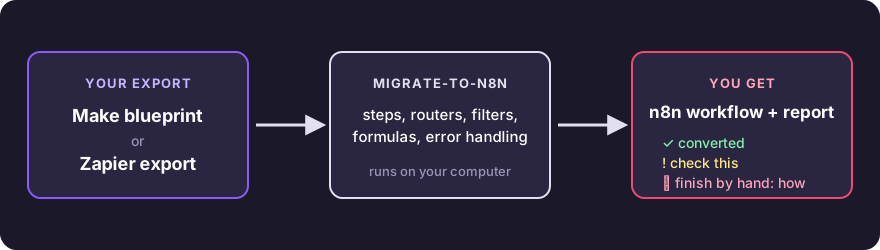
What you get
Every step of your scenario ends up in one of three states, and the report lists them all:
| What it means | Example | |
|---|---|---|
| ✅ converted | Runs after import. You only reconnect credentials. | Webhook, HTTP request, router, iterator, Gmail send |
| ⚠️ review | Converted, with one named thing to check. | A formula with no exact n8n twin, a sheet written by column letter |
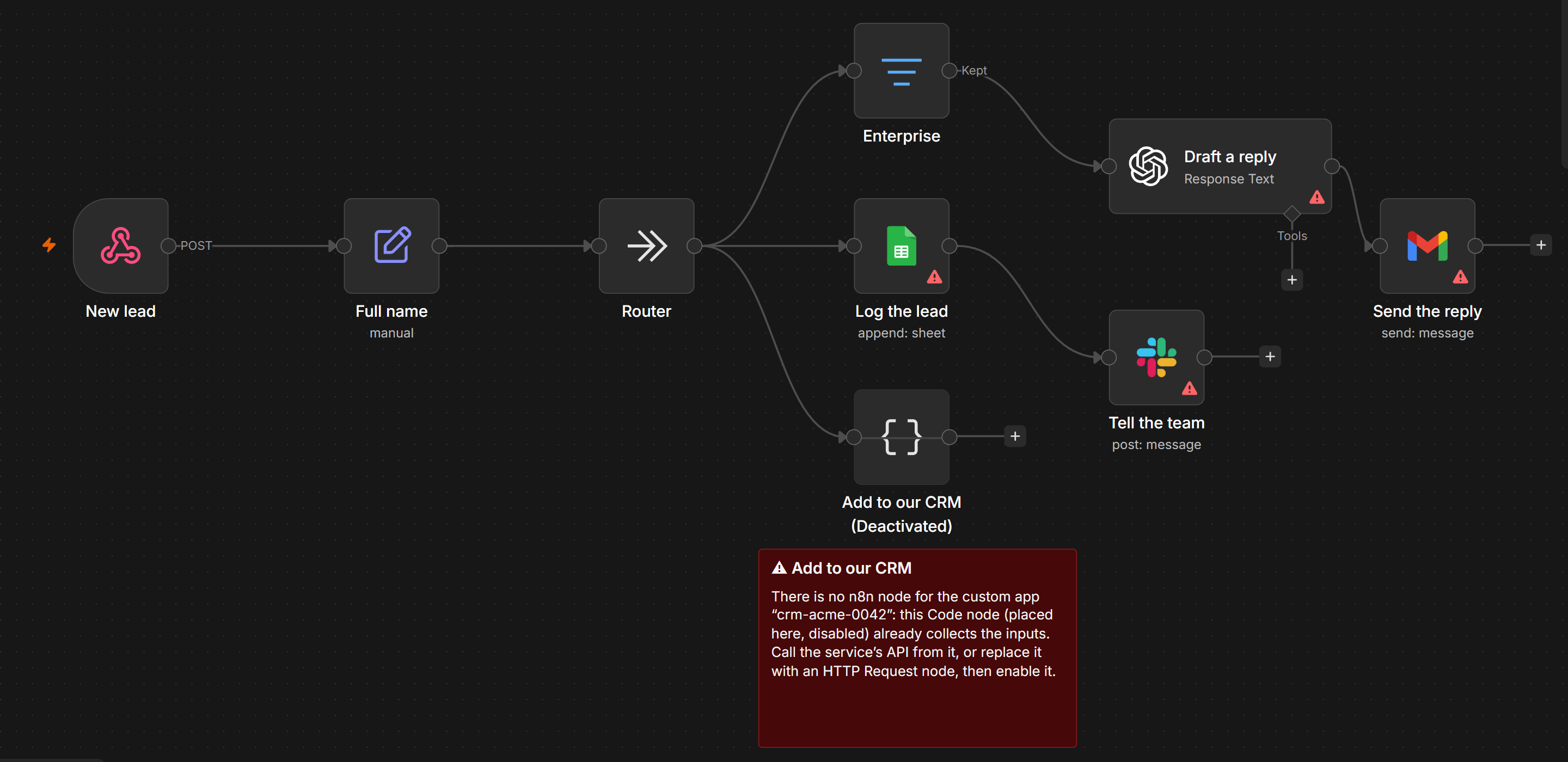
| 🛠 manual | No safe automatic equivalent. The step sits in place, disabled, with a sticky note that says what to do. | A private Make app: you get a Code node that already collects its inputs |
Nothing gets dropped. Manual steps keep the workflow connected, so it imports and runs while you finish them. This is the demo scenario after conversion, opened in n8n 2.44: the private CRM app has no n8n node, so its step waits disabled, with a note on what to do.
Formulas carry over too: {{formatDate(1.date; "DD.MM.YYYY")}} becomes
{{ DateTime.fromISO(String($('Webhook').item.json.body.date)).toFormat('dd.LL.yyyy') }}.
Measured on 2026-10-22 on the public Make blueprints and Zapier exports found on GitHub:
| Source | Workflows | Steps | ✅ Converted | ⚠️ To review | 🛠 Manual | Broken outputs | Time (median) |
|---|---|---|---|---|---|---|---|
| Make | 1,432 | 10,129 | 42.7% | 40.5% | 16.7% | 0 | 0.7 ms |
| Zapier | 148 | 910 | 7% | 63.7% | 29.2% | 0 | 0.3 ms |
"Broken outputs" counts workflows that n8n would reject. The test suite also imports a sample of these workflows into real n8n 2.44 and 1.123, and runs some of them through their webhooks to compare the answers with Make. Many public Zapier exports come without step settings or code, which keeps the Zapier numbers lower.
Try it in one minute
You need Node.js 22 or newer.
npx migrate-to-n8n convert my-scenario.blueprint.json
The workflow and the report go to Documents/migrate-to-n8n. Import the .n8n.json file in n8n:
Workflows → Import from File.
No export at hand? Try the demo scenario: download it and run the same command on it.
Step by step
1. Export from Make or Zapier
- Make: open the scenario, click ⋯ at the bottom of the editor, choose Export Blueprint.
- Zapier: Settings → Security and data → Download my Zap workflows. You get one file with all your zaps.
Pick the ones you want with
list_zaps(ormigrate-to-n8n list-zaps <file>).
2. Connect it to your AI client
Claude Desktop: download migrate-to-n8n.mcpb and open it. Claude Desktop installs it in one click. The settings are optional: an output folder, and your n8n address and API key if you want uploads.
Claude Code:
claude mcp add migrate-to-n8n -- npx -y migrate-to-n8n serve
Cursor, VS Code, Windsurf and other clients: add this to the client's MCP config
(.cursor/mcp.json, .vscode/mcp.json, …):
{
  "mcpServers": {
    "migrate-to-n8n": {
      "command": "npx",
      "args": ["-y", "migrate-to-n8n", "serve"],
      "env": { "N8N_URL": "", "N8N_API_KEY": "" }
    }
  }
}
VS Code uses "servers" instead of "mcpServers".
3. Convert
Attach the file in the chat (or give its path) and ask:
Convert this Make scenario to n8n and help me finish what doesn't convert.
The assistant gets the report and walks you through every step marked ⚠️ or 🛠.
4. Import into n8n
Import the .n8n.json file (Workflows → Import from File), pick your credentials in the nodes the report lists,
point webhook senders to the new URL, run it once with test data, then activate it.
With N8N_URL and N8N_API_KEY set (n8n → Settings → n8n API), the assistant can upload the workflow
for you. It creates a new, inactive workflow named "… (migrated)" and never touches existing ones.
Tools
| Tool | What it does |
|---|---|
convert_make | Make blueprint → n8n workflow file + report |
convert_zapier | Zapier export → one workflow file + report per zap |
list_zaps | The zaps in a Zapier export: title, steps, apps, on/off |
suggest_replacement | How one module or step is handled, and what to use instead |
supported_modules | Search what converts automatically |
check_n8n_workflow | Problems left in a workflow file: broken links, disabled steps, placeholders, credentials |
upload_to_n8n | Create the workflow in your n8n, inactive (only when N8N_URL and N8N_API_KEY are set) |
What converts
Flow control converts in full on both sides: routers and paths (every matching route runs, as in Make and Zapier), filters with AND/OR groups, iterators and aggregators, error handlers, schedules, variables, webhooks and responses, HTTP requests, JSON, Formatter, Code, Delay, Storage. About 50 Make formula functions, Make date formats, operators and 25 Zapier Formatter transforms translate to n8n expressions.
Make: 135 modules and steps convert automatically
| Module / step | Becomes in n8n |
|---|---|
*:makeApiCall | HTTP Request (the app's API) |
airtable:ActionCreateRecord | Airtable: Create |
airtable:ActionGetRecord | Airtable: Get |
airtable:ActionSearchRecords | Airtable: Search |
airtable:ActionUpdateRecords | Airtable: Update |
airtable:TriggerWatchRecords | Airtable Trigger |
anthropic-claude:createAMessage | Anthropic: Message a Model |
anthropic-claude:simpleTextPrompt | Anthropic: Message a Model |
apify:fetchDatasetItems | HTTP Request (Apify API) |
apify:finishedActorRuns | Webhook (Apify) |
apify:runActor | HTTP Request (Apify API) |
apify:runActorNew | HTTP Request (Apify API) |
builtin:BasicAggregator | Aggregate |
builtin:BasicFeeder | Split Out |
builtin:BasicFilter | No Operation |
builtin:BasicIterator | Split Out |
builtin:BasicRepeater | Code (repeat) |
builtin:BasicRouter | No Operation (fan-out) |
code:ExecuteCode | Code |
csv:ParseCSV | Code (parse CSV) + Split Out |
datastore:AddRecord | Data Table: Insert Row |
datastore:DeleteRecord | Data Table: Delete Rows |
datastore:ExistRecord | Data Table: If Row Exists |
datastore:GetRecord | Data Table: Get Rows |
datastore:SearchRecord | Data Table: Get Rows |
datastore:UpdateRecord | Data Table: Update / Upsert |
discord:createMessage | Discord: Send Message |
dropbox:createShareLink | HTTP Request (Dropbox API) |
dropbox:uploadLargeFile | Dropbox: Upload |
email:ActionSendEmail | Send Email (SMTP) |
email:TriggerNewEmail | Email Trigger (IMAP) |
facebook-pages:CreatePost | Facebook Graph API: Page Post |
facebook-pages:CreatePostWithPhotos | Facebook Graph API: Page Photo Post |
gateway:CustomWebHook | Webhook |
gateway:WebhookRespond | Respond to Webhook |
gemini-ai:createACompletionGeminiPro | Google Gemini: Message a Model |
gmail:ActionSendEmail | Gmail: Send |
gmail:sendAnEmail | Gmail: Send |
gmail:TriggerNewEmail | Gmail Trigger |
google-calendar:createAnEvent | Google Calendar: Create Event |
google-calendar:deleteAnEvent | Google Calendar: Delete Event |
google-calendar:searchEvents | Google Calendar: Get Many Events |
google-docs:createADocument | Google Docs: Create |
google-docs:createADocumentFromTemplate | Google Drive: Copy (template) |
google-docs:getADocument | Google Docs: Get |
google-drive:createAFolder | Google Drive: Create Folder |
google-drive:getAFile | Google Drive: Download |
google-drive:moveAFileIntoAFolder | Google Drive: Move |
google-drive:searchForFilesFolders | Google Drive: Search |
google-drive:shareAFileFolder | Google Drive: Share |
google-drive:uploadAFile | Google Drive: Upload |
google-drive:watchFilesInAFolder | Google Drive Trigger |
google-email:ActionCreateDraft | Gmail: Create Draft |
google-email:ActionSendEmail | Gmail: Send |
google-email:createADraft | Gmail: Create Draft |
google-email:sendAnEmail | Gmail: Send |
google-email:TriggerNewEmail | Gmail Trigger |
google-email:TriggerWatchEmails | Gmail Trigger |
google-email:triggerWatchNewEmails | Gmail Trigger |
google-sheets:addRow | Google Sheets: Append Row |
google-sheets:createSpreadsheet | Google Sheets: Create Spreadsheet |
google-sheets:deleteRow | Google Sheets: Delete Rows |
google-sheets:filterRows | Google Sheets: Get Rows (+ Filter) |
google-sheets:getCell | HTTP Request (Sheets API, read a cell) |
google-sheets:getSheetContent | Google Sheets: Get Rows (+ Filter) |
google-sheets:searchRows | Google Sheets: Get Rows (+ Filter) |
google-sheets:searchRowsAdvanced | Google Sheets: Get Rows (+ Filter) |
google-sheets:updateCell | HTTP Request (Sheets API, write a cell) |
google-sheets:updateRow | Google Sheets: Update Row |
google-sheets:watchRows | Google Sheets Trigger (row added) |
http:ActionGetFile | HTTP Request (file) |
http:ActionSendData | HTTP Request |
http:ActionSendDataAPIKeyAuth | HTTP Request (API key) |
http:ActionSendDataBasicAuth | HTTP Request (basic auth) |
http:DownloadFile | HTTP Request (file) |
http:MakeRequest | HTTP Request |
instagram-business:CreateAReelPost | Facebook Graph API: Instagram reel + publish |
instagram-business:CreatePostPhoto | Facebook Graph API: Instagram media + publish |
json:AggregateToJSON | Aggregate + Edit Fields |
json:CreateJSON | Edit Fields |
json:ParseJSON | Edit Fields (JSON) |
json:TransformToJSON | Edit Fields |
linkedin:CreateCompanyImagePost | LinkedIn: Create Post |
linkedin:CreateCompanyPost | LinkedIn: Create Post |
linkedin:CreatePost | LinkedIn: Create Post |
linkedin:ShareImage | LinkedIn: Create Post |
manychat:SetSubscriberCustomField | HTTP Request (ManyChat API) |
markdown:Compile | Markdown → HTML |
notion:createAPage | Notion: Create Database Page |
notion:updateADatabaseItem | Notion: Update Database Page |
open-router:createAChatCompletion | HTTP Request (OpenRouter API) |
openai-gpt-3:askAnything | OpenAI: Message a Model |
openai-gpt-3:CreateCompletion | OpenAI: Message a Model |
openai-gpt-3:createModelResponse | OpenAI: Message a Model |
openai-gpt-3:GenerateImage | OpenAI: Generate an Image |
openai-gpt-3:messageAssistantAdvanced | OpenAI: Message a Model (instructions) |
openai-gpt-3:transformTextToStructuredData | OpenAI: Message a Model (JSON) |
perplexity-ai:createAChatCompletion | HTTP Request (Perplexity API) |
placeholder:Placeholder | No Operation |
regexp:HTMLToText | Edit Fields |
regexp:Parser | Code |
regexp:Replace | Edit Fields |
resend:sendAnEmail | HTTP Request (Resend API) |
rss:ActionReadArticles | RSS Read |
rss:TriggerNewArticle | RSS Feed Trigger |
scenario-service:ReturnData | Edit Fields (sub-workflow output) |
slack:CreateMessage | Slack: Send Message |
slack:InviteUsers | Slack: Invite to Channel |
supabase:ActionCreateARecord | Supabase: Create Row |
supabase:createARow | Supabase: Create Row |
supabase:searchRows | Supabase: Get Many Rows |
supabase:upsertARecord | Supabase: Create Row |
telegram:DownloadFile | Telegram: Get File |
telegram:SendReplyMessage | Telegram: Send Message |
telegram:WatchUpdates | Telegram Trigger |
twilio:SendSMS | Twilio: Send SMS |
twitter:createATweet | X (Twitter): Create Tweet |
typeform:ListResponses | HTTP Request (Typeform API) |
typeform:WatchEventsWithResponses | Typeform Trigger |
util:ComposeTransformer | Edit Fields |
util:FunctionAggregator2 | Aggregate + Edit Fields |
util:FunctionIncrement | Code (counter) |
util:FunctionSleep | Wait |
util:GetVariable2 | Edit Fields |
util:GetVariables | Edit Fields |
util:SetMultipleVariables | Edit Fields |
util:SetVariable2 | Edit Fields |
util:SetVariables | Edit Fields |
util:Sleep | Wait |
util:Switcher | Edit Fields |
util:TextAggregator | Aggregate + Edit Fields |
webflow:publishAnItem | HTTP Request (Webflow API) |
webflow:updateItem | Webflow: Update Item |
whatsapp-business-cloud:sendMessage | WhatsApp: Send Message |
xml:ParseXML | XML (to JSON) |
Zapier: 98 modules and steps convert automatically
| Module / step | Becomes in n8n |
|---|---|
AICLIAPI:get_completion | OpenAI: Message a Model |
AirtableCLIAPI:create_or_update_record | Airtable: Upsert |
AirtableCLIAPI:createRecord | Airtable: Create |
AirtableCLIAPI:newRecordInView | Airtable Trigger |
AirtableCLIAPI:updateRecord | Airtable: Update |
BranchingAPI:branch | No Operation (fan-out) |
ChatGPTCLIAPI:chat_completion | OpenAI: Message a Model |
ChatGPTCLIAPI:chat_completion_memory | OpenAI: Message a Model |
ChatGPTCLIAPI:conversation | OpenAI: Message a Model |
CodeCLIAPI:* | Code |
DelayAPI:delay_for | Wait |
DelayAPI:delay_until | Wait |
DelayCLIAPI:delay_for | Wait |
DelayCLIAPI:delay_until | Wait |
EmailCLIAPI:* | Send Email |
ExcelCLIAPI:add_row | Microsoft Excel: Append to Table |
ExcelCLIAPI:add_rows | Microsoft Excel: Append to Table |
FilterAPI:filter | Filter |
FilterCLIAPI:filter | Filter |
FilterCLIAPI:zapier_filter | Filter |
GmailAPI:message | Gmail: Send (or Gmail Trigger as the first step) |
GmailV2API:message | Gmail: Send (or Gmail Trigger as the first step) |
GoogleMailCLIAPI:message | Gmail: Send (or Gmail Trigger as the first step) |
GoogleMailV2CLIAPI:message | Gmail: Send (or Gmail Trigger as the first step) |
GoogleSheetsAPI:add_row | Google Sheets: Append Row |
GoogleSheetsAPI:add_rows | Google Sheets: Append Row |
GoogleSheetsCLIAPI:add_row | Google Sheets: Append Row |
GoogleSheetsCLIAPI:add_rows | Google Sheets: Append Row |
GoogleSheetsV2API:add_row | Google Sheets: Append Row |
GoogleSheetsV2API:add_rows | Google Sheets: Append Row |
GoogleSheetsV2API:new_or_updated_row | Google Sheets Trigger |
GoogleSheetsV2API:new_row | Google Sheets Trigger |
GoogleSheetsV2API:new_row_notify_hook | Google Sheets Trigger |
GoogleSheetsV2API:updated_row_notify_hook | Google Sheets Trigger |
GoogleSheetsV2CLIAPI:add_row | Google Sheets: Append Row |
GoogleSheetsV2CLIAPI:add_rows | Google Sheets: Append Row |
GoogleSheetsV2CLIAPI:new_or_updated_row | Google Sheets Trigger |
GoogleSheetsV2CLIAPI:new_row | Google Sheets Trigger |
GoogleSheetsV2CLIAPI:new_row_notify_hook | Google Sheets Trigger |
GoogleSheetsV2CLIAPI:updated_row_notify_hook | Google Sheets Trigger |
HubSpotCLIAPI:_zap_raw_request | HTTP Request (HubSpot API: API request) |
HubSpotCLIAPI:company_crmSearch | HTTP Request (HubSpot API: Search companies) |
HubSpotCLIAPI:contact_crmSearch | HTTP Request (HubSpot API: Search contacts) |
HubSpotCLIAPI:create_associations | HTTP Request (HubSpot API: Create an association between two records) |
HubSpotCLIAPI:deal_crmSearch | HTTP Request (HubSpot API: Search deals) |
HubSpotCLIAPI:find_associations | HTTP Request (HubSpot API: Find the associations of a record) |
HubSpotCLIAPI:update_crm_deal | HTTP Request (HubSpot API: Update a deal) |
HubSpotCLIAPI:upsert_contact | HubSpot: Create or Update Contact |
InterfacesCLIAPI:new_form_submission | n8n Form Trigger |
LinearCLIAPI:create_issue | Linear: Create Issue |
LoopingCLIAPI:* | Split Out |
NotionCLIAPI:create_database_item | Notion: Create Database Page |
OpenAiCLIAPI:send_prompt | OpenAI: Message a Model |
S3API:file | AWS S3: Upload |
ScheduleAPI:* | Schedule Trigger |
SlackAPI:channel_message | Slack: Send Message (or Slack Trigger as the first step) |
SlackAPI:direct_message | Slack: Send Message (to a user) |
SlackAPI:send_channel_message | Slack: Send Message (or Slack Trigger as the first step) |
SlackCLIAPI:channel_message | Slack: Send Message (or Slack Trigger as the first step) |
SlackCLIAPI:direct_message | Slack: Send Message (to a user) |
SlackCLIAPI:send_channel_message | Slack: Send Message (or Slack Trigger as the first step) |
StorageCLIAPI:get_all_values | Code (static data) |
StorageCLIAPI:get_value | Code (static data) |
StorageCLIAPI:increment_value | Code (static data) |
StorageCLIAPI:remove_value | Code (static data) |
StorageCLIAPI:set_value | Code (static data) |
TableCLIAPI:create_record | Data Table: Insert Row |
TableCLIAPI:find_record | Data Table: Get Rows |
TableCLIAPI:increment_value | Code (increment a Data Table value) |
TableCLIAPI:new_or_updated_record | Schedule + Data Table (watch rows) |
TableCLIAPI:new_record | Schedule + Data Table (watch rows) |
TableCLIAPI:update_record | Data Table: Update Row |
TableCLIAPI:updated_record | Schedule + Data Table (watch rows) |
TallyCLIAPI:response | Webhook (Tally) |
TelegramCLIAPI:send_message | Telegram: Send Message |
TodoistV2DevAPI:new_task | Todoist: Create Task |
WebHookCLIAPI:catch_hook | Webhook |
WebHookCLIAPI:catch_raw_hook | Webhook |
WebHookCLIAPI:custom_request | HTTP Request |
WebHookCLIAPI:get | HTTP Request |
WebHookCLIAPI:hook | Webhook |
WebHookCLIAPI:hook_raw | Webhook |
WebHookCLIAPI:hook_v2 | Webhook |
WebHookCLIAPI:patch | HTTP Request |
WebHookCLIAPI:post | HTTP Request |
WebHookCLIAPI:put | HTTP Request |
WebhooksCLIAPI:catch_hook | Webhook |
WebhooksCLIAPI:catch_raw_hook | Webhook |
WebhooksCLIAPI:custom_request | HTTP Request |
WebhooksCLIAPI:get | HTTP Request |
WebhooksCLIAPI:hook | Webhook |
WebhooksCLIAPI:hook_raw | Webhook |
WebhooksCLIAPI:hook_v2 | Webhook |
WebhooksCLIAPI:patch | HTTP Request |
WebhooksCLIAPI:post | HTTP Request |
WebhooksCLIAPI:put | HTTP Request |
ZapierFormatterCLIAPI:* | Edit Fields |
ZapierMailCLIAPI:outbound | Send Email |
Anything else still gets a place in the workflow: the closest of 362 n8n app nodes, an HTTP request to the app's API, or a Code node with the inputs already wired, each disabled with a note on how to finish it.
What does not convert, and why
- Credentials. Make and Zapier never export them. Create them in n8n; the report lists which nodes need one.
- Data. Make data stores and Zapier Tables become n8n Data Tables (n8n 1.113 or newer) with the same fields, but the rows stay behind.
- Webhook URLs. n8n gives each webhook a new address. The report names them so you can update the senders.
- Python code from Zapier or Make. n8n runs Python, but reads inputs differently in 1.x and 2.x: the code is placed in a Code node for you to adapt.
- Output field names of apps. n8n's app nodes sometimes name results differently. Steps that read them are marked ⚠️ so you can check the field once after a test run.
Command line
migrate-to-n8n convert <file> [-o <folder>] [--zap <id or title>]...
migrate-to-n8n list-zaps <file>
migrate-to-n8n supported [text] [--source make|zapier]
migrate-to-n8n check <workflow.json>
migrate-to-n8n upload <workflow.json>      # needs N8N_URL and N8N_API_KEY
migrate-to-n8n serve                       # MCP server over stdio
Development
npm install
npm run n8n-types     # n8n's node catalogs, for the tests (kept out of the package)
npm test              # unit tests, golden conversions, checks against n8n's own node descriptions
npm run corpus -- download && npm run corpus -- stats    # measure on public exports (needs gh)
docker compose -f docker-compose.e2e.yml up -d && npm run e2e   # real n8n 2.x and 1.x
Every node the converter writes is checked against the parameter descriptions of n8n 2.44 and 1.123: names, allowed values and display rules. The n8n catalogs are downloaded for tests only and never ship.
Roadmap
- Routers inside Make error-handler routes (today the modules of a handler are placed in one line on the error output).
- More apps, driven by what people convert. Tell me which ones you need.
Contact
Feedback, ideas, job offers or custom projects (n8n, MCP, AI automation): [email protected]. Bug reports and feature requests are welcome in Issues.
License
MIT. Make, Zapier and n8n are trademarks of their owners; this project is not affiliated with them.
コメント
AI アプリケーションが外部のツールやデータソースに統一的な方法で接続するためのオープンなプロトコルです。クライアントはモデルとの対話を担い、MCP サーバーはツール・リソース・プロンプトテンプレートを提供します。標準メッセージでやり取りするため、1 つのサーバーを複数のクライアントで再利用できます。