試してみる – インストールは不要です。uvx は uv に含まれています(pipx run でも同じことができます)。
uvx proxy-scraper-cli --pick 3 --verify               # up to 3 proxies from the hourly list that pass right now, from your network
uvx proxy-scraper-cli --diagnose socks5://HOST:PORT   # one proxy, check by check: what it did and what it didn't
# Docker – learned state and results stay in two folders next to you
mkdir -p proxy-data results
docker run --rm --user "$(id -u):$(id -g)" -v "$PWD/proxy-data:/data" -v "$PWD/results:/work/results" \
  ghcr.io/maximilianfeix/proxy-scraper --want 50 --https-only

# pip into the current environment
pip install proxy-scraper-cli

# optional: faster event loop on macOS/Linux
pipx install "proxy-scraper-cli[fast]"

# the latest main instead of the latest release
pipx install git+https://github.com/maximilianfeix/proxy-scraper.git

# no install at all
git clone https://github.com/maximilianfeix/proxy-scraper.git
cd proxy-scraper
pip install -r requirements.txt
python3 proxy_scraper.py
eval "$(proxy-scraper --completion zsh)"     # in ~/.zshrc (after compinit), same for bash in ~/.bashrc
proxy-scraper --completion fish > ~/.config/fish/completions/proxy-scraper.fish
proxy-scraper --completion powershell | Out-String | Invoke-Expression   # in $PROFILE
# 50 proxies that can do HTTPS – then stop
proxy-scraper --want 50 --https-only

# only Germany, Austria and Switzerland, the 20,000 most promising candidates
proxy-scraper --country DE,AT,CH -l 20000

# fast elite SOCKS5 proxies
proxy-scraper --types socks5 --anonymity elite --max-latency 1500

# 20 proxies that really reach Google AND Discord
proxy-scraper --target google.com --target discord.com --want 20

# only recheck the last hits (plus history) – takes seconds
proxy-scraper --recheck

# wizard with defaults – it keeps what you already passed
proxy-scraper -i --country DE

# which sources deliver the most?
proxy-scraper --list-sources
from proxyscraper import check_proxies, find_proxies

if __name__ == "__main__":  # needed on macOS/Windows, the parser uses a process pool
    for p in find_proxies(want=20, https=True, countries=["DE", "NL"], no_datacenter=True):
        print(p.url, p.latency, p.country, p.org)

    alive = check_proxies(["socks5://1.2.3.4:1080", "5.6.7.8:3128"])  # your own list
import itertools, requests
from proxyscraper import live_proxies

proxies = live_proxies(types=["socks5"], https=True, min_uptime=90)  # the reliable ones this week
pool = itertools.cycle(p.url for p in proxies)
r = requests.get("https://api.ipify.org", proxies={"https": next(pool)}, timeout=15)  # pip install "requests[socks]"
from proxyscraper import ProxyRotator

with ProxyRotator(country="DE") as rotator:
    r = rotator.get("https://httpbin.org/ip")
    print(r.status, r.text, "via", r.via)
通常は数秒で完了しますが、プロキシが連続して多数ダウンしている場合は 1 分かかることがあります(timeout= は試行ごとに適用されます)。asyncio のコードでは、async with と組み合わせて aget() を使えます。
proxy-scraper --recheck --serve # recheck the last hits, then go – takes seconds
curl -x http://127.0.0.1:8899 https://api.ipify.org              # a different IP every time
curl -x socks5h://127.0.0.1:8899 https://api.ipify.org           # SOCKS5 on the same port
curl -x http://country-de:[email protected]:8899 https://api.ipify.org # only German exits
curl -x http://session-cart42:[email protected]:8899 https://shop.example  # same proxy for this session
curl http://127.0.0.1:8899/__proxy-scraper/status                # pool and counters as JSON
curl http://127.0.0.1:8899/__proxy-scraper/metrics               # the same for Prometheus/Grafana
export PROXY_SCRAPER_SERVE_PASSWORD=$(openssl rand -hex 16)   # the env var keeps it out of `ps`
proxy-scraper --recheck --serve --serve-host 0.0.0.0
curl -x "http://country-de:$PROXY_SCRAPER_SERVE_PASSWORD@your-server:8899" https://api.ipify.org
curl http://127.0.0.1:8899/get                          # one proxy as JSON, chosen like a connection would be
curl "http://127.0.0.1:8899/get?country=DE&https=1&format=txt"   # → http://203.0.113.7:8080
curl "http://127.0.0.1:8899/all?protocol=socks5&limit=20"        # the 20 best SOCKS5 proxies
curl "http://127.0.0.1:8899/report?proxy=203.0.113.7:8080&ok=0"  # it failed you – three times and it's out
import requests
proxy = requests.get("http://127.0.0.1:8899/get?type=https").json()["url"]   # e.g. socks5://…, type included
requests.get("https://example.com", proxies={"http": proxy, "https": proxy})
flowchart LR
    A[sources.json<br/>meta lists<br/>GitHub discovery] --> B[Fetch & parse<br/>in parallel on all cores]
    B --> C[Prioritize<br/>history → good sources → rest]
    C --> D[Check<br/>HTTP · SOCKS4 · SOCKS5]
    D --> E[Details<br/>HTTPS · anonymity · country]
    E --> F[results/]
    D -. hit rate per source .-> G[(learned state)]
    G -. next run .-> C
チェック – 各プロキシは、チェック先(checkip.amazonaws.com。予備として ifconfig.me、ipinfo.io、wtfismyip.com、ident.me を使用し、いずれも Cloudflare の背後にはありません)から出口 IP を取得し、有効な「国外」の IP を返す必要があります。実行中にチェック先が停止した場合、ツールは別のチェック先に切り替え、影響を受けたプロキシを再チェックします。これにより、障害から統計が学習されるのを防ぎます。後続のチェック先に対するチェックに失敗した場合は、そのチェック先に直接問い合わせます。そこからも応答がなければ、プロキシのチェック結果は failed ではなく unavailable になります。自分の IP をそのまま返すプロキシは除外されます。次に httpbin.org 経由で2回目のリクエストを行い、同じ出口 IP が確認される必要があります。最初のチェックで「200 + IP」だけを返すプロキシはここで失敗し、不安定なプロキシや出口 IP が切り替わるプロキシも失敗します。最後に、プロキシを使わずに取得した場合とバイト単位で一致する静的 HTML ページが返される必要があります。各チェックの結果が、結果に記録されます。
proxy-scraper --source https://example.com/my-list.txt --source socks5=./socks.txt   # on top of the built-in sources
proxy-scraper --only-sources --source bought.txt --want 50                            # only yours
import json
from pathlib import Path

import requests

run = Path("results") / Path("results/latest.txt").read_text().strip()   # works on every OS
proxies = json.loads((run / "proxies.json").read_text())   # fastest first

for p in proxies:
    if not p["https"]:
        continue
    try:
        r = requests.get("https://api.ipify.org", proxies={"http": p["url"], "https": p["url"]}, timeout=8)
        print(p["url"], "→", r.text)
        break
    except requests.RequestException:
        continue  # free proxies come and go – just take the next one
import httpx
from proxyscraper import live_proxies

for p in live_proxies(types=["http", "socks5"], https=True, min_uptime=90, limit=10):  # httpx can't do SOCKS4
    try:
        with httpx.Client(proxy=p.url, timeout=10) as client:
            print(p.url, "→", client.get("https://api.ipify.org").text)
        break
    except httpx.HTTPError:
        continue  # next one
import asyncio

import aiohttp
from aiohttp_socks import ProxyConnector, ProxyError
from proxyscraper import live_proxies_async


async def main():
    for p in await live_proxies_async(https=True, min_uptime=90, limit=10):
        try:
            async with aiohttp.ClientSession(connector=ProxyConnector.from_url(p.url)) as session:
                async with session.get("https://api.ipify.org", timeout=aiohttp.ClientTimeout(total=10)) as r:
                    print(p.url, "→", await r.text())
                    return
        except (aiohttp.ClientError, ProxyError, asyncio.TimeoutError, OSError):
            continue  # free proxies come and go – just take the next one

asyncio.run(main())
import itertools

import scrapy
from scrapy.crawler import CrawlerProcess
from proxyscraper import live_proxies

PROXIES = [p.url for p in live_proxies(types="http", https=True, min_uptime=50)]
if not PROXIES:
    raise SystemExit("No proxy matches right now – loosen the filters (e.g. min_uptime)")
POOL = itertools.cycle(PROXIES)


class RotatingProxy:
    def process_request(self, request, spider=None):  # newer Scrapy leaves out spider
        request.meta["proxy"] = next(POOL)


class IpSpider(scrapy.Spider):
    name = "ip"
    start_urls = [f"https://api.ipify.org/?n={i}" for i in range(3)]
    custom_settings = {
        "DOWNLOADER_MIDDLEWARES": {f"{__name__}.RotatingProxy": 350},
        "RETRY_TIMES": 5, "DOWNLOAD_TIMEOUT": 15,
    }

    def parse(self, response):
        print(response.meta["proxy"], "→", response.text)


if __name__ == "__main__":
    process = CrawlerProcess()
    process.crawl(IpSpider)
    process.start()
proxy-scraper --recheck live --serve --https-only # 127.0.0.1:8899, ready in about 30 s
from selenium import webdriver

options = webdriver.ChromeOptions()
options.add_argument("--proxy-server=http://127.0.0.1:8899")
driver = webdriver.Chrome(options=options)
driver.get("https://api.ipify.org")
print(driver.find_element("tag name", "body").text)     # a different IP on each start
driver.quit()
proxy-scraper --recheck --serve &
export HTTPS_PROXY=http://127.0.0.1:8899 HTTP_PROXY=http://127.0.0.1:8899
pip download requests   # git, pip, npm & co. now go through the pool
- id: proxies
  uses: maximilianfeix/proxy-scraper@v1
  with:
    types: socks5
    https: true
    min-uptime: 90        # on the list for 90 %+ of the week
    min-speed: 100        # optional: downloaded 100+ KB/s in the last check
    works-on: google      # optional: google, reddit, amazon
    recheck: true         # optional: check them again from the runner
- run: curl -x "${{ steps.proxies.outputs.proxy }}" https://api.ipify.org
pip install -e ".[dev]"
python3 -m pytest          # runs offline – fake proxies on localhost
ruff check .
python3 docs/make_demo.py  # regenerate the images in this README
プロジェクト構成
proxy_scraper.py        entry point when run from a clone
bot/                    Discord bot for the live list (own requirements, deployed by GitHub Actions)
proxyscraper/
├── cli.py              arguments, wizard or direct start
├── app.py              one run in phases: network → jobs → check → learn & report
├── options.py          RunOptions + Filters – all settings in one place
├── pipeline.py         collect sources, prioritize, check loop
├── checker.py          the checks: basic, second request, content, HTTPS
├── handshake.py        HTTP/SOCKS4/SOCKS5 handshakes incl. login
├── judges.py           check targets, Cloudflare filter, failover
├── sources.py          source lists, meta sources, GitHub discovery, statistics
├── sources.json        curated sources
├── fetchcache.py       ETag cache for unchanged lists
├── parsing.py          find proxies in text, HTML and JSON
├── history.py          history of working proxies
├── geo.py              countries: offline first, ip-api.com as fallback
├── asndb.py            DB-IP provider database, datacenter heuristic
├── geodb.py            DB-IP country database (monthly, binary search)
├── targets.py          target sites for --target
├── output.py           result files
├── exporters.py        proxychains, Clash, sing-box, curl, PAC and Proxifier formats (--export)
├── server/             rotating proxy server (--serve): pool · http · upstream · socks · status · api · core
├── api.py              find_proxies() / check_proxies() for Python
├── agent.py            MCP tools without the SDK: live list, filters, fetch through proxies
├── mcp_server.py       MCP server (proxy-scraper-mcp) for AI agents
├── publish.py          live list for GitHub Actions
├── sourcepages.py      the ranking of the sources on the website
├── mirror.py           the same lists in their own repo (free-proxy-list)
├── paths.py            where state and results are stored
├── compat.py           differences between Unix and Windows
├── netio.py            small HTTP client on asyncio
└── ui/                 widgets · dashboard · report · wizard · serve · keys
AI アプリケーションが外部のツールやデータソースに統一的な方法で接続するためのオープンなプロトコルです。クライアントはモデルとの対話を担い、MCP サーバーはツール・リソース・プロンプトテンプレートを提供します。標準メッセージでやり取りするため、1 つのサーバーを複数のクライアントで再利用できます。
















 イラスト:docs/make_demo.py がサンプルデータで描画した、実際のインターフェースです。表示されている数値は架空のものです。
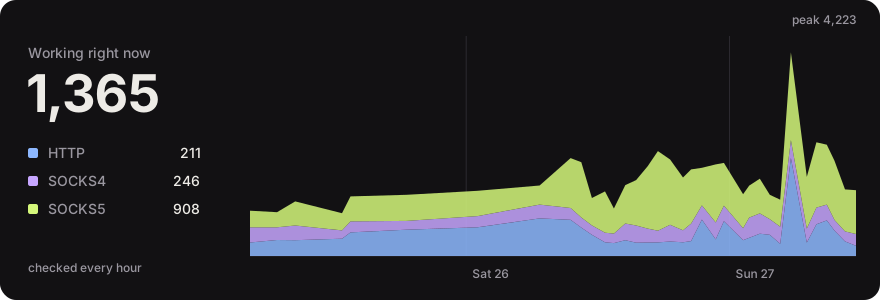






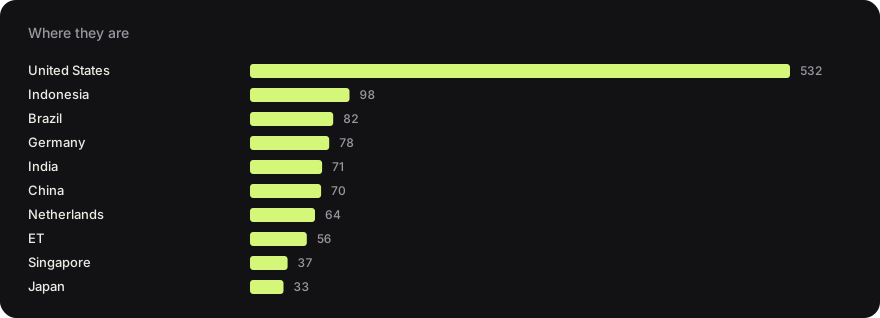


 図:実際のインターフェースを、