
Computing Mcp について
Computing Mcpは、AIクライアントから記号・数値計算、データ分析、可視化を実行できる科学・工学向けMCPサーバーです。量子計算分析にも対応し、コンテナ内で動作します。
主な機能
- 01記号数学と微分方程式の解法
- 02線形代数と行列演算
- 03量子計算分析
- 04統計処理と機械学習
- 05データの可視化
- 06x86_64とARMに対応
活用シーン
- 01微分方程式や記号式の解法
- 02テンソル積や複素行列の計算
- 03データセットの統計分析やクラスタリング
- 04科学計算結果のグラフ作成
MCP 対応
このプロジェクトはMCPサーバーとして、AIクライアントに科学計算、データ分析、可視化機能を提供します。READMEにはDockerを使ってClaude for Desktopに設定する方法が記載されています。
設定
ローカルサーバーの設定はどのクライアントでも共通です。コピーしてクライアントの MCP 設定ファイルに貼り付けてください。
ツール
ローカルサーバーのツールはマシン上で起動して初めて取得できます。メンテナーはまだツール一覧を提供していません。
詳細
symbolica-mcp
科学計算用の Model Context Protocol(MCP)サーバーを使用すると、Claude などの AI が、コンテナ化された環境内で記号計算、計算の実行、データ分析、可視化の生成を行えます。量子コンピューティングを含む、科学やエンジニアリングの用途で特に役立ちます。
特長
- NumPy、SciPy、SymPy、Pandas を使用した科学計算処理の実行
- 記号数学の計算と微分方程式の求解
- 線形代数演算と行列操作への対応
- 量子コンピューティングの分析
- Matplotlib と Seaborn を使用したデータの可視化
- scikit-learn を使用した機械学習処理の実行
- テンソル演算と複雑な行列計算の実行
- 統計ツールを使用したデータセットの分析
- クロスプラットフォーム対応(Windows、macOS、Linux を自動検出)。特に Mac M シリーズチップをお使いの方に便利です
- Intel/AMD(x86_64)と ARM の両方のプロセッサーで動作
クイックスタート
Docker イメージを使用する
# Pull the image from Docker Hub
docker pull ychen94/computing-mcp:latest

# Run the container (automatically detects host OS)
docker run -i --rm -v /tmp:/app/shared ychen94/computing-mcp:latest
Windows ユーザーの場合:
docker run -i --rm -v $env:TEMP:/app/shared ychen94/computing-mcp:latest
Claude for Desktop との統合
- Claude for Desktop を開きます
- Settings ➝ Developer ➝ Edit Config を開きます
- 次の設定を追加します:
MacOS/Linux の場合:
{
  "mcpServers": {
    "computing-mcp": {
      "command": "docker",
      "args": [
        "run",
        "-i",
        "--rm",
        "-v",
        "/tmp:/app/shared",
        "ychen94/computing-mcp:latest"
      ]
    }
  }
}
Windows の場合:
{
  "mcpServers": {
    "computing-mcp": {
      "command": "docker",
      "args": [
        "run",
        "-i",
        "--rm",
        "-v",
        "%TEMP%:/app/shared",
        "ychen94/computing-mcp:latest"
      ]
    }
  }
}
使用例
テンソル積
Can you calculate and visualize the tensor product of two matrices? Please run:

import numpy as np
import matplotlib.pyplot as plt

# Define two matrices
A = np.array([[1, 2],
              [3, 4]])
B = np.array([[5, 6],
              [7, 8]])

# Calculate tensor product using np.kron (Kronecker product)
tensor_product = np.kron(A, B)

# Display the result
print("Matrix A:")
print(A)
print("\nMatrix B:")
print(B)
print("\nTensor Product A ⊗ B:")
print(tensor_product)

# Create a visualization of the tensor product
plt.figure(figsize=(8, 6))
plt.imshow(tensor_product, cmap='viridis')
plt.colorbar(label='Value')
plt.title('Visualization of Tensor Product A ⊗ B')
記号数学
Can you solve this differential equation? Please run:
import sympy as sp
import matplotlib.pyplot as plt
import numpy as np

# Define symbolic variable
x = sp.Symbol('x')
y = sp.Function('y')(x)

# Define the differential equation: y''(x) + 2*y'(x) + y(x) = 0
diff_eq = sp.Eq(sp.diff(y, x, 2) + 2*sp.diff(y, x) + y, 0)

# Solve the equation
solution = sp.dsolve(diff_eq)
print("Solution:")
print(solution)

# Plot a particular solution (C1=1, C2=0)
solution_func = solution.rhs.subs({sp.symbols('C1'): 1, sp.symbols('C2'): 0})
print("Particular solution:")
print(solution_func)

# Create a numerical function we can evaluate
solution_lambda = sp.lambdify(x, solution_func)

# Plot the solution
x_vals = np.linspace(0, 5, 100)
y_vals = [float(solution_lambda(x_val)) for x_val in x_vals]

plt.figure(figsize=(10, 6))
plt.plot(x_vals, y_vals)
plt.grid(True)
plt.title("Solution to y''(x) + 2*y'(x) + y(x) = 0")
plt.xlabel('x')
plt.ylabel('y(x)')
plt.show()
データ分析
Can you perform a clustering analysis on this dataset? Please run:

import numpy as np
import pandas as pd
import matplotlib.pyplot as plt
from sklearn.cluster import KMeans
from sklearn.preprocessing import StandardScaler

# Create a sample dataset
np.random.seed(42)
n_samples = 300

# Create three clusters
cluster1 = np.random.normal(loc=[2, 2], scale=0.5, size=(n_samples//3, 2))
cluster2 = np.random.normal(loc=[7, 7], scale=0.5, size=(n_samples//3, 2))
cluster3 = np.random.normal(loc=[2, 7], scale=0.5, size=(n_samples//3, 2))

# Combine clusters
X = np.vstack([cluster1, cluster2, cluster3])

# Create DataFrame
df = pd.DataFrame(X, columns=['Feature1', 'Feature2'])
print(df.head())

# Standardize data
scaler = StandardScaler()
X_scaled = scaler.fit_transform(X)

# Apply KMeans clustering
kmeans = KMeans(n_clusters=3, random_state=42)
df['Cluster'] = kmeans.fit_predict(X_scaled)

# Plot the clusters
plt.figure(figsize=(10, 6))
for cluster_id in range(3):
    cluster_data = df[df['Cluster'] == cluster_id]
    plt.scatter(cluster_data['Feature1'], cluster_data['Feature2'],
                label=f'Cluster {cluster_id}', alpha=0.7)

# Plot cluster centers
centers = scaler.inverse_transform(kmeans.cluster_centers_)
plt.scatter(centers[:, 0], centers[:, 1], s=200, c='red', marker='X', label='Centers')

plt.title('K-Means Clustering Results')
plt.xlabel('Feature 1')
plt.ylabel('Feature 2')
plt.legend()
plt.grid(True)
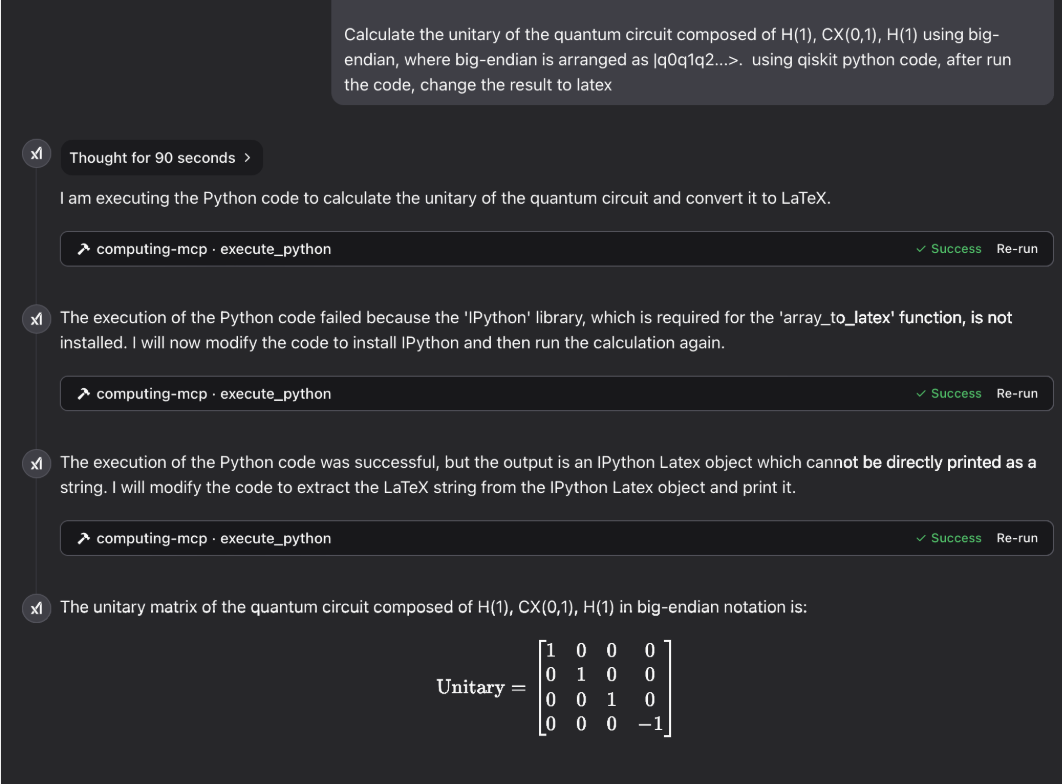
量子コンピューティング
ギャラリー
レーザー物理学:

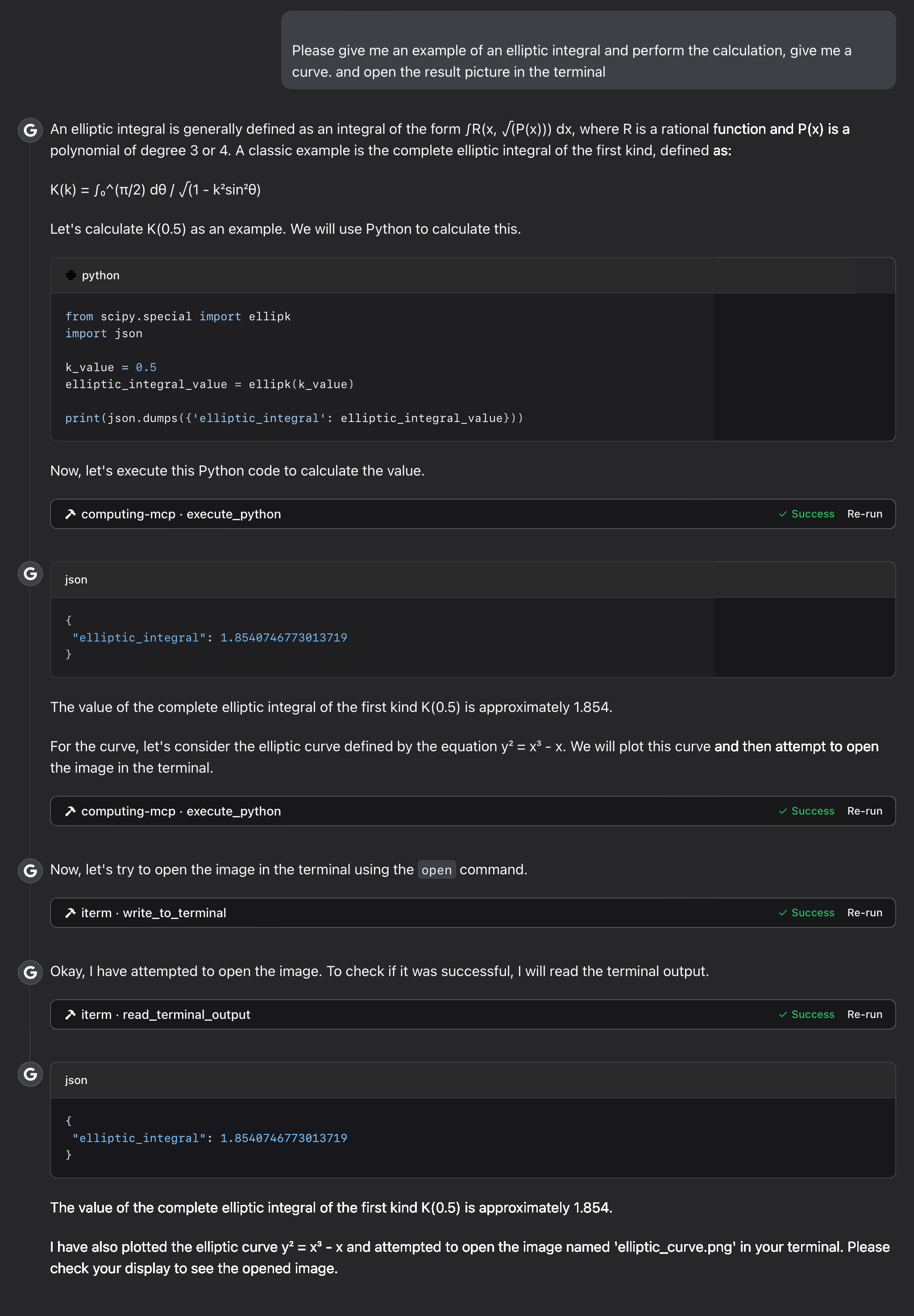
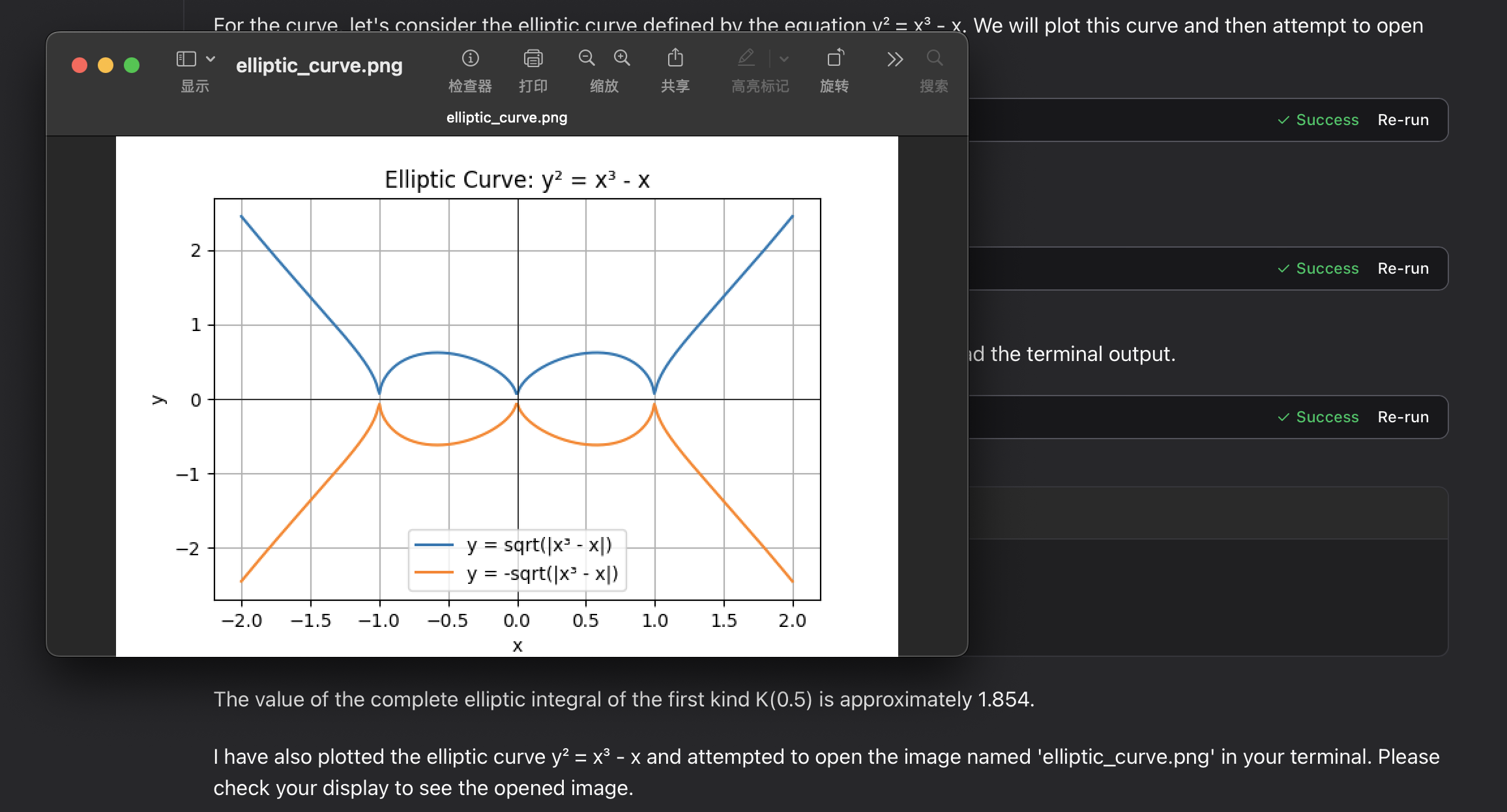
楕円積分:
トラブルシューティング
よくある問題
-
ボリュームマウントでの権限エラー
- マウントディレクトリが存在し、適切な権限が設定されていることを確認してください
-
プロット画像ファイルが表示されない
-
ホストシステム上のパスを確認してください:macOS/Linux では
/tmp、Windows では一時フォルダーです -
Docker にマウント先への書き込み権限があることを確認してください
-
MCP ツールの出力内容を確認してください
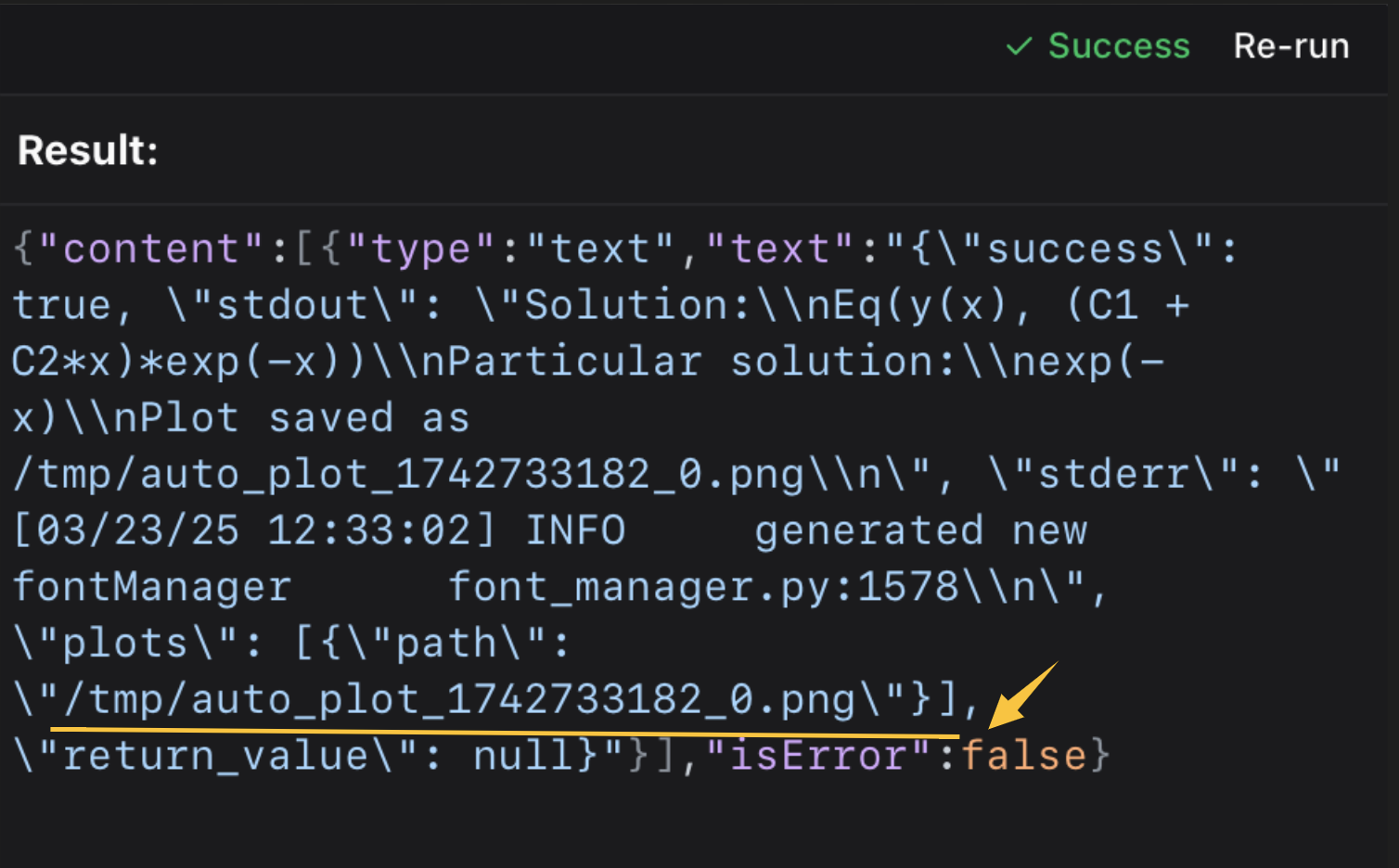 その後、ターミナルまたは画像ビューアーで開いてください。
⭐️ ⭐️ ワークフローを中断せずにファイルを開くため、iterm-mcp-server や、ほかのターミナルの MCP サーバーを使用しています。 ⭐️ ⭐️
-
サポート
問題が発生した場合は、次の情報を添えて GitHub の Issue を作成してください:
- エラーメッセージ
- お使いのオペレーティングシステムと Docker のバージョン
- 問題を再現する手順
ライセンス
このプロジェクトは MIT ライセンスの下でライセンスされています。
詳しくは、このプロジェクトのリポジトリにある LICENSE ファイルをご覧ください。
コメント
AI アプリケーションが外部のツールやデータソースに統一的な方法で接続するためのオープンなプロトコルです。クライアントはモデルとの対話を担い、MCP サーバーはツール・リソース・プロンプトテンプレートを提供します。標準メッセージでやり取りするため、1 つのサーバーを複数のクライアントで再利用できます。