
关于 apply-anthropic-skill-best-practices
依据 Anthropic 官方建议编写 Claude 技能的指南,适用于技能作者。内容涵盖精简结构、发现机制、渐进式披露、工作流和跨模型测试。
主要功能
- 01技能元数据与命名指导
- 02便于发现的描述写法
- 03渐进式披露模式
- 04工作流与反馈循环建议
- 05跨 Claude 模型测试
适用场景
- 01规划新技能的结构
- 02改进技能发现描述
- 03组织逐步加载的参考资料
- 04安排跨模型技能测试
安装
复制下面的命令,在终端中运行。
npx skills add https:/安装后在 Claude Code 中输入/apply-anthropic-skill-best-practices确认已加载。
详细介绍
Anthropic 官方的 Skill 编写最佳实践
在编写 Skill 时,遵循 Anthropic 官方的 Skill 编写最佳实践。
优秀的 Skill 简洁、结构清晰,并经过实际使用测试。本指南提供实用的编写建议,帮助你编写 Claude 能有效发现和使用的 Skill。
核心原则
Skill 元数据
Skill 中并非每个 token 都会立即产生开销。启动时,系统会预加载所有 Skill 的元数据(名称和描述)。只有当 Skill 变得相关时,Claude 才会读取 SKILL.md;只有在需要时,才会读取其他文件。不过,SKILL.md 仍应保持简洁:Claude 加载它后,其中的每个 token 都会与对话历史和其他上下文争夺空间。
使用计划支持的所有模型进行测试
Skill 作为对模型的补充,因此效果取决于底层模型。请使用计划采用的所有模型测试 Skill。
各模型的测试注意事项:
- Claude Haiku(快速、经济):Skill 是否提供了足够的指导?
- Claude Sonnet(均衡):Skill 是否清晰且高效?
- Claude Opus(推理能力强):Skill 是否避免了过度解释?
对于 Opus 非常有效的内容,可能需要为 Haiku 添加更多细节。如果计划在多个模型中使用 Skill,请尽量编写适用于所有模型的指令。
Skill 结构
**YAML Frontmatter**:SKILL.md 的 frontmatter 支持两个字段:-
name- Skill 的易读名称(最多 64 个字符) -
description- 对 Skill 功能及其适用场景的单行描述(最多 1024 个字符)有关完整的 Skill 结构详情,请参阅 Skills 概览。
命名规范
使用一致的命名模式,让 Skill 更容易被引用和讨论。我们建议使用动名词形式(动词 + -ing)作为 Skill 名称,以清楚描述 Skill 提供的活动或能力。
良好的命名示例(动名词形式):
- “处理 PDF”
- “分析电子表格”
- “管理数据库”
- “测试代码”
- “编写文档”
可接受的替代形式:
- 名词短语:“PDF 处理”“电子表格分析”
- 面向行动的表达:“处理 PDF”“分析电子表格”
避免使用:
- 含义模糊的名称:“助手”“实用工具”“工具”
- 过于宽泛的名称:“文档”“数据”“文件”
- Skill 集合内部命名模式不一致
一致的命名方式有助于:
- 在文档和对话中引用 Skill
- 快速了解 Skill 的用途
- 整理和搜索多个 Skill
- 维护专业且协调统一的 Skill 库
编写有效的描述
description 字段用于帮助发现 Skill,应同时说明 Skill 的功能和适用场景。
- 良好示例:“处理 Excel 文件并生成报告”
- 避免:“我可以帮你处理 Excel 文件”
- 避免:“你可以用它来处理 Excel 文件”
描述应具体并包含关键词。除了说明 Skill 的功能,还应加入其适用场景或触发条件。
每个 Skill 只能有一个描述字段。描述对 Skill 选择至关重要:Claude 会根据描述,从可能超过 100 个可用 Skill 中选择合适的 Skill。描述必须足够详细,让 Claude 知道何时选择该 Skill;而 SKILL.md 的其余部分则提供实现细节。
有效示例:
PDF 处理 Skill:
description: Extract text and tables from PDF files, fill forms, merge documents. Use when working with PDF files or when the user mentions PDFs, forms, or document extraction.
Excel 分析 Skill:
description: Analyze Excel spreadsheets, create pivot tables, generate charts. Use when analyzing Excel files, spreadsheets, tabular data, or .xlsx files.
Git 提交助手 Skill:
description: Generate descriptive commit messages by analyzing git diffs. Use when the user asks for help writing commit messages or reviewing staged changes.
避免使用以下含义模糊的描述:
description: Helps with documents
description: Processes data
description: Does stuff with files
渐进式披露模式
SKILL.md 充当概览,根据需要引导 Claude 查阅详细材料,就像入职指南中的目录一样。如需了解渐进式披露的工作原理,请参阅概览中的 技能的工作原理。
实用建议:
- 为获得最佳性能,将 SKILL.md 正文控制在 500 行以内
- 接近此上限时,将内容拆分到单独的文件中
- 使用以下模式,有效组织指令、代码和资源
可视化概览:从简单到复杂
基本的 Skill 只需一个包含元数据和说明的 SKILL.md 文件:
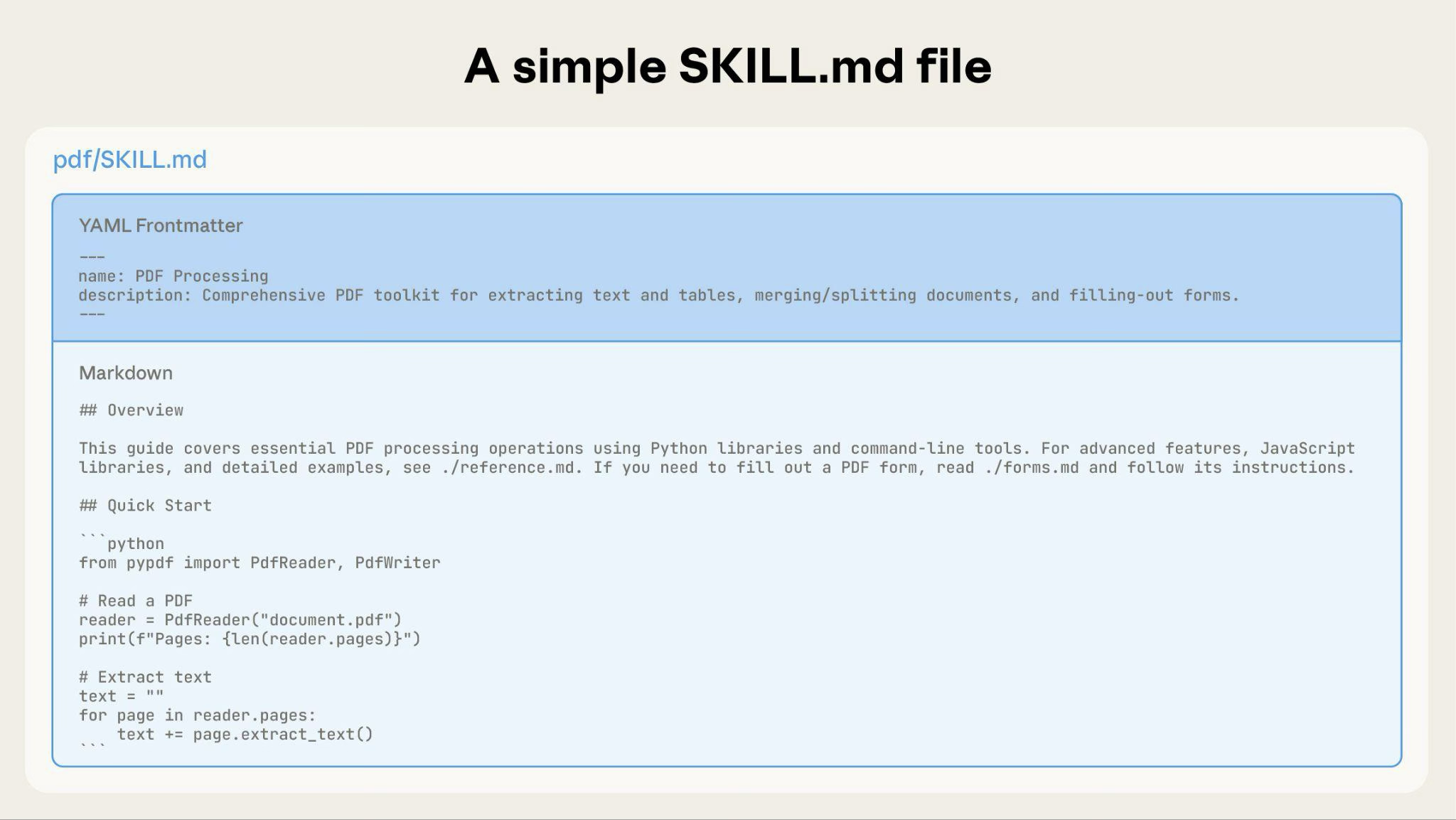
随着 Skill 不断扩展,你可以打包其他内容,供 Claude 仅在需要时加载:
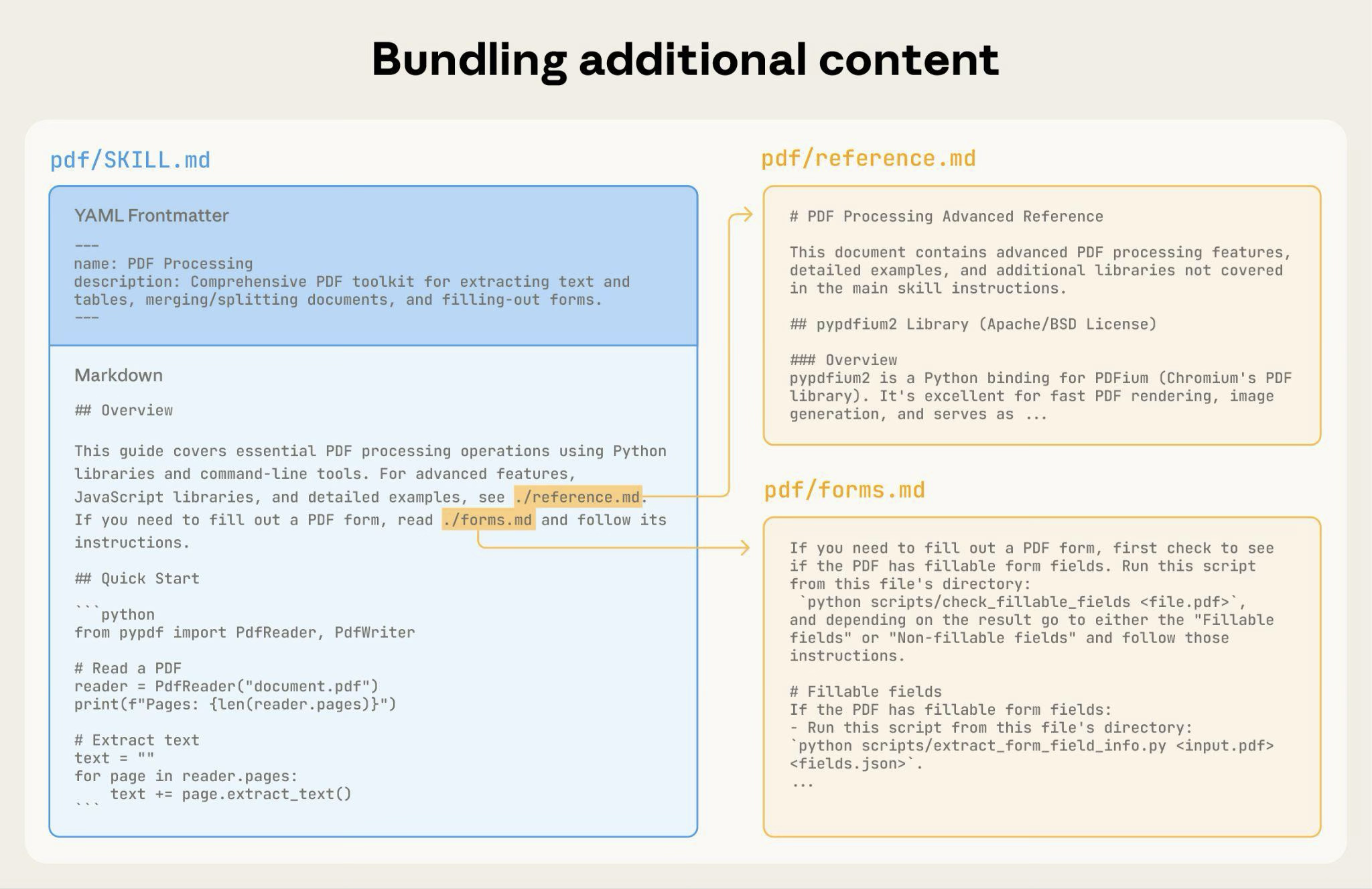
完整的 Skill 目录结构可能如下所示:
pdf/
├── SKILL.md              # Main instructions (loaded when triggered)
├── FORMS.md              # Form-filling guide (loaded as needed)
├── reference.md          # API reference (loaded as needed)
├── examples.md           # Usage examples (loaded as needed)
└── scripts/
    ├── analyze_form.py   # Utility script (executed, not loaded)
    ├── fill_form.py      # Form filling script
    └── validate.py       # Validation script
模式 1:带参考资料的高级指南
---
name: PDF Processing
description: Extracts text and tables from PDF files, fills forms, and merges documents. Use when working with PDF files or when the user mentions PDFs, forms, or document extraction.
---

# PDF Processing

## Quick start

Extract text with pdfplumber:
```python
import pdfplumber
with pdfplumber.open("file.pdf") as pdf:
    text = pdf.pages[0].extract_text()
```

## Advanced features

**Form filling**: See [FORMS.md](FORMS.md) for complete guide
**API reference**: See [REFERENCE.md](REFERENCE.md) for all methods
**Examples**: See [EXAMPLES.md](EXAMPLES.md) for common patterns
Claude 仅在需要时加载 FORMS.md、REFERENCE.md 或 EXAMPLES.md。
模式 2:按领域组织
对于包含多个领域的 Skills,按领域组织内容,避免加载无关上下文。当用户询问销售指标时,Claude 只需读取销售相关的架构,无需读取财务或营销数据。这样可以减少 token 用量,并让上下文更加聚焦。
bigquery-skill/
├── SKILL.md (overview and navigation)
└── reference/
    ├── finance.md (revenue, billing metrics)
    ├── sales.md (opportunities, pipeline)
    ├── product.md (API usage, features)
    └── marketing.md (campaigns, attribution)
# BigQuery Data Analysis

## Available datasets

**Finance**: Revenue, ARR, billing → See [reference/finance.md](reference/finance.md)
**Sales**: Opportunities, pipeline, accounts → See [reference/sales.md](reference/sales.md)
**Product**: API usage, features, adoption → See [reference/product.md](reference/product.md)
**Marketing**: Campaigns, attribution, email → See [reference/marketing.md](reference/marketing.md)

## Quick search

Find specific metrics using grep:

```bash
grep -i "revenue" reference/finance.md
grep -i "pipeline" reference/sales.md
grep -i "api usage" reference/product.md
```
模式 3:条件式详情
展示基本内容,并链接到进阶内容:
# DOCX Processing

## Creating documents

Use docx-js for new documents. See [DOCX-JS.md](DOCX-JS.md).

## Editing documents

For simple edits, modify the XML directly.

**For tracked changes**: See [REDLINING.md](REDLINING.md)
**For OOXML details**: See [OOXML.md](OOXML.md)
只有在用户需要这些功能时,Claude 才会读取 REDLINING.md 或 OOXML.md。
避免深层嵌套引用
如果文件被其他已引用的文件引用,Claude 可能只会部分读取这些文件。遇到嵌套引用时,Claude 可能会使用 head -100 之类的命令预览内容,而不是读取整个文件,导致信息不完整。
引用层级应从 SKILL.md 开始,且只保持一层。所有引用文件都应由 SKILL.md 直接链接,确保 Claude 在需要时读取完整文件。
错误示例:层级过深:
# SKILL.md
See [advanced.md](advanced.md)...

# advanced.md
See [details.md](details.md)...

# details.md
Here's the actual information...
正确示例:一层引用:
# SKILL.md

**Basic usage**: [instructions in SKILL.md]
**Advanced features**: See [advanced.md](advanced.md)
**API reference**: See [reference.md](reference.md)
**Examples**: See [examples.md](examples.md)
为较长的引用文件添加目录
对于超过 100 行的引用文件,请在顶部添加目录。这样,即使 Claude 只预览部分内容,也能了解可用信息的完整范围。
示例:
# API Reference

## Contents
- Authentication and setup
- Core methods (create, read, update, delete)
- Advanced features (batch operations, webhooks)
- Error handling patterns
- Code examples

## Authentication and setup
...

## Core methods
...
之后,Claude 可以根据需要读取完整文件或跳转到特定章节。
有关这种基于文件系统的架构如何实现渐进式披露的详情,请参阅下方进阶部分中的运行时环境章节。
工作流与反馈循环
复杂任务使用工作流
将复杂操作拆分为清晰、按顺序排列的步骤。对于特别复杂的工作流,请提供一份清单,供 Claude 复制到回复中,并在完成每项任务后勾选。
示例 1:研究综合工作流(适用于不含代码的 Skill):
## Research synthesis workflow

Copy this checklist and track your progress:

```
Research Progress:
- [ ] Step 1: Read all source documents
- [ ] Step 2: Identify key themes
- [ ] Step 3: Cross-reference claims
- [ ] Step 4: Create structured summary
- [ ] Step 5: Verify citations
```

**Step 1: Read all source documents**

Review each document in the `sources/` directory. Note the main arguments and supporting evidence.

**Step 2: Identify key themes**

Look for patterns across sources. What themes appear repeatedly? Where do sources agree or disagree?

**Step 3: Cross-reference claims**

For each major claim, verify it appears in the source material. Note which source supports each point.

**Step 4: Create structured summary**

Organize findings by theme. Include:
- Main claim
- Supporting evidence from sources
- Conflicting viewpoints (if any)

**Step 5: Verify citations**

Check that every claim references the correct source document. If citations are incomplete, return to Step 3.
此示例展示了如何将工作流应用于无需代码的分析任务。清单模式适用于任何复杂的多步骤流程。
示例 2:PDF 表单填写工作流(适用于含代码的 Skill):
## PDF form filling workflow

Copy this checklist and check off items as you complete them:

```
Task Progress:
- [ ] Step 1: Analyze the form (run analyze_form.py)
- [ ] Step 2: Create field mapping (edit fields.json)
- [ ] Step 3: Validate mapping (run validate_fields.py)
- [ ] Step 4: Fill the form (run fill_form.py)
- [ ] Step 5: Verify output (run verify_output.py)
```

**Step 1: Analyze the form**

Run: `python scripts/analyze_form.py input.pdf`

This extracts form fields and their locations, saving to `fields.json`.

**Step 2: Create field mapping**

Edit `fields.json` to add values for each field.

**Step 3: Validate mapping**

Run: `python scripts/validate_fields.py fields.json`

Fix any validation errors before continuing.

**Step 4: Fill the form**

Run: `python scripts/fill_form.py input.pdf fields.json output.pdf`

**Step 5: Verify output**

Run: `python scripts/verify_output.py output.pdf`

If verification fails, return to Step 2.
清晰的步骤可以避免 Claude 跳过关键验证。清单有助于 Claude 和你跟踪多步骤工作流的进展。
实现反馈循环
常见模式:运行验证器 → 修复错误 → 重复
此模式可以大幅提高输出质量。
示例 1:遵循风格指南(适用于不含代码的 Skill):
## Content review process

1. Draft your content following the guidelines in STYLE_GUIDE.md
2. Review against the checklist:
   - Check terminology consistency
   - Verify examples follow the standard format
   - Confirm all required sections are present
3. If issues found:
   - Note each issue with specific section reference
   - Revise the content
   - Review the checklist again
4. Only proceed when all requirements are met
5. Finalize and save the document
此示例展示了如何使用参考文档而不是脚本实现验证循环模式。这里的“验证器”是 STYLE_GUIDE.md,Claude 通过阅读和比较来执行检查。
示例 2:文档编辑流程(适用于含代码的 Skill):
## Document editing process

1. Make your edits to `word/document.xml`
2. **Validate immediately**: `python ooxml/scripts/validate.py unpacked_dir/`
3. If validation fails:
   - Review the error message carefully
   - Fix the issues in the XML
   - Run validation again
4. **Only proceed when validation passes**
5. Rebuild: `python ooxml/scripts/pack.py unpacked_dir/ output.docx`
6. Test the output document
验证循环可以及早发现错误。
内容指南
避免包含时效性信息
不要包含会过时的信息:
错误示例:时效性信息(之后可能会出错):
If you're doing this before August 2025, use the old API.
After August 2025, use the new API.
正确示例(使用“旧模式”章节):
## Current method

Use the v2 API endpoint: `api.example.com/v2/messages`

## Old patterns

<details>
<summary>Legacy v1 API (deprecated 2025-08)</summary>

The v1 API used: `api.example.com/v1/messages`

This endpoint is no longer supported.
</details>
旧模式章节可以提供历史背景,同时避免主内容杂乱。
术语保持一致
选择一个术语,并在整个 Skill 中统一使用:
正确示例——保持一致:
- 始终使用“API 端点”
- 始终使用“字段”
- 始终使用“提取”
错误示例——不一致:
- 混用“API 端点”“URL”“API 路由”“路径”
- 混用“字段”“框”“元素”“控件”
- 混用“提取”“拉取”“获取”“检索”
术语一致有助于 Claude 理解并遵循指令。
常见模式
模板模式
提供输出格式模板。根据需求选择严格程度。
适用于严格要求(例如 API 响应或数据格式):
## Report structure

ALWAYS use this exact template structure:

```markdown
# [Analysis Title]

## Executive summary
[One-paragraph overview of key findings]

## Key findings
- Finding 1 with supporting data
- Finding 2 with supporting data
- Finding 3 with supporting data

## Recommendations
1. Specific actionable recommendation
2. Specific actionable recommendation
```
适用于灵活指导(需要灵活调整时):
## Report structure

Here is a sensible default format, but use your best judgment based on the analysis:

```markdown
# [Analysis Title]

## Executive summary
[Overview]

## Key findings
[Adapt sections based on what you discover]

## Recommendations
[Tailor to the specific context]
```

Adjust sections as needed for the specific analysis type.
示例模式
对于输出质量取决于示例的 Skill,请像常规提示词一样提供输入/输出示例:
## Commit message format

Generate commit messages following these examples:

**Example 1:**
Input: Added user authentication with JWT tokens
Output:
```
feat(auth): implement JWT-based authentication

Add login endpoint and token validation middleware
```

**Example 2:**
Input: Fixed bug where dates displayed incorrectly in reports
Output:
```
fix(reports): correct date formatting in timezone conversion

Use UTC timestamps consistently across report generation
```

**Example 3:**
Input: Updated dependencies and refactored error handling
Output:
```
chore: update dependencies and refactor error handling

- Upgrade lodash to 4.17.21
- Standardize error response format across endpoints
```

Follow this style: type(scope): brief description, then detailed explanation.
与单纯的描述相比,示例能帮助 Claude 更清楚地理解预期风格和详细程度。
条件式工作流模式
引导 Claude 完成决策:
## Document modification workflow

1. Determine the modification type:

   **Creating new content?** → Follow "Creation workflow" below
   **Editing existing content?** → Follow "Editing workflow" below

2. Creation workflow:
   - Use docx-js library
   - Build document from scratch
   - Export to .docx format

3. Editing workflow:
   - Unpack existing document
   - Modify XML directly
   - Validate after each change
   - Repack when complete
先构建评估
在编写大量文档之前,先创建评估。 这样可以确保你的 Skill 能解决实际问题,而不是为想象中的问题编写文档。
评估驱动开发:
- 找出差距:在没有 Skill 的情况下,让 Claude 执行有代表性的任务。记录具体的失败或缺失的上下文
- 创建评估:构建三个用于测试这些差距的场景
- 建立基线:衡量 Claude 在没有 Skill 时的表现
- 编写最精简的指令:只创建足以弥补差距并通过评估的内容
- 迭代:执行评估,与基线比较并进行改进
这种方法可以确保你解决的是实际问题,而不是预先考虑那些可能永远不会出现的需求。
评估结构:
{
  "skills": ["pdf-processing"],
  "query": "Extract all text from this PDF file and save it to output.txt",
  "files": ["test-files/document.pdf"],
  "expected_behavior": [
    "Successfully reads the PDF file using an appropriate PDF processing library or command-line tool",
    "Extracts text content from all pages in the document without missing any pages",
    "Saves the extracted text to a file named output.txt in a clear, readable format"
  ]
}
与 Claude 一起迭代开发 Skills
最高效的 Skill 开发流程会使用 Claude 本身。与一个 Claude 实例(“Claude A”)协作创建 Skill,供其他实例(“Claude B”)使用。Claude A 会帮助你设计和改进指令,而 Claude B 会在实际任务中测试这些指令。之所以可行,是因为 Claude 模型既理解如何编写有效的 Agent 指令,也了解 Agent 需要哪些信息。
创建新 Skill:
-
在没有 Skill 的情况下完成任务:使用常规提示词与 Claude A 一起解决问题。在过程中,你会自然地提供上下文、解释偏好并分享流程知识。留意你反复提供了哪些信息。
-
找出可复用的模式:完成任务后,找出你提供的哪些上下文对今后类似任务有用。
示例:如果你完成了一项 BigQuery 分析,可能提供了表名、字段定义、筛选规则(例如“始终排除测试账号”)和常用查询模式。
-
让 Claude A 创建 Skill:“创建一个 Skill,记录我们刚才使用的 BigQuery 分析模式。包括表结构、命名约定,以及筛选测试账号的规则。”
Claude 模型原生理解 Skill 的格式和结构。你不需要特殊的系统提示词,也不需要专门用于“编写 Skills”的 Skill,Claude 就能帮助创建 Skills。只需让 Claude 创建一个 Skill,它就会生成结构正确、包含适当 frontmatter 和正文内容的 SKILL.md。 -
检查内容是否简洁:确认 Claude A 没有添加不必要的解释。可以这样要求:“删除关于胜率含义的解释——Claude 已经知道了。”
-
改进信息架构:让 Claude A 更有效地组织内容。例如:“将表结构整理到单独的参考文件中。我们以后可能会添加更多表。”
-
在类似任务上测试:在相关用例中,让 Claude B(加载了该 Skill 的全新实例)使用此 Skill。观察 Claude B 是否找到了正确的信息、正确应用规则并成功完成任务。
-
根据观察迭代:如果 Claude B 遇到困难或遗漏了某些内容,向 Claude A 提供具体情况:“Claude 使用这个 Skill 时,忘记按 Q4 日期进行筛选了。我们是否应该添加一个关于日期筛选模式的章节?”
迭代改进现有 Skills:
改进 Skills 时,也采用同样的分层模式。你需要在以下环节之间交替进行:
- 与 Claude A 协作(帮助改进 Skill 的专家)
- 使用 Claude B 测试(使用 Skill 执行实际工作的 Agent)
- 观察 Claude B 的行为,并将发现反馈给 Claude A
-
在实际工作流中使用 Skill:给 Claude B 分配实际任务(已加载该 Skill),而不是测试场景
-
观察 Claude B 的行为:记录它在哪里遇到困难、取得成功,或做出意料之外的选择
观察示例: “我让 Claude B 编写区域销售报告时,它写了查询,却忘了筛除测试账户,尽管 Skill 提到了这条规则。”
-
回到 Claude A 进行改进:分享当前的 SKILL.md,并描述你的观察。询问:“我注意到,让 Claude B 编写区域报告时,它忘了筛除测试账户。Skill 提到了筛选,但也许这条规则不够突出?”
-
审查 Claude A 的建议:Claude A 可能会建议调整结构以突出规则,使用更强烈的措辞(例如用“MUST filter”代替“always filter”),或重组工作流部分。
-
应用并测试更改:根据 Claude A 的优化建议更新 Skill,然后让 Claude B 再次处理类似请求并进行测试
-
根据使用情况重复迭代:遇到新场景时,继续进行观察、优化和测试。每次迭代都会根据 Agent 的实际行为改进 Skill,而不是依赖假设。
收集团队反馈:
- 与团队成员分享 Skills,并观察他们如何使用
- 询问:Skill 是否会在预期情况下触发?说明是否清晰?还缺少什么?
- 根据反馈弥补自己使用模式中的盲点
这种方法为何有效:Claude A 了解 Agent 的需求,你提供领域专业知识,Claude B 通过实际使用揭示不足,迭代优化则能根据观察到的行为改进 Skills,而不是依赖假设。
观察 Claude 如何浏览 Skills
在迭代优化 Skills 时,留意 Claude 在实际使用中是如何使用它们的。注意以下情况:
- 意料之外的探索路径:Claude 是否以你没预料到的顺序读取文件?这可能说明你的结构没有想象中那么直观
- 遗漏关联:Claude 是否没有遵循引用,找到重要文件?你可能需要让链接更加明确或醒目
- 过度依赖某些部分:如果 Claude 反复读取同一个文件,请考虑是否应该将其中的内容放入主 SKILL.md
- 忽略内容:如果 Claude 从不访问某个捆绑文件,它可能没有必要,或未在主说明中得到充分提示
根据这些观察进行迭代,而不要依赖假设。Skill 元数据中的“name”和“description”尤其关键。Claude 会在决定是否针对当前任务触发 Skill 时使用这些信息。请确保它们清楚说明 Skill 的功能及适用场景。
应避免的反模式
避免使用 Windows 风格的路径
即使在 Windows 上,文件路径也始终使用正斜杠:
- ✓ 良好示例:
scripts/helper.py、reference/guide.md - ✗ 避免:
scripts\helper.py、reference\guide.md
Unix 风格的路径适用于所有平台,而 Windows 风格的路径会在 Unix 系统上导致错误。
避免提供过多选项
除非必要,否则不要提供多种方案:
**Bad example: Too many choices** (confusing):
"You can use pypdf, or pdfplumber, or PyMuPDF, or pdf2image, or..."

**Good example: Provide a default** (with escape hatch):
"Use pdfplumber for text extraction:
```python
import pdfplumber
```

For scanned PDFs requiring OCR, use pdf2image with pytesseract instead."
进阶:包含可执行代码的 Skills
以下部分重点介绍包含可执行脚本的 Skills。如果你的 Skill 只使用 Markdown 说明,请跳转到有效 Skills 检查清单。
解决问题,不要推给 Claude
为 Skills 编写脚本时,应处理错误情况,而不是把问题推给 Claude。
良好示例:明确处理错误:
def process_file(path):
    """Process a file, creating it if it doesn't exist."""
    try:
        with open(path) as f:
            return f.read()
    except FileNotFoundError:
        # Create file with default content instead of failing
        print(f"File {path} not found, creating default")
        with open(path, 'w') as f:
            f.write('')
        return ''
    except PermissionError:
        # Provide alternative instead of failing
        print(f"Cannot access {path}, using default")
        return ''
错误示例:把问题推给 Claude:
def process_file(path):
    # Just fail and let Claude figure it out
    return open(path).read()
配置参数也应说明依据并做好文档记录,以避免出现“魔法常量”(Ousterhout 定律)。如果你不知道正确的值,Claude 又该如何确定?
良好示例:自说明:
# HTTP requests typically complete within 30 seconds
# Longer timeout accounts for slow connections
REQUEST_TIMEOUT = 30

# Three retries balances reliability vs speed
# Most intermittent failures resolve by the second retry
MAX_RETRIES = 3
错误示例:魔法数字:
TIMEOUT = 47  # Why 47?
RETRIES = 5   # Why 5?
提供实用脚本
即使 Claude 能编写脚本,预先准备好的脚本也有以下优势:
实用脚本的优点:
- 比生成的代码更可靠
- 节省 token(无需在上下文中包含代码)
- 节省时间(无需生成代码)
- 确保每次使用时保持一致
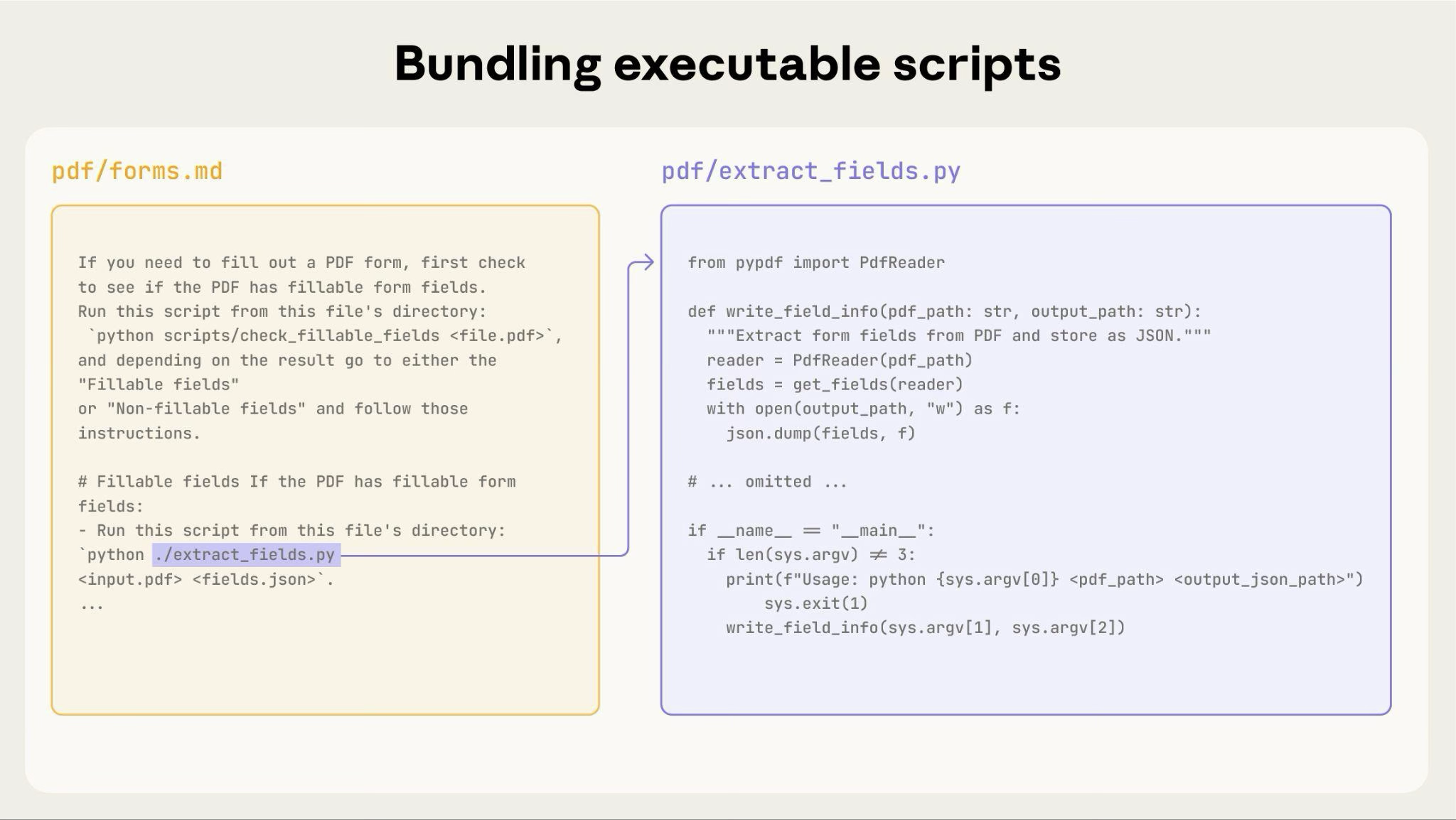
上图展示了可执行脚本如何与指令文件配合使用。指令文件(forms.md)引用该脚本,Claude 无需将脚本内容加载到上下文中即可执行。
重要区别:请在指令中明确说明 Claude 应该:
- 执行脚本(最常见):“运行
analyze_form.py提取字段” - 将其作为参考阅读(适用于复杂逻辑):“查看
analyze_form.py,了解字段提取算法”
对于大多数实用脚本,执行脚本更可靠、更高效。有关脚本执行方式的详细信息,请参阅下文的运行时环境部分。
示例:
## Utility scripts

**analyze_form.py**: Extract all form fields from PDF

```bash
python scripts/analyze_form.py input.pdf > fields.json
```

Output format:
```json
{
  "field_name": {"type": "text", "x": 100, "y": 200},
  "signature": {"type": "sig", "x": 150, "y": 500}
}
```

**validate_boxes.py**: Check for overlapping bounding boxes

```bash
python scripts/validate_boxes.py fields.json
# Returns: "OK" or lists conflicts
```

**fill_form.py**: Apply field values to PDF

```bash
python scripts/fill_form.py input.pdf fields.json output.pdf
```
使用视觉分析
当输入可以渲染为图像时,让 Claude 对其进行分析:
## Form layout analysis

1. Convert PDF to images:
   ```bash
   python scripts/pdf_to_images.py form.pdf
   ```

2. Analyze each page image to identify form fields
3. Claude can see field locations and types visually
Claude 的视觉能力有助于理解布局和结构。
创建可验证的中间输出
Claude 执行复杂、开放式任务时可能会出错。“规划-验证-执行”模式可以尽早发现错误:先让 Claude 以结构化格式制定计划,再用脚本验证计划,然后再执行。
示例:假设你让 Claude 根据电子表格更新 PDF 中的 50 个表单字段。如果没有验证,Claude 可能会引用不存在的字段、创建冲突的值、遗漏必填字段,或错误地应用更新。
解决方案:使用上文所示的工作流模式(填写 PDF 表单),但在应用更改前,添加一个经过验证的中间文件 changes.json。工作流变为:分析 → 创建计划文件 → 验证计划 → 执行 → 验证。
此模式有效的原因:
- 尽早发现错误:在应用更改前,验证就能发现问题
- 可由机器验证:脚本能提供客观验证
- 可逆的规划:Claude 可以反复调整计划,而不触及原始文件
- 便于调试:错误消息会指出具体问题
适用场景:批量操作、破坏性更改、复杂的验证规则、高风险操作。
实现提示:让验证脚本提供详细的错误消息,例如“未找到字段 'signature_date'。可用字段:customer_name、order_total、signature_date_signed”,以帮助 Claude 修复问题。
软件包依赖项
技能在代码执行环境中运行,但会受到平台特定限制:
- claude.ai:可以从 npm 和 PyPI 安装软件包,也可以从 GitHub 仓库拉取内容
- Anthropic API:无法访问网络,也不能在运行时安装软件包
在 SKILL.md 中列出所需的软件包,并在代码执行工具文档中确认这些软件包可用。
运行时环境
Skills 在具有文件系统访问权限、bash 命令和代码执行能力的代码执行环境中运行。有关此架构的概念性说明,请参阅概览中的 Skills 架构。
这对编写 Skills 有何影响:
Claude 如何访问 Skills:
- 预加载元数据:启动时,所有 Skills 的 YAML frontmatter 中的名称和描述都会加载到系统提示词中
- 按需读取文件:需要时,Claude 会使用 bash Read 工具访问文件系统中的 SKILL.md 和其他文件
- 高效执行脚本:无需将实用脚本的完整内容加载到上下文中,即可通过 bash 执行。只有脚本输出会消耗 token
- 大文件不会占用上下文:参考文件、数据或文档在实际读取之前不会消耗上下文 token
- 文件路径很重要:Claude 会像浏览文件系统一样浏览你的 Skill 目录。使用正斜杠(
reference/guide.md),不要使用反斜杠 - 使用描述性文件名:使用能表明内容的名称:
form_validation_rules.md,而不是doc2.md - 便于查找地组织文件:按领域或功能组织目录
- 好的示例:
reference/finance.md、reference/sales.md - 不好的示例:
docs/file1.md、docs/file2.md
- 好的示例:
- 打包完整的资源:包含完整的 API 文档、大量示例和大型数据集;在访问之前不会占用上下文
- 确定性操作优先使用脚本:编写
validate_form.py,而不是让 Claude 生成验证代码 - 明确说明执行意图:
- “运行
analyze_form.py提取字段”(执行) - “查看
analyze_form.py了解提取算法”(作为参考阅读)
- “运行
- 测试文件访问方式:使用真实请求进行测试,确认 Claude 能浏览你的目录结构
示例:
bigquery-skill/
├── SKILL.md (overview, points to reference files)
└── reference/
    ├── finance.md (revenue metrics)
    ├── sales.md (pipeline data)
    └── product.md (usage analytics)
用户询问收入时,Claude 会读取 SKILL.md,看到其中引用了 reference/finance.md,然后调用 bash 只读取该文件。sales.md 和 product.md 文件仍保留在文件系统中,在需要之前不会占用任何上下文 token。这种基于文件系统的模式使渐进式披露成为可能。Claude 可以浏览并有选择地加载每项任务所需的内容。
有关技术架构的完整详情,请参阅 Skills 概览中的 Skills 的工作方式。
MCP 工具引用
如果你的 Skill 使用 MCP(Model Context Protocol)工具,请始终使用完全限定的工具名称,以避免出现“找不到工具”错误。
格式:ServerName:tool_name
示例:
Use the BigQuery:bigquery_schema tool to retrieve table schemas.
Use the GitHub:create_issue tool to create issues.
其中:
BigQuery和GitHub是 MCP 服务名称bigquery_schema和create_issue是这些服务中的工具名称
如果省略服务前缀,Claude 可能无法找到工具,尤其是在有多个 MCP 服务可用时。
避免假设工具已安装
不要假设相关软件包已可用:
**Bad example: Assumes installation**:
"Use the pdf library to process the file."

**Good example: Explicit about dependencies**:
"Install required package: `pip install pypdf`

Then use it:
```python
from pypdf import PdfReader
reader = PdfReader("file.pdf")
```"
技术说明
YAML frontmatter 要求
SKILL.md 的 frontmatter 仅包含 name(最多 64 个字符)和 description(最多 1024 个字符)字段。完整的结构详情请参阅 Skills 概览。
Token 预算
为获得最佳性能,请将 SKILL.md 正文控制在 500 行以内。如果内容超过此限制,请使用前文介绍的渐进式披露模式,将内容拆分到单独的文件中。有关架构详情,请参阅 Skills 概览。
高效 Skills 检查清单
分享 Skill 之前,请确认以下事项:
核心质量
- 描述具体,并包含关键术语
- 描述既说明 Skill 的作用,也说明何时使用
- SKILL.md 正文少于 500 行
- 额外详情放在单独的文件中(如有需要)
- 不包含时效性信息(或将其放在“旧模式”部分)
- 全文术语一致
- 示例具体,而非抽象
- 文件引用最多深入一层
- 适当采用渐进式披露
- 工作流包含清晰的步骤
代码和脚本
- 脚本用于解决问题,而非把任务推给 Claude
- 明确说明错误处理,并提供有用信息
- 不使用“魔法常量”(所有值都有合理依据)
- 在说明中列出所需软件包,并验证其可用性
- 脚本包含清晰的文档
- 不使用 Windows 风格的路径(统一使用正斜杠)
- 为关键操作提供验证步骤
- 为质量关键任务纳入反馈循环
测试
- 至少创建 3 项评估
- 已使用 Haiku、Sonnet 和 Opus 进行测试
- 已在真实使用场景中进行测试
- 已纳入团队反馈(如适用)