
关于 server-side-rendering-flutter-apps-with-rfw
这篇教程面向 Flutter 开发者,演示使用 RFW 通过 HTTP 从服务端下发并动态更新界面。内容涵盖 dart_frog 服务端、Flutter 客户端及本地缓存等实现思路。
主要功能
- 01通过 HTTP 传输 RFW 二进制界面
- 02在服务端生成动态界面
- 03客户端注册自定义组件
- 04通过请求头传递状态
- 05缓存界面以支持离线查看
适用场景
- 01更新银行类应用的界面
- 02构建航班、酒店或租车预订应用
- 03实现聊天应用的服务端界面
- 04按用户定向更新营销或实验界面
安装
复制下面的命令,在终端中运行。
npx skills add https:/安装后在 Claude Code 中输入/server-side-rendering-flutter-apps-with-rfw确认已加载。
详细介绍
使用 RFW 服务端渲染 Flutter 应用
本文将指导你如何构建一个利用服务端渲染(SSR)并能动态更新 UI 的 Flutter 应用。
如果你刚接触 Flutter,可以参阅这篇文章了解如何入门
此技术将在服务端和客户端使用 rfw 包,通过 HTTP 请求发送二进制数据。
简而言之,你可以在这里找到最终源码。
开始使用
新建一个名为 flutter_ssr 的目录,然后在终端中进入该目录,或使用你喜欢的 IDE 打开它。
更新方式
如果你身处移动应用领域,就会知道要让所有用户都使用最新版本有多么困难。即使只是更新 API 或数据库架构,也可能非常棘手,因为有些用户使用的是旧版本(有时是由于操作系统限制)。
代码推送
Shorebird 采用了一种有趣的方式,通过代码推送向用户交付更新,并实时更新应用。这种方式的优势在于可以更新 UI 和逻辑,但如果内容更新只针对某个特定用户或用户群体呢?
支持最新版本
另一种方式是制定 SLO/政策,只支持最近的 X 个版本,并让应用在旧版本上无法运行。
在移动端,可以使用 upgrader 配合 AppCast,或者使用 in_app_update 调用 Google Play API,在后台更新应用,或在更新前禁止使用应用。
这样做的好处是,你可以确定用户使用的是最新版本,或者不再获得支持,并且可以针对较新的 API,更轻松地推出更新。但这也意味着用户会更频繁地受到更新打扰,而且较旧的设备可能不再受支持。
服务端驱动更新
并非所有应用都需要在服务端渲染数据;有时构建离线优先应用时,你会希望一切都优先在本地完成。但如果你需要构建服务端优先的应用,就可以采用这种方式。以下是一些示例和使用场景:
- 银行账户
- 航空/酒店/汽车预订
- 聊天应用(即时消息)
- 营销和 A/B 测试
- 数据库优先的应用
这些示例并不意味着应用只能依赖服务端;在很多情况下,你仍会希望在本地缓存数据,以提供出色的离线体验。
使用 Flutter 时,你构建的是一个运行时,并将其作为 Web 上的单页应用(SPA)以及应用商店中的移动/桌面应用发布给用户。这意味着每次更新都需要发布全部逻辑和 UI。
这种方式的优势在于可以将更多逻辑放在服务端处理;可能非常耗费资源的请求也可以在服务端完成,然后只将渲染后的 UI 发送给客户端。客户端仍可以缓存响应,以支持离线查看。其缺点是客户端需要在某个时刻与服务端通信,因此可能不适用于纯离线应用。
远程 Flutter Widgets(RFW)
Flutter 团队提供了一个软件包,可用于在客户端和服务端创建 Widget,并发送连接它们所需的数据。这个软件包名为 rfw。
除 UI 之外,也可以通过 WASM 发布逻辑,但这不在本文讨论范围内。
rfw 软件包使用一种文本格式,该格式可编译为二进制,用于表示状态和分发事件。
import core;
import material;

widget MaterialShop = Scaffold(
  appBar: AppBar(
    title: Text(text: ['Products']),
  ),
  body: ListView(
    children: [
      ...for product in data.server.games:
        Product(product: product)
    ],
  ),
);

widget Product = ListTile(
  title: Text(text: args.product.name),
  onTap: event 'shop.productSelect' { name: args.product.name, path: args.product.link },
);
可以定义多个 Widget,它们看起来甚至可能与您熟悉的 Flutter Dart API 类似,但并不完全相同。
这种格式没有逻辑分支块或条件渲染,而是一种无状态格式,并可根据需要在每一帧更新。
以下是创建新项目时生成的 Flutter 计数器应用:
class MyHomePage extends StatefulWidget {
  final String title;

  const MyHomePage({
    Key? key,
    required this.title,
  }) : super(key: key);

  @override
  State<MyHomePage> createState() => _MyHomePageState();
}

class _MyHomePageState extends State<MyHomePage> {
  int _counter = 0;

  void _incrementCounter() {
    setState(() {
      _counter++;
    });
  }

  @override
  Widget build(BuildContext context) {
    return Scaffold(
      appBar: AppBar(
        backgroundColor: Theme.of(context).colorScheme.inversePrimary,
        title: Text(widget.title),
      ),
      body: Center(
        child: Column(
          mainAxisAlignment: MainAxisAlignment.center,
          children: [
            const Text(
              'You have pushed the button this many times:',
            ),
            Text(
              '$_counter',
              style: Theme.of(context).textTheme.headlineMedium,
            ),
          ],
        ),
      ),
      floatingActionButton: FloatingActionButton(
        onPressed: _incrementCounter,
        tooltip: 'Increment',
        child: const Icon(Icons.add),
      ),
    );
  }
}
我们可以用 rfw 将其表示为:
import widgets;
import material;

widget root = Scaffold(
  appBar: AppBar(
    title: Text(text: ['Counter Example']),
    centerTitle: true,
    backgroundColor: data.colorScheme.inversePrimary,
  ),
  body: Center(
    child: Column(
      mainAxisAlignment: "center",
      children: [
        Text(text: ["You have pushed the button this many times:"]),
        Text(
          text: [data.counter.value],
          style: {
            fontSize: 20.0,
          },
        ),
      ],
    ),
  ),
  floatingActionButton: FloatingActionButton(
     onPressed: event "click" {},
     tooltip: ["Increment"],
     child: Icon(
        icon: 0xe047,
        fontFamily: 'MaterialIcons',
     ),
  ),
);
您可能注意到了字符串数组以及定义 Widget 的不同方式。这是有意设计的,API 不会与 Flutter SDK 完全一致,但这些限制也带来了不同的权衡。
您可以在应用中定义任意自定义 Widget,只使用您在设计系统中定义的 UI,服务端也只能生成符合预期的 UI。
也可以完全使用这种文本格式创建 UI,其中包括行、列、容器等。
设置服务端
本例将使用 dart_frog 创建服务端应用。
在之前创建的目录中运行以下命令:
dart_frog create server
flutter pub add rfw
这会为我们生成服务端样板代码,并添加正确的依赖项。
您可以暂时删除测试目录,也可以之后更新它来检查响应是否正确。
打开 /server/routes/index.dart 并更新文件内容如下:
import 'package:dart_frog/dart_frog.dart';
import 'package:rfw/formats.dart';

Response onRequest(RequestContext context) {
  var count = context.request.headers['COUNTER_VALUE'] ?? '0';

  if (context.request.method == HttpMethod.post) {
    count = (int.parse(count) + 1).toString();
  }

  return Response.bytes(
    body: encodeLibraryBlob(parseLibraryFile(template)),
    headers: {'COUNTER_VALUE': count},
  );
}

const template = '''
import widgets;
import material;

widget root = Scaffold(
  appBar: AppBar(
    title: Text(text: ['Counter Example']),
    centerTitle: true,
    backgroundColor: data.colorScheme.inversePrimary,
  ),
  body: Center(
    child: Column(
      mainAxisAlignment: "center",
      children: [
        Text(text: ["You have pushed the button this many times:"]),
        Text(
          text: [data.counter.value],
          style: {
            fontSize: 20.0,
          },
        ),
      ],
    ),
  ),
  floatingActionButton: FloatingActionButton(
     onPressed: event "click" {},
     tooltip: ["Increment"],
     child: Icon(
        icon: 0xe047,
        fontFamily: 'MaterialIcons',
     ),
  ),
);
''';
这会将我们之前定义的 rfw 文本格式添加到字符串模板中。
使用该模板,我们可以调用 encodeLibraryBlob(parseLibraryFile(template)),创建这种文本格式的二进制表示。
我们还会检查请求头中的 COUNTER_VALUE,以便向客户端发送状态并接收客户端发来的状态。服务端是无状态的,也更易于扩展,因此这种做法有助于避免使用会话存储或上下文。
如果您进入 server 目录,就可以启动下一步需要的开发服务器:
dart_frog dev
您应该会看到以下内容:
✓ Running on http://localhost:8080
设置客户端
在新的终端标签页中,进入目录的根目录并运行以下命令:
flutter create app
flutter pub add rfw http
这会为我们生成计数器应用的样板代码,并添加正确的依赖项。
rfw 软件包自带 core 和 material Widget,但本例会手动添加它们,以展示它们的调用和创建方式。
创建并更新位于 app/lib/rfw/decoders.dart 的文件:
import 'package:flutter/material.dart';
import 'package:rfw/rfw.dart';

class CustomArgumentDecoders {
  static ButtonStyle? outlinedButtonStyle(
    DataSource source,
    List<Object> key,
    BuildContext context,
  ) {
    if (!source.isMap(key)) {
      return null;
    }
    return OutlinedButton.styleFrom(
      foregroundColor: ArgumentDecoders.color(source, ['foregroundColor']),
      backgroundColor: ArgumentDecoders.color(source, ['backgroundColor']),
      disabledForegroundColor:
          ArgumentDecoders.color(source, [...key, 'disabledForegroundColor']),
      disabledBackgroundColor:
          ArgumentDecoders.color(source, [...key, 'disabledBackgroundColor']),
      shadowColor: ArgumentDecoders.color(source, [...key, 'shadowColor']),
      surfaceTintColor:
          ArgumentDecoders.color(source, [...key, 'surfaceTintColor']),
      elevation: source.v<double>(['elevation']),
      textStyle: ArgumentDecoders.textStyle(source, [...key, 'textStyle']),
      padding: ArgumentDecoders.edgeInsets(source, [...key, 'padding']),
      minimumSize: CustomArgumentDecoders.size(source, [...key, 'minimumSize']),
      fixedSize: CustomArgumentDecoders.size(source, [...key, 'fixedSize']),
      maximumSize: CustomArgumentDecoders.size(source, [...key, 'maximumSize']),
      side: ArgumentDecoders.borderSide(source, [...key, 'side']),
      shape: CustomArgumentDecoders.outlinedBorder(source, [...key, 'shape']),
      enabledMouseCursor: CustomArgumentDecoders.mouseCursor(
          source, [...key, 'enabledMouseCursor']),
      disabledMouseCursor: CustomArgumentDecoders.mouseCursor(
          source, [...key, 'disabledMouseCursor']),
      visualDensity:
          ArgumentDecoders.visualDensity(source, [...key, 'visualDensity']),
      tapTargetSize: ArgumentDecoders.enumValue<MaterialTapTargetSize>(
              MaterialTapTargetSize.values,
              source,
              [...key, 'tapTargetSize']) ??
          MaterialTapTargetSize.shrinkWrap,
      animationDuration: ArgumentDecoders.duration(
          source, [...key, 'animationDuration'], context),
      enableFeedback: source.v<bool>([...key, 'enableFeedback']),
      alignment: ArgumentDecoders.alignment(source, [...key, 'alignment']),
    );
  }

  static ButtonStyle? filledButtonStyle(
    DataSource source,
    List<Object> key,
    BuildContext context,
  ) {
    if (!source.isMap(key)) {
      return null;
    }
    return FilledButton.styleFrom(
      foregroundColor: ArgumentDecoders.color(source, ['foregroundColor']),
      backgroundColor: ArgumentDecoders.color(source, ['backgroundColor']),
      disabledForegroundColor:
          ArgumentDecoders.color(source, [...key, 'disabledForegroundColor']),
      disabledBackgroundColor:
          ArgumentDecoders.color(source, [...key, 'disabledBackgroundColor']),
      shadowColor: ArgumentDecoders.color(source, [...key, 'shadowColor']),
      surfaceTintColor:
          ArgumentDecoders.color(source, [...key, 'surfaceTintColor']),
      elevation: source.v<double>(['elevation']),
      textStyle: ArgumentDecoders.textStyle(source, [...key, 'textStyle']),
      padding: ArgumentDecoders.edgeInsets(source, [...key, 'padding']),
      minimumSize: CustomArgumentDecoders.size(source, [...key, 'minimumSize']),
      fixedSize: CustomArgumentDecoders.size(source, [...key, 'fixedSize']),
      maximumSize: CustomArgumentDecoders.size(source, [...key, 'maximumSize']),
      side: ArgumentDecoders.borderSide(source, [...key, 'side']),
      shape: CustomArgumentDecoders.outlinedBorder(source, [...key, 'shape']),
      enabledMouseCursor: CustomArgumentDecoders.mouseCursor(
          source, [...key, 'enabledMouseCursor']),
      disabledMouseCursor: CustomArgumentDecoders.mouseCursor(
          source, [...key, 'disabledMouseCursor']),
      visualDensity:
          ArgumentDecoders.visualDensity(source, [...key, 'visualDensity']),
      tapTargetSize: ArgumentDecoders.enumValue<MaterialTapTargetSize>(
              MaterialTapTargetSize.values,
              source,
              [...key, 'tapTargetSize']) ??
          MaterialTapTargetSize.shrinkWrap,
      animationDuration: ArgumentDecoders.duration(
          source, [...key, 'animationDuration'], context),
      enableFeedback: source.v<bool>([...key, 'enableFeedback']),
      alignment: ArgumentDecoders.alignment(source, [...key, 'alignment']),
    );
  }

  static ButtonStyle? textButtonStyle(
    DataSource source,
    List<Object> key,
    BuildContext context,
  ) {
    if (!source.isMap(key)) {
      return null;
    }
    return TextButton.styleFrom(
      foregroundColor: ArgumentDecoders.color(source, ['foregroundColor']),
      backgroundColor: ArgumentDecoders.color(source, ['backgroundColor']),
      disabledForegroundColor:
          ArgumentDecoders.color(source, [...key, 'disabledForegroundColor']),
      disabledBackgroundColor:
          ArgumentDecoders.color(source, [...key, 'disabledBackgroundColor']),
      shadowColor: ArgumentDecoders.color(source, [...key, 'shadowColor']),
      surfaceTintColor:
          ArgumentDecoders.color(source, [...key, 'surfaceTintColor']),
      elevation: source.v<double>(['elevation']),
      textStyle: ArgumentDecoders.textStyle(source, [...key, 'textStyle']),
      padding: ArgumentDecoders.edgeInsets(source, [...key, 'padding']),
      minimumSize: CustomArgumentDecoders.size(source, [...key, 'minimumSize']),
      fixedSize: CustomArgumentDecoders.size(source, [...key, 'fixedSize']),
      maximumSize: CustomArgumentDecoders.size(source, [...key, 'maximumSize']),
      side: ArgumentDecoders.borderSide(source, [...key, 'side']),
      shape: CustomArgumentDecoders.outlinedBorder(source, [...key, 'shape']),
      enabledMouseCursor: CustomArgumentDecoders.mouseCursor(
          source, [...key, 'enabledMouseCursor']),
      disabledMouseCursor: CustomArgumentDecoders.mouseCursor(
          source, [...key, 'disabledMouseCursor']),
      visualDensity:
          ArgumentDecoders.visualDensity(source, [...key, 'visualDensity']),
      tapTargetSize: ArgumentDecoders.enumValue<MaterialTapTargetSize>(
              MaterialTapTargetSize.values,
              source,
              [...key, 'tapTargetSize']) ??
          MaterialTapTargetSize.shrinkWrap,
      animationDuration: ArgumentDecoders.duration(
          source, [...key, 'animationDuration'], context),
      enableFeedback: source.v<bool>([...key, 'enableFeedback']),
      alignment: ArgumentDecoders.alignment(source, [...key, 'alignment']),
    );
  }

  static EdgeInsets? edgeInsets(DataSource source, List<Object> key) {
    if (!source.isMap(key)) {
      return null;
    }
    final all = source.v<double>([...key, 'all']);
    if (all != null) return EdgeInsets.all(all);
    final vertical = source.v<double>([...key, 'vertical']);
    final horizontal = source.v<double>([...key, 'horizontal']);
    if (vertical != null || horizontal != null) {
      return EdgeInsets.symmetric(
        vertical: vertical ?? 0,
        horizontal: horizontal ?? 0,
      );
    }
    final top = source.v<double>([...key, 'top']);
    final bottom = source.v<double>([...key, 'bottom']);
    final left = source.v<double>([...key, 'left']);
    final right = source.v<double>([...key, 'right']);
    return EdgeInsets.only(
      top: top ?? 0,
      bottom: bottom ?? 0,
      left: left ?? 0,
      right: right ?? 0,
    );
  }

  static Size? size(DataSource source, List<Object> key) {
    if (!source.isMap(key)) {
      return null;
    }
    return Size(
      source.v<double>([...key, 'width']) ?? 0.0,
      source.v<double>([...key, 'height']) ?? 0.0,
    );
  }

  static MouseCursor? mouseCursor(DataSource source, List<Object> key) {
    if (!source.isMap(key)) {
      return null;
    }
    final type = source.v<String>([...key, 'type']);
    final value = source.v<String>([...key, 'value']);
    if (type == 'system') {
      switch (value) {
        case 'alias':
          return SystemMouseCursors.alias;
        case 'none':
          return SystemMouseCursors.none;
        case 'basic':
          return SystemMouseCursors.basic;
        case 'click':
          return SystemMouseCursors.click;
        case 'forbidden':
          return SystemMouseCursors.forbidden;
        case 'wait':
          return SystemMouseCursors.wait;
        case 'progress':
          return SystemMouseCursors.progress;
        case 'contextMenu':
          return SystemMouseCursors.contextMenu;
        case 'help':
          return SystemMouseCursors.help;
        case 'text':
          return SystemMouseCursors.text;
        case 'verticalText':
          return SystemMouseCursors.verticalText;
        case 'cell':
          return SystemMouseCursors.cell;
        case 'precise':
          return SystemMouseCursors.precise;
        case 'move':
          return SystemMouseCursors.move;
        case 'grab':
          return SystemMouseCursors.grab;
        case 'grabbing':
          return SystemMouseCursors.grabbing;
        case 'noDrop':
          return SystemMouseCursors.noDrop;
        case 'alias':
          return SystemMouseCursors.alias;
        case 'copy':
          return SystemMouseCursors.copy;
        case 'disappearing':
          return SystemMouseCursors.disappearing;
        case 'allScroll':
          return SystemMouseCursors.allScroll;
        case 'resizeLeftRight':
          return SystemMouseCursors.resizeLeftRight;
        case 'resizeUpDown':
          return SystemMouseCursors.resizeUpDown;
        case 'resizeUpLeftDownRight':
          return SystemMouseCursors.resizeUpLeftDownRight;
        case 'resizeUpRightDownLeft':
          return SystemMouseCursors.resizeUpRightDownLeft;
        case 'resizeUp':
          return SystemMouseCursors.resizeUp;
        case 'resizeDown':
          return SystemMouseCursors.resizeDown;
        case 'resizeLeft':
          return SystemMouseCursors.resizeLeft;
        case 'resizeRight':
          return SystemMouseCursors.resizeRight;
        case 'resizeUpLeft':
          return SystemMouseCursors.resizeUpLeft;
        case 'resizeUpRight':
          return SystemMouseCursors.resizeUpRight;
        case 'resizeDownLeft':
          return SystemMouseCursors.resizeDownLeft;
        case 'resizeDownRight':
          return SystemMouseCursors.resizeDownRight;
        case 'resizeColumn':
          return SystemMouseCursors.resizeColumn;
        case 'resizeRow':
          return SystemMouseCursors.resizeRow;
        case 'zoomIn':
          return SystemMouseCursors.zoomIn;
        case 'zoomOut':
          return SystemMouseCursors.zoomOut;
        default:
      }
    }
    return null;
  }

  static LinearBorderEdge? linearBorderEdge(
      DataSource source, List<Object> key) {
    if (!source.isMap(key)) {
      return null;
    }
    return LinearBorderEdge(
      size: source.v<double>([...key, 'size']) ?? 1.0,
      alignment: source.v<double>([...key, 'alignment']) ?? 0.0,
    );
  }

  static OutlinedBorder? outlinedBorder(DataSource source, List<Object> key) {
    if (!source.isMap(key)) {
      return null;
    }
    final type = source.v<String>([...key, 'type']);
    switch (type) {
      case "RoundedRectangleBorder":
        return RoundedRectangleBorder(
          side: ArgumentDecoders.borderSide(source, [...key, 'side']) ??
              BorderSide.none,
          borderRadius:
              ArgumentDecoders.borderRadius(source, [...key, 'borderRadius']) ??
                  BorderRadius.zero,
        );
      case "BeveledRectangleBorder":
        return BeveledRectangleBorder(
          side: ArgumentDecoders.borderSide(source, [...key, 'side']) ??
              BorderSide.none,
          borderRadius:
              ArgumentDecoders.borderRadius(source, [...key, 'borderRadius']) ??
                  BorderRadius.zero,
        );
      case "ContinuousRectangleBorder":
        return ContinuousRectangleBorder(
          side: ArgumentDecoders.borderSide(source, [...key, 'side']) ??
              BorderSide.none,
          borderRadius:
              ArgumentDecoders.borderRadius(source, [...key, 'borderRadius']) ??
                  BorderRadius.zero,
        );
      case "CircleBorder":
        return CircleBorder(
          side: ArgumentDecoders.borderSide(source, [...key, 'side']) ??
              BorderSide.none,
          eccentricity: source.v<double>([...key, 'eccentricity']) ?? 0.0,
        );
      case "LinearBorder":
        return LinearBorder(
          side: ArgumentDecoders.borderSide(source, [...key, 'side']) ??
              BorderSide.none,
          start: CustomArgumentDecoders.linearBorderEdge(
              source, [...key, 'start']),
          end: CustomArgumentDecoders.linearBorderEdge(source, [...key, 'end']),
          top: CustomArgumentDecoders.linearBorderEdge(source, [...key, 'top']),
          bottom: CustomArgumentDecoders.linearBorderEdge(
              source, [...key, 'bottom']),
        );
      case "OvalBorder":
        return OvalBorder(
          side: ArgumentDecoders.borderSide(source, [...key, 'side']) ??
              BorderSide.none,
          eccentricity: source.v<double>([...key, 'eccentricity']) ?? 0.0,
        );
      case "StadiumBorder":
        return StadiumBorder(
          side: ArgumentDecoders.borderSide(source, [...key, 'side']) ??
              BorderSide.none,
        );
      case "StarBorder":
        return StarBorder(
          side: ArgumentDecoders.borderSide(source, [...key, 'side']) ??
              BorderSide.none,
          points: source.v<double>([...key, 'points']) ?? 5.0,
          innerRadiusRatio:
              source.v<double>([...key, 'innerRadiusRatio']) ?? 0.4,
          pointRounding: source.v<double>([...key, 'pointRounding']) ?? 0.0,
          valleyRounding: source.v<double>([...key, 'valleyRounding']) ?? 0.0,
          rotation: source.v<double>([...key, 'rotation']) ?? 0.0,
          squash: source.v<double>([...key, 'squash']) ?? 0.0,
        );
      default:
        break;
    }
    return null;
  }
}
这会创建定义接下来要用到的 Widget 所需的自定义解码器。
定义 core 库
创建并更新位于 app/lib/rfw/core.dart 的文件:
import 'package:flutter/gestures.dart';
import 'package:flutter/material.dart';
import 'package:rfw/rfw.dart';
LocalWidgetLibrary createCoreWidgets() =>
LocalWidgetLibrary(_coreWidgetsDefinitions);
Map<String, LocalWidgetBuilder> get _coreWidgetsDefinitions =>
<String, LocalWidgetBuilder>{
'AnimationDefaults': (BuildContext context, DataSource source) {
return AnimationDefaults(
duration: ArgumentDecoders.duration(source, ['duration'], context),
curve: ArgumentDecoders.curve(source, ['curve'], context),
child: source.child(['child']),
);
},
'Align': (BuildContext context, DataSource source) {
return AnimatedAlign(
duration: ArgumentDecoders.duration(source, ['duration'], context),
curve: ArgumentDecoders.curve(source, ['curve'], context),
alignment: ArgumentDecoders.alignment(source, ['alignment']) ??
Alignment.center,
widthFactor: source.v<double>(['widthFactor']),
heightFactor: source.v<double>(['heightFactor']),
onEnd: source.voidHandler(['onEnd']),
child: source.optionalChild(['child']),
);
},
'AspectRatio': (BuildContext context, DataSource source) {
return AspectRatio(
aspectRatio: source.v<double>(['aspectRatio']) ?? 1.0,
child: source.optionalChild(['child']),
);
},
'Center': (BuildContext context, DataSource source) {
return Center(
widthFactor: source.v<double>(['widthFactor']),
heightFactor: source.v<double>(['heightFactor']),
child: source.optionalChild(['child']),
);
},
'ColoredBox': (BuildContext context, DataSource source) {
return ColoredBox(
color: ArgumentDecoders.color(source, ['color']) ??
const Color(0xFF000000),
child: source.optionalChild(['child']),
);
},
'Column': (BuildContext context, DataSource source) {
return Column(
mainAxisAlignment: ArgumentDecoders.enumValue<MainAxisAlignment>(
MainAxisAlignment.values, source, ['mainAxisAlignment']) ??
MainAxisAlignment.start,
mainAxisSize: ArgumentDecoders.enumValue<MainAxisSize>(
MainAxisSize.values, source, ['mainAxisSize']) ??
MainAxisSize.max,
crossAxisAlignment: ArgumentDecoders.enumValue<CrossAxisAlignment>(
CrossAxisAlignment.values, source, ['crossAxisAlignment']) ??
CrossAxisAlignment.center,
textDirection: ArgumentDecoders.enumValue<TextDirection>(
TextDirection.values, source, ['textDirection']),
verticalDirection: ArgumentDecoders.enumValue<VerticalDirection>(
VerticalDirection.values, source, ['verticalDirection']) ??
VerticalDirection.down,
textBaseline: ArgumentDecoders.enumValue<TextBaseline>(
TextBaseline.values, source, ['textBaseline']),
children: source.childList(['children']),
);
},
'Container': (BuildContext context, DataSource source) {
return AnimatedContainer(
duration: ArgumentDecoders.duration(source, ['duration'], context),
curve: ArgumentDecoders.curve(source, ['curve'], context),
alignment: ArgumentDecoders.alignment(source, ['alignment']),
padding: ArgumentDecoders.edgeInsets(source, ['padding']),
color: ArgumentDecoders.color(source, ['color']),
decoration: ArgumentDecoders.decoration(source, ['decoration']),
foregroundDecoration:
ArgumentDecoders.decoration(source, ['foregroundDecoration']),
width: source.v<double>(['width']),
height: source.v<double>(['height']),
constraints: ArgumentDecoders.boxConstraints(source, ['constraints']),
margin: ArgumentDecoders.edgeInsets(source, ['margin']),
transform: ArgumentDecoders.matrix(source, ['transform']),
transformAlignment:
ArgumentDecoders.alignment(source, ['transformAlignment']),
clipBehavior: ArgumentDecoders.enumValue<Clip>(
Clip.values, source, ['clipBehavior']) ??
Clip.none,
onEnd: source.voidHandler(['onEnd']),
child: source.optionalChild(['child']),
);
},
'DefaultTextStyle': (BuildContext context, DataSource source) {
return AnimatedDefaultTextStyle(
duration: ArgumentDecoders.duration(source, ['duration'], context),
curve: ArgumentDecoders.curve(source, ['curve'], context),
style: ArgumentDecoders.textStyle(source, ['style']) ??
const TextStyle(),
textAlign: ArgumentDecoders.enumValue<TextAlign>(
TextAlign.values, source, ['textAlign']),
softWrap: source.v<bool>(['softWrap']) ?? true,
overflow: ArgumentDecoders.enumValue<TextOverflow>(
TextOverflow.values, source, ['overflow']) ??
TextOverflow.clip,
maxLines: source.v<int>(['maxLines']),
textWidthBasis: ArgumentDecoders.enumValue<TextWidthBasis>(
TextWidthBasis.values, source, ['textWidthBasis']) ??
TextWidthBasis.parent,
textHeightBehavior: ArgumentDecoders.textHeightBehavior(
source, ['textHeightBehavior']),
onEnd: source.voidHandler(['onEnd']),
child: source.child(['child']),
);
},
'Directionality': (BuildContext context, DataSource source) {
return Directionality(
textDirection: ArgumentDecoders.enumValue<TextDirection>(
TextDirection.values, source, ['textDirection']) ??
TextDirection.ltr,
child: source.child(['child']),
);
},
'Expanded': (BuildContext context, DataSource source) {
return Expanded(
flex: source.v<int>(['flex']) ?? 1,
child: source.child(['child']),
);
},
'FittedBox': (BuildContext context, DataSource source) {
return FittedBox(
fit: ArgumentDecoders.enumValue<BoxFit>(
BoxFit.values, source, ['fit']) ??
BoxFit.contain,
alignment: ArgumentDecoders.alignment(source, ['alignment']) ??
Alignment.center,
clipBehavior: ArgumentDecoders.enumValue<Clip>(
Clip.values, source, ['clipBehavior']) ??
Clip.none,
child: source.optionalChild(['child']),
);
},
'FractionallySizedBox': (BuildContext context, DataSource source) {
return FractionallySizedBox(
alignment: ArgumentDecoders.alignment(source, ['alignment']) ??
Alignment.center,
widthFactor: source.v<double>(['widthFactor']),
heightFactor: source.v<double>(['heightFactor']),
child: source.child(['child']),
);
},
'GestureDetector': (BuildContext context, DataSource source) {
return GestureDetector(
onTap: source.voidHandler(['onTap']),
onTapDown: source.handler(['onTapDown'],
(VoidCallback trigger) => (TapDownDetails details) => trigger()),
onTapUp: source.handler(['onTapUp'],
(VoidCallback trigger) => (TapUpDetails details) => trigger()),
onTapCancel: source.voidHandler(['onTapCancel']),
onDoubleTap: source.voidHandler(['onDoubleTap']),
onLongPress: source.voidHandler(['onLongPress']),
behavior: ArgumentDecoders.enumValue<HitTestBehavior>(
HitTestBehavior.values, source, ['behavior']),
child: source.optionalChild(['child']),
);
},
'GridView': (BuildContext context, DataSource source) {
return GridView.builder(
scrollDirection: ArgumentDecoders.enumValue<Axis>(
Axis.values, source, ['scrollDirection']) ??
Axis.vertical,
reverse: source.v<bool>(['reverse']) ?? false,
primary: source.v<bool>(['primary']),
shrinkWrap: source.v<bool>(['shrinkWrap']) ?? false,
padding: ArgumentDecoders.edgeInsets(source, ['padding']),
gridDelegate:
ArgumentDecoders.gridDelegate(source, ['gridDelegate']) ??
const SliverGridDelegateWithFixedCrossAxisCount(
crossAxisCount: 2),
itemBuilder: (BuildContext context, int index) =>
source.child(['children', index]),
itemCount: source.length(['children']),
addAutomaticKeepAlives:
source.v<bool>(['addAutomaticKeepAlives']) ?? true,
addRepaintBoundaries:
source.v<bool>(['addRepaintBoundaries']) ?? true,
addSemanticIndexes: source.v<bool>(['addSemanticIndexes']) ?? true,
cacheExtent: source.v<double>(['cacheExtent']),
semanticChildCount: source.v<int>(['semanticChildCount']),
dragStartBehavior: ArgumentDecoders.enumValue<DragStartBehavior>(
DragStartBehavior.values, source, ['dragStartBehavior']) ??
DragStartBehavior.start,
keyboardDismissBehavior:
ArgumentDecoders.enumValue<ScrollViewKeyboardDismissBehavior>(
ScrollViewKeyboardDismissBehavior.values,
source,
['keyboardDismissBehavior']) ??
ScrollViewKeyboardDismissBehavior.manual,
restorationId: source.v<String>(['restorationId']),
clipBehavior: ArgumentDecoders.enumValue<Clip>(
Clip.values, source, ['clipBehavior']) ??
Clip.hardEdge,
);
},
'Icon': (BuildContext context, DataSource source) {
return Icon(
ArgumentDecoders.iconData(source, []) ?? Icons.flutter_dash,
size: source.v<double>(['size']),
color: ArgumentDecoders.color(source, ['color']),
semanticLabel: source.v<String>(['semanticLabel']),
textDirection: ArgumentDecoders.enumValue<TextDirection>(
TextDirection.values, source, ['textDirection']),
);
},
'IconTheme': (BuildContext context, DataSource source) {
return IconTheme(
data: ArgumentDecoders.iconThemeData(source, []) ??
const IconThemeData(),
child: source.child(['child']),
);
},
'IntrinsicHeight': (BuildContext context, DataSource source) {
return IntrinsicHeight(
child: source.optionalChild(['child']),
);
},
'IntrinsicWidth': (BuildContext context, DataSource source) {
return IntrinsicWidth(
stepWidth: source.v<double>(['width']),
stepHeight: source.v<double>(['height']),
child: source.optionalChild(['child']),
);
},
'Image': (BuildContext context, DataSource source) {
return Image(
image: ArgumentDecoders.imageProvider(source, []) ??
const AssetImage('error.png'),
semanticLabel: source.v<String>(['semanticLabel']),
excludeFromSemantics:
source.v<bool>(['excludeFromSemantics']) ?? false,
width: source.v<double>(['width']),
height: source.v<double>(['height']),
color: ArgumentDecoders.color(source, ['color']),
colorBlendMode: ArgumentDecoders.enumValue<BlendMode>(
BlendMode.values, source, ['blendMode']),
fit: ArgumentDecoders.enumValue<BoxFit>(
BoxFit.values, source, ['fit']),
alignment: ArgumentDecoders.alignment(source, ['alignment']) ??
Alignment.center,
repeat: ArgumentDecoders.enumValue<ImageRepeat>(
ImageRepeat.values, source, ['repeat']) ??
ImageRepeat.noRepeat,
centerSlice: ArgumentDecoders.rect(source, ['centerSlice']),
matchTextDirection: source.v<bool>(['matchTextDirection']) ?? false,
gaplessPlayback: source.v<bool>(['gaplessPlayback']) ?? false,
isAntiAlias: source.v<bool>(['isAntiAlias']) ?? false,
filterQuality: ArgumentDecoders.enumValue<FilterQuality>(
FilterQuality.values, source, ['filterQuality']) ??
FilterQuality.low,
);
},
'ListBody': (BuildContext context, DataSource source) {
return ListBody(
mainAxis: ArgumentDecoders.enumValue<Axis>(
Axis.values, source, ['mainAxis']) ??
Axis.vertical,
reverse: source.v<bool>(['reverse']) ?? false,
children: source.childList(['children']),
);
},
'ListView': (BuildContext context, DataSource source) {
return ListView.builder(
scrollDirection: ArgumentDecoders.enumValue<Axis>(
Axis.values, source, ['scrollDirection']) ??
Axis.vertical,
reverse: source.v<bool>(['reverse']) ?? false,
primary: source.v<bool>(['primary']),
shrinkWrap: source.v<bool>(['shrinkWrap']) ?? false,
padding: ArgumentDecoders.edgeInsets(source, ['padding']),
itemExtent: source.v<double>(['itemExtent']),
prototypeItem: source.optionalChild(['prototypeItem']),
itemCount: source.length(['children']),
itemBuilder: (BuildContext context, int index) =>
source.child(['children', index]),
clipBehavior: ArgumentDecoders.enumValue<Clip>(
Clip.values, source, ['clipBehavior']) ??
Clip.hardEdge,
addAutomaticKeepAlives:
source.v<bool>(['addAutomaticKeepAlives']) ?? true,
addRepaintBoundaries:
source.v<bool>(['addRepaintBoundaries']) ?? true,
addSemanticIndexes: source.v<bool>(['addSemanticIndexes']) ?? true,
cacheExtent: source.v<double>(['cacheExtent']),
semanticChildCount: source.v<int>(['semanticChildCount']),
dragStartBehavior: ArgumentDecoders.enumValue<DragStartBehavior>(
DragStartBehavior.values, source, ['dragStartBehavior']) ??
DragStartBehavior.start,
keyboardDismissBehavior:
ArgumentDecoders.enumValue<ScrollViewKeyboardDismissBehavior>(
ScrollViewKeyboardDismissBehavior.values,
source,
['keyboardDismissBehavior']) ??
ScrollViewKeyboardDismissBehavior.manual,
restorationId: source.v<String>(['restorationId']),
);
},
'Opacity': (BuildContext context, DataSource source) {
return AnimatedOpacity(
duration: ArgumentDecoders.duration(source, ['duration'], context),
curve: ArgumentDecoders.curve(source, ['curve'], context),
opacity: source.v<double>(['opacity']) ?? 0.0,
onEnd: source.voidHandler(['onEnd']),
alwaysIncludeSemantics:
source.v<bool>(['alwaysIncludeSemantics']) ?? true,
);
},
'Padding': (BuildContext context, DataSource source) {
return AnimatedPadding(
duration: ArgumentDecoders.duration(source, ['duration'], context),
curve: ArgumentDecoders.curve(source, ['curve'], context),
padding: ArgumentDecoders.edgeInsets(source, ['padding']) ??
EdgeInsets.zero,
onEnd: source.voidHandler(['onEnd']),
child: source.optionalChild(['child']),
);
},
'Placeholder': (BuildContext context, DataSource source) {
return Placeholder(
color: ArgumentDecoders.color(source, ['color']) ??
const Color(0xFF455A64),
strokeWidth: source.v<double>(['strokeWidth']) ?? 2.0,
fallbackWidth: source.v<double>(['placeholderWidth']) ?? 400.0,
fallbackHeight: source.v<double>(['placeholderHeight']) ?? 400.0,
);
},
'Positioned': (BuildContext context, DataSource source) {
return AnimatedPositionedDirectional(
duration: ArgumentDecoders.duration(source, ['duration'], context),
curve: ArgumentDecoders.curve(source, ['curve'], context),
start: source.v<double>(['start']),
top: source.v<double>(['top']),
end: source.v<double>(['end']),
bottom: source.v<double>(['bottom']),
width: source.v<double>(['width']),
height: source.v<double>(['height']),
onEnd: source.voidHandler(['onEnd']),
child: source.child(['child']),
);
},
'Rotation': (BuildContext context, DataSource source) {
return AnimatedRotation(
duration: ArgumentDecoders.duration(source, ['duration'], context),
curve: ArgumentDecoders.curve(source, ['curve'], context),
turns: source.v<double>(['turns']) ?? 0.0,
alignment: (ArgumentDecoders.alignment(source, ['alignment']) ??
Alignment.center)
.resolve(Directionality.of(context)),
filterQuality: ArgumentDecoders.enumValue<FilterQuality>(
FilterQuality.values, source, ['filterQuality']),
onEnd: source.voidHandler(['onEnd']),
child: source.optionalChild(['child']),
);
},
'Row': (BuildContext context, DataSource source) {
return Row(
mainAxisAlignment: ArgumentDecoders.enumValue<MainAxisAlignment>(
MainAxisAlignment.values, source, ['mainAxisAlignment']) ??
MainAxisAlignment.start,
mainAxisSize: ArgumentDecoders.enumValue<MainAxisSize>(
MainAxisSize.values, source, ['mainAxisSize']) ??
MainAxisSize.max,
crossAxisAlignment: ArgumentDecoders.enumValue<CrossAxisAlignment>(
CrossAxisAlignment.values, source, ['crossAxisAlignment']) ??
CrossAxisAlignment.center,
textDirection: ArgumentDecoders.enumValue<TextDirection>(
TextDirection.values, source, ['textDirection']),
verticalDirection: ArgumentDecoders.enumValue<VerticalDirection>(
VerticalDirection.values, source, ['verticalDirection']) ??
VerticalDirection.down,
textBaseline: ArgumentDecoders.enumValue<TextBaseline>(
TextBaseline.values, source, ['textBaseline']),
children: source.childList(['children']),
);
},
'SafeArea': (BuildContext context, DataSource source) {
return SafeArea(
left: source.v<bool>(['left']) ?? true,
top: source.v<bool>(['top']) ?? true,
right: source.v<bool>(['right']) ?? true,
bottom: source.v<bool>(['bottom']) ?? true,
minimum: (ArgumentDecoders.edgeInsets(source, ['minimum']) ??
EdgeInsets.zero)
.resolve(Directionality.of(context)),
maintainBottomViewPadding:
source.v<bool>(['maintainBottomViewPadding']) ?? false,
child: source.child(['child']),
);
},
'Scale': (BuildContext context, DataSource source) {
return AnimatedScale(
duration: ArgumentDecoders.duration(source, ['duration'], context),
curve: ArgumentDecoders.curve(source, ['curve'], context),
scale: source.v<double>(['scale']) ?? 1.0,
alignment: (ArgumentDecoders.alignment(source, ['alignment']) ??
Alignment.center)
.resolve(Directionality.of(context)),
filterQuality: ArgumentDecoders.enumValue<FilterQuality>(
FilterQuality.values, source, ['filterQuality']),
onEnd: source.voidHandler(['onEnd']),
child: source.optionalChild(['child']),
);
},
'SingleChildScrollView': (BuildContext context, DataSource source) {
return SingleChildScrollView(
scrollDirection: ArgumentDecoders.enumValue<Axis>(
Axis.values, source, ['scrollDirection']) ??
Axis.vertical,
reverse: source.v<bool>(['reverse']) ?? false,
padding: ArgumentDecoders.edgeInsets(source, ['padding']),
primary: source.v<bool>(['primary']) ?? true,
dragStartBehavior: ArgumentDecoders.enumValue<DragStartBehavior>(
DragStartBehavior.values, source, ['dragStartBehavior']) ??
DragStartBehavior.start,
clipBehavior: ArgumentDecoders.enumValue<Clip>(
Clip.values, source, ['clipBehavior']) ??
Clip.hardEdge,
restorationId: source.v<String>(['restorationId']),
keyboardDismissBehavior:
ArgumentDecoders.enumValue<ScrollViewKeyboardDismissBehavior>(
ScrollViewKeyboardDismissBehavior.values,
source,
['keyboardDismissBehavior']) ??
ScrollViewKeyboardDismissBehavior.manual,
child: source.optionalChild(['child']),
);
},
'SizedBox': (BuildContext context, DataSource source) {
return SizedBox(
width: source.v<double>(['width']),
height: source.v<double>(['height']),
child: source.optionalChild(['child']),
);
},
'SizedBoxExpand': (BuildContext context, DataSource source) {
return SizedBox.expand(
child: source.optionalChild(['child']),
);
},
'SizedBoxShrink': (BuildContext context, DataSource source) {
return SizedBox.shrink(
child: source.optionalChild(['child']),
);
},
'Spacer': (BuildContext context, DataSource source) {
return Spacer(
flex: source.v<int>(['flex']) ?? 1,
);
},
'Stack': (BuildContext context, DataSource source) {
return Stack(
alignment: ArgumentDecoders.alignment(source, ['alignment']) ??
AlignmentDirectional.topStart,
textDirection: ArgumentDecoders.enumValue<TextDirection>(
TextDirection.values, source, ['textDirection']),
fit: ArgumentDecoders.enumValue<StackFit>(
StackFit.values, source, ['fit']) ??
StackFit.loose,
clipBehavior: ArgumentDecoders.enumValue<Clip>(
Clip.values, source, ['clipBehavior']) ??
Clip.hardEdge,
children: source.childList(['children']),
);
},
'Text': (BuildContext context, DataSource source) {
String? text = source.v<String>(['text']);
if (text == null) {
final StringBuffer builder = StringBuffer();
final int count = source.length(['text']);
for (int index = 0; index < count; index += 1) {
builder.write(source.v<String>(['text', index]) ?? '');
}
text = builder.toString();
}
return Text(
text,
style: ArgumentDecoders.textStyle(source, ['style']),
strutStyle: ArgumentDecoders.strutStyle(source, ['strutStyle']),
textAlign: ArgumentDecoders.enumValue<TextAlign>(
TextAlign.values, source, ['textAlign']),
textDirection: ArgumentDecoders.enumValue<TextDirection>(
TextDirection.values, source, ['textDirection']),
locale: ArgumentDecoders.locale(source, ['locale']),
softWrap: source.v<bool>(['softWrap']),
overflow: ArgumentDecoders.enumValue<TextOverflow>(
TextOverflow.values, source, ['overflow']),
textScaleFactor: source.v<double>(['textScaleFactor']),
maxLines: source.v<int>(['maxLines']),
semanticsLabel: source.v<String>(['semanticsLabel']),
textWidthBasis: ArgumentDecoders.enumValue<TextWidthBasis>(
TextWidthBasis.values, source, ['textWidthBasis']),
textHeightBehavior: ArgumentDecoders.textHeightBehavior(
source, ['textHeightBehavior']),
);
},
'Wrap': (BuildContext context, DataSource source) {
return Wrap(
direction: ArgumentDecoders.enumValue<Axis>(
Axis.values, source, ['direction']) ??
Axis.horizontal,
alignment: ArgumentDecoders.enumValue<WrapAlignment>(
WrapAlignment.values, source, ['alignment']) ??
WrapAlignment.start,
spacing: source.v<double>(['spacing']) ?? 0.0,
runAlignment: ArgumentDecoders.enumValue<WrapAlignment>(
WrapAlignment.values, source, ['runAlignment']) ??
WrapAlignment.start,
runSpacing: source.v<double>(['runSpacing']) ?? 0.0,
crossAxisAlignment: ArgumentDecoders.enumValue<WrapCrossAlignment>(
WrapCrossAlignment.values, source, ['crossAxisAlignment']) ??
WrapCrossAlignment.start,
textDirection: ArgumentDecoders.enumValue<TextDirection>(
TextDirection.values, source, ['textDirection']),
verticalDirection: ArgumentDecoders.enumValue<VerticalDirection>(
VerticalDirection.values, source, ['verticalDirection']) ??
VerticalDirection.down,
clipBehavior: ArgumentDecoders.enumValue<Clip>(
Clip.values, source, ['clipBehavior']) ??
Clip.none,
children: source.childList(['children']),
);
},
};
这会创建所有不属于任何设计系统的核心 Widget。将它们分开,可以让您独立于核心 Widget 更新设计系统。
定义 Material 库
创建并更新位于 app/lib/rfw/material.dart 的文件:
import 'package:flutter/gestures.dart';
import 'package:flutter/material.dart';
import 'package:rfw/rfw.dart';
import 'decoders.dart';
LocalWidgetLibrary createMaterialWidgets() =>
LocalWidgetLibrary(_materialWidgetsDefinitions);
Map<String, LocalWidgetBuilder> get _materialWidgetsDefinitions =>
<String, LocalWidgetBuilder>{
'AboutListTile': (context, source) {
return AboutListTile(
icon: source.optionalChild(['icon']),
applicationName: source.v<String>(['applicationName']),
applicationVersion: source.v<String>(['applicationVersion']),
applicationIcon: source.optionalChild(['applicationIcon']),
applicationLegalese: source.v<String>(['applicationLegalese']),
aboutBoxChildren: source.childList(['aboutBoxChildren']),
dense: source.v<bool>(['dense']),
child: source.optionalChild(['child']),
);
},
'AppBar': (context, source) {
return AppBar(
leading: source.optionalChild(['leading']),
automaticallyImplyLeading:
source.v<bool>(['automaticallyImplyLeading']) ?? true,
title: source.optionalChild(['title']),
actions: source.childList(['actions']),
elevation: source.v<double>(['elevation']),
shadowColor: ArgumentDecoders.color(source, ['shadowColor']),
shape: ArgumentDecoders.shapeBorder(source, ['shape']),
backgroundColor: ArgumentDecoders.color(source, ['backgroundColor']),
foregroundColor: ArgumentDecoders.color(source, ['foregroundColor']),
iconTheme: ArgumentDecoders.iconThemeData(source, ['iconTheme']),
actionsIconTheme:
ArgumentDecoders.iconThemeData(source, ['actionsIconTheme']),
primary: source.v<bool>(['primary']) ?? true,
centerTitle: source.v<bool>(['centerTitle']),
excludeHeaderSemantics:
source.v<bool>(['excludeHeaderSemantics']) ?? false,
titleSpacing: source.v<double>(['titleSpacing']),
toolbarOpacity: source.v<double>(['toolbarOpacity']) ?? 1.0,
toolbarHeight: source.v<double>(['toolbarHeight']),
leadingWidth: source.v<double>(['leadingWidth']),
toolbarTextStyle:
ArgumentDecoders.textStyle(source, ['toolbarTextStyle']),
titleTextStyle:
ArgumentDecoders.textStyle(source, ['titleTextStyle']),
);
},
'ButtonBar': (context, source) {
return ButtonBar(
alignment: ArgumentDecoders.enumValue<MainAxisAlignment>(
MainAxisAlignment.values, source, ['alignment']) ??
MainAxisAlignment.start,
mainAxisSize: ArgumentDecoders.enumValue<MainAxisSize>(
MainAxisSize.values, source, ['mainAxisSize']) ??
MainAxisSize.max,
buttonMinWidth: source.v<double>(['buttonMinWidth']),
buttonHeight: source.v<double>(['buttonHeight']),
buttonPadding: ArgumentDecoders.edgeInsets(source, ['buttonPadding']),
buttonAlignedDropdown:
source.v<bool>(['buttonAlignedDropdown']) ?? false,
layoutBehavior: ArgumentDecoders.enumValue<ButtonBarLayoutBehavior>(
ButtonBarLayoutBehavior.values, source, ['layoutBehavior']),
overflowDirection: ArgumentDecoders.enumValue<VerticalDirection>(
VerticalDirection.values, source, ['overflowDirection']),
overflowButtonSpacing: source.v<double>(['overflowButtonSpacing']),
children: source.childList(['children']),
);
},
'Card': (context, source) {
return Card(
color: ArgumentDecoders.color(source, ['color']),
shadowColor: ArgumentDecoders.color(source, ['shadowColor']),
elevation: source.v<double>(['elevation']),
shape: ArgumentDecoders.shapeBorder(source, ['shape']),
borderOnForeground: source.v<bool>(['borderOnForeground']) ?? true,
margin: ArgumentDecoders.edgeInsets(source, ['margin']),
clipBehavior: ArgumentDecoders.enumValue<Clip>(
Clip.values, source, ['clipBehavior']) ??
Clip.none,
semanticContainer: source.v<bool>(['semanticContainer']) ?? true,
child: source.optionalChild(['child']),
);
},
'CircularProgressIndicator': (context, source) {
return CircularProgressIndicator(
value: source.v<double>(['value']),
color: ArgumentDecoders.color(source, ['color']),
backgroundColor: ArgumentDecoders.color(source, ['backgroundColor']),
strokeWidth: source.v<double>(['strokeWidth']) ?? 4.0,
semanticsLabel: source.v<String>(['semanticsLabel']),
semanticsValue: source.v<String>(['semanticsValue']),
);
},
'Divider': (context, source) {
return Divider(
height: source.v<double>(['height']),
thickness: source.v<double>(['thickness']),
indent: source.v<double>(['indent']),
endIndent: source.v<double>(['endIndent']),
color: ArgumentDecoders.color(source, ['color']),
);
},
'Drawer': (context, source) {
return Drawer(
elevation: source.v<double>(['elevation']) ?? 16.0,
semanticLabel: source.v<String>(['semanticLabel']),
child: source.optionalChild(['child']),
);
},
'DrawerHeader': (context, source) {
return DrawerHeader(
duration: ArgumentDecoders.duration(source, ['duration'], context),
curve: ArgumentDecoders.curve(source, ['curve'], context),
decoration: ArgumentDecoders.decoration(source, ['decoration']),
margin: ArgumentDecoders.edgeInsets(source, ['margin']) ??
const EdgeInsets.only(bottom: 8.0),
padding: ArgumentDecoders.edgeInsets(source, ['padding']) ??
const EdgeInsets.fromLTRB(16.0, 16.0, 16.0, 8.0),
child: source.optionalChild(['child']),
);
},
'ElevatedButton': (context, source) {
return ElevatedButton(
onPressed: source.voidHandler(['onPressed']),
onLongPress: source.voidHandler(['onLongPress']),
autofocus: source.v<bool>(['autofocus']) ?? false,
clipBehavior: ArgumentDecoders.enumValue<Clip>(
Clip.values, source, ['clipBehavior']) ??
Clip.none,
child: source.child(['child']),
);
},
'InkWell': (context, source) {
return InkWell(
onTap: source.voidHandler(['onTap']),
onDoubleTap: source.voidHandler(['onDoubleTap']),
onLongPress: source.voidHandler(['onLongPress']),
onTapDown: source.handler(['onTapDown'],
(VoidCallback trigger) => (TapDownDetails details) => trigger()),
onTapCancel: source.voidHandler(['onTapCancel']),
radius: source.v<double>(['radius']),
borderRadius: ArgumentDecoders.borderRadius(source, ['borderRadius'])
?.resolve(Directionality.of(context)),
customBorder: ArgumentDecoders.shapeBorder(source, ['customBorder']),
enableFeedback: source.v<bool>(['enableFeedback']) ?? true,
excludeFromSemantics:
source.v<bool>(['excludeFromSemantics']) ?? false,
autofocus: source.v<bool>(['autofocus']) ?? false,
child: source.optionalChild(['child']),
);
},
'LinearProgressIndicator': (context, source) {
return LinearProgressIndicator(
value: source.v<double>(['value']),
color: ArgumentDecoders.color(source, ['color']),
backgroundColor: ArgumentDecoders.color(source, ['backgroundColor']),
minHeight: source.v<double>(['minHeight']),
semanticsLabel: source.v<String>(['semanticsLabel']),
semanticsValue: source.v<String>(['semanticsValue']),
);
},
'ListTile': (context, source) {
return ListTile(
leading: source.optionalChild(['leading']),
title: source.optionalChild(['title']),
subtitle: source.optionalChild(['subtitle']),
trailing: source.optionalChild(['trailing']),
isThreeLine: source.v<bool>(['isThreeLine']) ?? false,
dense: source.v<bool>(['dense']),
visualDensity:
ArgumentDecoders.visualDensity(source, ['visualDensity']),
shape: ArgumentDecoders.shapeBorder(source, ['shape']),
contentPadding:
ArgumentDecoders.edgeInsets(source, ['contentPadding']),
enabled: source.v<bool>(['enabled']) ?? true,
onTap: source.voidHandler(['onTap']),
onLongPress: source.voidHandler(['onLongPress']),
selected: source.v<bool>(['selected']) ?? false,
focusColor: ArgumentDecoders.color(source, ['focusColor']),
hoverColor: ArgumentDecoders.color(source, ['hoverColor']),
autofocus: source.v<bool>(['autofocus']) ?? false,
tileColor: ArgumentDecoders.color(source, ['tileColor']),
selectedTileColor:
ArgumentDecoders.color(source, ['selectedTileColor']),
enableFeedback: source.v<bool>(['enableFeedback']),
horizontalTitleGap: source.v<double>(['horizontalTitleGap']),
minVerticalPadding: source.v<double>(['minVerticalPadding']),
minLeadingWidth: source.v<double>(['minLeadingWidth']),
);
},
'Scaffold': (context, source) {
final Widget? appBarWidget = source.optionalChild(['appBar']);
final List<Widget> persistentFooterButtons =
source.childList(['persistentFooterButtons']);
return Scaffold(
appBar: appBarWidget == null
? null
: PreferredSize(
preferredSize: Size.fromHeight(
source.v<double>(['bottomHeight']) ?? 56.0),
child: appBarWidget,
),
body: source.optionalChild(['body']),
floatingActionButton: source.optionalChild(['floatingActionButton']),
persistentFooterButtons:
persistentFooterButtons.isEmpty ? null : persistentFooterButtons,
drawer: source.optionalChild(['drawer']),
endDrawer: source.optionalChild(['endDrawer']),
bottomNavigationBar: source.optionalChild(['bottomNavigationBar']),
bottomSheet: source.optionalChild(['bottomSheet']),
backgroundColor: ArgumentDecoders.color(source, ['backgroundColor']),
resizeToAvoidBottomInset:
source.v<bool>(['resizeToAvoidBottomInset']),
primary: source.v<bool>(['primary']) ?? true,
drawerDragStartBehavior:
ArgumentDecoders.enumValue<DragStartBehavior>(
DragStartBehavior.values,
source,
['drawerDragStartBehavior']) ??
DragStartBehavior.start,
extendBody: source.v<bool>(['extendBody']) ?? false,
extendBodyBehindAppBar:
source.v<bool>(['extendBodyBehindAppBar']) ?? false,
drawerScrimColor:
ArgumentDecoders.color(source, ['drawerScrimColor']),
drawerEdgeDragWidth: source.v<double>(['drawerEdgeDragWidth']),
drawerEnableOpenDragGesture:
source.v<bool>(['drawerEnableOpenDragGesture']) ?? true,
endDrawerEnableOpenDragGesture:
source.v<bool>(['endDrawerEnableOpenDragGesture']) ?? true,
restorationId: source.v<String>(['restorationId']),
);
},
'VerticalDivider': (context, source) {
return VerticalDivider(
width: source.v<double>(['width']),
thickness: source.v<double>(['thickness']),
indent: source.v<double>(['indent']),
endIndent: source.v<double>(['endIndent']),
color: ArgumentDecoders.color(source, ['color']),
);
},
'FilledButton': (context, source) {
return FilledButton(
onPressed: source.voidHandler(['onPressed']),
onLongPress: source.voidHandler(['onLongPress']),
autofocus: source.v<bool>(['autofocus']) ?? false,
clipBehavior: ArgumentDecoders.enumValue<Clip>(
Clip.values, source, ['clipBehavior']) ??
Clip.none,
style: CustomArgumentDecoders.filledButtonStyle(
source, ['style'], context),
child: source.child(['child']),
);
},
'FilledButtonIcon': (context, source) {
return FilledButton.icon(
onPressed: source.voidHandler(['onPressed']),
onLongPress: source.voidHandler(['onLongPress']),
autofocus: source.v<bool>(['autofocus']) ?? false,
clipBehavior: ArgumentDecoders.enumValue<Clip>(
Clip.values, source, ['clipBehavior']) ??
Clip.none,
style: CustomArgumentDecoders.filledButtonStyle(
source, ['style'], context),
icon: source.child(['icon']),
label: source.child(['label']),
);
},
'FilledButtonTonal': (context, source) {
return FilledButton.tonal(
onPressed: source.voidHandler(['onPressed']),
onLongPress: source.voidHandler(['onLongPress']),
autofocus: source.v<bool>(['autofocus']) ?? false,
clipBehavior: ArgumentDecoders.enumValue<Clip>(
Clip.values, source, ['clipBehavior']) ??
Clip.none,
style: CustomArgumentDecoders.filledButtonStyle(
source, ['style'], context),
child: source.child(['child']),
);
},
'FilledButtonTonalIcon': (context, source) {
return FilledButton.tonalIcon(
onPressed: source.voidHandler(['onPressed']),
onLongPress: source.voidHandler(['onLongPress']),
autofocus: source.v<bool>(['autofocus']) ?? false,
clipBehavior: ArgumentDecoders.enumValue<Clip>(
Clip.values, source, ['clipBehavior']) ??
Clip.none,
style: CustomArgumentDecoders.filledButtonStyle(
source, ['style'], context),
icon: source.child(['icon']),
label: source.child(['label']),
);
},
'TextButton': (context, source) {
return TextButton(
onPressed: source.voidHandler(['onPressed']),
onLongPress: source.voidHandler(['onLongPress']),
autofocus: source.v<bool>(['autofocus']) ?? false,
clipBehavior: ArgumentDecoders.enumValue<Clip>(
Clip.values, source, ['clipBehavior']) ??
Clip.none,
style: CustomArgumentDecoders.textButtonStyle(
source, ['style'], context),
child: source.child(['child']),
);
},
'TextButtonIcon': (context, source) {
return TextButton.icon(
onPressed: source.voidHandler(['onPressed']),
onLongPress: source.voidHandler(['onLongPress']),
autofocus: source.v<bool>(['autofocus']) ?? false,
clipBehavior: ArgumentDecoders.enumValue<Clip>(
Clip.values, source, ['clipBehavior']) ??
Clip.none,
style: CustomArgumentDecoders.textButtonStyle(
source, ['style'], context),
icon: source.child(['icon']),
label: source.child(['label']),
);
},
'OutlinedButton': (context, source) {
return OutlinedButton(
onPressed: source.voidHandler(['onPressed']),
onLongPress: source.voidHandler(['onLongPress']),
autofocus: source.v<bool>(['autofocus']) ?? false,
clipBehavior: ArgumentDecoders.enumValue<Clip>(
Clip.values, source, ['clipBehavior']) ??
Clip.none,
style: CustomArgumentDecoders.outlinedButtonStyle(
source, ['style'], context),
child: source.child(['child']),
);
},
'OutlinedButtonIcon': (context, source) {
return OutlinedButton.icon(
onPressed: source.voidHandler(['onPressed']),
onLongPress: source.voidHandler(['onLongPress']),
autofocus: source.v<bool>(['autofocus']) ?? false,
clipBehavior: ArgumentDecoders.enumValue<Clip>(
Clip.values, source, ['clipBehavior']) ??
Clip.none,
style: CustomArgumentDecoders.outlinedButtonStyle(
source, ['style'], context),
icon: source.child(['icon']),
label: source.child(['label']),
);
},
'FloatingActionButton': (context, source) {
return FloatingActionButton(
onPressed: source.voidHandler(['onPressed']),
tooltip: source.v<String>(['tooltip']),
foregroundColor: ArgumentDecoders.color(source, ['foregroundColor']),
backgroundColor: ArgumentDecoders.color(source, ['backgroundColor']),
focusColor: ArgumentDecoders.color(source, ['focusColor']),
hoverColor: ArgumentDecoders.color(source, ['hoverColor']),
splashColor: ArgumentDecoders.color(source, ['splashColor']),
heroTag: source.v<String>(['heroTag']),
elevation: source.v<double>(['elevation']),
focusElevation: source.v<double>(['focusElevation']),
hoverElevation: source.v<double>(['hoverElevation']),
highlightElevation: source.v<double>(['highlightElevation']),
disabledElevation: source.v<double>(['disabledElevation']),
mini: source.v<bool>(['mini']) ?? false,
shape: ArgumentDecoders.shapeBorder(source, ['shape']),
clipBehavior: ArgumentDecoders.enumValue<Clip>(
Clip.values, source, ['clipBehavior']) ??
Clip.none,
autofocus: source.v<bool>(['autofocus']) ?? false,
mouseCursor:
CustomArgumentDecoders.mouseCursor(source, ['mouseCursor']),
materialTapTargetSize:
ArgumentDecoders.enumValue<MaterialTapTargetSize>(
MaterialTapTargetSize.values,
source,
['materialTapTargetSize']),
isExtended: source.v<bool>(['isExtended']) ?? false,
enableFeedback: source.v<bool>(['enableFeedback']),
child: source.child(['child']),
);
},
'FloatingActionButtonExtended': (context, source) {
return FloatingActionButton.extended(
onPressed: source.voidHandler(['onPressed']),
tooltip: source.v<String>(['tooltip']),
foregroundColor: ArgumentDecoders.color(source, ['foregroundColor']),
backgroundColor: ArgumentDecoders.color(source, ['backgroundColor']),
focusColor: ArgumentDecoders.color(source, ['focusColor']),
hoverColor: ArgumentDecoders.color(source, ['hoverColor']),
splashColor: ArgumentDecoders.color(source, ['splashColor']),
heroTag: source.v<String>(['heroTag']),
elevation: source.v<double>(['elevation']),
focusElevation: source.v<double>(['focusElevation']),
hoverElevation: source.v<double>(['hoverElevation']),
highlightElevation: source.v<double>(['highlightElevation']),
disabledElevation: source.v<double>(['disabledElevation']),
shape: ArgumentDecoders.shapeBorder(source, ['shape']),
clipBehavior: ArgumentDecoders.enumValue<Clip>(
Clip.values, source, ['clipBehavior']) ??
Clip.none,
autofocus: source.v<bool>(['autofocus']) ?? false,
mouseCursor:
CustomArgumentDecoders.mouseCursor(source, ['mouseCursor']),
materialTapTargetSize:
ArgumentDecoders.enumValue<MaterialTapTargetSize>(
MaterialTapTargetSize.values,
source,
['materialTapTargetSize']),
isExtended: source.v<bool>(['isExtended']) ?? true,
enableFeedback: source.v<bool>(['enableFeedback']),
label: source.child(['label']),
icon: source.child(['icon']),
);
},
'FloatingActionButtonSmall': (context, source) {
return FloatingActionButton.small(
onPressed: source.voidHandler(['onPressed']),
tooltip: source.v<String>(['tooltip']),
foregroundColor: ArgumentDecoders.color(source, ['foregroundColor']),
backgroundColor: ArgumentDecoders.color(source, ['backgroundColor']),
focusColor: ArgumentDecoders.color(source, ['focusColor']),
hoverColor: ArgumentDecoders.color(source, ['hoverColor']),
splashColor: ArgumentDecoders.color(source, ['splashColor']),
heroTag: source.v<String>(['heroTag']),
elevation: source.v<double>(['elevation']),
focusElevation: source.v<double>(['focusElevation']),
hoverElevation: source.v<double>(['hoverElevation']),
highlightElevation: source.v<double>(['highlightElevation']),
disabledElevation: source.v<double>(['disabledElevation']),
shape: ArgumentDecoders.shapeBorder(source, ['shape']),
clipBehavior: ArgumentDecoders.enumValue<Clip>(
Clip.values, source, ['clipBehavior']) ??
Clip.none,
autofocus: source.v<bool>(['autofocus']) ?? false,
mouseCursor:
CustomArgumentDecoders.mouseCursor(source, ['mouseCursor']),
materialTapTargetSize:
ArgumentDecoders.enumValue<MaterialTapTargetSize>(
MaterialTapTargetSize.values,
source,
['materialTapTargetSize']),
enableFeedback: source.v<bool>(['enableFeedback']),
child: source.child(['child']),
);
},
'FloatingActionButtonLarge': (context, source) {
return FloatingActionButton.large(
onPressed: source.voidHandler(['onPressed']),
tooltip: source.v<String>(['tooltip']),
foregroundColor: ArgumentDecoders.color(source, ['foregroundColor']),
backgroundColor: ArgumentDecoders.color(source, ['backgroundColor']),
focusColor: ArgumentDecoders.color(source, ['focusColor']),
hoverColor: ArgumentDecoders.color(source, ['hoverColor']),
splashColor: ArgumentDecoders.color(source, ['splashColor']),
heroTag: source.v<String>(['heroTag']),
elevation: source.v<double>(['elevation']),
focusElevation: source.v<double>(['focusElevation']),
hoverElevation: source.v<double>(['hoverElevation']),
highlightElevation: source.v<double>(['highlightElevation']),
disabledElevation: source.v<double>(['disabledElevation']),
shape: ArgumentDecoders.shapeBorder(source, ['shape']),
clipBehavior: ArgumentDecoders.enumValue<Clip>(
Clip.values, source, ['clipBehavior']) ??
Clip.none,
autofocus: source.v<bool>(['autofocus']) ?? false,
mouseCursor:
CustomArgumentDecoders.mouseCursor(source, ['mouseCursor']),
materialTapTargetSize:
ArgumentDecoders.enumValue<MaterialTapTargetSize>(
MaterialTapTargetSize.values,
source,
['materialTapTargetSize']),
enableFeedback: source.v<bool>(['enableFeedback']),
child: source.child(['child']),
);
},
'InteractiveViewer': (context, source) {
return InteractiveViewer(
clipBehavior: ArgumentDecoders.enumValue<Clip>(
Clip.values, source, ['clipBehavior']) ??
Clip.none,
alignPanAxis: source.v<bool>(['alignPanAxis']) ?? false,
panAxis: ArgumentDecoders.enumValue<PanAxis>(
PanAxis.values, source, ['panAxis']) ??
PanAxis.free,
boundaryMargin:
CustomArgumentDecoders.edgeInsets(source, ['boundaryMargin']) ??
EdgeInsets.zero,
constrained: source.v<bool>(['constrained']) ?? true,
maxScale: source.v<double>(['maxScale']) ?? 2.5,
minScale: source.v<double>(['minScale']) ?? 0.8,
interactionEndFrictionCoefficient:
source.v<double>(['interactionEndFrictionCoefficient']) ??
0.0000135,
panEnabled: source.v<bool>(['panEnabled']) ?? true,
scaleEnabled: source.v<bool>(['scaleEnabled']) ?? true,
scaleFactor: source.v<double>(['scaleFactor']) ?? 0.8,
alignment:
ArgumentDecoders.alignment(source, ['alignment']) as Alignment?,
trackpadScrollCausesScale:
source.v<bool>(['trackpadScrollCausesScale']) ?? false,
child: source.child(['child']),
);
},
};
本例使用 Material Widget,但也可以使用 fluent_ui 或 macos_ui 软件包中的组件,甚至使用您自己的自定义设计系统。
现在我们已经定义了 rfw 的核心部分,可以开始为应用添加逻辑和 UI 了。
rfw 软件包直接包含 material 和 core,因此您可以直接导入它,无需像这样自行定义。
连接到服务器
创建并更新位于 app/lib/main.dart 的以下文件:
import 'package:flutter/material.dart';

import 'network.dart';

void main() {
  runApp(const MyApp());
}

class MyApp extends StatelessWidget {
  const MyApp({super.key});

  @override
  Widget build(BuildContext context) {
    return MaterialApp(
      title: 'Flutter SSR Example',
      debugShowCheckedModeBanner: false,
      theme: ThemeData(
        colorScheme: ColorScheme.fromSeed(seedColor: Colors.deepPurple),
        useMaterial3: true,
      ),
      home: const NetworkExample(),
    );
  }
}
接下来,创建并更新位于 app/lib/network.dart 的以下文件:
import 'package:flutter/material.dart';
import 'package:http/http.dart' as http;

import 'package:rfw/rfw.dart';

import 'rfw/material.dart' as m;
import 'rfw/core.dart' as c;

class NetworkExample extends StatefulWidget {
  const NetworkExample({super.key});

  @override
  State<NetworkExample> createState() => _NetworkExampleState();
}

class _NetworkExampleState extends State<NetworkExample> {
  final Runtime _runtime = Runtime();
  final DynamicContent _data = DynamicContent();
  bool loaded = false;
  int count = 0;
  final route = Uri.parse('http://localhost:8080/');

  @override
  void initState() {
    super.initState();
    _update();
  }

  @override
  void reassemble() {
    super.reassemble();
    _update();
  }

  static const coreName = LibraryName(['widgets']);
  static const materialName = LibraryName(['material']);
  static const remoteName = LibraryName(['remote']);

  void _update() async {
    _runtime.update(coreName, c.createCoreWidgets());
    _runtime.update(materialName, m.createMaterialWidgets());
    await fetchWidget();
    if (mounted) setState(() => loaded = true);
  }

  Future<void> fetchWidget() async {
    final res = await http.get(route, headers: {
      'COUNTER_VALUE': count.toString(),
    });
    if (res.statusCode == 200) {
      count = int.tryParse(res.headers['counter_value'].toString()) ?? count;
      _data.update('counter', <String, Object>{'value': '$count'});
      _runtime.update(remoteName, decodeLibraryBlob(res.bodyBytes));
    }
  }

  void onEvent(String name, DynamicMap arguments) async {
    debugPrint('user triggered event "$name" with data: $arguments');
    if (name == 'click') {
      final res = await http.post(route, headers: {
        'COUNTER_VALUE': count.toString(),
      });
      if (res.statusCode == 200) {
        count = int.tryParse(res.headers['counter_value'].toString()) ?? count;
        _data.update('counter', <String, Object>{'value': '$count'});
        _runtime.update(remoteName, decodeLibraryBlob(res.bodyBytes));
      }
    }
  }

  @override
  Widget build(BuildContext context) {
    final colors = Theme.of(context).colorScheme;
    _data.update('colorScheme', <String, Object>{
      'inversePrimary': colors.inversePrimary.value,
      'inverseSurface': colors.inverseSurface.value,
      'onInverseSurface': colors.onInverseSurface.value,
      'primary': colors.primary.value,
      'onPrimary': colors.onPrimary.value,
      'primaryContainer': colors.primaryContainer.value,
      'onPrimaryContainer': colors.onPrimaryContainer.value,
      'secondary': colors.secondary.value,
      'onSecondary': colors.onSecondary.value,
      'secondaryContainer': colors.secondaryContainer.value,
      'onSecondaryContainer': colors.onSecondaryContainer.value,
      'tertiary': colors.tertiary.value,
      'onTertiary': colors.onTertiary.value,
      'tertiaryContainer': colors.tertiaryContainer.value,
      'onTertiaryContainer': colors.onTertiaryContainer.value,
      'error': colors.error.value,
      'onError': colors.onError.value,
      'errorContainer': colors.errorContainer.value,
      'onErrorContainer': colors.onErrorContainer.value,
      'background': colors.background.value,
      'onBackground': colors.onBackground.value,
      'surface': colors.surface.value,
      'onSurface': colors.onSurface.value,
      'outline': colors.outline.value,
      'outlineVariant': colors.outlineVariant.value,
      'scrim': colors.scrim.value,
      'shadow': colors.shadow.value,
    });
    if (!loaded) {
      return const Center(child: CircularProgressIndicator());
    }
    const root = FullyQualifiedWidgetName(remoteName, 'root');
    return Container(
      color: Theme.of(context).scaffoldBackgroundColor,
      child: RemoteWidget(
        runtime: _runtime,
        data: _data,
        widget: root,
        onEvent: onEvent,
      ),
    );
  }
}
这里涉及很多内容,简单来说,我们要连接到服务器,定义创建的本地组件,并创建一个本地计数器状态,用于发送给服务器并根据响应进行更新。
由于 DynamicContent _data 每帧都可能更新,因此我们会在 build 方法中根据应用当前主题设置本地颜色:
_data.update('colorScheme', <String, Object>{
      'inversePrimary': colors.inversePrimary.value,
      'inverseSurface': colors.inverseSurface.value,
      'onInverseSurface': colors.onInverseSurface.value,
      'primary': colors.primary.value,
      'onPrimary': colors.onPrimary.value,
      'primaryContainer': colors.primaryContainer.value,
      'onPrimaryContainer': colors.onPrimaryContainer.value,
      'secondary': colors.secondary.value,
      'onSecondary': colors.onSecondary.value,
      'secondaryContainer': colors.secondaryContainer.value,
      'onSecondaryContainer': colors.onSecondaryContainer.value,
      'tertiary': colors.tertiary.value,
      'onTertiary': colors.onTertiary.value,
      'tertiaryContainer': colors.tertiaryContainer.value,
      'onTertiaryContainer': colors.onTertiaryContainer.value,
      'error': colors.error.value,
      'onError': colors.onError.value,
      'errorContainer': colors.errorContainer.value,
      'onErrorContainer': colors.onErrorContainer.value,
      'background': colors.background.value,
      'onBackground': colors.onBackground.value,
      'surface': colors.surface.value,
      'onSurface': colors.onSurface.value,
      'outline': colors.outline.value,
      'outlineVariant': colors.outlineVariant.value,
      'scrim': colors.scrim.value,
      'shadow': colors.shadow.value,
    });
首次加载 UI 时,我们要发送 GET 请求,以获取服务器上的最新内容;如果无法获取,则回退到缓存中的最新内容(甚至是 rootBundle):
Future<void> fetchWidget() async {
    final res = await http.get(route, headers: {
      'COUNTER_VALUE': count.toString(),
    });
    if (res.statusCode == 200) {
      count = int.tryParse(res.headers['counter_value'].toString()) ?? count;
      _data.update('counter', <String, Object>{'value': '$count'});
      _runtime.update(remoteName, decodeLibraryBlob(res.bodyBytes));
    }
  }
设置和读取标头后,我们就可以向服务器发送状态,并在更新时作出响应。
我们还可以响应 UI 中的事件并触发请求:
void onEvent(String name, DynamicMap arguments) async {
    debugPrint('user triggered event "$name" with data: $arguments');
    if (name == 'click') {
      final res = await http.post(route, headers: {
        'COUNTER_VALUE': count.toString(),
      });
      if (res.statusCode == 200) {
        count = int.tryParse(res.headers['counter_value'].toString()) ?? count;
        _data.update('counter', <String, Object>{'value': '$count'});
        _runtime.update(remoteName, decodeLibraryBlob(res.bodyBytes));
      }
    }
  }
这里我们使用 POST 请求的响应来更新 UI,但也可以再次调用 fetchWidget 方法来获取最新内容,并使用标头更新数据。
要运行应用,只需运行 flutter run。如果使用 MacOS 桌面目标,请务必设置正确的网络权限。
如果一切顺利,你应该会看到以下内容:
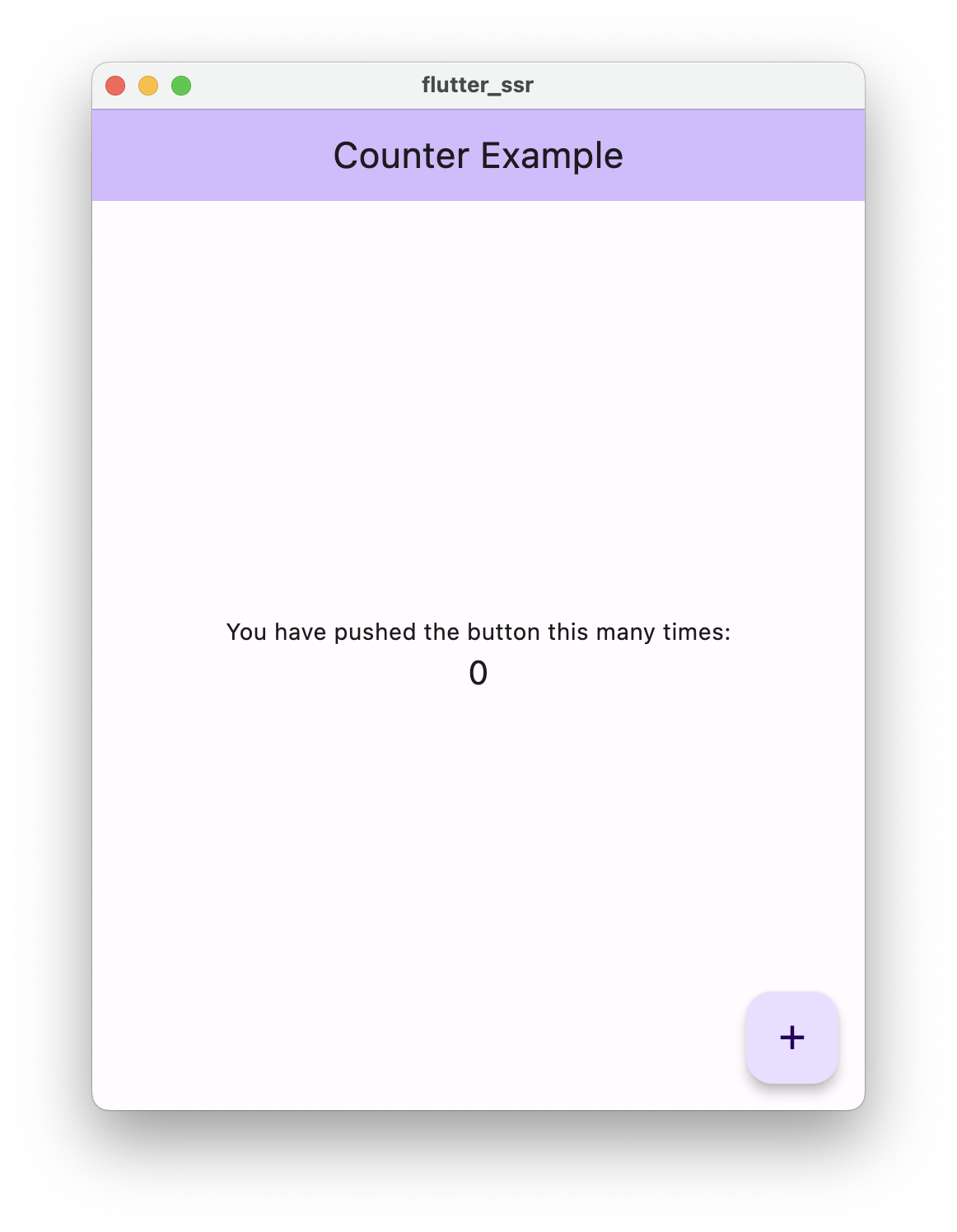
每次按下按钮都会触发网络请求,UI 则会反映服务器上执行的逻辑。
你也可以调用数据库,并根据响应更新 UI。
总结
通过这个示例,我们还可以做更多事情。不过,深入了解这种格式后,我觉得分享一些示例能帮助其他人理解它。
最终代码可在此处查看。