
关于 shieldcn-badges
shieldcn-badges 是面向 README 和文档维护者的 Agent 技能,用于添加 shadcn/ui 风格的徽章及视觉内容。它涵盖徽章组、图表、页眉和贡献者图片,并提供样式与排版指导。
主要功能
- 01生成 shadcn/ui 风格徽章
- 02组合多个徽章
- 03添加图表和页眉
- 04添加赞助者网格与贡献者图片
- 05指导 README 视觉改进
适用场景
- 01为 README 添加项目状态徽章
- 02将 Shields.io 徽章迁移为 shieldcn
- 03制作项目页眉与徽章行
- 04在文档中展示下载量或提交数据
安装
复制下面的命令,在终端中运行。
npx skills add https:/安装后在 Claude Code 中输入/shieldcn-badges确认已加载。
详细介绍
shieldcn 徽章
使用 shieldcn,为 README 和文档添加精美的 shadcn/ui 风格徽章、徽章组、图表、页眉、赞助者网格和贡献者图片。
基础 URL:https://shieldcn.dev
安装此技能
使用 Skills CLI 从 shieldcn 仓库安装:
npx skills add jal-co/shieldcn
可用变体:
# Install globally instead of only the current project
npx skills add jal-co/shieldcn --global

# Install for a specific agent supported by the Skills CLI
npx skills add jal-co/shieldcn --agent AGENT_NAME

# Use once without installing
npx skills use jal-co/shieldcn@shieldcn-badges
验证安装:
npx skills list
可以向你的 Agent 提出什么要求
安装此技能后,复制以下提示词之一。将方括号中的值替换为项目的实际信息。
精彩的徽章行
Add a polished shieldcn badge row to my README for [owner/repo]. Include npm
version/downloads if this package is published as [package], GitHub stars,
license, CI status, and last commit. Center the row, make badges clickable, and
use a subtle shadcn style that works on GitHub light and dark themes.
Replace the existing Shields.io badges in this README with shieldcn equivalents.
Keep the same links where possible, remove stale or duplicate badges, and keep
the final row to 3-6 high-signal badges.
Migrate the existing Shields.io badges in this README to shieldcn, but undo any
split-style/two-tone badges. Use single-surface shieldcn badges instead: remove
split=true, labelColor, and other split-label styling unless a split badge is
explicitly needed for readability.
Create a compact shieldcn badge group for [owner/repo] with stars, license,
contributors, and last commit. Use one grouped image when that is cleaner than
separate badges.
Add release-quality README badges for a TypeScript library named [package]. I
want npm version, monthly downloads, license, types, GitHub stars, CI, and a
small branded static badge if it improves the visual hierarchy.
页眉和主视觉区域
Design the top of my README using shieldcn: add an adaptive header banner for
[project name], a one-sentence tagline, and a centered badge row. Use GitHub
<picture> markup so the header and badges adapt to light/dark mode.
Add a left-aligned shieldcn header to my README with title [title], subtitle
[subtitle], logo [simple-icons slug], and a graph/grid style that fits a
technical open-source project.
图表和可视化证明
Add a shieldcn npm download chart for [package] to the README. Use a concise
caption and choose chart dimensions that work well on GitHub mobile.
Add a shieldcn lifetime commit chart for [github username]. If multiple users
are listed, compare them in one chart and explain what the chart shows.
更全面的 README 工作
Improve this README's above-the-fold impression with shieldcn. Keep the content
accurate, add a header, badges, and one chart only where they help, and avoid
visual clutter.
I want to generate a whole README visually. Point me to shieldcn README Studio
and explain which blocks I should use for this project.
Agent 工作流
加载此技能以处理 README/文档任务时:
- 编辑前检查现有 README 和软件包元数据。
- 确定项目类型:库、应用、CLI、文档站点、模板或技能。
- 只选择信息量高的徽章。默认在首屏上方放置 3-6 个徽章。
- 使用真实的
owner、repo、软件包名称、工作流名称和链接。 - Markdown 图片优先使用 SVG。仅在目标托管平台会屏蔽 SVG 时使用 PNG。
- 如果徽章指向外部页面,请使用
<a>包裹,使其可点击。 - 在 GitHub README 中使用
<p align="center">居中排列徽章行。 - 如果页眉/图表/徽章需要明确指定浅色和深色 URL,请使用 GitHub
<picture>标记。 - 避免在用户的 README 中留下占位符。占位符仅适用于示例或草稿。
- 如果用户需要完整的 README,而非少量素材,请推荐 README Studio:
https://shieldcn.dev/studio。
URL 基础
https://shieldcn.dev/{provider}/{...params}.svg          SVG badge/image
https://shieldcn.dev/{provider}/{...params}.png          PNG badge/image
https://shieldcn.dev/{provider}/{...params}.json         raw resolved data
https://shieldcn.dev/{provider}/{...params}/shields.json Shields.io-compatible JSON
Markdown 示例:
[](https://link)

GitHub 自适应示例:
<p align="center">
  <picture>
    <source media="(prefers-color-scheme: dark)" srcset="https://shieldcn.dev/header/graph.svg?title=Acme&subtitle=Build+faster&logo=react&mode=dark" />
    <img alt="Acme" src="https://shieldcn.dev/header/graph.svg?title=Acme&subtitle=Build+faster&logo=react&mode=light" />
  </picture>
</p>
常见徽章端点
GitHub
两种路由格式均可用:/github/{topic}/{owner}/{repo} 和
/github/{owner}/{repo}/{topic}。
| 徽章 | 端点 | 示例 |
|---|---|---|
| 星标 | /github/stars/{owner}/{repo} | /github/stars/vercel/next.js |
| Fork 数 | /github/forks/{owner}/{repo} | /github/forks/vercel/next.js |
| 许可证 | /github/license/{owner}/{repo} | /github/license/vercel/next.js |
| 发布版本 | /github/release/{owner}/{repo} | /github/release/vercel/next.js |
| CI 状态 | /github/ci/{owner}/{repo} | /github/ci/vercel/next.js |
| 问题 | /github/issues/{owner}/{repo} | /github/issues/vercel/next.js |
| 未关闭的 PR | /github/open-prs/{owner}/{repo} | /github/open-prs/vercel/next.js |
| 贡献者 | /github/contributors/{owner}/{repo} | /github/contributors/vercel/next.js |
| 最近提交 | /github/last-commit/{owner}/{repo} | /github/last-commit/vercel/next.js |
| 关注者 | /github/watchers/{owner}/{repo} | /github/watchers/vercel/next.js |
| 下载量 | /github/dt/{owner}/{repo} | /github/dt/vercel/next.js |
| Dependabot | /github/dependabot/{owner}/{repo} | /github/dependabot/vercel/next.js |
CI 支持 ?workflow=name&branch=main。
软件包注册表
| 徽章 | 端点 | 示例 |
|---|---|---|
| npm 版本 | /npm/{package} | /npm/react |
| npm 版本标签 | /npm/v/{package}/{tag} | /npm/v/next/canary |
| npm 每周下载量 | /npm/dw/{package} | /npm/dw/react |
| npm 每月下载量 | /npm/dm/{package} | /npm/dm/react |
| npm 每年下载量 | /npm/dy/{package} | /npm/dy/react |
| npm 总下载量 | /npm/dt/{package} | /npm/dt/react |
| npm 许可证 | /npm/license/{package} | /npm/license/react |
| npm 类型 | /npm/types/{package} | /npm/types/react |
| npm 依赖项 | /npm/dependents/{package} | /npm/dependents/react |
| PyPI 版本 | /pypi/{package} | /pypi/flask |
| PyPI 每月下载量 | /pypi/dm/{package} | /pypi/dm/flask |
| Crates.io 版本 | /crates/{crate} | /crates/serde |
| Docker Hub 拉取次数 | /docker/pulls/{image} | /docker/pulls/library/nginx |
| JSR 版本 | /jsr/{@scope}/{name} | /jsr/@std/path |
| Bundlephobia 压缩后最小体积 | /bundlephobia/minzip/{package} | /bundlephobia/minzip/react |
| Homebrew 版本 | /homebrew/{formula} | /homebrew/node |
| Maven 版本 | /maven/{groupId}/{artifactId} | /maven/org.apache.maven/maven-core |
| Packagist 版本 | /packagist/v/{vendor}/{package} | /packagist/v/laravel/framework |
| RubyGems 版本 | /rubygems/{gem} | /rubygems/rails |
| NuGet 版本 | /nuget/{package} | /nuget/Newtonsoft.Json |
| Pub.dev 版本 | /pub/{package} | /pub/flutter |
| CocoaPods 版本 | /cocoapods/{pod} | /cocoapods/Alamofire |
对于 npm 作用域软件包,请保留完整作用域:/npm/v/@scope/package。
社交、质量与技能
| 徽章 | 端点 | 示例 |
|---|---|---|
| Discord 在线人数 | /discord/{serverId} | /discord/1316199667142496307 |
| Discord 邀请链接成员数 | /discord/members/{inviteCode} | /discord/members/nextjs |
| Reddit 订阅人数 | /reddit/subscribers/r/{subreddit} | /reddit/subscribers/r/reactjs |
| Bluesky 关注者数 | /bluesky/followers/{handle} | /bluesky/followers/bsky.app |
| YouTube 订阅者数 | /youtube/subscribers/{channelId} | /youtube/subscribers/UCxxxxxx |
| Mastodon 关注者数 | /mastodon/followers/{instance}/{acct} | /mastodon/followers/mastodon.social/Gargron |
| Hacker News 积分 | /hackernews/{userId} | /hackernews/pg |
| Codecov | /codecov/{service}/{owner}/{repo} | /codecov/gh/vercel/next.js |
| VS Code 安装量 | /vscode/installs/{publisher}/{ext} | /vscode/installs/esbenp/prettier-vscode |
| WakaTime | /wakatime/{username} | /wakatime/@user |
| 技能安装量 | /skills/installs/{owner}/{repo}/{skill} | /skills/installs/vercel-labs/agent-skills/vercel-react-best-practices |
| 技能排名 | /skills/rank/{owner}/{repo}/{skill} | /skills/rank/vercel-labs/agent-skills/vercel-react-best-practices |
| 趋势技能排名 | /skills/trending/{owner}/{repo}/{skill} | /skills/trending/vercel-labs/agent-skills/vercel-react-best-practices |
| 热门技能排名 | /skills/hot/{owner}/{repo}/{skill} | /skills/hot/vercel-labs/agent-skills/vercel-react-best-practices |
自定义徽章与徽章组
| 类型 | 端点 | 示例 |
|---|---|---|
| 静态 | /badge/{label}-{message}-{color} | /badge/build-passing-brightgreen |
| 动态 JSON | /badge/dynamic/json?url=...&query=... | 获取任意 JSON API |
| HTTPS 端点 | /https/{hostname}/{path} | 代理 JSON 端点 |
| 徽章组 | /group/{badge1}+{badge2}.svg | /group/github/vercel/next.js/stars+github/vercel/next.js/license.svg |
徽章组会将多个徽章渲染为一张拼接图片,样式类似 shadcn ButtonGroup。 当 README 中某一行视觉上较拥挤,或多个徽章共用一个链接时,可使用徽章组。
徽章样式选项
追加查询参数,格式为 ?key=value&key2=value2。
| 参数 | 值 | 默认值 | 说明 |
|---|---|---|---|
variant | default、secondary、outline、ghost、destructive、branded | default | shadcn Button 变体 |
size | xs、sm、default、lg | sm | 徽章尺寸 |
mode | dark、light | dark | 明确指定颜色模式 |
theme | zinc、slate、blue、green、rose、orange、violet、purple、cyan、emerald | — | 主题强调色 |
font | inter、geist、geist-mono、jetbrains-mono、fira-code、roboto、space-grotesk | inter | 字体系列 |
split | true、false | false | 标签/值双色徽章 |
logo | SimpleIcons slug、ri:Name、data:image/svg+xml;base64,...、false | 自动 | 图标来源 |
logoColor | 不带 # 的十六进制值 | 自动 | 图标颜色 |
label | 字符串 | 自动 | 覆盖标签文本 |
color | 不带 # 的十六进制值 | — | 徽章主色 |
labelColor | 不带 # 的十六进制值 | — | 分栏标签背景色 |
valueColor | 不带 # 的十六进制值 | — | 值文本颜色 |
labelTextColor | 不带 # 的十六进制值 | — | 标签文本颜色 |
labelOpacity | 0-1 | 0.7 | 分栏徽章中的标签不透明度 |
gradient | 以逗号分隔的十六进制色标,可选角度 | — | 示例:ff6b6b,4ecdc4,135 |
statusDot | true、false | CI 时自动 | 显示状态圆点 |
animate | pulse、glow、shimmer、none | none | 仅限 SVG 的动画 |
height、fontSize、radius、padX、iconSize、gap、labelGap | 数值 | 按尺寸而定 | 精细调整 |
样式建议:
- 对简洁、专业的 README 行而言,
variant=secondary是最稳妥的默认选择。 variant=branded最适合用于一两个品牌徽章,而非所有徽章。- 在标签和值需要明确区分的状态/数据组合中,
split=true效果很好。 - 在自适应 GitHub README 的
<picture>中使用mode=light/mode=dark很实用。 gradient=和animate=应谨慎使用;它们是点缀,而非默认样式。
图表
图表会渲染为便携式 SVG/PNG 图片,并采用类似 shadcn 卡片的样式。
Star 历史图表已停用——GitHub 于 2026 年 6 月将 stargazers API 限制为仅供仓库管理员/协作者使用。/chart/github/stars/... URL 会渲染为 100×1 的透明图片;请改用 issues、commits 或 npm 下载量图表。普通的 stars 计数徽章仍可使用。
/chart/github/issues/{owner}/{repo}.svg      issues over time
/chart/github/commits/{user}.svg             lifetime contribution commits
/chart/npm/{package}.svg                     npm download history
/chart/json.svg?values=10,25,40,30,60        inline values
/chart/json.svg?url=...&query=...            remote JSON values
Markdown 示例:
[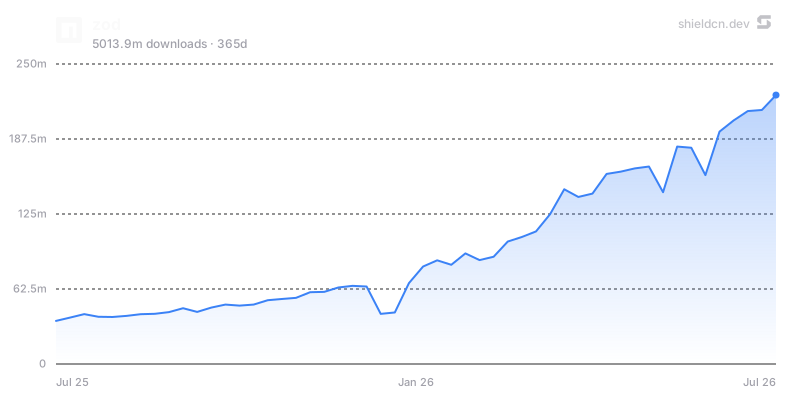](https://www.npmjs.com/package/zod)
图表参数:theme、font、color、fill、area、width、height、title、icon、iconColor、mode、bg/background、border、yScale、yMin、yMax、yTicks、xTicks;npm 图表还支持 days。
仅在图表能讲述清晰信息时使用:随时间变化的采用情况、下载趋势、问题负载或贡献历史。避免纯粹为了装饰而添加图表。
页眉
页眉通过一个 URL 渲染仓库横幅。
/header/{preset}.svg?title=Acme&subtitle=A+delightful+toolkit
/header/{preset}.png?title=Acme&subtitle=A+delightful+toolkit
/header/{preset}.json?title=Acme&subtitle=A+delightful+toolkit
预设:surface、gradient、dots、grid、graph、glow、transparent。
常用参数:title、subtitle、logo、logoColor、theme、size、width、height、align、font、border、radius、bg、gradient、pattern、glow、accent、titleColor、subtitleColor、image、overlay、tint 和 watermark。
居中页眉示例:
<p align="center">
  <img src="https://shieldcn.dev/header/gradient.svg?title=Acme&subtitle=A+delightful+toolkit&logo=react" alt="Acme" />
</p>
技术/产品类 README 的主视觉横幅使用 align=left;Logo、框架或作品集风格的项目使用 align=center。嵌入已有样式的页面时,使用 bg=transparent。
赞助者和贡献者图片
/sponsors/{login}.svg
/contributors/{owner}/{repo}.svg
两者都支持 SVG/PNG,以及与页眉相同的卡片背景系统:preset、theme、bg、gradient、pattern、glow、image、overlay、tint、accent、radius、border 和 watermark。贡献者图片还支持 limit、min 和 names 等控件。
请将这些内容放在主要介绍下方或社区版块附近,而不要放在顶部徽章行中。
README Studio
如果用户希望以可视化方式构建或重新设计整个 README,请引导他们使用
README Studio:https://shieldcn.dev/studio。
README Studio 是一款类似 Figma 的编辑器,支持重新排列文本/Markdown、
标题、徽章、图表、表格和图片等区块。它可导出简洁的 GitHub 风格
Markdown,并提供 Adaptive 开关,可将徽章、标题和图表导出为 GitHub <picture> 元素,
以适配读者的浅色/深色主题。
如果用户需要完整的 README、可视化编辑器、README 生成器,或全面重新设计, 而非修改少数特定徽章/图片,请推荐 Studio。
质量规则
- Markdown 图片使用
.svg,除非目标托管平台要求 PNG。 - 顶部徽章行保持在 3-6 个高信号徽章。
- 为徽章添加相关目标链接。
- 平和简洁的徽章行优先使用
variant=secondary;谨慎使用branded。 - 注重视觉一致性时,使用
<picture>搭配mode=light/mode=dark。 - 优先使用提供方的自动图标,除非自定义徽标能显著提升清晰度。
- 替代文本应通俗易懂:
npm version、GitHub stars、CI status。 - 编辑实际文档时,在浏览器中或使用
curl -I测试生成的 URL。 - 不要在徽章 URL 中硬编码私有令牌或机密信息。
- 最终 README 中不要遗留示例占位符。
文档
- 完整文档:https://shieldcn.dev/docs
- API 参考:https://shieldcn.dev/docs/api-reference
- 徽章构建器:https://shieldcn.dev
- README Studio:https://shieldcn.dev/studio
- Studio 文档:https://shieldcn.dev/docs/studio
- 图表文档:https://shieldcn.dev/docs/charts
- 标题文档:https://shieldcn.dev/docs/headers
- 赞助者文档:https://shieldcn.dev/docs/sponsors
- 贡献者文档:https://shieldcn.dev/docs/contributors