Skills
101,174 packaged capabilities and playbooks for agents. Install any of them with one command.

All

Collect and research materials for X (Twitter) content creation using multi-round web search strategy. Use when user wants to gather trending topics, research subjects for X posts, or mentions "collect materials", "research topic", "find content for X", "x-collect". Performs 4-round deep research mimicking human research workflow.

N-dimensional labeled arrays for geoscience data. Read/write NetCDF, work with climate and oceanographic datasets, perform multi-dimensional analysis with labeled coordinates. Use when the agent needs to: (1) Read/write NetCDF or Zarr files, (2) Work with multidimensional arrays with labeled dimensions, (3) Analyze climate, ocean, or atmosphere data, (4) Compute temporal aggregations (daily/monthly/annual means), (5) Perform area-weighted statistics, (6) Process large datasets with Dask, (7) Apply CF conventions to scientific data.

A local WeChat digital asset library: supports full local parsing on macOS and tested Windows environments, including full-library collection, authentication and decryption, chat history reading/search/export, and parsing Moments and Favorites content. Mac also supports incremental refresh and checks for missed messages or pending replies. WeChat 1 is the default; WeChat 2 must be explicitly specified. On Windows, local collection uses windows, offline chat queries use snapshot, and Moments/Favorites reuse the package's pure-function workflow; this does not trigger Mac configuration or workflows. When the latest chats are needed, refresh the corresponding source first; old records cannot substitute for the requested data. See the local collection reference for Windows versions and feature boundaries.

Generate blog cover images optimized for 16:9 headers — clean composition with text-friendly layouts, powered by multi-model AI. Use when user wants "blog cover", "featured image", "article image", "cover image", "thumbnail", "文章配图", "封面图", "博客配图", "ブログカバー", "블로그 커버".
Conduct deep research on any topic — get comprehensive reports with citations, key findings, and actionable insights in minutes. Use when user wants to "deep research", "research this", "investigate", "analysis report", "深度研究", "调研", "リサーチ", "심층 연구".

The Zephyr sourdough bake tagging scheme — key syntax, bake log filename resolution, event_time tags, weight notation, and the Starter peak duration block. Use when working with Zephyr bake logs, finding which bake log corresponds to a Zephyr key, reading Zephyr voice memo entries to extract bake events, or adding event_time tags. Also read this skill as the shared core whenever a Zephyr verb skill needs those rules.

Generates publication-quality figures for ML papers from research context. Given a paper section or description, extracts system components and relationships to generate architecture diagrams via Gemini. Given experiment results or data, auto-selects chart type and generates data-driven figures via matplotlib/seaborn. Use when creating any figure for a conference paper.


Mine the highest-converting ad angles from customer reviews, Reddit complaints, support tickets, and competitor ads. Extracts actual pain language, competitor weaknesses, and outcome phrases that real buyers use. Outputs a ranked angle bank with proof quotes and recommended ad formats per angle.

Writes commit messages and pull request descriptions for the adk-python repository: Conventional Commits types and scopes, subject lines that say why a change was made, and the linked-issue and testing-plan sections the PR template requires. Use when writing or rewording a commit message, squashing commits before a pull request, drafting a PR description, or checking that a change is shaped to land. Don't use for generic git mechanics such as rebasing, resolving conflicts, cherry-picking, or branch surgery; those need no skill. Don't use to judge the content of a change (use adk-review) or for code style and naming (use adk-style).

Use this skill to gate Elixir, OTP, Ecto, and Phoenix code with a pass/fail adversarial review — a single blind reviewer subagent judges a diff or file set against 19 decidable rules that catch architecture ported from an alien paradigm, covering enterprise layering (repository wrappers over Ecto, service-object tiers, DI behaviours with a single implementation, logic trapped in effectful callbacks), processes as objects (GenServer-per-entity, Agents as mutable variables, leaked message protocols, singleton managers), anemic data (bare maps as entities, boolean-flag state, hand-rolled type dispatch, 32+-field structs), defensive control flow (raise/rescue as branching, nil-guard swallowing, raw input past the boundary), transliterated loops, and needless metaprogramming (macro DSLs for data, use-as-import, compile-time coupling). Trigger it before merging Elixir work, or to check agent-authored code. It renders verdicts only, never fixes; Ecto-dependent rules go N/A without Ecto.
One-click deployment of camoufox anti-detection browser with modified agent-browser. Patches agent-browser to auto-detect camoufox/firefox from executable path instead of defaulting to chromium. Includes SkillsI integration for seamless browser automation workflows.

Prepares Go applications to work effectively with AI coding agents. Use when setting up a new Go project or retrofitting an existing one to ensure: structured JSON logging (slog/Zap/ZeroLog/Logrus), machine-readable command output, thorough golangci-lint configuration, non-interactive CLI design with --yes flags, structured error handling with meaningful exit codes, proper context.Context propagation, graceful shutdown, health check endpoints, and a standardized Makefile. Triggers when a user asks to make their Go app "agent-ready," "AI-friendly," wants to improve agent tooling/observability in a Go project, or needs to audit an existing Go project against agent-readiness best practices.


Orchestrate multi-agent teams with defined roles, task lifecycles, handoff protocols, and review workflows. Use when: (1) Setting up a team of 2+ agents with different specializations, (2) Defining task routing and lifecycle (inbox → spec → build → review → done), (3) Creating handoff protocols between agents, (4) Establishing review and quality gates, (5) Managing async communication and artifact sharing between agents.

Run web-scraping subagents inside isolated Docker sandboxes, one box per subagent. Each box has a terminal (curl, python), a persistent headless Chromium, passive request listeners that log every HTTP call, and an optional proxy with a hard budget and known cost per request. Use when a task fans out to several subagents that must browse or scrape websites, find hidden API endpoints behind pages, validate data sources or build crawlers, and you need every request and every agent step logged and auditable

Design or refactor cohesive modules with small, useful public contracts and enforceable dependency boundaries. Use for concrete architecture, coupling, refactoring, or agent-editability problems. Do not restructure a working codebase merely because an AI agent will edit it.

Stop your AI from making things up. Use when your AI hallucinates, fabricates facts, is not grounded in real data, does not cite sources, makes unsupported claims, or you need to verify AI responses against source material. Also use when your LLM makes up facts, responses are disconnected from the input, or outputs are not grounded in source documents. Covers citation enforcement, faithfulness verification, grounding via retrieval, confidence thresholds, and evaluation of anti-hallucination quality. Also used for AI makes up citations, LLM fabricates data, ground AI in source documents, RAG but AI still hallucinates, force AI to cite sources, factual accuracy for AI, prevent AI from inventing facts, AI confident but wrong, LLM confabulation, hallucination detection, verify AI claims against documents.
Best practices for integrating Alipay Open Platform payment products. Covers product selection and integration guidance for in-person payments, order-code payments, App payments, JSAPI payments, mobile website payments, desktop website payments, pre-authorized payments, merchant deductions, and more. Use this Skill when users mention “integrate Alipay,” “integrate Alipay payments,” “connect payments,” “receive payments with Alipay,” “add a payment feature,” “place an Alipay order,” “H5 payments,” “mini program payments,” “pre-authorization,” “payment code,” “QR code payments,” “web payments,” “PC payments,” “recurring deductions,” “auto-renewal,” “membership subscriptions,” “monthly subscriptions,” or “direct debit,” or ask about errors or troubleshooting related to payment products.

Use when generating videos with Model Studio DashScope SDK using Wan video generation models (wan2.6-t2v, wan2.6-i2v-flash, wan2.6-i2v and regional variants). Use when implementing or documenting video.generate requests/responses, mapping prompt/negative_prompt/duration/fps/size/seed/reference_image/motion_strength, or integrating video generation into the video-agent pipeline.

Use this skill to create subject-neutral images and videos in an analog occultism / industrial CRT noir aesthetic: near-monochrome archival technical atmosphere, severe low-key lighting, tactile signal degradation, industrial geometry, and quiet unresolved tension. Use for portraits, products, environments, interfaces, diagrams, abstract forms, stills, and motion. Do not use for colorful cyberpunk, vaporwave, glossy advertising, conventional horror, or clean digital renders.

Use when generating detailed timestamps or topic summaries for long-form live streams and videos featuring speaker "Boat" (Pu Boat) using Frontier / Cloud models (Claude 3.5 Sonnet, Gemini Pro) via parallel subagents. For local single-GPU/LM Studio models without API costs, use anibon-timestamper-local.



Run pre-flight submission checks for an App Store version using the `asc` CLI tool. Use this skill when: (1) Checking if a version is ready to submit to App Store review (2) Diagnosing why a version cannot be submitted (missing build, no pricing, wrong state) (3) Running a CI/CD gate before calling `asc versions submit` (4) User asks "is my version ready?", "check readiness", "why can't I submit?", "run pre-flight checks", "check submission requirements", or any submission-readiness task (5) Building an automated pipeline that conditionally submits based on readiness
Manage power and performance metrics and diagnostic logs using the `asc` CLI tool. Use this skill when: (1) Listing performance metrics for an app: "asc perf-metrics list --app-id <id>" (2) Listing performance metrics for a build: "asc perf-metrics list --build-id <id>" (3) Filtering metrics by type: "asc perf-metrics list --app-id <id> --metric-type LAUNCH" (4) Listing diagnostic signatures for a build: "asc diagnostics list --build-id <id>" (5) Filtering diagnostics: "asc diagnostics list --build-id <id> --diagnostic-type HANGS" (6) Viewing diagnostic logs: "asc diagnostic-logs list --signature-id <id>" Also trigger when the user mentions: performance metrics, launch time, hang rate, disk writes, memory usage, battery life, termination, animation hitches, diagnostic signatures, call stacks, power metrics, app performance monitoring, "why is my app slow", "check hangs", "check launch time"
Release an app version to the App Store using `asc` CLI. Guides the agent through: bump version, archive, upload, update metadata, and submit. Use this skill when: (1) User says "release", "ship", "submit to App Store", "publish new version" (2) User says "bump version and upload" (3) User says "prepare release for iOS/macOS" (4) User says "update What's New and submit"
Manage TestFlight beta groups and testers using the `asc` CLI tool. Use this skill when: (1) Listing beta groups for an app (`asc testflight groups list`) (2) Creating internal or external beta groups (`asc testflight groups create --internal`) (3) Listing testers in a group (`asc testflight testers list --group-id <id>`) (3) Adding a single tester by email (`asc testflight testers add`) (4) Removing a tester from a group (`asc testflight testers remove`) (5) Bulk-importing testers from a CSV file (`asc testflight testers import`) (6) Exporting testers to CSV for re-use (`asc testflight testers export`) (7) User says "add beta tester", "invite tester", "remove tester", "import testers", "export testers", "list beta groups", or any TestFlight tester management task


Guide for writing ast-grep rules to perform structural code search and analysis. Use when users need to search codebases using Abstract Syntax Tree (AST) patterns, find specific code structures, or perform complex code queries that go beyond simple text search. This skill should be used when users ask to search for code patterns, find specific language constructs, or locate code with particular structural characteristics.

Cleans spoken audio via Whisper transcription, Claude segment classification, and ffmpeg cuts, plus breath taming and noise-gate artifact repair. USE WHEN clean audio, edit audio, remove filler words, clean podcast, remove ums, cut dead air, polish audio, trim recording, cut stutters, ticking audio, clicking audio, audio clicks, gate artifacts, popping audio, loud breaths, breathing sounds, mouth sounds, mouth clicks, lip smacks, tame the breaths. NOT FOR video composition (HyperFrames) or tight-cutting a podcast or spoken recording for publishing (the video skill's TightCut intent (maintainer-side; not in the public release)).

Review application source code for broken authorization — IDOR / Broken Object Level Authorization (OWASP API1), Broken Function Level Authorization (API5), mass assignment (API3), multi-tenant isolation gaps, and privilege escalation. Reads routes, controllers, resolvers, and data models offline and reports the missing ownership/role check at file:line with a framework-correct fix. No running app, no credentials, no tools. Trigger when reviewing endpoints/handlers, auditing a PR diff that adds or changes routes, hardening a multi-tenant SaaS, or when the user asks "is this endpoint authorized?", "can a user access another user's data?", "IDOR", "BOLA", or "broken access control".


Analyze coding sessions to detect corrections and preferences, then propose targeted improvements to Skills used in the session. Use this skill when the user asks to "learn from this session", "update skills", or "remember this pattern". Extracts durable preferences and codifies them into the appropriate skill files.

Implement custom caching with CacheMgr, caches.json definitions, and cache region configuration. Use this skill whenever the user needs to cache expensive computations or API responses server-side, define cache regions with TTL and size limits, invalidate cache entries, or debug disappearing cache data. Also use when optimizing script performance with application-level caching -- even if they just say 'cache this data' or 'my cached values keep disappearing'.
Register and implement B2C Commerce platform hooks declared in hooks.json and invoked by HookMgr during OCAPI/SCAPI requests or system events. Use for hooks.json, HookMgr.callHook(), dw.system.Status, dw.ocapi.shop.* before/after/modifyResponse hooks, dw.order.payment.authorize/authorizeCreditCard, dw.order.calculate, app.payment.processor.*, SCAPI order-payment authorization and placement, rollback semantics, and request.custom transport. Do not use for external Node.js webhooks, SFRA controller middleware or prepend/append chains, scheduled job steps in steptypes.json, or Git/CI hooks.

Babylon.js 8 3D engine development expertise with curated API patterns, code examples, and on-demand documentation access. Use when working with Babylon.js scenes, meshes, materials (PBR/Standard), cameras, lights, shadows, GUI (2D/3D), animations, physics (Havok), thin instances, glTF loading, post-processing, WebXR, procedural/code-built 3D models, or any 3D rendering task. Covers: (1) Scene setup and engine initialization (WebGL/WebGPU), (2) Mesh creation, transforms, instancing, and merging, (3) PBR and Standard materials with textures, (4) Camera types (ArcRotate, Universal, Follow), (5) Lighting and shadows, (6) 2D/3D GUI with AdvancedDynamicTexture, (7) Animation system and animation groups, (8) Asset loading (glTF, OBJ, STL), (9) Performance optimization and profiling, (10) ASRS/warehouse digital twin visualization patterns, (11) Procedural modeling: building high-quality 3D models from primitives with animation-ready parent/pivot hierarchies, CSG2 booleans, lathes, extrudes, and custom VertexData.

Use when the user wants to browse or buy gift cards, mobile top-ups or eSIMs on Bitrefill, or manage Bitrefill orders. Detect available shopping and payment tools, check regional availability and pricing, and confirm purchases with the user. Do not activate for unrelated cryptocurrency, wallet or payment requests


Reads public X (formerly Twitter) posts, threads, X Articles, profiles, followers, following, and search results as Markdown or JSON, with no X account and no API key. Use when a URL points at x.com, twitter.com, or t.co; when the user mentions a tweet, an X post, a thread, or an X profile; when you need an account's recent posts or connections; or when you need X search results as structured data. Read-only: it never posts, replies, follows, or reads protected accounts, direct messages, or Lists.



Track product champions for job changes and qualify their new companies against ICP. Takes a CSV of known champions (with LinkedIn URLs), creates a baseline snapshot via Apify enrichment, then detects when champions move to new companies. Scores new companies on a 0-4 ICP fit scale. Outputs a downloadable CSV of movers with qualification verdicts.


Before implementing a feature, hear out the requirement, then research existing libraries / tools / local packages (monorepo components) that already solve it. Use when scoping a new feature, evaluating build-vs-reuse, or asked to find existing solutions before writing code.

Post-earnings quarterly update reports for A-share companies under coverage. Analyzes 业绩快报/正式财报, generates variance tables (actual vs 一致预期 vs prior), flags key drivers, and drafts structured earnings notes in Chinese sell-side format. Use instead of the original earnings-analysis skill for Chinese equities. Triggers on "A股财报分析", "季度业绩点评", "年报/中报点评", "earnings review", or "[company] earnings".

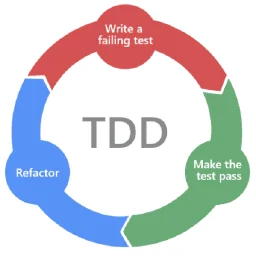
Clean-code engineering standards for writing, refactoring, and reviewing code in any programming language. Use this whenever the user asks to write clean code, follow clean-code principles, refactor for clarity, improve naming, reduce complexity or duplication, separate concerns, tighten error handling, work test-first or do TDD, or otherwise raise code quality, readability, and maintainability. Apply these rules by default when producing or changing code for a quality-conscious user.

This skill should be used when the user asks to "understand a codebase", "get code context", "research a library", "explore a repository", "find code examples", "look up documentation", asks a natural-language code/technology question (e.g. "how does X work", "X vs Y", "best practice for Z"), or wants to understand how a specific project, library, or concept works before making changes.

Shared vocabulary for designing deep modules. Use when the user wants to design or improve a module's interface, find opportunities for deepening, decide where seams go, make code more testable or easier for AI to navigate, or when other skills need deep module vocabulary.



When the user wants to create competitor comparison or alternative pages for SEO and sales enablement. Also use when the user mentions “alternative page,” “vs page,” “competitor comparison,” “comparison page,” “[Product] vs [Product],” “[Product] alternative,” “competitive landing pages,” “how do we compare to X,” “battle card,” or “competitor teardown.” Use this for any content that positions your product against competitors. Covers four formats: singular alternative, plural alternatives, you vs competitor, and competitor vs competitor. For sales-specific competitor docs, see sales-enablement.

Use this skill to inspect a competitor website and extract structured evidence about the company, positioning, pricing, social proof, and hiring signals. Trigger it when creating a current competitor profile from public pages before comparative analysis.
New to MCP?
From what the protocol is to installing your first server, these answers cover most first questions.
An open protocol that defines how AI applications connect to external tools and data in a uniform way. Clients talk to the model; MCP servers provide tools, resources and prompt templates. They exchange standard messages, so one server can be reused by many clients.